
Are you trying to find out who is hosting a domain name? Knowing the host behind a website can give you important clues about its reliability, security, and even how it works.
But finding this information isn’t always easy if you don’t know where to look. You’ll discover simple, step-by-step methods to quickly uncover the host of any domain name. By the end, you’ll have the tools to reveal hosting details like a pro—helping you make smarter decisions online.
Keep reading, because what you learn here could save you time, money, and frustration.
Check Domain Registration Details
Checking domain registration details is a key step to find the host of a domain name. These details show who owns the domain and which company manages it. You can learn a lot by examining this information. It helps to identify the hosting service behind the website.
Use Whois Lookup Tools
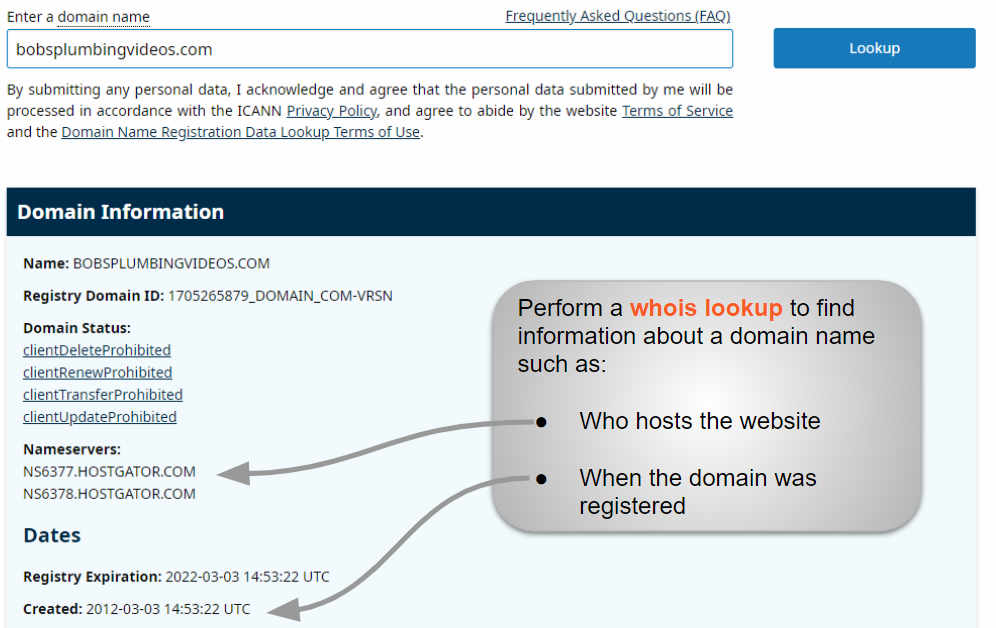
WHOIS lookup tools provide public data about domain names. Enter the domain name in a WHOIS search box. The tool will display registration details instantly. You will see the owner’s name, contact info, and registrar. Some WHOIS tools also show the hosting provider. These tools are easy to use and free on many websites.
Analyze Registrar Information
The registrar is the company that manages the domain name. Look closely at the registrar’s name in the WHOIS results. Some registrars also offer hosting services. If the registrar matches a hosting company, that may be the domain host. Sometimes, the registrar and host are different. You might need to check additional records for hosting details.
Inspect Dns Records
Inspecting DNS records is a key step to find the host of a domain name. DNS records hold important details about the domain’s setup. These details show which servers handle the domain’s services. Understanding these records helps reveal the hosting provider behind the domain. This process is simple and can be done with free tools online.
Identify Name Servers
Name servers are the first clue to identify a domain’s host. They control the domain’s DNS records. You can find the name servers by running a DNS lookup. These servers usually belong to the hosting company. For example, if the name servers include “bluehost.com,” the host is likely Bluehost. Check the name servers with tools like Whois or DNS checker. This step narrows down the possible hosting providers quickly.
Trace Hosting Provider Via Ip Address
Next, trace the hosting provider using the domain’s IP address. The IP shows where the website files are stored. Use a DNS lookup to find the domain’s IP address. Then, perform a reverse IP lookup to see the hosting company. Many hosting providers own a range of IP addresses. The IP address often points directly to the host. This method confirms the host even if name servers are private or hidden.
Leverage Online Hosting Lookup Services
Finding the host of a domain name becomes simple with online hosting lookup services. These tools scan the internet and reveal the web host behind a website. They save time and effort by providing clear data quickly.
Anyone can use these services without technical skills. Just enter the domain name, and the tool does the rest. The results help understand where a website is stored and who manages its hosting.
Popular Hosting Checker Websites
Several websites offer free hosting lookup services. Some well-known options include:
- WhoIsHostingThis: Easy to use and shows detailed hosting info.
- HostAdvice: Provides hosting data and user reviews.
- Site24x7: Offers hosting info with uptime and performance checks.
- HostingChecker: Fast results and clear hosting provider names.
These sites update their databases often. They cover most hosting providers worldwide.
Interpreting Lookup Results
Lookup results usually show the hosting company’s name. Sometimes, they list the server IP address and location.
Look for terms like “hosting provider,” “ISP,” or “web host.” These indicate the company hosting the domain.
Some results include extra info, like DNS servers and domain registrars. Focus on the hosting provider for your main answer.
Not all domains reveal hosting details easily. Privacy services or custom servers may hide this info.

Credit: support.intermedia.com
Use Command Line Tools
Using command line tools offers a quick way to find the host of a domain name. These tools work directly in your computer’s terminal or command prompt. They provide clear information about the domain without needing extra software. Learning to use these commands helps you understand how the internet connects websites to servers.
Ping And Traceroute Commands
Ping sends small data packets to the domain’s server to check if it is reachable. It shows the response time and confirms the server is online. This helps identify the host’s IP address quickly.
Traceroute tracks the path data takes to reach the domain’s server. It lists all the points between your computer and the host. This can reveal the server’s location and network details.
Nslookup And Dig Utilities
Nslookup finds DNS records of the domain name. It shows the IP address and sometimes the hosting provider’s information. This tool is easy to use and available on most systems.
Dig is a powerful command for detailed DNS queries. It provides more information about the domain’s DNS setup. Dig helps discover the host by examining DNS records like A, MX, and NS.
Analyze Website Content And Technology
Analyzing website content and technology helps reveal clues about the domain host. This method uses visible signs on the site and technical tools. It offers useful hints about where the site might be hosted.
Check For Hosting Platform Indicators
Many websites display hints about their hosting platform. Look for footer text or badges that mention the host. Some sites show names like “Hosted by Bluehost” or “Powered by Wix.”
Check the website’s URL structure for patterns. Some hosts add unique elements in URLs or subdomains. For example, WordPress sites often use “wp-content” in their paths.
Review the site’s loading speed and uptime reports. These may point to certain hosting services known for specific performance levels.
Use Website Technology Profilers
Website technology profilers analyze a site’s backend tools and services. Tools like BuiltWith or Wappalyzer reveal hosting providers by scanning server info.
These profilers detect server software, content management systems, and security certificates. Such details help identify the hosting company behind the website.
Simply enter the website address into the profiler. The tool then lists technologies, including hosting services used by the site.
Contact Domain Owner Or Support
Contacting the domain owner or support team can help find the hosting provider. They have the most accurate information about where the website is hosted. This approach works well if other methods fail or show unclear results.
Find Contact Information
Start by checking the domain’s WHOIS record. This database often lists the owner’s email or phone number. Use a WHOIS lookup tool to access this data quickly. Sometimes, privacy protection hides the owner’s details. In such cases, look for the domain registrar’s contact info. The registrar can forward your message to the owner.
Request Hosting Details
Send a clear and polite message to the domain owner or support team. Explain why you need the hosting information. Ask if they can share the hosting provider’s name or IP address. Keep your request simple and direct. Wait patiently for a response. Many owners respond to genuine queries.
Consider Privacy And Legal Aspects
Finding the host of a domain name involves more than just technical steps. Privacy and legal aspects play a big role in the process. Many domain owners use privacy protection services. These services hide their personal details from public view. Understanding how these services work helps in finding the real host. Legal rules also set limits on what information you can access. Knowing these rules prevents trouble and respects others’ rights.
Handle Privacy Protection Services
Privacy protection services hide the domain owner’s contact details. This prevents spammers and unwanted contacts. These services replace personal info with generic data. It can make it hard to find the real host. Some tools try to bypass this protection but may not work. Respect the privacy settings and use only legal ways to search.
Respect Legal Boundaries
Domain information is protected by laws and regulations. Some countries have strict rules about data privacy. Accessing hidden information without permission can be illegal. Use only public and authorized sources to find domain hosts. Avoid hacking or using fake requests. Always respect the rights of domain owners and their privacy.

Credit: www.webhostinghub.com
Credit: www.boldgrid.com
Frequently Asked Questions
What Is The Best Way To Find A Domain’s Host?
The easiest way is to use online Whois lookup tools. They provide domain registration and hosting details quickly. Enter the domain name, and the tool displays the hosting provider’s information along with DNS records.
How Can I Identify A Domain’s Hosting Provider?
Check the domain’s DNS records, especially the nameservers. Hosting providers often use unique nameservers. Alternatively, use specialized websites that analyze domain hosting data accurately.
Can I Find Hosting Details Using Ip Address?
Yes, you can trace a domain’s IP address via ping or traceroute commands. Then, use IP lookup services to identify the hosting company linked to that IP address.
Are There Free Tools To Find Domain Hosting?
Many free tools exist, such as Whois. net, ICANN Lookup, and Hosting Checker. These tools provide domain registration and hosting information without any cost.
Conclusion
Finding the host of a domain name is easier than you think. Use simple online tools to check hosting information quickly. Knowing the host helps manage websites and troubleshoot issues. Always double-check the details for accuracy and updates. This knowledge gives you better control over your web presence.
Keep practicing these steps to become comfortable with domain hosting. Understanding this process saves time and reduces confusion. Now, you can confidently find domain hosts whenever needed.


