
Are you ready to give your WordPress site a fresh look, but feeling overwhelmed by the sea of themes available? You’re not alone.
Choosing the perfect theme can be a daunting task, especially when you want it to reflect your brand and captivate your audience. The right theme is more than just a pretty face; it’s a powerful tool that can enhance user experience and boost your site’s performance.
But how do you find the one that ticks all the boxes? In this guide, we’ll unravel the secrets to selecting a theme that aligns with your vision and keeps your visitors engaged. Stick around to discover simple tips and tricks that will make this decision a breeze, transforming your website into a stunning showcase of your creativity and professionalism.
Credit: www.hostpapa.com
Choosing The Right Theme
Know what your website does. Is it for a blog, a shop, or a gallery? Each type needs a special theme. Themes with features help. A shop needs payment options. A blog needs easy reading. Choose wisely.
Think about who visits your site. Young people like fun designs. Professionals prefer clean looks. User-friendly themes are best. They make browsing easy. Keep your audience happy with simple choices.
Your theme should match your brand. Colors and style need to fit. A theme that clashes can confuse. Consistency is key. It builds trust and makes your site memorable. Pick a theme that feels right.

Credit: kinsta.com
Exploring Theme Sources
The WordPress Theme Directory is a great place to start. It offers free themes for your site. Each theme is checked for quality and safety. You can search by color, layout, and features. This helps find the best match for your needs. New users can easily install themes from here.
If you want more options, explore premium theme marketplaces. These places have themes with extra features and designs. Some popular marketplaces are ThemeForest and Elegant Themes. Premium themes often come with support and updates. They are a good choice for serious projects.
Independent developers offer unique themes. These themes have special styles and features. Often, they provide direct support and customization options. This is ideal for custom needs. You can find these developers through online searches or community forums.
Evaluating Theme Features
Themes must fit screens of all sizes. Phones, tablets, and computers. This is called responsive design. It helps your site look good on every device. Check if the theme adjusts well. Test it on different gadgets. This makes sure everyone sees your site clearly. Avoid themes that look bad on small screens.
Each site needs a unique look. Themes should offer many customization options. Change colors, fonts, and layouts. Make it feel like your own. Try different settings. See what works best for your site. Personal touches matter. They make your site special.
Themes must be SEO-friendly. This helps your site rank higher. Check if the theme has clean code. Search engines like clean code. Fast loading themes are better for SEO. Make sure your theme supports meta tags. These tags help search engines find you. Good SEO brings more visitors.
Plugins add extra features to your site. Themes need to work well with plugins. Check if popular plugins are supported. This includes SEO, forms, and galleries. Test the theme with a few plugins. Ensure there are no conflicts. Plugins and themes should work as a team.
Credit: www.inmotionhosting.com
Checking Theme Reviews And Ratings
Reading User Feedback is very helpful. People share their experiences online. They tell if the theme is good or bad. Look for common opinions. These show the theme’s quality. Check if users mention bugs. Bugs can be a problem.
Analyzing Ratings helps you decide. High ratings mean users like the theme. Low ratings mean problems. Check how many users rated the theme. Many ratings are better. Look for stars. Stars show user satisfaction.
Identifying Common Issues is important. Users often talk about theme problems. Read these carefully. Some themes have bugs or slow speeds. Find themes with few complaints. This means fewer headaches later.
Testing Theme Performance
Good speed is important for a website. A fast theme keeps visitors happy. Slow websites make people leave quickly. Choose themes known for their fast loading times. Use tools like Google PageSpeed Insights to test speed. A theme should load under three seconds. This helps improve user experience.
Websites should work on all browsers. Themes must look good on Chrome, Firefox, Safari, and Edge. Test your theme on different browsers. Ensure it displays correctly. Some themes offer cross-browser support. This makes the website look the same everywhere.
Many people use phones to browse the web. Choose a theme that is mobile-friendly. The theme should adjust to different screen sizes. This provides a good experience on phones and tablets. Test the theme on various devices to ensure it works well. A responsive theme keeps visitors engaged.
Installing A Theme
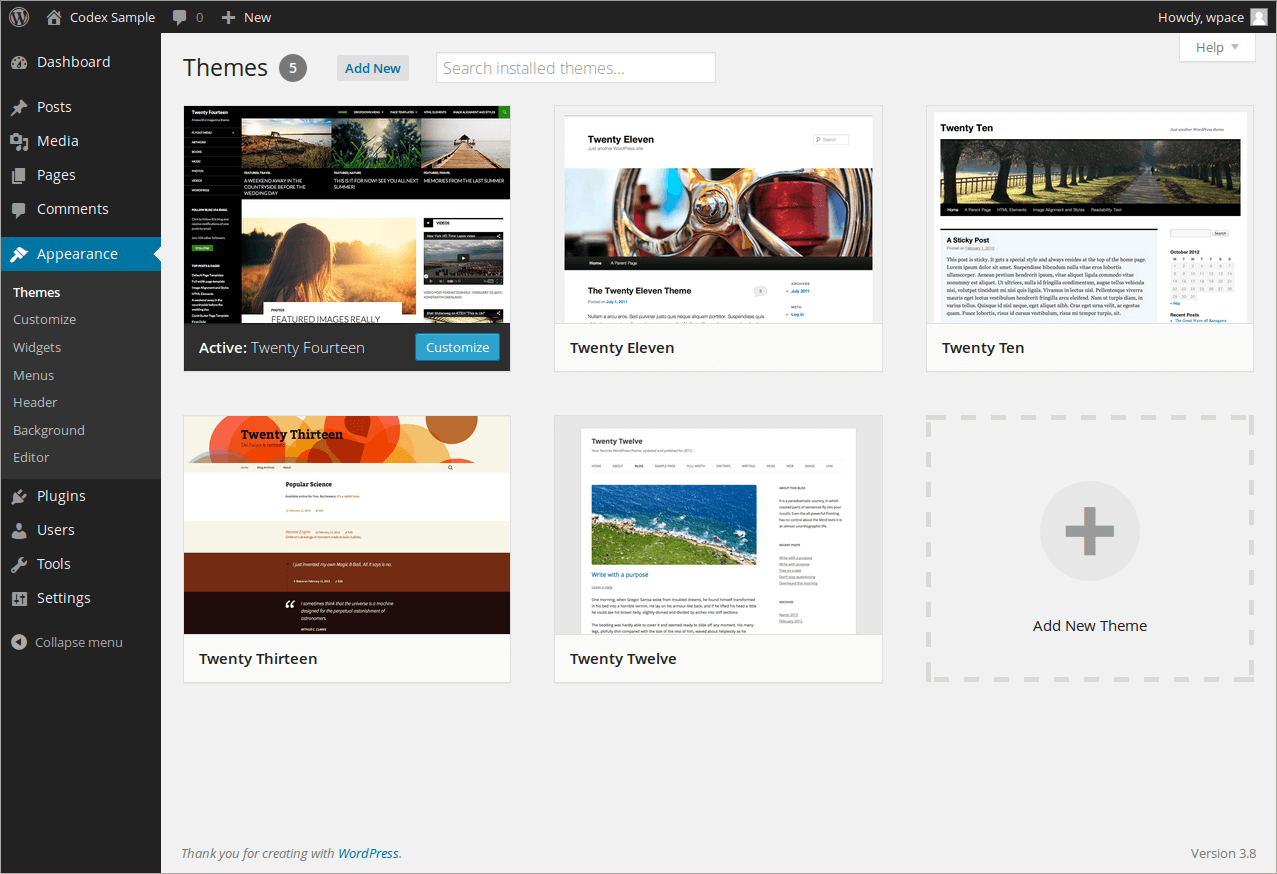
First, log in to your WordPress dashboard. Click on Appearance, then Themes. Next, click Add New at the top. Now you can see many themes. Use the search bar to find themes you like. Once you find one, click Install.
Download a theme from a trusted source. In your dashboard, go to Appearance, then Themes. Click Add New, then Upload Theme. Choose your file and click Install Now. Wait until it uploads completely.
After installing, click Activate to use your new theme. Check how your site looks now. You can change settings under Customize. Make sure everything works well. Enjoy your new WordPress look!
Customizing Your Theme
The WordPress Customizer helps change your site’s look. See changes live as you make them. It’s like a magic window to your website. You can tweak the layout and design. Just click and make your changes. Easy and fun!
Widgets are small tools you add to your site. They help display weather, news, or photos. Menus help visitors find pages. Adding them is simple. Go to the dashboard and click on menus. Drag and drop items to place them. Make your site easy to navigate.
Colors and fonts make your site look good. Choose colors that match your brand. Pick fonts that are easy to read. Click on the color or font option. Change them with a few clicks. Make your site unique and special.
Maintaining And Updating Your Theme
Finding the right theme for WordPress involves browsing the theme directory. Choose a theme that matches your style and functionality needs. After selecting, easily install it through the WordPress dashboard for a fresh look and improved user experience.
Regular Updates
Themes need updates. Updates fix bugs. Updates add new features. Keeping your theme updated is important. It helps your site run smoothly. Updates also fix security issues. Check for updates often. Always use the latest version. Developers improve themes regularly. They ensure better performance.
Backing Up Your Site
Always back up your site. Backing up saves your work. It’s a safety net. Before updating, take a backup. Store backups in a safe place. Use plugins for easy backups. Backups help in emergencies. They protect your data. You can restore your site easily. It’s peace of mind.
Troubleshooting Common Issues
Problems may arise with themes. Troubleshoot issues quickly. Check theme settings first. Sometimes plugins cause conflicts. Disable plugins to test. Clear cache if needed. Look for error messages. Search online for solutions. Many guides can help. Contact theme support if stuck. They offer expert advice.
Frequently Asked Questions
How Do I Choose A WordPress Theme?
Choosing a WordPress theme involves assessing your site’s goals and audience. Look for themes with responsive design, good ratings, and customization options. Consider the theme’s compatibility with plugins and its loading speed. Always preview the theme and ensure it aligns with your brand’s style and functionality needs.
Where Can I Find Free WordPress Themes?
You can find free WordPress themes in the WordPress. org theme directory. It’s a reliable source with numerous options. Other sources include ThemeForest and TemplateMonster. Always ensure the theme is updated regularly and has positive reviews. Be cautious of third-party sites that may offer themes with security vulnerabilities.
What Should I Consider Before Installing A Theme?
Before installing a theme, consider its responsiveness, SEO friendliness, and compatibility with your plugins. Check its customization options and support availability. Ensure it fits your brand’s aesthetic and functionalities. Read user reviews and check for recent updates to avoid potential security risks and ensure ongoing support.
How Do I Install A Theme On WordPress?
To install a theme, navigate to the WordPress dashboard. Go to Appearance > Themes > Add New. Search for a theme and click ‘Install’. Once installed, click ‘Activate’ to make it live. You can also upload themes manually if you have downloaded them from external sources.
Conclusion
Finding the right WordPress theme boosts your website’s appeal. Start by exploring the WordPress theme directory. Focus on your site’s purpose and your audience’s needs. Choose a theme that’s mobile-friendly and fast-loading. Check for regular updates and support. Testing a theme before committing is vital.
Ensure it aligns with your brand. Remember, a well-chosen theme enhances user experience. Make your website stand out with the right look and feel. Trust your instincts and take your time. A thoughtful choice leads to a successful online presence.


