
Curious about the web hosting details of your favorite website? You’re not alone.
Whether you’re a budding entrepreneur, a seasoned developer, or just someone with a keen interest in the digital realm, knowing where a website is hosted can be incredibly useful. It can offer insights into site speed, reliability, and even security features.
But how do you unearth this information without diving into complex technical jargon? Don’t worry; you’re about to discover simple, effective methods to find a site’s web hosting details. Stay with us, as this guide is designed to equip you with actionable steps that are easy to follow. Get ready to unlock the secrets behind the websites you love and those you’re curious about.
Credit: www.elegantthemes.com
Identifying Domain Information
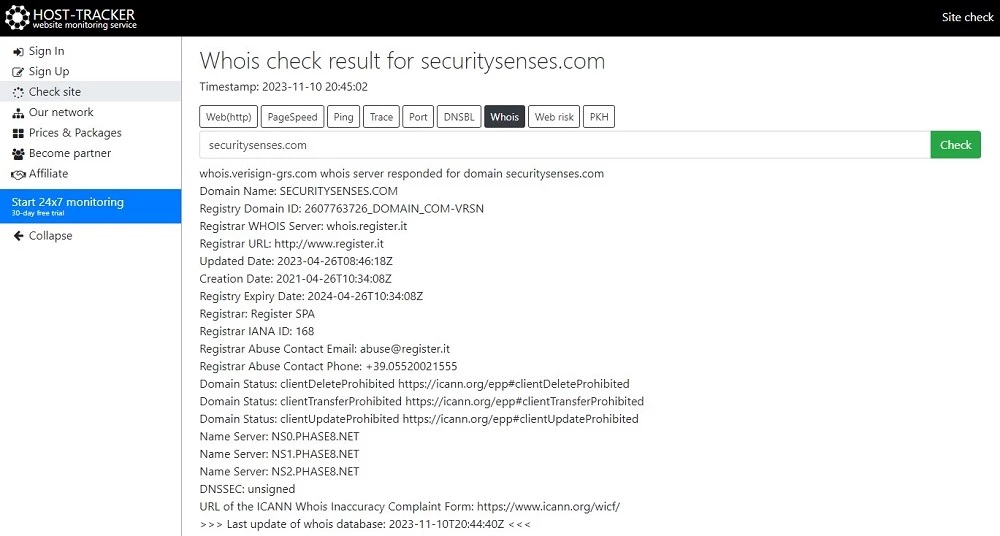
WHOIS is a tool to find domain details. It shows the owner and hosting info. Type the website name in a WHOIS search site. It will show the registrar and hosting provider.
Domain registration info tells who owns a site. Visit a WHOIS site and enter the domain. You will see the name and contact of the owner. This helps to know who hosts the site.
Exploring Website Source Code
Open the website in your browser. Right-click and select “View Page Source.” A new tab will show the HTML code. This code has many lines. Look for the word “host” or similar. You might find it in comments or scripts. Sometimes, the hosting company name is there.
Search for common hosting names. Examples include Bluehost and GoDaddy. Not all sites show this. So, it might not work every time. But it’s a good start.
Meta tags are small pieces of code. They tell browsers about the site. Sometimes, they have hosting info. Look for tags like “generator” or “author.” They might tell you the hosting platform.
Use your browser’s “Inspect” tool. Right-click on the page and choose “Inspect.” A panel will open. Look under the “Elements” tab. You will see meta tags there. It’s like a treasure hunt. Finding the hosting info can be fun!
Utilizing Online Tools
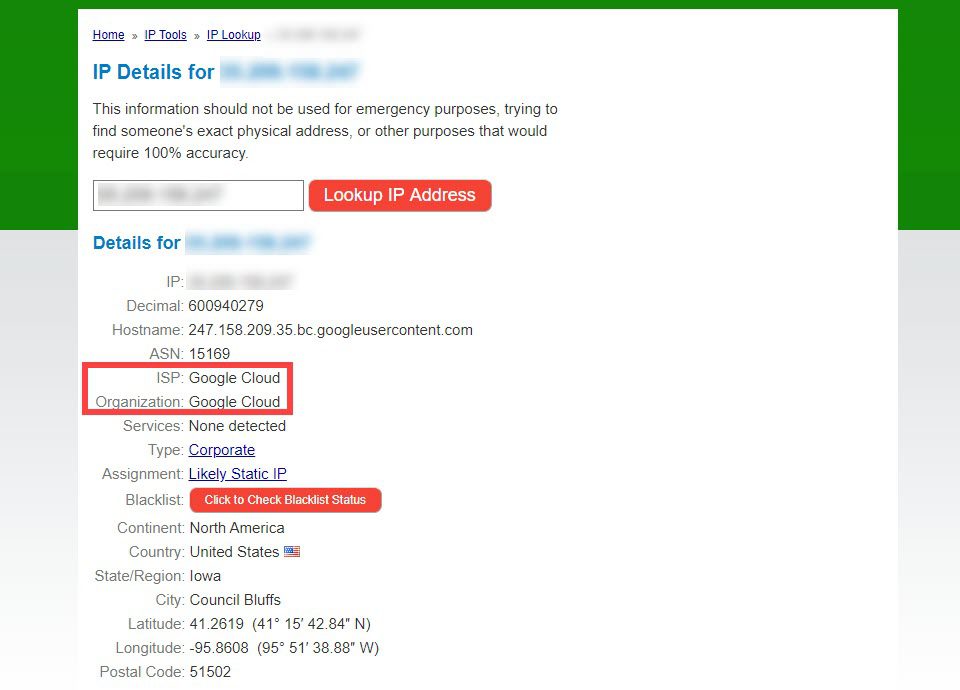
Find out a site’s hosting with free tools online. They are easy to use. Enter the site’s URL. The tool shows the hosting provider. These tools are quick and efficient. Many people use them every day. Some popular ones include WhoIsHostingThis and HostingChecker. They help you learn more about websites. Using these tools saves you time. You get results fast and without cost. Make sure to try a few. Each tool might show different results.
Paid services offer extra features. They are more accurate than free ones. You get detailed reports on hosting. Paid services often provide support. This helps if you have questions. They can be a good choice for businesses. They offer more reliable information. You can trust their results more. They also update their data often. This ensures you get the latest info. Paid services are a wiser investment for serious users.
Credit: securitysenses.com
Analyzing Dns Records
Discovering a site’s web hosting involves analyzing DNS records. These records reveal key information about hosting providers. By checking DNS entries, you can identify where a website is hosted. This process helps in understanding a website’s server details.
Understanding Dns Basics
DNS stands for Domain Name System. It helps translate domain names into IP addresses. Every website has a unique IP address. DNS makes browsing easier for us. Instead of numbers, we type words. DNS servers store these translations. They work like a phonebook for the internet. Understanding DNS is important for web hosting. It shows where a website is hosted.
Using Dns Lookup Tools
DNS lookup tools help find a site’s web hosting. These tools show the server’s IP address. You can use websites like Whois or MXToolbox. Just enter the site’s domain name. The tool will display the hosting details. It’s simple and quick to use. Many tools are free online. They provide detailed DNS records. This includes information on mail servers and more. Knowing these details is useful. It helps in troubleshooting and understanding site setup.
Contacting Website Administrators
Discovering a website’s web hosting can be simple. Start by checking the site’s domain registration details. Online tools like WHOIS can help identify hosting providers.
Crafting A Professional Inquiry
Start with a polite greeting. Use the site’s contact form or email. Write a clear subject line. Make it simple. Explain your reason. Mention the website name. Ask who manages the hosting. Request details about the host. Be respectful and brief. Thank them for their help. End with your name and contact info.
What To Ask About Hosting
Ask about the hosting provider’s name. Inquire about the hosting plan. Ask if they use shared or dedicated hosting. Question the server location. Ask about uptime and speed. Inquire about security measures. Request info on support options. These questions will help you learn more.

Credit: www.nameboy.com
Examining Website Headers
Browser developer tools help see a website’s headers. Open the developer tools by right-clicking on a page. Select “Inspect” or press F12 on your keyboard. Look for the “Network” tab. Refresh the page if needed. You’ll see a list of requests. Click on the first item. Now, check the “Headers” section.
The headers show important data. You might find the server name here. It tells what software hosts the site. Sometimes, you see hosting company info. This helps find where the site is hosted. Reading these headers is like solving a puzzle. Each piece gives clues about the website.
Exploring Third-party Services
Web hosting forums are places where people talk about hosting. You can ask questions or read what others have said. Many people share their experiences and tips. This helps you find good web hosting. Also, communities can be very helpful. You can join groups or pages online. People often share links to useful tools. You might find a new service you didn’t know about. Always be polite and ask questions clearly. This way, others will help you more.
Some companies help you find web hosting. They know a lot about it. You can hire them to save time. They do all the hard work for you. Professional services have experts. They know which hosts are good or bad. They check reviews and prices. This means you get the best deal. They also help with setting up your site. This makes everything easier for you.
Cross-referencing Hosting Providers
Many methods can help find a website’s hosting provider. Domain tools can be useful. They offer detailed hosting information. WHOIS search provides insights. It shows the domain’s registration details. Traceroute tools can trace the path to the server. This helps identify the hosting provider.
Cross-referencing results ensures accuracy. Compare information from different tools. This increases reliability. Check IP address locations. They reveal server locations. Use reliable sources. Avoid misleading data. Gather information from trusted websites. This keeps findings accurate.
Frequently Asked Questions
How To Find Out What Web Hosting A Site Is Using?
Use tools like “WhoIsHostingThis” or “HostAdvice” to identify a site’s web hosting provider. Check website source code for clues. Inspect DNS records using “MXToolbox” or “DNSChecker” for hosting details. Analyze website IP address using “IPinfo” or similar services to determine hosting provider.
How Do I Find The Host Site Of A Website?
To find a website’s host, use online tools like WHOIS or hosting checker sites. Enter the website URL to retrieve host information. You can also inspect DNS records or use domain hosting lookup services for detailed insights.
How To Find Out What Platform A Website Is Hosted On?
Use online tools like BuiltWith or Netcraft to identify hosting platforms. Check a website’s source code for clues. Look for hosting-related information in the site’s footer or contact page. Use web hosting forums for expert advice. Analyze DNS records using tools like Whois or MX Toolbox for hosting details.
How Much Does It Cost For Someone To Host Your Website?
Website hosting costs vary from $3 to $300 monthly. Shared hosting is cheaper, while dedicated servers cost more. Consider factors like storage, bandwidth, and support. Compare plans to find the best option for your needs and budget.
Conclusion
Finding the right web hosting is crucial for your site’s success. Start by identifying your site’s needs. Research options thoroughly. Compare features and prices. Read reviews from actual users. Ensure reliable customer support. Prioritize security features and uptime guarantees. Consider scalability for future growth.
Check for user-friendly interfaces. Test the hosting speed. Don’t rush your decision. A thoughtful choice brings peace of mind. A good host supports your site’s journey. Make the choice that aligns with your goals. Happy hosting!


