
Imagine you’re ready to launch your own website. You’ve got the ideas, the design, and the content.
But there’s one crucial element you need to understand before you can make your site live: web hosting. If the term sounds a bit technical, don’t worry. You’re not alone. Web hosting can seem complex at first, but it’s actually quite simple once you break it down.
You’ll discover exactly what web hosting is and why it’s so essential for your website. By the end, you’ll have a clear understanding that will empower you to make informed decisions about your online presence. Ready to demystify web hosting? Let’s dive in and make it as straightforward as possible.
Web Hosting Basics
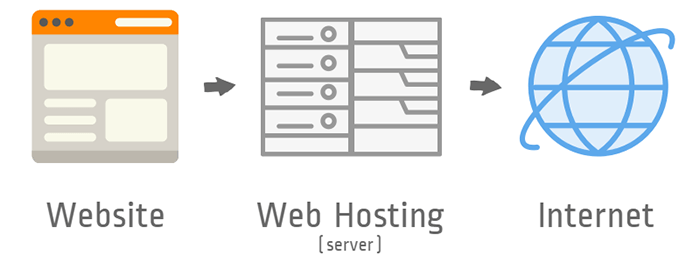
Web hosting is like renting a space on the internet. Websites need a place to live. Web hosts provide that space. They store all the files that make up a website. These files include text, images, and videos. Web hosting ensures that anyone can see the website online. Without hosting, websites can’t be visible to others.
Having a good web host is important. It keeps a website running smoothly. A bad host can make a website slow or offline. Fast websites are better for visitors. They keep people happy. Reliable hosting helps websites get found. Search engines like Google prefer fast sites. This can help more people visit the website. Choose hosting wisely.

Credit: www.geeksforgeeks.org
Types Of Web Hosting
Shared hosting means many websites use one server. It’s cheap and easy. Perfect for beginners. But it can be slow. If one site gets busy, others slow down. Great for small sites.
Dedicated hosting gives you a whole server. It’s fast and powerful. Best for big websites. Costs more money. But you get full control. No sharing with others.
VPS stands for Virtual Private Server. Like a mix of shared and dedicated. You share, but have your own space. It’s flexible and not too expensive. Good for growing sites.
Cloud hosting uses many servers together. It’s reliable and scalable. If one server fails, others help. Good for sites with lots of traffic. Pay for what you use.
Choosing A Web Hosting Provider
Choosing a web hosting provider can be tricky. Some features matter a lot. First, check the uptime guarantee. This shows how often your site will be up. Look for 99% or more. Next, consider the storage space. Make sure it’s enough for your needs. Also, check the bandwidth. This affects how much traffic your site can handle. Lastly, think about customer support. It’s good to have help when things go wrong.
| Provider | Uptime | Storage | Bandwidth | Support |
|---|---|---|---|---|
| Provider A | 99.9% | 50GB | Unlimited | 24/7 Chat |
| Provider B | 99.8% | 100GB | 1TB | Email Only |
| Provider C | 99.5% | 200GB | Unlimited | Phone Support |
Common Web Hosting Terms
Bandwidth is like a road for your website. It shows how much data can travel. If your website has more visitors, you need more bandwidth. Think of it like a bigger road for more cars. If the road is small, cars move slowly. So, more bandwidth means faster access to your website.
Disk space is like a room. It stores all your website files. More disk space means more room for pictures, videos, and text. If you have less space, you need to delete some files. Always check how much disk space you have. It helps your website grow.
Uptime is the time your website is online. More uptime is better. It means your website is always available. If uptime is low, your website can go offline. Visitors can’t see your website then. Good web hosts have high uptime, usually 99% or more.
Setting Up Your Website
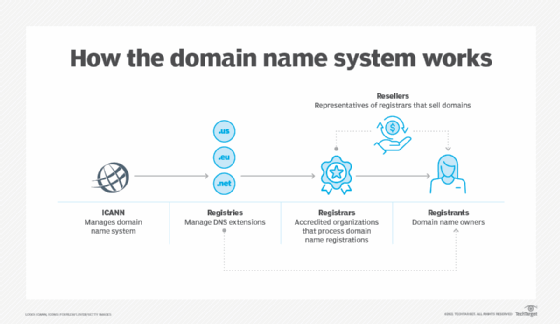
Choosing a domain name is the first step. This is your website’s address. Make it easy to remember. You can buy a domain from a registrar. Common options include .com or .net. Prices vary based on the name. Once purchased, it becomes your website’s identity. Keep it simple and related to your site’s purpose. A good domain helps people find you online.
A Content Management System (CMS) helps you build your site. Popular CMS options are WordPress and Joomla. These systems are easy to use. They offer various templates and plugins. Templates give your site a look. Plugins add features like contact forms. Installing a CMS is often a one-click process. This makes it simple for beginners. With a CMS, managing your website becomes easier.
Credit: www.crucial.com.au
Troubleshooting Web Hosting Issues
Websites can face many common problems. Sometimes, they load slowly. Other times, they do not load at all. A website might show a 404 error. This means a page is missing. Server downtime can also happen. This is when the server stops working. Check for expired domains. Ensure the domain is still active. Clear the browser cache to fix loading issues. Use tools to monitor uptime. These tools check if your website is online. They notify you when the site is down.
Look for support options from your hosting provider. Many have a help desk. They offer live chat for quick help. Some have phone support. Email support is also common. Read the FAQ section on their website. They answer many questions there. Join online forums. Other users share tips and solutions. Consider hiring professional support if needed. They can solve complex issues. Keep a backup of your website. This helps if something goes wrong.
Future Of Web Hosting
New technologies are changing web hosting. Cloud hosting is now popular. It is fast and flexible. Artificial Intelligence helps in managing servers. It predicts problems before they happen. Blockchain offers more security. People trust it with their data.
Web hosting is always changing. Green hosting is a new trend. It uses less energy. This helps the planet. Edge computing is another trend. It makes websites load faster. This is good for users. Hybrid hosting mixes different types of hosting. It offers more options.
Credit: www.techtarget.com
Frequently Asked Questions
What Is Web Hosting In Simple Words?
Web hosting stores your website files on a server, making them accessible on the internet. It allows people to visit your site using a domain name. Hosting providers offer various plans with different features and storage options. Choose a reliable host to ensure your website is fast and secure.
What Is Web Hosting For Dummies?
Web hosting is a service that stores your website files on servers. These servers make your site accessible online. Hosting providers manage server maintenance, security, and technology. You choose a plan based on your needs, like storage and bandwidth.
What Are The 3 Types Of Web Hosting?
The three types of web hosting are shared hosting, dedicated hosting, and VPS hosting. Shared hosting involves multiple sites on one server. Dedicated hosting provides exclusive server access for one site. VPS hosting offers a virtual server with dedicated resources on a shared physical server.
What Is An Example Of A Web Host?
An example of a web host is Bluehost. They offer various hosting plans, including shared, VPS, and dedicated hosting. Known for reliability and user-friendly features, Bluehost is popular among bloggers and small businesses. Their services include domain registration, 24/7 support, and easy WordPress integration.
Conclusion
Web hosting is the backbone of every website. It stores all data securely. This service makes your site accessible online. Choosing the right host is crucial. It impacts site speed and reliability. Consider your needs and budget carefully. Research different hosting types.
Shared, VPS, and dedicated each offer unique benefits. Beginners often start with shared hosting. As your site grows, you may need more resources. Always check customer support options. Good support ensures quick problem-solving. Now, you are ready to make informed hosting choices.
Your website deserves the best foundation.


