
Picture this: You’re all set to launch your website, or maybe you’re expecting a surge of visitors. But then, something goes wrong—your web host is down.
Panic sets in as you wonder why this is happening and how long it will last. You’re not alone in this digital dilemma. Many find themselves in the same predicament, searching for answers and solutions. But what if you could quickly diagnose the problem and take action to minimize downtime?
You’ll discover straightforward steps to pinpoint why your web host is down. We’ll guide you through identifying the root causes, empowering you to restore your online presence swiftly. Ready to turn this challenge into a learning opportunity? Let’s dive in and get your website back on track!
Identifying Common Issues
Server overload happens when too many users visit a website at once. This can slow down the server or make it stop. Websites with lots of traffic might face this issue often. Reducing traffic or upgrading the server can help fix it.
Network failures occur when connections break. This could be due to bad weather or cable issues. Fixing network paths or using backup systems can help. Regular checks can prevent these problems.
Hardware malfunctions happen when computer parts fail. This could be a broken hard drive or faulty memory. Replacing damaged parts is important. Regular maintenance keeps hardware healthy.
Checking Server Status
Your hosting provider has tools to check server status. Log into your account. Find the server status page. It shows if the server is up or down. Many providers offer a dashboard. Look for alerts or warnings. They tell you about issues.
Check for any maintenance alerts. These tell you if work is being done. Contact customer support if you see no issues. They can help find the problem. Always check the provider’s blog or social media. They post updates about outages there.
Some websites check server status for you. UptimeRobot is one example. Pingdom is another. These tools check if your site is live. They use simple tests to see if servers respond. Visit their website. Enter your website URL to test.
These tools send alerts if your site is down. Sign up for their services to get alerts. They can send you emails or messages. This helps you know when your site faces issues. Always use these checkers to ensure your site is online.
Analyzing Dns Problems
DNS tells browsers where to go. When DNS settings are wrong, sites break. Check if records are set right. Look for typos or missing bits. Fix errors to make things better.
DNS changes take time. Sometimes hours, sometimes days. This is called propagation delay. It means updates move slowly. Be patient. Monitor changes for problems. Use tools to check DNS status.

Credit: www.instagram.com
Investigating Security Breaches
A DDoS attack floods a server with fake requests. This makes it hard for real users to connect. The server gets overwhelmed and may crash. Online games and popular websites often face these attacks. To check for DDoS, look at the traffic logs. Sudden spikes in traffic might mean an attack. Firewalls can help stop DDoS attacks. Always keep them updated.
Hackers can try to break into your server. They look for weak passwords and old software. If a hacker gets in, they can cause damage. They might change files or steal data. Check your access logs for strange activity. Unknown IP addresses might be hackers. Update your software often. Use strong passwords to keep hackers out.
Reviewing Recent Changes
New software can cause problems. Sometimes, updates are not tested well. They might break things. Check recent updates on your web host. See if new versions were installed. Old software might conflict with new updates. Ask your host about recent changes. They can tell you if updates were made.
Changes to settings can cause issues. Wrong settings can make a host stop working. Look at recent changes in configuration. Check logs for errors. Find out who changed settings. Sometimes, small changes have big impacts. Always keep a record of your settings. Backup configurations before making changes. This helps if you need to go back.

Credit: www.hostinger.com
Consulting With Technical Support
Your website is down. Contact the hosting provider right away. Explain the issue simply. Provide your website name. Ask if there is a server problem. Sometimes, they know about ongoing issues. They might have solutions ready.
Problems not solved? Ask to escalate the issue. Speak to someone higher up. This helps in getting faster solutions. Keep note of conversations. Write down important details. This is useful if issues continue. Be patient and polite always.
Monitoring And Prevention
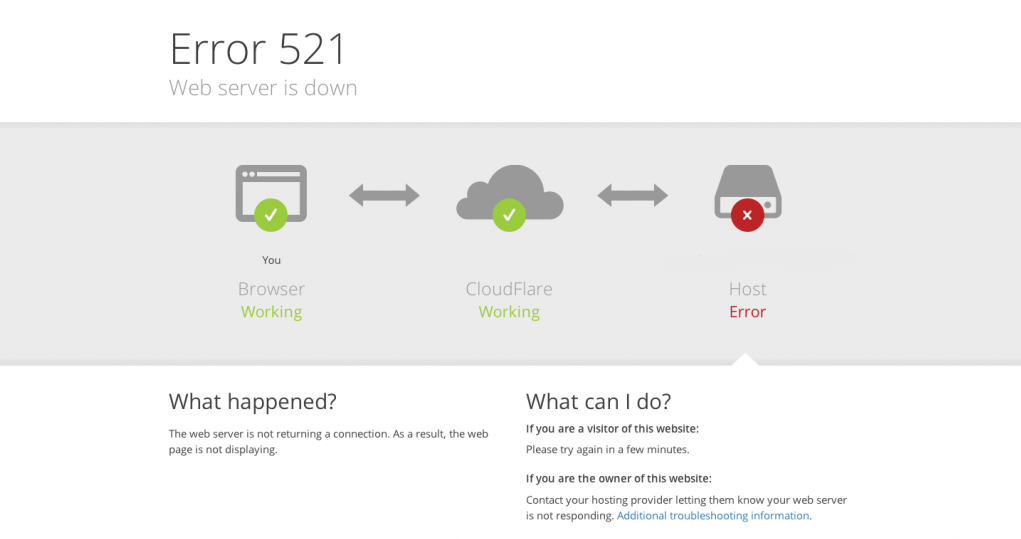
Is your web host down? Start by checking server status online. Network issues often cause downtime. Inspect DNS settings and IP connectivity. Contact support for assistance. Regular monitoring can prevent outages and improve reliability.
Setting Up Alerts
Alerts keep you informed about your web host status. They notify you about downtime quickly. You can use tools like Uptime Robot or Pingdom. These tools send alerts to your email or phone. Alerts help you act fast. They reduce the impact of downtime on your website. Alerts are easy to set up and manage. Choose the alert type that suits your needs best.
Regular Maintenance
Regular checks keep your hosting healthy. Maintenance prevents unexpected problems. It ensures your host runs smoothly. Schedule checks for server updates and backups. This helps avoid data loss. Also, clean up old files and logs. They slow down the server. Regular maintenance reduces downtime risk. It keeps your website active and reliable. Maintenance is key to a stable web host.
Credit: www.hostinger.com
Frequently Asked Questions
How To Check Why The Server Is Down?
To check why the server is down, verify network connectivity first. Review server logs for error messages. Test server hardware and inspect software configurations. Ensure sufficient server resources and confirm no security breaches. Finally, contact your hosting provider for assistance if needed.
Why Would A Web Server Be Down?
A web server may be down due to hardware failure, software errors, network issues, or server overload. Maintenance activities can also temporarily shut down a server. Attack threats like DDoS can disrupt server operations. Regular monitoring and updates help prevent downtime and ensure stability.
Why Is A Website Down Just For Me?
A website may be down for you due to local network issues, DNS problems, or browser cache errors. Checking with a different device or network can help identify the issue. Use an online site checker to confirm if the site is globally accessible.
How To Check If A Host Is Down?
Use a tool like Pingdom or Down For Everyone Or Just Me to check host status. Alternatively, run a ping test or traceroute in your command prompt for real-time verification. These methods help in quickly identifying if the host is down or experiencing issues.
Conclusion
Understanding why your web host is down is crucial. It ensures your website runs smoothly. First, check your internet connection. Then, explore server issues. Look for expired domain names. Also, consider possible attacks like DDoS. Lastly, contact your hosting provider for help.
Regular checks can prevent future downtime. Stay informed and act quickly. Protect your online presence. Your website deserves the best care. Stay proactive and maintain peace of mind. With these steps, you can tackle host problems effectively. Keep your site live and thriving!


