
Imagine having a website that truly reflects your unique style and personality. One that doesn’t just stand out but speaks directly to your audience, capturing their attention and keeping them engaged.
Designing and personalizing a theme website on WordPress can transform this vision into reality. Whether you’re a blogger, entrepreneur, or creative professional, a personalized website is your digital canvas. It’s where your ideas come to life and where your brand shines brightest.
In this guide, you’ll discover the step-by-step process to make your WordPress site not only look amazing but also function seamlessly. Get ready to unlock the secrets to creating a website that’s as unique as you are. Keep reading, and let’s turn your digital dreams into reality!
Credit: wedevs.com
Choosing The Right Theme
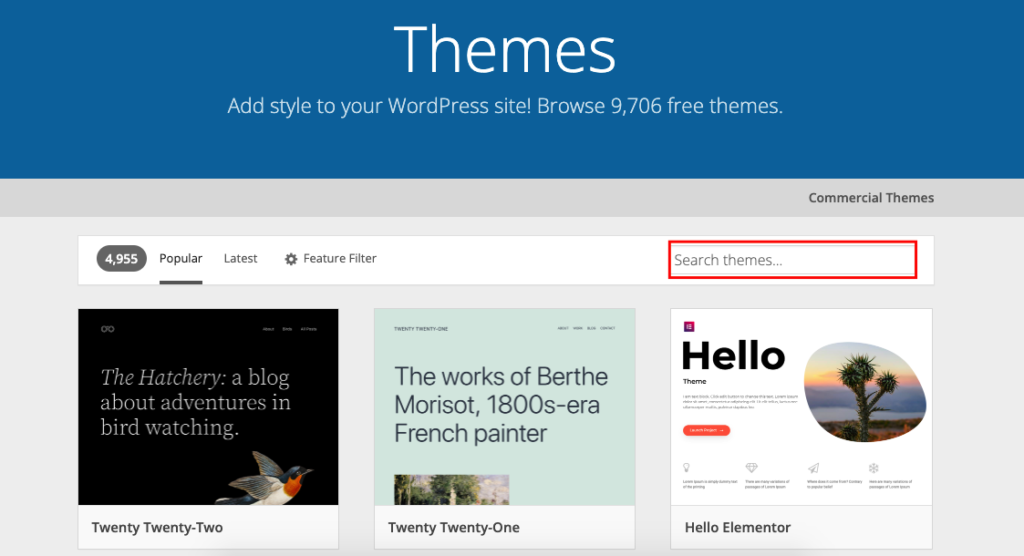
Picking a theme is fun. Free themes are easy to start with. They cost nothing. But they have fewer features. Limited options for color and fonts. Support is often not available. Premium themes cost money. They offer more options. More colors and fonts to choose from. Better support and updates. Some come with ready-made templates. These templates save time. Choose based on your needs.
A responsive design is key. People use different devices. Phones, tablets, and computers. The website should look good on all. It should fit every screen size. Easy to read and use. This helps in keeping visitors happy. They stay longer on your site. Google likes responsive sites. It helps in search rankings. Make sure your theme is responsive.
Customizing The Theme
WordPress offers a powerful tool called the Customizer. This tool helps you change your site’s look. You can find it under the Appearance menu. It lets you adjust your theme without coding. Change the header, background, and more. Preview changes before saving them.
Fonts and colors give your site personality. Use the Customizer to tweak them easily. Choose from many fonts available. Change text color to suit your brand. Adjust the background color too. These small changes make a big impact.
Widgets add functionality to your site. They can be found in the Customizer under Widgets. Add a calendar, recent posts, or social media links. Drag and drop to position them. Customize their settings to fit your needs. Widgets enhance your site’s interaction.
Adding Personal Content
Images and videos make your website pop. Choose high-quality pictures. They tell your story better. Upload videos for more fun. Videos keep visitors engaged. Use the WordPress media library. It’s simple to add images there. Drag and drop to upload. Click to insert them into your page. Resize images if needed. Smaller files load faster. Fast loading keeps users happy.
Custom pages make your site unique. Use the WordPress page editor. Add text, images, and links. Make sections for easy reading. Use short sentences. Visitors like clear information. Add buttons for actions. Contact forms are helpful. They let visitors reach you easily. Create an “About” page. Share your story there. It builds trust with readers.
SEO helps your site appear in searches. Use keywords people search. Place them in titles and text. Write clear descriptions for each page. Descriptions help search engines understand your content. Use alt text for images. This helps people find your pictures. Keep your URLs simple. They should match the page content. Fast loading pages rank better. Check your site’s speed often.

Credit: www.paradigmmarketinganddesign.com
Incorporating Plugins
Enhance your WordPress theme by incorporating plugins for added features and personalization. Plugins offer tools to customize design elements. This allows a unique, user-friendly website experience.
Essential Plugins For Personalization
Choosing the right plugins is important. Some plugins add great features to your site. These plugins can change colors, fonts, and layouts. Some plugins help make your site unique and fun. Always check if the plugin is compatible with your theme. Be sure the plugin is updated regularly. This keeps your site safe and fast.
Enhancing Functionality With Plugins
Plugins make your website better. They add new functions without coding. Some plugins help with SEO. Others make your site load faster. Use plugins for social media links. This helps users share your site easily. Always use plugins with good reviews. Check if many people use them. This shows the plugin is trusted.
Testing And Troubleshooting
Creating a personalized theme on WordPress involves testing and troubleshooting for a smooth user experience. Check for broken links, adjust colors, and fine-tune layout elements to match your brand. Regular updates ensure compatibility and functionality, enhancing your site’s appeal and performance.
Cross-browser Testing
Websites must work well on all browsers. Check your site on Chrome, Firefox, Safari, and Edge. Use tools like BrowserStack or CrossBrowserTesting. These tools show how your site looks on different browsers. Watch for layout changes, missing images, or broken links. Fix any issues you find. You want your website to look great on every browser.
Debugging Common Issues
Common issues often occur with plugins or themes. Plugins sometimes conflict with each other. Themes might not work well with all plugins. Deactivate plugins one by one to find the problem. Check your theme settings carefully. Look for errors in your WordPress admin panel. Use the WordPress debug mode for more help. Solving these problems makes your site run smoothly.
Maintaining Your Personalized Site
Regular Updates and Backups keep your site safe. Plugins and themes need updating. Updates fix bugs. They also add new features. Backup your site often. This saves your data. Use tools like UpdraftPlus. Backups are like a safety net. They help if something breaks. Updates and backups work best together. They make your site run well.
Monitoring Performance is crucial. Check how fast your site loads. Slow sites lose visitors. Use tools like Google PageSpeed. These tools show what slows your site. Improve speed by reducing image sizes. Also, limit plugins. Too many plugins can slow the site. Always keep an eye on site performance.
Credit: www.sayenkodesign.com
Frequently Asked Questions
How Do I Personalize A WordPress Theme?
Personalizing a WordPress theme starts with selecting a theme that suits your style. Use the WordPress Customizer to change colors, fonts, and layouts. Add widgets and plugins to enhance functionality. Modify the header and footer for a unique look. Always preview changes before saving to ensure the design matches your vision.
What Tools Help In WordPress Theme Design?
WordPress theme design is aided by tools like Elementor and Divi, which offer drag-and-drop interfaces. Use WordPress Customizer for basic adjustments. Plugins like WPBakery provide advanced design options. Themes usually come with built-in design tools. Explore these tools to find what best suits your design needs.
Can I Use Plugins For Theme Customization?
Yes, plugins enhance theme customization on WordPress. They offer additional features, making personalization easier. Use plugins for sliders, galleries, and SEO optimization. Essential plugins include Yoast SEO and WooCommerce. Choose plugins compatible with your theme for best results. Always keep plugins updated for security and performance.
How To Choose The Right WordPress Theme?
Choosing the right WordPress theme depends on your site’s purpose and audience. Consider the theme’s responsiveness and customization options. Check for SEO-friendly features and compatibility with plugins. Read user reviews and ratings. Opt for themes regularly updated by developers. Free or premium, ensure it aligns with your vision.
Conclusion
Creating a personalized theme on WordPress is simple and fun. Start with a clear vision for your website. Choose themes that match your style and needs. Customize colors, fonts, and layouts to express yourself. Add plugins for extra features. Keep your design clean and user-friendly.
Test on different devices for the best experience. With practice, you can create a site that feels unique and inviting. Remember, your website reflects you. Make it memorable and engaging for visitors. Enjoy the process, and let your creativity shine through.


