
Have you ever wondered how to design a basic WordPress theme on your own? You’re not alone.
Many people think creating a WordPress theme is too complex, meant only for tech experts. But the truth is, with the right guidance, you can design a theme that reflects your unique style and vision. Imagine the satisfaction of seeing your design come to life, perfectly tailored to your needs.
This guide will show you how to create a basic WordPress theme step-by-step, using simple language and easy-to-follow instructions. Whether you’re looking to build a personal blog or a small business site, you’ll find valuable insights here to bring your ideas to fruition. Don’t let the tech jargon scare you away; let’s dive in and simplify the process together.
Getting Started With WordPress
WordPress themes change the look of your website. They use templates and styles. Themes can be simple or complex. Basic themes are a good start. They help you learn. You can use them as a base. Customizing them is easy.
Creating a WordPress theme needs some tools. A computer is needed. You also need a text editor. Notepad++ or Sublime Text works well. A local server like XAMPP is helpful. This lets you test your theme locally. WordPress software is a must. Download it from the official site. With these tools, you can begin creating your theme.
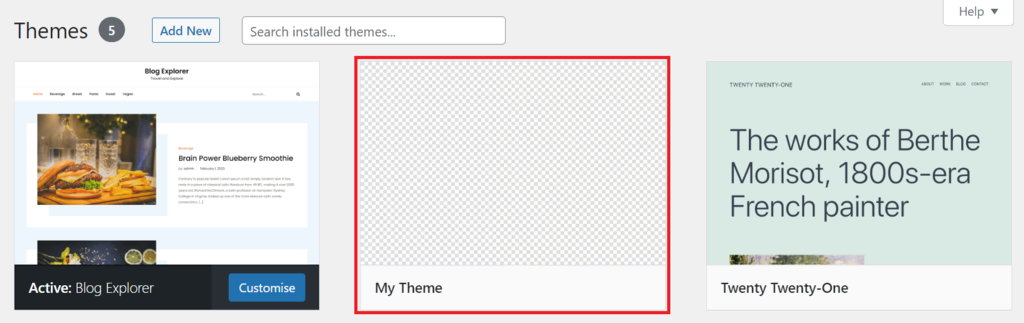
Credit: www.hostinger.com
Setting Up Your Development Environment
First, download WordPress from the official website. Then, extract the files. You need a local server to run WordPress. Use software like XAMPP or MAMP. Install it on your computer. Open the software and start the server. Check if Apache and MySQL are running.
Create a new database in phpMyAdmin. Use a name you can remember. Go to the WordPress folder. Find the wp-config.php file. Open it in a text editor. Enter your database details. Save the changes. Now, open your browser. Type localhost/yourfoldername. Follow the setup instructions. Your local WordPress site is ready!
Creating The Theme Folder Structure
A WordPress theme needs a few key files. First, create a folder for your theme. Name it something simple. Inside, you need a file named style.css. This file is for styling your theme. Another important file is index.php. It shows the main page of your site. You also need a functions.php file. It adds features to your theme.
Make sure to include a screenshot.png. This shows what your theme looks like. Other important files include header.php and footer.php. These files control the top and bottom of your site. A sidebar.php file is also useful. It manages the side area of your site.
Keep your files neat. Use folders for images and scripts. An images folder holds pictures. A scripts folder is for JavaScript files. This keeps everything tidy. Organizing files helps find them quickly. A clean structure makes updates easier.

Credit: www.youtube.com
Building The Essential Theme Files
This file makes your site look pretty. It controls the colors, fonts, and layout. Every theme needs a style.css file. It tells WordPress about your theme. At the top, add your theme’s name and author. Add a description too. This helps WordPress understand your theme. Use CSS rules to style your site. Change text colors or background colors. Make your site look unique.
This file is important. It is the heart of your theme. It shows your posts and pages. WordPress uses index.php to display content. Add HTML and PHP to this file. Use loops to show posts. Make sure your site works well. You can add headers and footers here too. This file helps organize your site.
This file adds special features to your theme. Use it to add new menus. Or add widgets to your site. functions.php lets you add custom features. Write PHP code here. It makes your theme do more. Add support for new features. Like featured images or custom logos. This file helps make your theme unique.
Designing The Header And Footer
Creating an engaging header and footer is key in designing a basic WordPress theme. These elements frame your content, enhancing navigation and branding. With simple customization options, you can easily modify colors, fonts, and layouts to reflect your unique style.
Creating Header.php
Start with a basic HTML structure. Add a DOCTYPE declaration. Use and tags. Include meta tags for SEO. Add a title tag. Link to style.css for styling. Use tag for content. Add a navigation menu using and tags. Include logo and site name. Use
Building Footer.php
Use tag at the bottom. Add contact info like email and phone. Include social media links. Use for lists. Add copyright notice. Link to privacy policy and terms of service. Keep the design simple and clear. Use for sections. Style with CSS for a nice look.
Developing The Main Content Area
The WordPress loop helps display posts on your site. It runs through each post one by one. Start with a simple PHP code to set up the loop. Use the have_posts() function to check if there are posts. Inside the loop, the the_post() function sets up the post data. You can then display the title and content using the_title() and the_content(). This is how WordPress shows your posts on the page.
Begin with your theme’s index.php file. This file holds the basic structure of your site. Add HTML tags to define sections like headers and footers. Use CSS to style the layout. The main template controls how the site looks. Add your loop code inside this file. This allows posts to appear in the content area. Modify this template to fit your site’s needs. You can also add sidebar and widget areas here.
Styling Your Theme
CSS is a powerful tool for theme styling. It controls the look of your website. Change colors, fonts, and spacing easily. Use it to make your site pretty. It is like painting on a blank canvas. Make buttons look different. Style text with bold and italic. Change background colors. CSS makes your site unique. Play with it. Try different styles.
Responsive design makes your theme work on all screens. Smartphones, tablets, and computers. CSS helps with this too. Use media queries. They change styles for different screen sizes. Make pictures small on phones. Keep text readable everywhere. Responsive design is important. Users will enjoy your site more. It looks good on any device. Easy to achieve with CSS.
Adding Widgets And Sidebars
Widgets make your site more fun. They help you add cool stuff. Sidebars hold these widgets. To use them, you need to register sidebar areas. This tells WordPress where to put the widgets. Use simple code in your theme files. Just a few lines can do the trick. Make sure to pick a good name. This helps you remember the sidebar’s use. Remember, each sidebar can hold many widgets.
You can change how widget areas look. This makes your site unique. Use the WordPress Customizer to change styles. Pick colors that match your site. Add borders or change fonts. It’s easy to do. Just a few clicks. Make sure the widgets fit well. They should look nice and clear. This makes your site better for visitors.
Testing And Debugging
Checking browser compatibility is important. Your WordPress theme must work on all browsers. Users may use Chrome, Firefox, or Safari. Each browser may show your theme differently. Test your theme on each one. Use tools like BrowserStack. It helps in testing without many devices. Make sure your theme looks good everywhere. Fix any inconsistencies you find. This keeps users happy.
Debugging common issues is a regular task. Themes might not work as expected. Bugs can appear in your code. Use tools like Debug Bar. It shows errors in your theme. Check for broken links. Ensure images load properly. Fix CSS styles that break your layout. Read error messages carefully. They guide you to the problem. Solve issues step by step. This makes your theme run smoothly.

Credit: wptavern.com
Preparing For Theme Launch
Speed matters. Fast themes make users happy. Start by compressing images. Small images load quickly. Use fewer plugins. Plugins slow down sites. Choose light-weight plugins. Minimize JavaScript. Less code runs faster. Cache helps. Keep files cached. Cached files load quickly. Test theme speed. Use tools like GTmetrix. Fix slow parts. Faster themes rank better. Users stay longer.
Secure themes protect sites. Update themes often. Updates fix bugs. Use trusted sources for plugins. Untrusted plugins harm sites. Limit admin access. Only trusted people should access. Strong passwords are key. Use complex passwords. Avoid common words. Regular backups are important. Backups save data. If things go wrong, restore from backup. Security matters for peace of mind.
Frequently Asked Questions
What Is A WordPress Theme?
A WordPress theme is a collection of files that dictate the look and feel of a WordPress site. It includes templates, stylesheets, and images. Themes allow customization of layouts, fonts, and colors, enhancing the site’s appearance without altering core code.
How Do I Start Designing A Theme?
Begin by understanding the basics of HTML, CSS, and PHP. Familiarize yourself with WordPress theme files and structure. Use starter themes like Underscores to build your own. Customize design elements to suit your brand and audience.
What Tools Are Needed For Theme Design?
Essential tools include a code editor like Visual Studio Code, and a local development environment such as XAMPP or MAMP. You’ll also need a browser for testing and debugging. Familiarity with Git for version control is beneficial.
How To Customize A WordPress Theme?
Customization involves editing theme files and using the WordPress Customizer. Modify stylesheets to change fonts, colors, and layouts. Utilize child themes to safely make changes without affecting the original theme’s code.
Conclusion
Creating a basic WordPress theme is a rewarding task. Start small. Experiment with colors and layouts. Explore different fonts and images. Aim for a clean design. Simple structures help in easy navigation. Keep your code organized. Comment your work for future edits.
Test your theme on multiple devices. Mobile-friendly designs attract more visitors. Remember to update regularly. This keeps your theme fresh and secure. Designing a theme takes patience. Practice improves skills over time. Enjoy the creative process. Your unique theme will enhance user experience.
A well-designed site can boost engagement and traffic.


