Are you looking to close your Namecheap account, but not quite sure where to start? Whether you’re switching to a different service provider or simply tidying up your online presence, the process might seem daunting.
But don’t worry—you’re in the right place. This guide will walk you through the steps to delete your Namecheap account, ensuring a smooth and hassle-free experience. With clear instructions and helpful tips, you’ll be able to make an informed decision and take control of your online accounts.
So, if you’re ready to simplify your digital life, keep reading to discover how easy it can be to part ways with Namecheap.
Credit: www.namecheap.com
Account Preparation
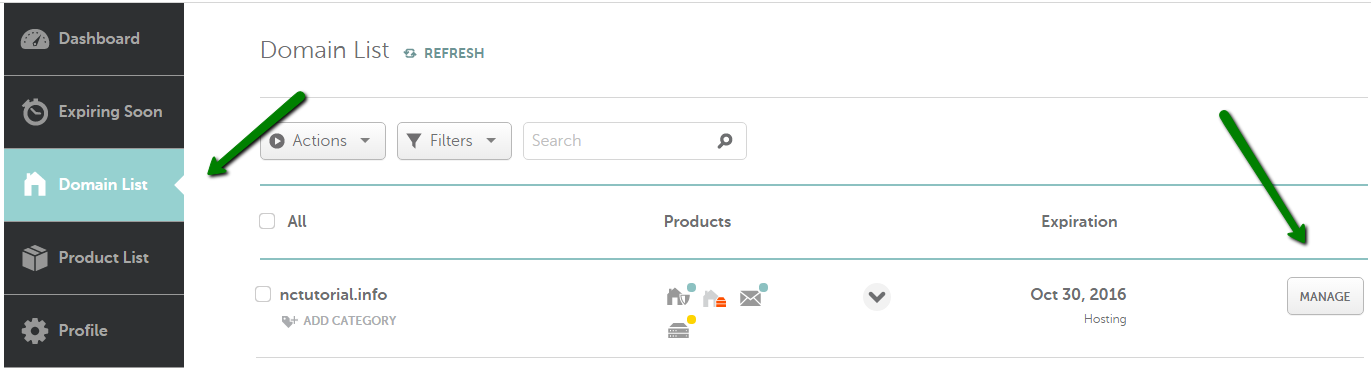
Deleting a Namecheap account involves a few straightforward steps. First, log into your account. Then, navigate to the account settings. Follow the prompts to request account deletion. Ensure you have canceled any active services before proceeding.
Preparing to delete your Namecheap account might feel like a daunting task, but with a little preparation, you can make the process smoother. Whether you’re switching to a new provider or simply clearing your digital slate, a few steps in advance can save you time and hassle. Let’s dive into how you can effectively prepare your account before hitting that delete button. ###Backup Important Data
Before you say goodbye to Namecheap, ensure you’ve backed up all critical data. This includes any domain registration details, website files, and emails associated with your account. You wouldn’t want to lose any vital information in the process. Consider using cloud storage or an external hard drive to keep these files safe. ###Transfer Your Domains
If you have domains registered with Namecheap, it’s crucial to transfer them to another registrar before account deletion. Namecheap provides a straightforward domain transfer process, so take advantage of it. Double-check the transfer requirements and initiate the process well in advance to avoid any disruptions. ###Cancel Subscriptions And Services
Review any active subscriptions or services linked to your Namecheap account. Are you subscribed to hosting services, VPN, or email plans? Cancel these services to prevent further charges. Make sure to follow the cancellation policies to avoid any unexpected fees. ###Review Financial Transactions
Go through your transaction history to ensure all payments are accounted for. Check for any pending invoices or refunds that you might need to settle. Keeping your financial records in check prevents future complications or disputes. ###Update Linked Accounts
If your Namecheap account is linked to other platforms, such as WordPress or Google Analytics, update those accounts with new details. This step ensures continuity in your online presence and prevents access issues. Taking care of this beforehand can save you the headache of reconnections later. ###Verify Account Details
Double-check your account information for accuracy. Make sure your contact details, payment methods, and security settings are up-to-date. This verification step ensures you receive any necessary final communications from Namecheap. ###Think About Future Needs
Consider your future needs before closing your account. Are there services or features you might require later? Deleting an account is often irreversible, so weigh your options carefully. Could keeping the account inactive for a while be a better choice? Preparing your Namecheap account for deletion involves thoughtful steps that can prevent future headaches. Have you backed up all your data? Have you transferred domains and canceled services? By addressing these questions and taking action, you ensure a smooth transition away from Namecheap.
Credit: www.youtube.com
Deletion Process
Closing a Namecheap account involves a few simple steps. First, log in and navigate to the dashboard. Then, select ‘Profile’, click on ‘Account Status’, and follow the prompts to delete.
Deleting a Namecheap account might seem daunting, but with a clear step-by-step guide, it becomes a straightforward task. Whether you’re switching providers or simply want a fresh start, understanding the deletion process is crucial. Let’s walk through the necessary steps and ensure you can confidently manage your account settings. ###How To Access Your Account Settings
First, log in to your Namecheap account. Locate the dashboard; it’s your command center. Navigate to the account settings section. This is where you’ll find all the options to manage your account preferences. ###Locate The Account Deletion Option
Scroll through the settings until you find the ‘Account Deletion’ option. It might be less obvious than you expect, but it’s there. Ensure you read any warnings or conditions associated with deleting your account. Namecheap provides important information that you need to be aware of before proceeding. ###Backup Important Data
Before deleting, it’s wise to backup any essential data. You wouldn’t want to lose vital information without a chance to recover it. Consider downloading important files or transferring domain names you might still need. This proactive step saves potential headaches later. ###Confirming Deletion
Once you’re ready, click on the deletion option. Namecheap will usually ask for confirmation to ensure you’re certain about this irreversible action. Double-check your decision. Are you ready to let go of all associated services and data? Confirm only when you’re sure. ###Feedback And Cancellation
After initiating deletion, Namecheap might request feedback. Share your reasons—it helps improve their services for others. If you change your mind, there may be a brief window to cancel the deletion. But act fast, as this opportunity doesn’t last long. ###Reflect And Move Forward
Think about your next steps. Whether you’re choosing a new service or taking a break, consider what you learned from using Namecheap. What features did you enjoy, and what would you change? Use these insights to make better decisions for your future online endeavors. Deleting your Namecheap account is just a click away. Are you ready to take control and ensure your digital presence aligns with your needs?Post-deletion Considerations
Deleting your Namecheap account is just the beginning. There are several factors to consider after the deletion. These aspects ensure a smooth transition from using Namecheap services.
Data Backup
Make sure to backup all essential data before account deletion. This includes domain settings, email accounts, and hosting files. Once deleted, retrieving this data can be challenging.
Domain Transfer
Consider transferring your domains to another registrar. Namecheap won’t manage your domains post-deletion. Check the new registrar’s policies for domain management.
Email Forwarding
If you used Namecheap for email services, set up forwarding with another provider. This ensures you won’t miss important messages after account deletion.
Financial Implications
Review any pending transactions tied to your Namecheap account. Ensure all payments are settled to avoid unexpected charges. Verify that subscriptions are canceled.
Account Recovery
Understand that account recovery is difficult post-deletion. If you decide to return, you might need to create a new account. Keep this in mind before finalizing your decision.
Service Alternatives
Explore alternatives for the services you previously used on Namecheap. Research different providers for hosting, domain registration, and email services. This helps maintain your online activities without interruption.
Credit: www.namecheap.com
Frequently Asked Questions
How Do I Start Deleting My Namecheap Account?
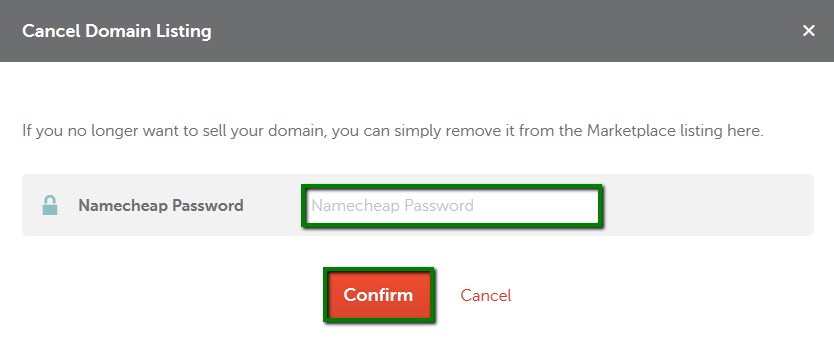
To delete your Namecheap account, first log in to your account. Navigate to the “Profile” section. From there, select “Security” and find the “Close Account” option. Follow the instructions provided to complete the process. Make sure to back up any important data before proceeding.
Can I Recover A Deleted Namecheap Account?
Once a Namecheap account is deleted, it cannot be recovered. Ensure you have backed up all important information before deleting. If you need assistance, contact Namecheap support for guidance. Consider this action carefully, as it is irreversible.
What Happens To My Domains After Deletion?
Deleting your Namecheap account does not automatically delete your domains. Domains will remain active until their expiration dates. Ensure you transfer or manage your domains accordingly. Consider transferring to another registrar if you plan to use them in the future.
Are There Fees For Deleting A Namecheap Account?
Namecheap does not charge any fees for deleting your account. However, ensure there are no pending charges or dues. Check any active services or subscriptions before initiating the deletion process. It’s best to clear all financial obligations beforehand.
Conclusion
Deleting a Namecheap account is straightforward with our guide. Follow each step carefully. Ensure you back up important data before proceeding. Double-check all details during the deletion process. Contact Namecheap support if you face any issues. Account deletion is permanent.
Make sure you truly want to delete it. Remember, once deleted, recovery is impossible. By following these steps, you can easily manage your online accounts. Keep your digital life organized and secure. Feel free to explore other hosting options if needed.
Stay informed and maintain control of your digital footprint.