
Are you looking to make your website stand out with a unique and personalized touch? Customizing the Brooklyn WordPress Theme could be your ticket to achieving just that.
This theme is renowned for its flexibility and modern design, making it a favorite among creatives and businesses alike. But how do you turn this dynamic theme into something that truly reflects your brand or vision? Imagine having a site that not only looks stunning but also feels like an extension of your personality or business ethos.
With the right tweaks, you can transform the Brooklyn theme into a powerful tool that captures your audience’s attention and keeps them engaged. This guide will walk you through the process, offering you straightforward steps and insider tips to make your customization journey smooth and rewarding. Ready to create a website that leaves a lasting impression? Let’s dive in and explore how you can tailor the Brooklyn WordPress Theme to perfectly suit your needs.
Installation Guide
Begin by logging into your WordPress dashboard. Find the “Appearance” tab on the left. Click on it, then select “Themes”. Next, hit the “Add New” button at the top. Type “Brooklyn” into the search bar. Click “Install” to add it to your site. After installation, click “Activate”. This will make Brooklyn your site’s theme.
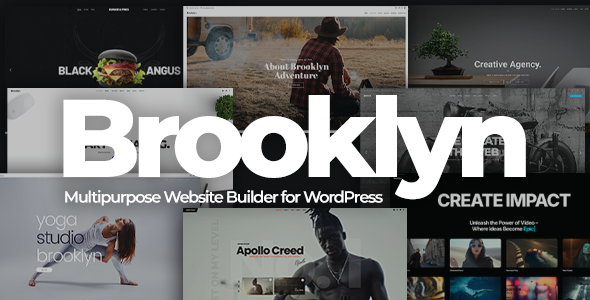
Demo content makes setup easy. Go to the Brooklyn options panel. Click on “Import Demo”. Choose the demo you like. Click “Import” to start. Wait for the process to finish. Your site will now look like the demo.
Credit: themeforest.net
Theme Settings Overview
Start with the general settings of the Brooklyn theme. Customize your site title and add your logo. Choose a color scheme that fits your brand. Set up the layout to match your style.
The header is important. You can change its style and position. Add your navigation menu. Make the header sticky for easy access.
Customize the footer. Add widgets and social links. Set the background color and text. Make sure it looks neat and clean.
Fonts matter. Pick a font style that is easy to read. Adjust font sizes for headings and paragraphs. Ensure text is clear and visible.
Customizing Header And Footer
Choose a simple layout for the header. Use the theme settings. Change the logo size. Adjust the menu position. You can move it to the left or right. Make sure the colors match your site. This helps the site look nice.
Go to the footer settings. Add some widgets. Choose ones like social media links. You can also add menus. Use simple links for easy navigation. Change the background color of the footer. This makes it stand out. Keep it simple and clean. Users will find it easy to use.
Personalizing Fonts And Colors
Fonts make your site special. Choose a font that matches your brand. Bold fonts can make headings stand out. For easy reading, use a simple font for the main text. Google Fonts offers many free choices. Pick one that fits your style. Try different sizes. See what looks best. Adjust line spacing for better readability.
Colors bring life to your website. Choose colors that match your theme. Primary colors are for the main parts. Secondary colors add extra flair. Use a color wheel for ideas. Balance light and dark shades. Avoid too many colors. Keep it simple. Test your colors on different screens. Make sure they look good everywhere.
Homepage Layout Options
The Brooklyn theme offers many ways to set up sliders and banners. You can choose between full-width sliders or smaller ones. Images are easy to upload. Just drag and drop. You can add captions to your sliders. These can be text or buttons. Banners can also include text. This helps in catching the eye. Make sure your images are clear. This way, they look nice on all screens.
Widgets help to add more features to your site. Drag and drop widgets into place. Arrange them in sidebars or footers. You can add text widgets for info. Use image widgets for pictures. Social media widgets connect your profiles. Keep the layout simple. This helps users find what they need. You can change the order anytime. This makes your site flexible.
Adding Custom Css
Changing styles is easy with Custom CSS. Go to your WordPress dashboard. Find the Appearance section, then click Customize. Look for the Additional CSS option.
Here, you can add your own CSS code. This changes how things look on your site. Want to change colors? Use CSS code like body { background-color: blue; }.
For fonts, try something like h1 { font-size: 24px; }.
Always save your changes. Check your site to see the new look. If you make a mistake, you can remove the CSS code.
Optimizing For Mobile Devices
Many people use phones to check websites. So, making your site mobile-friendly is important. Start by checking how your site looks on a phone. Is the text easy to read? Are the buttons big enough? If not, you need to make changes. Use responsive design. This means your site changes size for phones or tablets. Brooklyn theme helps with this. It automatically adjusts your content. But, always test to be sure it works well. Sometimes images can be too big. Make sure images fit the screen. This helps pages load faster. Quick loading is important for users. It keeps them happy and on your site longer.
Credit: themeforest.net
Integrating Social Media
Social media can make your website more lively. It helps people share your content easily. Brooklyn WordPress Theme has tools for this. You can add buttons for Facebook, Instagram, and Twitter. These buttons make sharing simple. Click them, and content is shared. Your site becomes more popular. People will visit more often. Integrating these tools is quick. Widgets are available for this purpose. You can place them anywhere on your page. Customization is key to match your site style. Keep the design clean and simple. This attracts more visitors and keeps them engaged.
Managing Plugins And Add-ons
Plugins add new features to your site. They help make it better. Always check if a plugin is safe. Read reviews before installing. This keeps your site secure. Some plugins are easy to use. Others may need a bit more work. Brooklyn theme supports many plugins. Choose ones that fit your needs. Add-ons can change your site’s look. They offer new styles. You can make your site unique with them.
Update plugins often. This keeps them working well. An updated plugin is less likely to break. Check for updates each month. This is important. It keeps your site running smoothly. If a plugin causes trouble, remove it. Find a better one. Backup your site before adding new plugins. This saves your work if something goes wrong. Always keep a backup handy. It’s a good practice.
Troubleshooting Common Issues
Customizing the Brooklyn WordPress theme often presents issues. Troubleshooting involves checking plugin conflicts and ensuring theme updates. Adjust settings carefully to enhance your website’s appearance.
Resolving Display Problems
Brooklyn theme might have display issues. Check if your theme and plugins are up-to-date. Sometimes, updates fix problems. If images don’t show, check your media settings. Make sure your image sizes are correct. Also, clear your cache. This helps refresh the display. If text is hard to read, adjust your font sizes. Use colors that contrast well. Always preview changes. This helps you see if fixes work.
Fixing Performance Issues
Slow websites annoy users. First, check your hosting. Sometimes servers are slow. Choose a reliable host. Next, optimize images. Large files slow down sites. Use compressed images. Plugins can also slow sites. Disable unused plugins. This boosts performance. Another tip is to enable caching. This helps load pages faster. Regularly check site speed. Use tools like Google PageSpeed Insights. This tool gives helpful tips.
Credit: themeforest.net
Frequently Asked Questions
How Do I Install Brooklyn Theme?
To install Brooklyn Theme, navigate to WordPress Dashboard, click ‘Appearance’, then ‘Themes’. Select ‘Add New’, search for Brooklyn, and click ‘Install’. After installation, activate the theme. You can then begin customizing your site using Brooklyn’s features and options.
Can I Customize Brooklyn Without Coding?
Yes, Brooklyn offers a user-friendly interface for customization without coding. Use the WordPress Customizer to easily change colors, fonts, and layouts. Additionally, Brooklyn provides pre-designed templates and elements that can be adjusted to fit your design needs without technical expertise.
What Are Brooklyn’s Customization Features?
Brooklyn includes features like slider integration, multiple header styles, and customizable page templates. You can adjust colors, fonts, and layouts using its drag-and-drop functionality. It also offers advanced options for styling each section, ensuring your site meets your aesthetic and functional requirements.
Is Brooklyn Theme Responsive?
Yes, Brooklyn Theme is fully responsive. It automatically adjusts to different screen sizes and devices. This ensures your website looks great and functions well on desktops, tablets, and smartphones, providing a seamless user experience for all visitors.
Conclusion
Customizing the Brooklyn WordPress theme is straightforward and rewarding. Choose fonts that match your style. Adjust colors for a personal touch. Tweak layouts to enhance user experience. Add unique features that suit your needs. With these steps, your website will reflect your vision.
Keep exploring new customization options. Enjoy the creative process. Remember, simplicity often works best. Your site will stand out with thoughtful designs. Engage visitors with an appealing look and feel. Let your creativity shine through every detail. Achieving a customized website is within reach.
Happy designing!


