
Are you looking to give your WordPress website a unique and cohesive look? Creating a theme palette could be the perfect solution.
Imagine having a website that not only looks stunning but also reflects your brand’s personality. With the right color combinations, your site can captivate visitors and make them stay longer. In this guide, you’ll discover how to easily create a theme palette in WordPress.
We’ll walk you through the steps to ensure your site looks professional and visually appealing. Don’t miss out on transforming your website into a compelling and memorable experience for your audience. Keep reading to find out how you can effortlessly enhance your site’s design with the perfect theme palette!
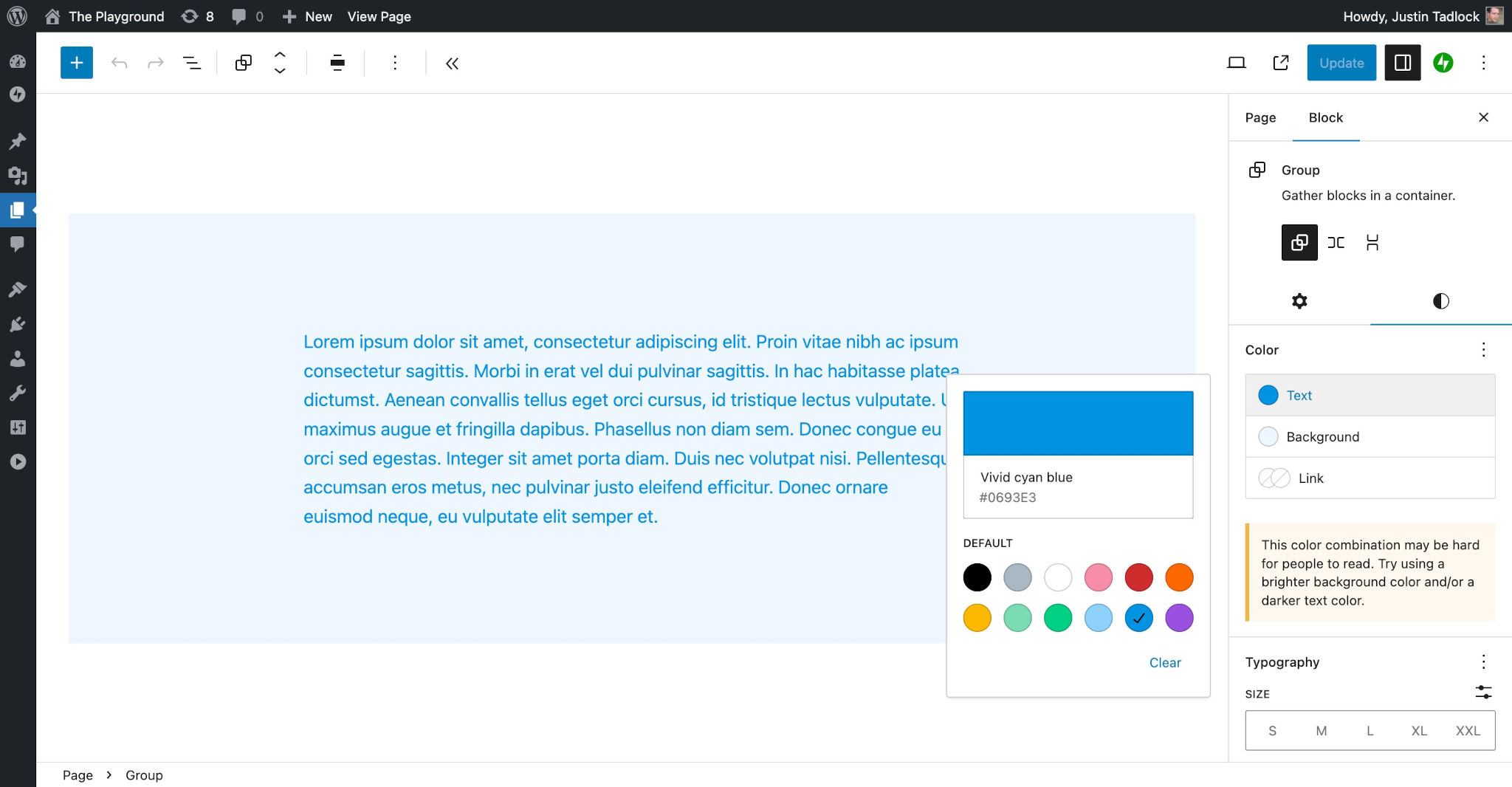
Credit: developer.wordpress.org
Understanding WordPress Theme Palettes
WordPress theme palettes help your website look nice. They decide what colors show up. This makes your site look neat and tidy. Colors are important. They give your site a mood or feeling.
Pick colors that match your brand. Keep it simple. Too many colors can make a site look messy. Use light colors for the background. Dark colors are good for text. This helps people read easily.
Changing colors is easy. Go to the theme settings. Look for color options. You can pick from preset colors. Or make your own. This gives your site a special look. Experiment with different colors. Find what works best for you.
Choosing The Right Colors
Colors can affect how people feel. Blue often makes people feel calm. Red can make them feel excited. Green is relaxing and fresh. Yellow is cheerful and warm. Think about how you want your visitors to feel. This can help you choose the right colors. A happy site may use yellow. A serious site may use blue or gray.
Consistency is key for brand identity. Use the same colors across your site. This helps people remember your brand. Use your logo colors in your theme palette. This builds trust and recognition. Keep color choices simple. Too many colors can confuse visitors. Stick to two or three main colors. This keeps the design clean and focused.
Tools For Color Selection
Many online tools help pick colors. These tools are easy to use. They show color codes, like HEX and RGB. These codes are important for WordPress themes. Some popular tools are Adobe Color and Coolors. Use them to find the perfect color for your site. Just click and see colors change. It’s fun and helpful.
Some people use design software to choose colors. Software like Photoshop or Illustrator are common. These tools let you play with colors. You can create your own palette. Save your favorite colors for later. It’s like painting with a digital brush. Great for creative minds.
Creating A Custom Color Palette
CSS variables help make a theme look unique. They are like color codes you name yourself. Use them to set colors for your theme. First, open your theme’s style.css file. Then, add the code for the variables. For example: --main-color: #ff5733;. This sets a main color for the theme.
Hex codes are a way to show colors. They look like this: #ff5733. Each code has six characters. Use hex codes to make your site colorful. Copy your favorite hex codes into the CSS file. Pair these codes with your CSS variables. This creates a vibrant and unique palette. Your site will look lively and bright.
Implementing The Palette In WordPress
The Theme Customizer helps change the look of your site. It’s easy to use. First, open your WordPress dashboard. Then, go to “Appearance” and choose “Customize.” Here, you can see many options. Choose “Colors” to start. You can find the color palette here. Change colors to match your style. Try different combinations. Make your site look nice. Save changes when happy. Your site will look fresh and new.
Style Sheets let you change more details. They use CSS. CSS changes how things look on the web. Find the “Additional CSS” option in the Customizer. Here, you can write your own CSS code. Change colors, fonts, and more. Be careful with code. Small mistakes can cause problems. Practice makes perfect. Save your changes to see results. Style Sheets help your site look unique.
Testing And Refining Your Palette
Creating a theme palette in WordPress involves selecting colors that match your site’s mood. Experiment with shades to find harmony. Adjust hues to ensure readability and aesthetic appeal.
Cross-device Testing
Testing your theme palette is important. It must look good on all devices. Check on a phone, tablet, and computer. Colors might look different on each. Adjust if needed. Consistency is key.
Ask your friends for help. Get user feedback from different people. They might see things you missed. They can tell you if the colors are nice. Or if something looks off. This helps improve your design.
Make changes based on what you learn. Try different shades or combinations. Keep testing until everything looks perfect. Your site should be visually appealing everywhere.
Ensuring Accessibility
Choosing the right colors is very important. High contrast helps everyone see better. Make sure text stands out from the background. Dark text on a light background works well. The opposite is also true. Light text on a dark background can be clear. Test your colors. Use online tools to check contrast. This helps people with vision problems. They can read your content easily.
Assistive tools help people use websites. Blind people use screen readers. These tools read text aloud. Good contrast helps them too. Make sure your site works with these tools. Test your site with a screen reader. Listen to how it sounds. Ensure all text is clear and easy to understand. This makes your site more friendly to everyone.
Credit: easydigitaldownloads.com
Troubleshooting Common Issues
Colors might not look as expected. Check if your theme supports custom colors. Some themes have limited options. Update your theme for better features. Clear your browser cache to see changes. Sometimes, colors may not update right away. Try another browser to check.
Responsive design makes sites look good on all devices. Sometimes, colors don’t show well on phones. Check your theme settings for mobile options. Use a tool to see how your site looks on phones. Update your theme if issues persist. Themes must be updated regularly for best results.
Inspiration From Successful Themes
Big themes use colors well. They create a strong visual identity. Look at popular themes like Astra and OceanWP. These themes mix colors in a smart way. They make sure each color has a purpose. You can learn from them.
Examine their color choices. See how they use shades and tones. This helps in creating a unique theme palette. Successful themes often use three main colors. A primary color, a secondary color, and an accent color. These colors create a balanced look.
Design trends change often. Colors need to be fresh and modern. Dark mode is popular now. People love dark backgrounds. Bright accents on dark backgrounds stand out. Minimalist designs are also in trend. Clean and simple palettes work well.
Look at websites that follow new trends. They use colors that are current. Bold colors catch attention. Soft colors soothe the eye. These choices can help make your theme look good. Observing trends helps in making themes appealing.
Credit: easydigitaldownloads.com
Frequently Asked Questions
What Is A Theme Palette In WordPress?
A theme palette in WordPress is a collection of colors and styles. It defines the visual appearance of your website. Customizing the theme palette allows you to align your site’s design with your brand identity. You can create a cohesive look across all web pages.
How Do I Customize Theme Colors In WordPress?
To customize theme colors, navigate to the Appearance section in your WordPress dashboard. Click on Customize, then Colors. Here, you can adjust primary, secondary, and background colors. Save changes to apply your new palette. This enhances your website’s aesthetic appeal and brand consistency.
Why Should I Create A Theme Palette?
Creating a theme palette ensures consistent design across your website. It helps in establishing brand identity and improves user experience. A well-designed palette can enhance readability and navigation. It makes your site visually appealing, attracting and retaining visitors effectively.
Can I Use Plugins For Theme Palettes?
Yes, WordPress offers plugins to manage theme palettes easily. Plugins like Elementor and Beaver Builder provide advanced customization options. They allow you to create and apply custom color schemes without coding. This simplifies the process and offers more design flexibility.
Conclusion
Creating a theme palette in WordPress is simple. It enhances your site’s visual appeal. Start by choosing colors that reflect your brand. Use WordPress’s customization options to set your palette. This helps maintain consistency across your site. A well-designed palette creates a cohesive look.
It aids user navigation and retention. Experiment with different color combinations. Adjust until you find the perfect balance. Your theme palette will make your site more engaging. Remember, your site’s design speaks to its visitors. Take the time to craft a palette that truly represents your vision.


