
Are you ready to take your WordPress site to the next level? Crafting a standout menu is a game-changer.
It’s not just about looks; it’s about guiding your visitors seamlessly. Imagine if they could find exactly what they need in seconds, leading to longer visits and happier users. This guide will show you how to create a menu WordPress theme that not only captures attention but also enhances user experience.
With simple steps and practical tips, you’ll transform the way people navigate your site. Dive in and discover how to make your menu not just functional, but unforgettable.
Credit: qodeinteractive.com
Choosing The Right Theme
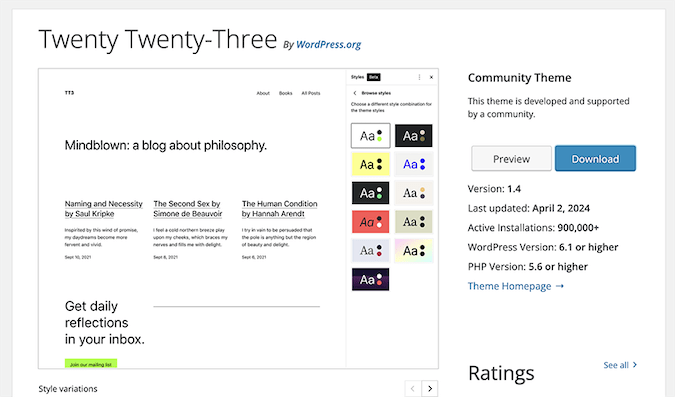
Selecting the ideal theme is crucial for creating a WordPress menu. It should be responsive and visually appealing. Look for customizable options to match your brand’s style, ensuring your menu is both functional and attractive.
Understanding Theme Requirements
Picking a good theme is important. Themes help your website look nice. They also make it work well. Make sure the theme fits your needs. Some themes are better for menus. Check if they support menu features. Look for customization options. This lets you change colors and fonts. Themes should be responsive. This means they work on phones and computers. Reading reviews helps too. People share their thoughts online. It helps you decide if the theme is good.
Popular WordPress Themes For Menus
Some themes are loved by many users. Divi is a popular choice. It offers many tools for creating menus. Astra is another good theme. It is fast and simple to use. OceanWP provides many menu templates. It is also flexible. Neve is lightweight and quick. It works well with menu plugins. Try these themes to see what fits best. Test them on your site. Make sure they meet your needs.
Setting Up Your WordPress Environment
First, download the WordPress files. Use the official website for this. Save the files on your computer. Next, you need a web host. Choose a host that supports WordPress. Install WordPress on your host. Follow the instructions on the screen. You will need a database. Create one using your host’s control panel. Connect WordPress to the database. Use the setup wizard for this step.
Visit the WordPress dashboard. It’s the main control center. Go to Settings on the left panel. Set your site’s title. Choose a tagline. Check your email address. It’s important for notifications. Set the time zone. This helps with scheduling posts. Choose a language. Pick one that suits your audience. Save all changes. Review your settings carefully.
Creating A Custom Menu
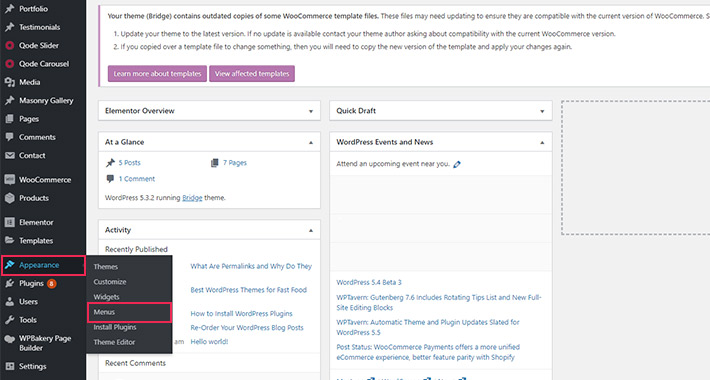
First, go to your WordPress dashboard. Find the Appearance section. Click on Menus. This opens the menu editor. You can see your current menus here. Ready to start? Let’s add new items.
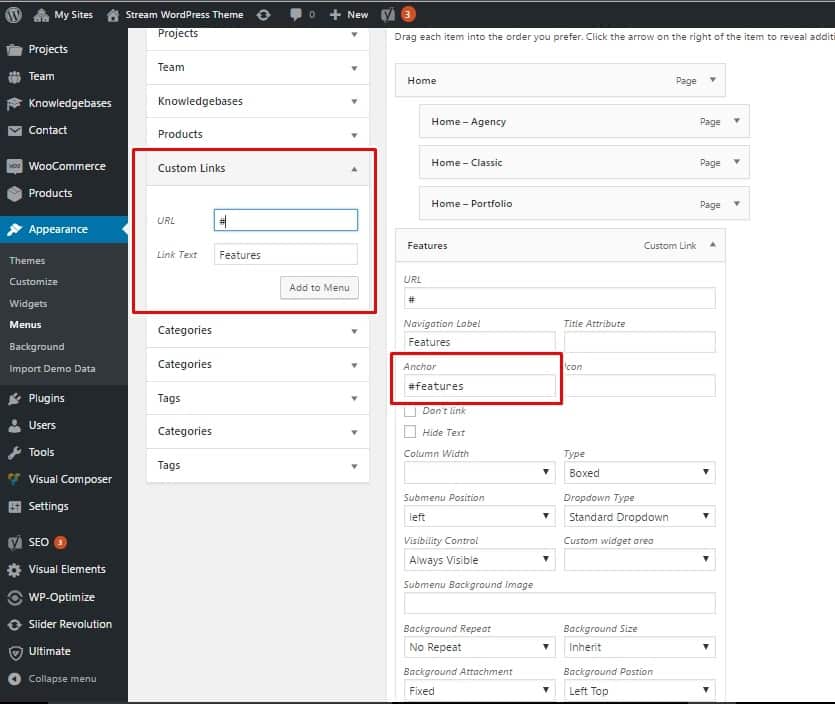
In the menu editor, look on the left. There are pages, posts, and links. Choose what you want. Click the checkbox. Then, click Add to Menu. Your new items appear on the right. You can see them in the menu list. Easy to do!
You can change the order of your menu items. Just drag them up or down. To make sub-items, drag them a bit to the right. This creates a drop-down menu. Use this to make your menu neat. Your visitors will love it!
Styling The Menu
CSS helps in making menus look nice. It can change colors, fonts, and sizes. You can also add borders and shadows. This makes the menu stand out. Use simple code for these changes. Keep it neat and clear.
Adding icons and graphics makes a menu fun. It helps users find things fast. Small images can show different sections. For example, a house icon for home. Use easy pictures to understand. This helps people navigate better.
Enhancing Menu Functionality
Creating a WordPress theme with enhanced menu functionality can improve website navigation. Start by designing intuitive menu layouts. Use WordPress customizer for seamless integration. Incorporate responsive design for mobile users. Enhance user experience by adding dropdown menus and icons. Keep it simple for easy user interaction.
Adding Dropdown Features
Dropdown menus help keep the website clean. Users can find information faster. Dropdowns show sub-menu items only when needed. This makes navigation easier. Users like simple menus. Creating a dropdown is simple. First, go to the WordPress dashboard. Next, click on Menus. Then, add a new menu item. Under it, add sub-items. These become dropdowns. Save changes. Dropdowns are ready!
Incorporating Search Functionality
Searching helps users find content fast. A search bar is easy to add. Go to the WordPress dashboard. Click on Widgets. Drag the Search widget to the menu area. Now, users can search easily. A search bar makes the site user-friendly. Users find what they need quickly. It saves time. Search bars are important for big sites. They improve the user experience.
Credit: www.crazyegg.com
Testing And Optimization
Explore the essentials of testing and optimization for your WordPress theme menu. Enhance user experience by identifying areas for improvement through thorough testing. Optimize menu design and functionality for seamless navigation.
Testing Across Devices
Make sure your menu works on all devices. Test on phones, tablets, and computers. Check if the menu looks good on each screen. Try clicking each menu item. Ensure everything links to the right page. Ask friends to test it too. Get feedback from different people. Fix any problems they find. This helps make your menu better.
Improving Load Speed
Fast websites are important. A slow menu can make people leave. Use smaller images in your menu. Compress them if needed. Avoid large files. They can slow down loading. Use a plugin to help improve speed. Plugins can make your site load faster. Check your site speed with online tools. Fix any issues they show. A fast menu keeps visitors happy.
Maintaining Your Menu
Menus need regular updates. Check links often. Broken links frustrate users. Update prices and dishes. This keeps your menu fresh. Regular checks ensure smooth user experience. Make sure images load quickly. Slow images drive people away. Keep fonts clear and readable. Users love simplicity. Ensure menu is mobile friendly. Many users browse on phones. A mobile-friendly menu helps them.
Listen to user feedback. Users know what they need. Ask them for menu suggestions. Adjust menu based on their input. User feedback improves menu quality. Happy users return often. Feedback helps spot errors quickly. Fixing errors boosts user trust. Trust leads to more visits. Keep feedback channels open. Emails and surveys work well.
Credit: visualmodo.com
Frequently Asked Questions
How Do I Start Creating A Menu In WordPress?
To start creating a menu, log into your WordPress dashboard. Navigate to Appearance, then Menus. Here, you can create, edit, and manage your menus. Choose a name for your menu and begin adding pages, categories, and custom links as needed.
Can I Customize My WordPress Menu Design?
Yes, you can customize your menu design using the WordPress Customizer. Access it by going to Appearance, then Customize. Here, you can change colors, fonts, and layout. Some themes offer advanced customization options, allowing you to tailor your menu to match your site’s style.
What Plugins Help Enhance WordPress Menus?
Several plugins can enhance WordPress menus, such as Max Mega Menu and WP Mega Menu. These plugins offer features like responsive menus, sub-menu designs, and custom styling options. They help improve navigation and user experience on your WordPress site.
How Do I Add A Dropdown Menu In WordPress?
To add a dropdown menu, go to Appearance, then Menus in your dashboard. Drag and drop items under a parent menu item. This creates a hierarchy, making the items appear as a dropdown on your site. Adjust menu settings as needed for the best display.
Conclusion
Creating a menu WordPress theme is straightforward. Start with clear objectives. Choose the right tools for your design. Customize the layout to fit your brand. Make sure navigation is user-friendly and intuitive. Test the theme across devices for responsiveness. Keep the design simple but effective.
Regular updates ensure the theme stays functional. Learn from feedback to improve your design. A well-crafted menu theme enhances user experience. It guides visitors smoothly through your site. Your unique theme reflects your brand’s personality. With careful planning, your theme will shine.
Enjoy the creative process and watch your site flourish!


