
Are you looking to give your website a unique flair? Creating your own WordPress theme can be a game-changer.
But where do you start, especially if you want a handy PDF guide to follow along? Imagine having the freedom to design your site exactly how you’ve envisioned it, with your personal touch reflected in every corner. This is not just about aesthetics; it’s about control, customization, and standing out in the digital landscape.
You’ll discover how to create a WordPress theme and compile your journey into a PDF. This step-by-step guide will empower you, making the process clear and accessible. Ready to dive in and watch your ideas come to life? Let’s get started!

Credit: buku.io
Getting Started With WordPress
WordPress themes change how a website looks and feels. They are like clothes for your website. Each theme has its own style. Some themes are colorful. Others are simple. You can pick a theme you like. Then, your site looks just right. People use themes to make their site special. It’s fun to try new themes.
To create a WordPress theme, you need some tools. First, you need a computer. Next, download a text editor like Notepad++. This helps you write code. Also, install WordPress on your computer. This is where you test your theme. You may also need a graphics program like GIMP. This is for making pictures. These tools help you create a beautiful theme.
Setting Up Your Development Environment
WordPress is a popular tool for creating websites. To start, install WordPress on your computer. First, download a local server software like XAMPP or MAMP. This software helps your computer act like a web server. Next, download the latest WordPress version from the official website. After downloading, unzip the WordPress files. Place them in the htdocs folder if using XAMPP or the MAMP folder if using MAMP. Open the server software and start the Apache and MySQL services. Create a new database using phpMyAdmin. This database will store your WordPress data. Finally, open a web browser and type localhost/wordpress. Follow the on-screen instructions to set up WordPress.
A good code editor makes working easy. Popular choices include Visual Studio Code and Sublime Text. These editors help you write code faster. They have features like code suggestions and error highlighting. Choose an editor that feels comfortable. You can change colors and fonts to suit your style. Some editors have plugins for extra features. Try different editors to find what suits you best. Remember, the right editor can make coding fun.
Designing Your Theme
Start with a simple wireframe. This shows the layout of your theme. Use plain shapes to represent different parts. For example, a rectangle for the header. Squares for images. Lines for text. A wireframe helps you see the structure. You can adjust it easily. Make sure it is simple and clear. This saves time later on.
Choose colors that match your theme’s style. Use a color wheel to help. Pick two or three main colors. These keep the design simple. Select fonts that are easy to read. Use different fonts for headings and body text. This adds variety. Avoid using too many fonts. It can make your theme look messy. Keep it clean and consistent.
Building The Theme Structure
Themes need many files to work. Each file has a job. The style.css file is for design. It controls colors and fonts. The index.php file shows the main page. It is like the home of the theme. The functions.php file adds extra features. These files make the theme unique.
Templates help in showing content. The header.php file is for the top part. This might include a logo or menu. The footer.php file is for the bottom part. This could have contact info or links. The sidebar.php file is for side areas. It often shows ads or widgets. Templates make the site look good.
Developing Theme Styles
CSS gives your WordPress theme its unique look. Use selectors to change elements like text and images. Colors and fonts make your site pretty. Make sure your code is clean and organized. This helps browsers read it better. Add comments in your code to remember what each part does.
SASS is like a friend to CSS. It helps with advanced styling. Variables store values like colors or fonts. This saves time when you need changes. Mixins are reusable bits of code. They make your theme code shorter. Nesting helps keep your code neat. Compile SASS to CSS before using it. This makes sure browsers understand it.
Adding Functionality With Php
A custom functions file is important for adding features. It helps your WordPress theme work better. Use PHP code to make changes. This file is named functions.php. Put all your functions here. Add new features like widgets or menus. Customize your theme easily. Keep the code clean and simple. This will help others understand it.
WordPress Hooks are key for flexibility. Hooks let you add or change functions. They are like signals. Use action and filter hooks. Actions perform tasks at specific times. Filters change data before it shows. Learn to use hooks properly. This enhances your theme’s capability.
Testing And Debugging
Testing Across Browsers ensures your theme works everywhere. Each browser can show your theme differently. Test your theme in Chrome, Firefox, Safari, and Edge. Look for layout issues or missing features. Fix any problems you find. Your theme should look good on all browsers. This makes users happy and keeps them on your site.
Using Debugging Tools helps find errors in your theme. Debugging tools show what’s wrong and where. Chrome DevTools is a popular choice. It lets you inspect code and fix bugs. Firebug is another helpful tool for Firefox users. These tools save time and make your theme better. They help you understand and solve problems fast.
Credit: www.upwork.com
Exporting The Theme To Pdf
First, gather all the necessary theme files. Make sure you have the HTML, CSS, and JavaScript files. Check if everything is working fine. If any file is missing, the PDF might not look right. Organize the files in a single folder. This helps in keeping everything neat and easy to find. Now, you are ready for the next step.
Choose a good PDF tool to convert your files. Many tools are available online. Some tools are free, while others may charge. Make sure the tool supports HTML to PDF conversion. Check user reviews before choosing. A good tool makes your PDF look nice. This step is crucial for a smooth conversion.
Finalizing And Sharing Your Theme
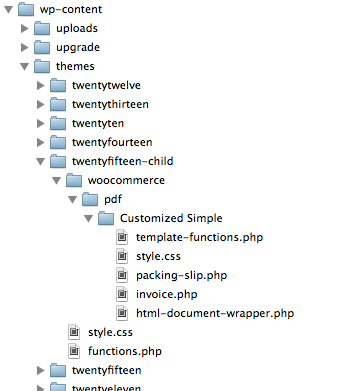
First, gather all theme files. Place them in one folder. This folder is your theme. Ensure everything is included. Check for images, styles, and scripts. Missing files can cause errors. Compress the folder. Use a zip tool. This makes it easier to share. Name the zip file clearly. For example, “MyCustomTheme.zip”.
Create a PDF guide for your theme. Write clear steps. Include images if possible. Use simple language. Make the PDF easy to read. Save the PDF file. Name it like “ThemeGuide.pdf”. Share the PDF online. Email it to friends. Post on forums. Upload to your website. Ensure others can download it easily. This helps others understand your theme.
Credit: docs.wpovernight.com
Frequently Asked Questions
How Do I Start Creating A WordPress Theme?
To start creating a WordPress theme, begin by understanding the basics of HTML, CSS, and PHP. Familiarize yourself with WordPress’s template hierarchy. Use a local development environment like XAMPP or MAMP. Create a new theme folder in your WordPress installation and start coding your template files.
What Software Do I Need To Design A Theme?
To design a WordPress theme, you need a code editor like VS Code or Sublime Text. You’ll also need a local server environment, such as XAMPP or MAMP. Adobe Photoshop or Sketch can be useful for designing visuals. Having a browser for testing is essential too.
Can I Convert Html To WordPress Theme?
Yes, you can convert HTML to a WordPress theme. Start by breaking the HTML into WordPress template files. Integrate WordPress functions and loops where necessary. Ensure your theme is responsive and functional. Test thoroughly to ensure all parts work correctly within the WordPress environment.
What Are WordPress Theme Development Tools?
WordPress theme development tools include code editors like VS Code, Sublime Text, and Atom. Use local server software such as XAMPP or MAMP. Debugging tools like Xdebug are helpful. Version control systems like Git are essential for managing your theme’s code efficiently.
Conclusion
Creating a WordPress theme PDF is easier than you think. Break down each step. Follow the guidelines. Choose your tools wisely. Focus on design simplicity. Keep your audience in mind. Test your theme thoroughly. Make adjustments as needed. A well-crafted theme enhances user experience.
It also reflects your style. Stay creative and curious. Learn and grow as you design. Embrace feedback for improvement. Enjoy the process. Your unique theme will shine. Keep exploring new ideas. Your journey in WordPress design is just beginning. Happy designing!


