
Are you ready to dive into the world of WordPress theme development? Creating your own WordPress theme from scratch might seem daunting, but with the right guidance, you can transform your ideas into a fully functional theme.
Imagine the thrill of having complete control over the design and functionality of your website. In this first part of our step-by-step guide, we’ll break down the process into simple, manageable steps that even beginners can follow. By the end of this series, you’ll have the skills to craft a unique WordPress theme tailored to your needs.
Stay with us, and you’ll discover the secrets to making your website stand out in a crowded digital landscape. Ready to start? Let’s get creative!

Credit: www.youtube.com
Understanding WordPress Theme Structure
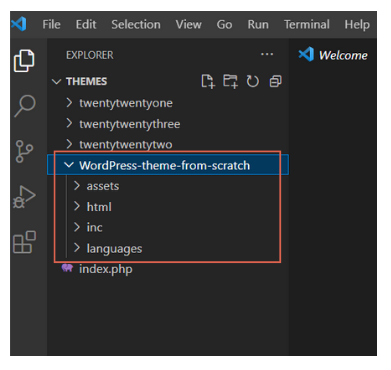
A WordPress theme has many parts. The style.css file is key. It tells WordPress about the theme. Another important file is index.php. This is the main file for your theme. Together, these files help make the site look good.
Themes also have directories. The images directory holds pictures. The js folder contains scripts. These scripts make the site interactive. Keeping files organized is important.
Themes need some basic parts. The header.php file adds the top part. The footer.php file adds the bottom part. These files are used on all pages.
Another file is sidebar.php. This is for side content. It can show links or ads. A good theme has all these elements.
Credit: tonjoo.com
Setting Up Development Environment
Good tools make work easy. Code editors help write neat code. Popular choices are Visual Studio Code and Sublime Text. They offer great features. Web browsers are needed too. Chrome and Firefox are common. They help test the theme. Use a version control system like Git. It keeps track of changes. Safety for your code.
A local setup helps test themes. Start by downloading XAMPP or MAMP. These create a local server. Install them on your computer. Next, download WordPress from the official site. Extract the files. Put them in the server’s folder. Open a browser and go to localhost. Follow the steps to set up WordPress. It’s simple. Now WordPress is ready to use. Themes can be tested easily.
Creating Theme Files
Start with the style.css file. It holds the theme’s basic info. This file is necessary for WordPress to recognize your theme. Add the theme name, author, and version at the top. Use comments to add these details. Below this, include styles for body, headings, and links. Customize colors and fonts as you like.
Create a functions.php file. It allows you to add features. This file can register menus and sidebars. Use it to enqueue scripts and styles. Start with opening PHP tags. Then add functions to load styles and scripts. Make sure to use wp_enqueue_style() and wp_enqueue_script() functions.
The index.php file is vital. It acts as the main template. Add basic HTML structure here. Use PHP to include the header and footer. Display posts with the_loop. This will show the latest posts. Add the_title() and the_content() functions. Customize as per your design needs.

Credit: www.youtube.com
Building Basic Theme Structure
Creating a WordPress theme starts with a basic structure. The header and footer files are important. They help in structuring your theme. The header file is named header.php. It contains the top part of your theme. The footer file is called footer.php. It contains the bottom part. These files help in organizing your theme. They make it look good and work well.
Sidebars add more space to your theme. They hold widgets and other content. The file for sidebars is named sidebar.php. Widgets are small blocks. They add features to your site. Examples are search bars and recent posts. You can add widgets to sidebars easily. This makes your theme more useful. It also makes it look nice.
Designing With Html And Css
Start with a clear plan. Decide where things go. This is your layout. Use HTML for structure. It tells the browser what to show. Think of HTML as bones. They hold everything together. Add tags for headings, paragraphs, and lists.
CSS makes your website pretty. It’s like clothes for HTML. Use CSS to change colors. Make text bigger or smaller. Use CSS to move things around. Add spaces between items. Keep your design simple. It helps users find things easily.
Integrating WordPress Functions
WordPress has many template tags to help you. They are like shortcuts. These tags make your theme dynamic. You can add title, content, and sidebar with these tags. Use php the_title(); ? for post titles. For content, use php the_content(); ?. These tags make adding content easy.
Dynamic content makes your site lively. You can add recent posts or comments. Use php get_recent_posts(); ? to show latest posts. For comments, use php comments_template(); ?. These functions help your site stay updated. They are important for user engagement.
Testing And Debugging
Creating a WordPress theme can be tricky. Many developers face common issues. Broken links are a frequent problem. Check links carefully. Missing files can cause errors too. Ensure all theme files are present. CSS conflicts may arise. Use unique class names to avoid this. PHP errors can break your site. Review your code for mistakes. Tools like WP_DEBUG help in finding errors. Keep your WordPress and plugins updated. This can fix many issues.
Different browsers display sites differently. Test your theme on major browsers. Google Chrome, Firefox, and Safari are popular. Some users still prefer Internet Explorer. Make sure your theme works there too. Use tools like BrowserStack for testing. Responsive design is crucial. Check your theme on mobile devices. Ensure fonts and images look good everywhere. Use CSS resets to fix style differences. This ensures a uniform look across browsers.
Frequently Asked Questions
What Is A WordPress Theme?
A WordPress theme dictates the design of your website. It controls the layout, fonts, colors, and overall style. Themes can be customized to meet your specific needs. Creating a theme from scratch allows you to have full control over your website’s appearance and functionality.
This blog post guides you through the process.
Why Create A Theme From Scratch?
Creating a theme from scratch offers complete customization. You can tailor the design and functionality to fit your exact needs. It provides a deeper understanding of WordPress and enhances coding skills. This approach ensures uniqueness and aligns with your brand identity.
It’s a rewarding experience for developers and designers.
What Are The Prerequisites For Creating A Theme?
Before creating a theme, you need basic HTML, CSS, and PHP knowledge. Familiarity with WordPress functions is essential. A development environment like XAMPP or MAMP is recommended. Understanding the WordPress theme structure is crucial. These prerequisites ensure a smooth theme development process.
How Do I Start Developing A WordPress Theme?
Start by setting up a local development environment. Create a new directory in the ‘wp-content/themes’ folder. Develop the essential files like style. css and index. php. Define the theme in style. css with a header comment. This initial setup is crucial for theme development.
Conclusion
Creating a WordPress theme from scratch is a rewarding journey. You’ve learned the basics in part one. Every detail matters, from the structure to the design. Experiment with code and see what works best. Practice makes perfect, so keep trying.
Understanding WordPress functions is crucial. They form the backbone of your theme. Pay attention to user experience; it drives engagement. Take one step at a time. Enjoy the creative process and watch your skills grow. Part two will expand your knowledge further.
Keep exploring and push your creativity. Your custom theme awaits.


