

Ready to share your passion, ideas, or expertise with the world? Creating a WordPress blog is one of the easiest and most effective ways to do just that.
Whether you want to build a personal journal, a professional portfolio, or a business website, WordPress gives you the tools to make it happen—without needing to be a tech expert. In this guide, you’ll discover simple, step-by-step instructions to set up your own WordPress blog quickly and confidently.
By the end, you’ll have a fully functional blog that looks great and works smoothly, helping you connect with your audience and grow your online presence. Let’s dive in and get your blog started today!
Credit: themeisle.com
Choosing Between WordPress.com And WordPress.org
Choosing between WordPress.com and WordPress.org is a key step in creating your blog. Both platforms use WordPress software but offer different features and control levels. Understanding their differences helps you pick the best fit for your goals and skills.
Free Plan Features On WordPress.com
WordPress.com offers a free plan with hosting included. You get a subdomain like yoursite.wordpress.com. It provides basic themes and templates. The platform handles security and backups. You can start blogging quickly without technical setup.
Limitations Of The Free WordPress.com Plan
The free plan limits design customization. You cannot upload custom themes or plugins. Storage space is restricted. Monetization options are limited and exclude WordPress ads. You also cannot use a custom domain name. These limits may slow blog growth.
Benefits Of Self-hosted WordPress.org
WordPress.org lets you install WordPress on your own hosting. You get full control over themes and plugins. Custom domain names are possible. There are no storage or monetization limits. This option suits users wanting more flexibility and growth potential.
Costs Involved With WordPress.org
WordPress.org software is free to download and use. You must pay for web hosting and a domain name separately. Hosting prices vary depending on provider and plan. Domain names usually cost around $10 to $15 per year. Additional costs may include premium themes or plugins.
Credit: blog.hubspot.com
Setting Up A Free Blog On WordPress.com
Setting up a free blog on WordPress.com is an easy way to start your online presence. This platform offers a simple process that requires no technical skills. It provides free hosting and a subdomain to get your blog live quickly.
The free plan is perfect for beginners who want to test blogging or share ideas. It includes basic features and allows you to focus on creating content. Follow these steps to create your free WordPress blog and begin your journey.
Creating A WordPress.com Account
First, visit WordPress.com and click the sign-up button. Enter your email address, choose a username, and set a password. Make sure to use a valid email for verification. After filling the form, confirm your email to activate the account. This step secures your blog and allows access to WordPress tools.
Selecting Your Blog Name And Subdomain
Choose a clear, simple blog name that reflects your content. WordPress.com will suggest a free subdomain based on your blog name. The subdomain looks like yourblogname.wordpress.com. Pick a subdomain that is easy to remember and spell. This address will be your blog’s online location.
Starting With The Free Plan
Select the free plan during the setup process to avoid any charges. The free plan offers essential features like themes and basic customization. It includes WordPress hosting and the subdomain at no cost. Keep in mind, storage and design options are limited. You can upgrade later if you need more tools or a custom domain.
Picking A Domain And Hosting For WordPress.org
Picking the right domain and hosting is the first step to create a WordPress.org blog. Your domain is your blog’s address on the web. Hosting is the service that stores your blog files and makes your site live. Choosing these carefully ensures your blog runs smoothly and grows well.
Choosing A Domain Name
Pick a domain name that is short and easy to remember. Use words related to your blog’s topic. Avoid numbers and special characters. Choose a domain ending like .com or .net for trust and recognition. Check if the name is available using domain search tools. Register your domain with a reliable registrar to keep it safe.
Selecting A Reliable Hosting Provider
Choose a hosting provider with strong uptime and fast speed. Look for providers offering easy WordPress installation. Check for good customer support that is available 24/7. Consider hosting plans with enough storage and bandwidth. Read reviews to find a host trusted by many WordPress users. Avoid very cheap hosts that may cause slow loading or downtime.
Installing WordPress On Your Host
Most hosts offer one-click WordPress installation in their control panel. Log into your hosting account and find the WordPress installer. Follow simple steps to set your site name, admin username, and password. After installation, you can log in to your WordPress dashboard. Start customizing your blog and adding content right away.
Customizing Your WordPress Blog
Customizing your WordPress blog shapes its look and feel. It helps you create a unique space that reflects your style. This step lets you control how visitors see and interact with your site. Customization also improves usability and keeps readers engaged.
Choosing And Installing Themes
The theme controls your blog’s overall appearance. WordPress offers thousands of free and paid themes. Pick a theme that matches your blog’s topic and style. Install the theme directly from the WordPress dashboard. Go to “Appearance” then “Themes” and click “Add New.” Preview themes before activating to see how they look. A good theme works well on phones and computers.
Adding Essential Plugins
Plugins add new features to your blog. They can help with SEO, security, and social sharing. Some must-have plugins include SEO tools, contact forms, and caching for speed. Install plugins from the “Plugins” menu in your dashboard. Search for what you need, click “Install,” then “Activate.” Avoid too many plugins to keep your site fast and stable.
Personalizing Site Layout And Design
Adjust your blog’s layout to suit your content and style. Use the WordPress Customizer under “Appearance” to change colors, fonts, and menus. Set your homepage layout to show posts or a static page. Add widgets like search bars or recent posts in sidebars and footers. Small design changes improve user experience and make your blog inviting.
Creating Your First Blog Posts
Creating your first blog posts is an exciting step in your WordPress journey. This is where your ideas take shape and your voice begins to reach readers. Writing clear, well-formatted posts helps keep visitors engaged and encourages them to return for more.
Organizing your content with categories and tags makes navigation easier for readers. Adding images and media enriches your posts and makes them visually appealing. Let’s explore these key steps to craft your first blog posts effectively.
Writing And Formatting Posts
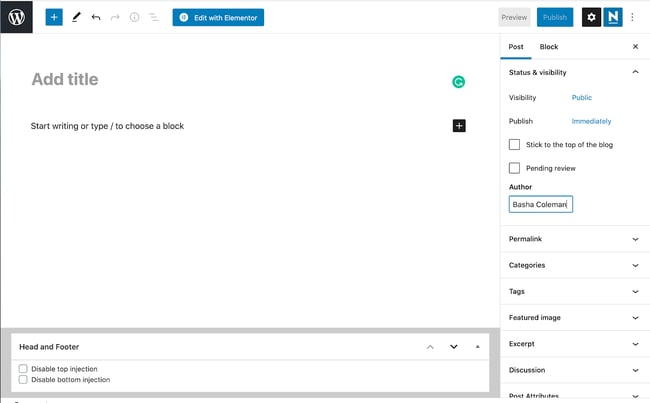
Start by choosing a simple, clear title for your post. Write short paragraphs to improve readability. Use headings to break the text into sections. Bullet points and numbered lists help highlight important ideas.
Use the WordPress editor toolbar to format text. Make key phrases bold or italic to draw attention. Check your spelling and grammar before publishing. A clean layout keeps readers focused on your message.
Using Categories And Tags
Categories group your posts by broad topics. Choose categories that match your blog’s main themes. Tags are more specific keywords related to each post. Add relevant tags to help readers find similar content.
Using categories and tags improves site navigation and SEO. It also helps search engines understand your blog’s structure. Avoid overusing tags; keep them relevant and concise.
Adding Images And Media
Images make your posts more attractive and engaging. Use high-quality pictures that relate to your content. Add images using the WordPress media uploader for easy placement.
Include alt text for each image to improve SEO and accessibility. You can also add videos, audio, or galleries to enrich your posts. Media breaks up text and keeps readers interested longer.
Optimizing Your Blog For Growth
Growing a WordPress blog takes more than just posting content. Optimizing your blog helps attract visitors and keeps them coming back. It improves your site’s visibility on search engines and builds a loyal audience. Simple strategies can make a big difference over time.
Basic Seo Tips For Beginners
Start with clear and simple titles for each post. Use keywords that your readers might search for. Add meta descriptions that explain what your post is about. Use headings (H1, H2, H3) to organize content well. Include images with descriptive alt text to help search engines understand them. Make sure your site loads fast by choosing a good hosting provider. Use internal links to connect related posts and pages. Install an SEO plugin like Yoast SEO to guide your optimization.
Promoting Your Blog On Social Media
Share your blog posts on popular platforms like Facebook, Twitter, and Instagram. Write short, engaging descriptions to catch attention. Use images or videos to make your posts stand out. Post regularly but avoid spamming your followers. Join groups or communities related to your blog’s topic and share your posts there. Encourage friends and followers to share your content. Track which platforms bring the most visitors and focus on those.
Engaging With Readers Through Comments
Respond to comments on your blog quickly and politely. Thank readers for their input and answer questions clearly. Encourage discussion by asking readers for their opinions. Use comments to understand what your audience likes and wants more of. Moderate comments to keep the conversation respectful and spam-free. This interaction builds trust and encourages readers to return often. Engaged readers are more likely to share your blog with others.
Using Chatgpt To Enhance Your Blog
Using ChatGPT to enhance your WordPress blog can save time and boost creativity. ChatGPT helps generate fresh content ideas, write drafts, and even improve your blog’s design. It acts as a smart assistant that supports your blogging journey.
This tool works well for beginners and experienced bloggers alike. It simplifies complex tasks and improves your blog’s quality. Here are some ways to use ChatGPT for your WordPress blog.
Generating Content Ideas And Drafts
ChatGPT can suggest blog topics based on your niche or audience. It offers unique angles and trending subjects to keep your blog relevant. You can also ask it to draft posts, headlines, or introductions. This helps overcome writer’s block and speeds up content creation.
Creating Custom Code Snippets
Adding features or fixing design issues may require coding. ChatGPT can generate simple code snippets for WordPress plugins or themes. It can write HTML, CSS, or PHP code tailored to your needs. This saves time and reduces the need for expert help.
Design And Layout Suggestions
ChatGPT provides tips to improve your blog’s look and user experience. It can recommend color schemes, font styles, and layout ideas. These suggestions enhance readability and make your blog more attractive. Using ChatGPT for design advice helps your blog stand out.

Credit: www.youtube.com
Frequently Asked Questions
Is Creating A Blog On WordPress Free?
Yes, creating a blog on WordPress. com is free using their basic plan with a free subdomain and hosting. Custom domains and advanced features require paid plans.
How Much Does WordPress Pay For 1000 Views?
WordPress itself does not pay for 1000 views. Earnings depend on your ad network, like Google AdSense, which pays $1-$5 per 1000 views.
Can Chatgpt Build A WordPress Website?
ChatGPT cannot build a complete WordPress website alone. It assists by generating code, content, and guidance for website creation.
Is Blogging Dead Due To Ai?
Blogging is not dead due to AI. AI enhances content creation but human creativity keeps blogging relevant and engaging.
Conclusion
Creating a WordPress blog is simple and rewarding. Start with a free plan to learn the basics. Choose a clear blog name and theme to attract readers. Customize your site step-by-step to match your style. Keep your content fresh and helpful for visitors.
Over time, explore paid plans for more features. Enjoy sharing your ideas and growing your audience. Blogging with WordPress opens many doors for creativity. Now, it’s your turn to build and share your story.


