
Are you ready to bring your online vision to life? Creating a website might seem daunting at first, but with the right tools and guidance, it can be a straightforward and rewarding process.
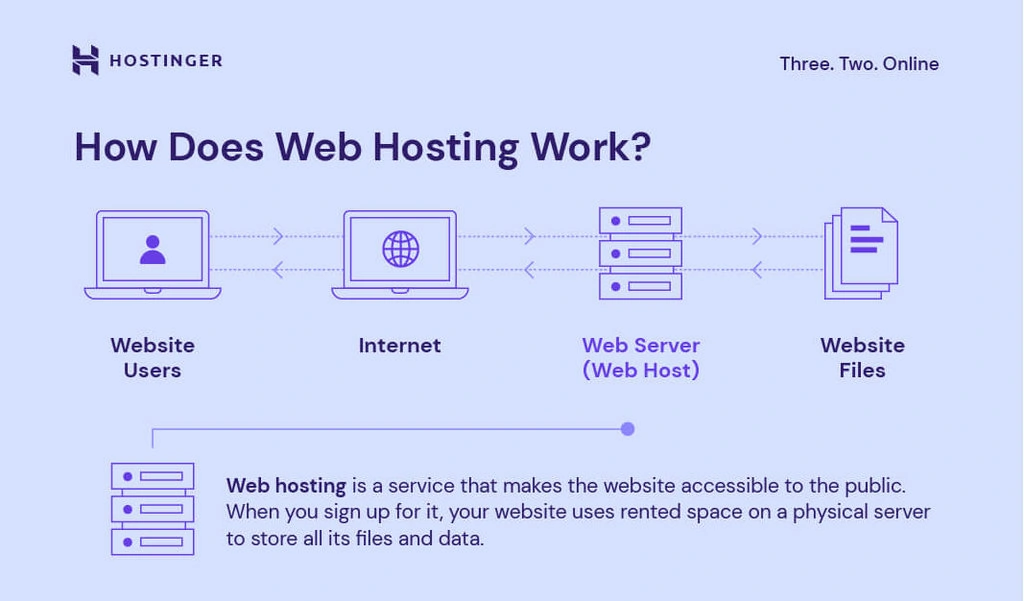
Imagine having a digital space where you can share your ideas, showcase your business, or connect with others. This is where web hosting comes into play. It’s the foundation that supports your website, making it accessible to users around the globe.
In this guide, you’ll discover how to create a website with web hosting, step by step. By the end, you’ll feel empowered and ready to launch your very own site. So, are you excited to dive in and see how simple it can be? Let’s get started!
Choosing The Right Domain Name
A good domain name is like your website’s address. People remember easy names. It helps in branding. A short name is better. No one likes long names. Make it simple. Avoid tricky words. Easy spelling matters. A good domain boosts your site’s trust. People visit more often. Your name is your identity. Choose wisely.
Start with a list of ideas. Use keywords related to your site. Keep it short and simple. Avoid numbers and hyphens. They confuse people. Check for availability. See if it’s taken. Use tools to search. Think about your audience. What will they remember? Buy the domain quickly. Good names get taken fast. Protect your brand.
Selecting A Web Hosting Provider
There are different types of web hosting. Shared hosting is for small websites. It costs less. VPS hosting gives more control. It is for medium sites. Dedicated hosting offers full control. It suits big websites. Cloud hosting is flexible. It can handle many visitors. Each type has its benefits and limits. Choose wisely for your needs.
Price is important. Check your budget first. Next, look at storage. More storage means more space for files. Think about bandwidth. It affects how many can visit your site. Look at security features. Keep your site safe. Check customer support. Get help when needed. Finally, consider scalability. Your site might grow. Plan for the future.
Registering Your Domain
Choosing a domain name is the first step. Pick a name that is easy to remember. It should also relate to your website’s purpose. After selecting a name, check its availability. Many sites help you check this for free. If your name is taken, try different words or extensions like .net or .org.
Once you find an available name, register it. Use a trusted domain registrar. These companies help you secure the name. You’ll need to provide your details like email and address. Complete the registration by paying the fee. Most registrations last a year. Remember to renew it to keep your name.
Some names might already be taken. In such cases, think of alternatives. Add words or change the domain extension. Typing errors can also cause problems. Double-check spelling before finalizing. Another issue is choosing a name that’s too long. Short names are easier to remember and type. Finally, ensure your name does not infringe on trademarks. This could lead to legal trouble.

Credit: m.youtube.com
Setting Up Web Hosting
Begin by logging into your hosting account. It’s like entering your room. Next, find the section called “Domains” or “My Websites.” Here, you will see options to add or manage your websites. Choose the “Add Domain” option if you have a new domain. If not, you can use a subdomain provided by your host. Make sure your domain name is correct. It’s like the address to your house.
Control panels help you manage your website. The most common one is called cPanel. It’s like a dashboard for your car. With cPanel, you can add emails, install apps, and check website stats. You can also manage files and databases here. Always look for the “Help” section if you get stuck. It offers guides and tips for beginners.
Designing Your Website
A website builder helps you make a site easily. Many builders offer drag-and-drop features. These features make designing fun and simple. Popular options include Wix, Squarespace, and WordPress. Each has unique tools and templates. Find one that fits your needs. Check if it has customer support. This is important if you have questions.
Personalizing your site makes it special. Add your own colors and fonts. Use images that match your style. Make sure the text is easy to read. Organize your pages well. This helps visitors find things quickly. Include a menu for easy navigation. Test your site on phones and computers. Make sure it looks good everywhere.
Adding Content To Your Site
Quality content is key for your website. It helps people stay longer. Use simple language that everyone understands. Keep your sentences short. Make sure your information is correct. Always check for spelling and grammar mistakes. Add pictures to make your page look nice. Pictures can help explain things better. Remember, people love stories. Write stories that connect with your readers. This keeps them coming back for more.
SEO optimization helps your site show in search results. Use keywords that match your topic. Place them in the title and headings. This tells search engines about your content. Add alt text to images. It explains the picture to search engines. Keep your website fast. A fast site makes visitors happy. Use links to other parts of your site. This helps people find more information. Update your content often. Fresh content ranks better in searches.
Testing Your Website
Creating a website with web hosting involves choosing a reliable hosting provider and setting up your domain. Testing your website ensures it loads quickly and functions smoothly, providing a great user experience. Regular checks help keep everything updated and secure.
Checking Functionality
Ensure that every button on your website works. Test all links to see if they lead to the correct pages. Use different browsers like Chrome, Firefox, and Safari. Check if forms are easy to fill. Make sure error messages are clear. Users should not feel confused. Test the search feature to see if it finds information quickly. Check the loading speed of each page. Fast loading keeps visitors happy.
Ensuring Mobile Responsiveness
Open your site on a phone and tablet. Check if images fit well on small screens. Text should be easy to read without zooming. Ensure buttons are big enough to click. Menus must be easy to navigate. Test horizontal and vertical views. Check if the site adjusts automatically. A responsive site helps users have a good experience. Make sure videos play smoothly on mobile. Always check mobile responsiveness.
Credit: www.hostinger.com
Launching Your Website
Check your website for errors. Make sure all links work. Test your site on different devices. See if it looks good on phones. Review content for spelling mistakes. Ensure images load properly. Verify your site is secure. Install security plugins. Set up analytics to track visits. Add a contact form. Make sure it sends messages. Double-check payment systems. Test to see if they process orders.
Share your website on social media. Tell your friends. Use email to spread the word. Write a blog post about your site. Join online forums. Talk about your site there. Use search engine tools. Help people find your site. Think about ads. They can bring more visitors. Create interesting content. People love to share fun stuff. Keep your site updated. Fresh content keeps visitors coming.
Maintaining And Updating Your Site
Keeping your website fresh is key to attracting visitors. Regular updates ensure content stays relevant and engaging. Make use of web hosting tools to streamline maintenance tasks efficiently.
Regular Backups
Regular backups keep your website safe. Backups help in case of mistakes. They also help after attacks. Keep backup copies in different places. Use trusted services for backups. Test your backups often. Make sure they work. This way, your data stays safe.
Content Updates
Content updates keep your site fresh. Fresh content attracts visitors. Old content can lose interest. Update images and text often. Check for broken links. Fix them quickly. Add new blog posts regularly. Engage your audience with questions. Encourage comments and feedback. Keep your website alive and exciting.

Credit: www.hostinger.com
Frequently Asked Questions
How To Set Up A Website Web Hosting?
Choose a reliable hosting provider. Sign up for a plan that suits your needs. Register your domain name. Connect the domain to your hosting account. Upload your website files using FTP or a control panel. Ensure everything is working correctly.
Optimize settings for security and performance.
Can I Build And Host My Own Website?
Yes, you can build and host your own website. Choose a domain name, use a website builder or code it manually, and select a hosting provider. Consider cost, technical skills, and maintenance. Popular choices include WordPress, Wix, and self-hosted solutions.
How Much Does It Cost To Host And Build A Website?
Website hosting and building costs vary. Basic hosting starts at $3-$10 monthly. Domain fees range from $10-$20 yearly. DIY builders like Wix or Squarespace charge around $12-$40 monthly. Professional web design can cost from $500 to several thousand dollars, depending on complexity and customization.
Can I Build A Website Before Hosting?
Yes, you can create a website without hosting. Use local development environments like XAMPP or online platforms like WordPress. Once ready, purchase hosting to make it live. This approach is great for testing and designing before going public.
Conclusion
Creating a website with web hosting is straightforward and rewarding. Start small. Choose a reliable hosting provider. Use a user-friendly platform. Keep your design simple and clean. Ensure your content is engaging and clear. Regularly update your website for better performance.
Monitor your site’s speed and security. This will help attract more visitors. Remember, practice makes perfect. As you build, you’ll learn and improve. Soon, you’ll have a website you’re proud of. Happy building!


