
Imagine having your very own corner of the internet, a place where you can share your ideas, showcase your products, or connect with others. Creating a website might seem daunting, but with Namecheap, it’s easier than ever.
You don’t need to be a tech wizard or have a hefty budget to get started. In this guide, you’ll discover step-by-step instructions that will lead you to launch your website effortlessly. Whether you’re a budding entrepreneur or a passionate hobbyist, having a website can transform your online presence.
Get ready to dive into the world of website creation, where simplicity meets innovation, and learn how Namecheap can be your trusted partner in bringing your vision to life. Curious about how easy it can be? Keep reading, and you’ll find out just how straightforward the process is!

Credit: www.namecheap.com
Choosing Your Domain Name
Creating a website with Namecheap starts with a crucial step: choosing your domain name. This decision can shape your online presence and directly impact your brand’s success. It’s not just about picking a catchy name; it involves strategic thinking and a touch of creativity. A well-chosen domain sets the stage for your site’s identity, making it memorable and easy to find.
Importance Of A Unique Domain
Your domain name is your online signature. Imagine it as your digital calling card. A unique domain helps you stand out in the crowded online world. It differentiates your brand from competitors and enhances your credibility. A distinctive domain is more likely to be remembered and shared, leading to increased traffic and engagement.
Think about how often you hear a friend’s recommendation for a website. If the domain is unique and easy to recall, you’re more likely to visit it. This illustrates the power of a unique domain in driving organic traffic. A memorable domain name can be the deciding factor in attracting and retaining visitors.
Tips For Selecting A Domain
- Keep it Short and Simple: Aim for a domain name that’s easy to spell and pronounce. Short names are easier to type and share.
- Use Keywords Wisely: Incorporate relevant keywords that reflect your site’s purpose or niche. This boosts your site’s visibility in search engines.
- Avoid Numbers and Hyphens: These can confuse users and are often misremembered or mistyped.
- Check Availability: Ensure your desired name is available and not trademarked. This avoids legal issues and ensures originality.
- Consider Your Audience: Think about who your visitors will be. A domain name that resonates with your target audience is a powerful tool.
Choosing a domain name is more than a technical task. It’s about understanding your brand’s essence and how you want to be perceived online. What story does your domain name tell? Does it align with your brand’s values and goals?
Take the time to brainstorm and test different options. Ask friends or colleagues for feedback. Remember, your domain is the first impression of your site. Make it count.
Registering Your Domain With Namecheap
Registering your domain is the first step in building a website. With Namecheap, the process is straightforward and user-friendly. Namecheap offers reliable services at affordable prices. Their website is designed to make domain registration easy. Let’s dive into the steps to register your domain with Namecheap.
Navigating The Namecheap Website
Start by visiting the Namecheap website. The homepage is clean and simple. Look for the search bar prominently displayed. This is where you’ll enter your desired domain name. Type your preferred domain and click ‘Search’. Namecheap will show you available options. Choose the domain that fits your needs. If your first choice is taken, try variations or different extensions. Once you find an available domain, click ‘Add to Cart’.
Completing The Registration Process
After adding the domain to your cart, proceed to checkout. You’ll need to create a Namecheap account if you don’t have one. Fill in your personal details accurately. Choose your domain registration duration. Longer durations often come with discounts. Look for options like WhoisGuard for privacy protection. Review your cart to ensure everything is correct. Apply any promo codes if available. Finally, proceed to payment. Namecheap supports various payment methods. Once payment is confirmed, you’ll own your domain. Check your email for confirmation and further instructions.
Selecting A Hosting Plan
Choosing a hosting plan with Namecheap is a straightforward process. Start by assessing your website’s needs and budget. Namecheap offers various options, making it easy to find a suitable plan.
Creating a website with Namecheap is a straightforward process, but one of the most crucial steps is selecting the right hosting plan. This decision affects your site’s performance, reliability, and growth potential. You might feel overwhelmed by the choices, but understanding the types of hosting available and key features to consider can simplify the process.Types Of Hosting Available
Namecheap offers several hosting options tailored to different needs. Shared Hosting is perfect for beginners and small sites, providing a cost-effective solution with basic resources. If your site grows, consider VPS Hosting. It offers more control and dedicated resources, allowing for better performance during traffic spikes. For those who demand maximum power and customization, Dedicated Server Hosting is the way to go. It offers complete control over your server environment. WordPress Hosting is optimized for WordPress sites, offering features and support specifically tailored to the platform. Have you ever thought about cloud hosting? Namecheap’s Cloud Hosting offers scalability and flexibility, ideal for sites expecting variable traffic.Features To Consider
When choosing a hosting plan, consider your website’s needs and future goals. Storage capacity is vital; ensure your plan can accommodate your site’s size and data demands. Bandwidth affects how much traffic your site can handle. A plan with limited bandwidth might restrict growth. Look for uptime guarantees. A reliable host promises high uptime percentages, ensuring your site stays accessible. Security features are crucial. Does the host offer SSL certificates or malware protection? Customer support is another key aspect. You want quick help when issues arise. Namecheap is known for its responsive support, but verify it meets your expectations. Lastly, consider the ease of use. A user-friendly interface can save you time and frustration when managing your site.Have you ever felt stuck choosing a hosting plan? Remember, your site’s future relies heavily on this decision. What features matter most to you? How do they align with your site’s goals?

Credit: www.youtube.com
Setting Up Your Hosting Account
Create a website with Namecheap by setting up your hosting account easily. Choose a hosting plan, register a domain, and follow the steps to get started. Namecheap offers user-friendly tools for beginners to build their online presence quickly and efficiently.
Creating a website with Namecheap starts with setting up your hosting account. This step is crucial, as it lays the foundation for your website’s performance and reliability. Many users find this process intimidating, but it’s simpler than you might think. With Namecheap’s user-friendly interface, setting up your hosting account is a breeze. You’ll be able to get your website up and running in no time. ###Accessing Your Account Dashboard
Once you’ve purchased your hosting plan, the first step is accessing your account dashboard. Log in to your Namecheap account using your credentials. You’ll find the dashboard intuitive, with all necessary tools at your fingertips. The dashboard is your command center. From here, you manage everything related to your hosting. Spend a few minutes exploring the options available. This will help you become familiar with the tools you’ll use regularly. ###Configuring Basic Settings
Now, it’s time to configure your basic settings. Start by setting your domain name. This is the identity of your website, so choose wisely. If you’ve already registered a domain with Namecheap, you can easily link it to your hosting account. Next, set up your email accounts. Namecheap allows you to create custom email addresses linked to your domain. This is a professional touch that can enhance your website’s credibility. Don’t forget to adjust your server settings. Choose the right server location for your target audience. A server close to your audience ensures faster loading times, improving user experience. Setting up your hosting account is not just a technical task. It’s a chance to set the tone for your entire online presence. What initial steps will you take to ensure your website stands out?Installing WordPress
Setting up WordPress on Namecheap is straightforward. Begin by purchasing a domain and hosting plan. Use the one-click installer to quickly get your website running.
Creating a website with Namecheap is a straightforward process, especially when it comes to installing WordPress. This robust platform powers millions of websites worldwide, thanks to its user-friendly interface and vast customization options. By using Namecheap’s tools, you can have your WordPress site up and running in no time, without needing to be a tech wizard. ###Using Namecheap’s One-click Installer
Namecheap simplifies the WordPress installation process with its one-click installer. This tool eliminates the need for manual setup, saving you time and effort. Begin by logging into your Namecheap account and accessing your cPanel. Here, you’ll find the Softaculous Apps Installer—your gateway to a hassle-free WordPress setup. Click on the WordPress icon, fill in your site details, and hit the install button. It’s like setting up a new phone; you just follow the prompts, and soon, your website is ready for customization. Have you ever wondered why Namecheap offers this feature? It’s all about making web hosting accessible to everyone, even if you’ve never built a site before. ###Customizing Your WordPress Installation
Once WordPress is installed, it’s time to make your website uniquely yours. Customization is where your vision comes to life, and WordPress offers endless possibilities. Start by selecting a theme that aligns with your brand or personal style. Whether you’re launching a blog, an e-commerce site, or a portfolio, there’s a theme out there for you. Check out the WordPress theme directory for free options or explore premium themes for more features. Next, focus on plugins to enhance functionality. Want to optimize your site for search engines? Consider installing Yoast SEO. Need a contact form? Try WPForms. These plugins are like adding apps to your smartphone, each one enhancing your site’s capabilities. Remember to keep your audience in mind. What do they need from your website? How can you make their experience seamless and engaging? By answering these questions, your site will not only look great but also serve its purpose effectively.Designing Your Website
Creating a website with Namecheap is simple and efficient. Begin by selecting a domain name that reflects your brand. Use Namecheap’s tools to customize your site’s layout and content, ensuring a user-friendly experience.
Creating a website with Namecheap is a rewarding process. Once you’ve set up your domain and hosting, the fun part begins—designing your website. This is where your creativity shines. It’s about making your site not just functional but visually appealing. You want visitors to enjoy their time on your site and remember it long after they’ve left.Choosing A Theme
The theme of your website serves as its backbone. It’s the first impression visitors get. Namecheap offers a variety of themes that cater to different needs, whether you’re running a blog, an online store, or a portfolio. Consider what resonates with your brand and audience. Think about color schemes and layouts. Do they reflect your style? Maybe you prefer a minimalist look, or perhaps something vibrant and bold. Testing a few themes can help you see what fits best. Remember, a well-chosen theme enhances user experience, making navigation easy and enjoyable.Adding Essential Plugins
Plugins are your website’s best friends. They add features and functionalities that aren’t built into your theme. Namecheap’s platform supports a wide range of plugins to enhance your site. Consider plugins for SEO to improve your visibility on search engines. Security plugins are crucial to protect your site from threats. If you’re running an online store, e-commerce plugins are essential for managing products and payments. But, don’t go overboard. Too many plugins can slow down your site. Choose only those that are essential to your site’s goals. As you design your website, always ask yourself: Is this enhancing my visitor’s experience? This simple question can guide you in making choices that benefit your site and your audience.Creating Content For Your Site
Discover how to create a website using Namecheap’s user-friendly platform. Start by choosing a domain that reflects your site’s purpose. Utilize Namecheap’s hosting plans to ensure reliable and secure online presence.
Creating content for your site is crucial for its success. Engaging content attracts visitors and keeps them on your page longer. It also helps with search engine rankings. High-quality content shows your expertise and builds trust with your audience. Here are ways to create engaging content for your website.Writing Engaging Blog Posts
Start with a catchy headline. It should grab attention quickly. Use simple words and keep it short. Introduce your topic in the first paragraph. Make it interesting and relevant. Use short sentences to improve readability. Break up text with subheadings and bullet points. This makes it easy to scan. Tell stories to connect with readers. Share personal experiences or client successes. Use a conversational tone. Write as if you’re speaking to a friend. Ask questions to engage your audience. Encourage comments and interactions. Use images to illustrate points. They make your posts visually appealing.Optimizing Content For Seo
Use keywords naturally in your text. Focus on one main keyword per post. Place it in the title, first paragraph, and subheadings. Use related keywords throughout the post. Avoid keyword stuffing. It can harm your rankings. Add meta descriptions to your content. They should summarize the post in one or two sentences. Include the main keyword. Keep it under 160 characters. Use alt text for images. This helps search engines understand them. Link to reputable sources and related internal content. This boosts your site’s authority. Ensure your site loads quickly. Slow sites can lead to higher bounce rates. Use a mobile-friendly design. Many users access sites from their phones. Regularly update content to keep it fresh. Search engines favor updated sites. Monitor analytics to understand what content works best. Adjust strategies based on these insights.Launching Your Website
Launching your website with Namecheap is an exciting moment. You’ve invested time and creativity. Now it’s time to share your work with the world. This step involves ensuring everything runs smoothly and your site reaches its audience.
Testing Website Functionality
Before unveiling your site, test its functionality. Check all links to ensure they direct correctly. Verify that images load quickly and display properly. Ensure forms work and capture data accurately. Test on various devices to ensure responsiveness. A flawless website enhances user experience and credibility.
Promoting Your Site
Once your site is live, promotion is key. Share your website on social media platforms. Engage with communities interested in your niche. Use SEO to improve visibility. Write blog posts to attract organic traffic. Consider paid advertising to reach a broader audience. Effective promotion brings traffic and growth.
Maintaining Your Website
Starting your website with Namecheap offers simplicity and efficiency. Begin by selecting a domain name that reflects your brand. Use their easy-to-follow tools to design and launch your site effortlessly.
Maintaining your website is crucial for ensuring its longevity, security, and efficiency. Once you’ve successfully created your site with Namecheap, the next step is to keep it running smoothly. This involves regular updates, performance checks, and backups. Imagine your website as a digital storefront. Would you leave your shop unattended? Of course not. Keeping an eye on your website ensures it remains fresh and functional for your audience.Regular Updates And Backups
Regular updates are your first line of defense against vulnerabilities. Updating plugins, themes, and the core software of your website is essential. This not only improves functionality but also tightens security. Backups, on the other hand, are your safety net. If something goes wrong, a backup can save you hours of headache and potential data loss. Set up automated backups to ensure you always have the latest version of your website stored safely.Monitoring Site Performance
Monitoring site performance is like checking your car’s engine. You want to ensure your website loads quickly and provides a seamless experience. Use tools like Google Analytics to track your site’s speed and traffic patterns. If your website is slow, visitors may leave before exploring your content. Addressing these issues promptly can improve user experience and boost your search engine ranking. Have you ever visited a slow website and left in frustration? Your users might do the same. Regular performance checks can help you catch these issues before they impact your audience. Incorporating these practices into your routine can significantly enhance your website’s reliability and user experience. As you continue to maintain your site, think of it as an ongoing relationship rather than a one-time task. Are there areas you could improve on today?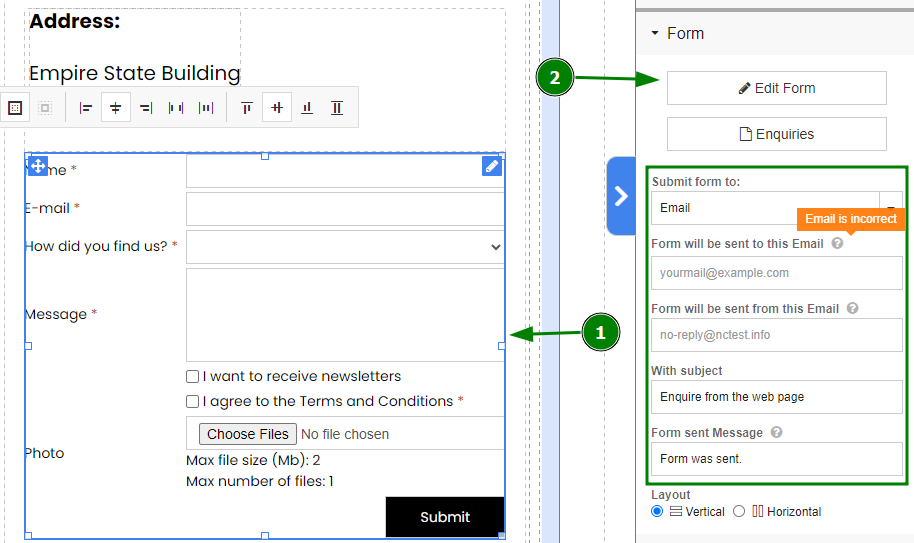
Credit: www.namecheap.com
Frequently Asked Questions
Can You Create A Website With Namecheap?
Yes, you can create a website with Namecheap. They offer domain registration and hosting services. Use their website builder for easy site creation. It’s suitable for beginners and affordable. Namecheap provides reliable customer support and various features to enhance your site.
Is Namecheap A Good Website Builder?
Namecheap offers a solid website builder with user-friendly tools and affordable pricing. It provides customizable templates and an easy-to-use interface, suitable for beginners. While it’s not as advanced as some competitors, it efficiently covers basic needs for small businesses or personal websites.
Overall, Namecheap is a reliable choice for simple website creation.
How Do I Connect My Namecheap Domain To My Website?
Log into Namecheap account. Navigate to the Domain List. Choose your domain and click Manage. Access the DNS settings. Update nameservers or add A records pointing to your website’s IP address. Save changes and wait for DNS propagation.
Does Namecheap Have An Ai Website Builder?
Namecheap does not currently offer an AI website builder. They provide traditional website building tools and services. For AI-powered builders, consider other platforms specializing in AI technology. Namecheap focuses on domain registration and hosting solutions.
Conclusion
Creating a website with Namecheap is simple and effective. Start with choosing a memorable domain. Next, select a hosting plan that fits your needs. Follow the setup instructions carefully. Use Namecheap’s tools to design your site. Don’t forget to make your website mobile-friendly.
Regular updates keep your site fresh and engaging. Namecheap provides great support if you need help. Your online presence begins with these easy steps. Happy website building!


