
Are you ready to launch your very own website but not sure where to start? Creating a website using a web host might sound technical, but it’s easier than you think.
Imagine having a digital space that reflects your ideas, showcases your business, or connects with like-minded individuals. It’s possible, and you can do it without needing an IT degree. In this guide, you’ll discover simple steps to get your website up and running with the right web host.
It’s all about making the right choices early on, so you can have a seamless and stress-free experience. Keep reading, and you’ll be amazed at how quickly you can turn your online vision into reality.
Credit: www.hostinger.com
Choosing The Right Web Host
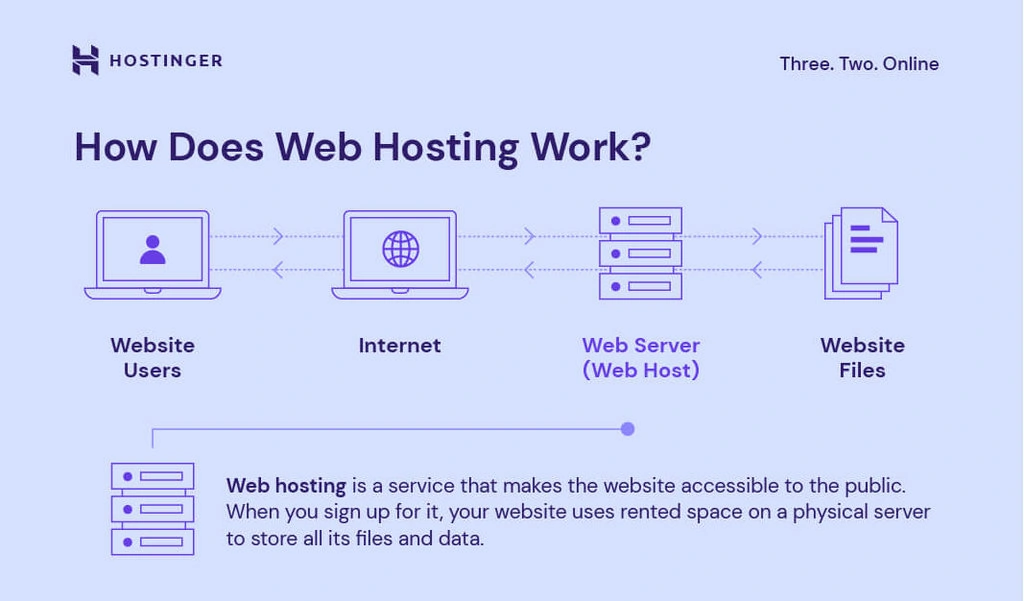
Web hosting comes in different types. Shared hosting is easy and cheap. Good for beginners. VPS hosting gives more power. It’s like a small personal server. Dedicated hosting offers full control. It’s best for large websites. Cloud hosting is flexible and reliable. It uses many servers for your site.
Important to check hosting features. Look for enough storage space. Bandwidth should be high. Fast loading speed matters a lot. Check for good customer support. Make sure they offer backups. Security features are vital. SSL certificates are good. Simple control panel is helpful.
Hosting costs can vary. Shared hosting is often cheaper. VPS is more costly. Dedicated hosting is expensive. Choose what fits your budget. Look for discounts or promotions. Some hosts offer free trials. Monthly or yearly plans can differ. Always read the fine print for extra fees.
Domain Name Selection
A domain name is like your website’s home address. It helps people find your site online. A good domain name is easy to remember. It should relate to your website’s content. Short names are better. Avoid complex words.
- Keep it short and simple.
- Use keywords that match your site.
- Avoid numbers and hyphens.
- Choose a name that is easy to spell.
- Check if the name is available.
First, visit a domain registrar website. Search for your chosen name. If it’s available, you can buy it. Most domains need yearly payments. Keep your contact details updated. This ensures you receive renewal notices. Secure your domain to prevent theft.
Setting Up Your Hosting Account
The control panel is where you manage your website. It has many tools and options. Logging in is the first step. Use your username and password. Once inside, explore the different sections. You will find file management, email settings, and more. Remember, the control panel is your website’s home base.
Your website may need special software. CMS like WordPress can be useful. Check the software section in the control panel. Most hosts offer easy installs. Click and follow instructions. Soon, your software will be ready. Keep your software updated for security.
Hosting resources include storage and bandwidth. Check these in the control panel. Make sure you have enough resources. If not, your site may slow down. Upgrade if needed. Keep an eye on resource usage. It helps your website run well.
Website Design Essentials
Website builders are tools to create sites easily. Many options exist like Wix, Squarespace, and WordPress. They offer drag-and-drop features. These tools help design your site quickly. Beginners find them easy to use. Choose one that fits your needs. Check for good support and features.
Design templates give your website a look. They are pre-made layouts for websites. Templates save time. Choose a template that matches your brand. Look for clean designs. Ensure it works well on mobile devices. A good template makes your site look professional.
Customizing layout makes your site unique. Change colors and fonts. Add images that tell your story. Move sections around. Make sure the layout is easy to navigate. Visitors should find information quickly. A well-organized layout keeps visitors happy.
Content Creation And Management
Building a website using a web host is straightforward. Choose a reliable host. Install a content management system. Customize your site with themes and plugins. Publish content easily and manage updates with simple tools. Enjoy a seamless process to share your ideas online.
Developing Content Strategy
A good content strategy is key for a website. First, know your audience. Think about what they like and need. Write simple and clear ideas. Plan how often you will post new content. Make a calendar for your posts. This helps keep track of what to write. Share stories that interest your readers. Use words that are easy to understand. Keep sentences short and simple.
Using Content Management Systems
Content Management Systems (CMS) help manage your website. CMS like WordPress are easy to use. They help you add pictures, videos, and texts. These systems help organize your site. You can change and update content easily. Choose a CMS that fits your needs. Look for user-friendly options. They make your work easy and fast.
Optimizing Content For Seo
SEO helps people find your site. Use key words in your text. These words should be related to your topic. Put key words in titles and headings. This helps search engines like Google find your site. Write clear and simple content. Make sure your site loads fast. Use pictures that are small in size. This helps the site work better.

Credit: www.youtube.com
Launch And Maintenance
Creating a website with a web host involves launch and maintenance. Start by choosing a reliable web host. Then, design your site and ensure regular updates for smooth operation.
Testing Website Functionality
Make sure your website works well. Check all links to see if they go to the right page. Test the forms to ensure they send information. Look at your site on different devices like phones and tablets. Ensure your site loads quickly. A fast site keeps visitors happy. Fix any errors you find. This helps your site run smoothly.
Publishing Your Website
After testing, your website is ready to go live. Use the hosting platform to publish it online. Check your website’s appearance once it’s live. Ensure the content displays correctly. If there are issues, adjust your settings. Make sure search engines can find your site. This helps people find you online.
Regular Updates And Backups
Keep your website fresh with new content. Regular updates make your site interesting. Always backup your website. This saves your work if something goes wrong. Use a backup tool or service. This protects your site data. Regular updates and backups keep your site safe and relevant.
Troubleshooting Common Issues
Creating a website using a web host can present challenges. Common issues include server downtime, domain setup errors, and slow page loading. Troubleshooting involves checking server status, verifying domain settings, and optimizing images for faster load times.
Identifying Technical Problems
Technical problems can happen. Websites may not load or be slow. Check your internet connection first. Is the server working? Look at your error logs. They tell you what’s wrong. Software updates can cause issues too. Make sure everything is updated. Sometimes, plugins or themes cause trouble. Disable them one by one. See if it fixes the problem.
Utilizing Support Resources
Help is always nearby. Your web host has a support team. Use their chat or email for help. Forums can be helpful too. Other users share their tips. Online tutorials are great for learning. Videos and articles make understanding easy. Don’t forget to check the FAQ section. It answers common questions.
Preventive Measures
Prevention is better than cure. Regular backups save your data. Automate them if possible. Keep your software updated. Updates fix bugs and add features. Use strong passwords. Hackers love weak passwords. Secure your website with an SSL certificate. It keeps information safe. Monitor your site’s performance regularly. It helps catch issues early.
Credit: www.geeksforgeeks.org
Frequently Asked Questions
How To Create A Website Web Host?
Choose a reliable hosting provider, register a domain, and select a hosting plan. Install a CMS like WordPress. Customize your site with themes and plugins. Ensure your site is optimized for speed and security. Regularly update content and monitor performance to ensure smooth operation.
Is Google Web Hosting Free?
Google does not offer free web hosting. Google Cloud provides hosting services, but they require payment. You can try limited free tiers for certain services, but full hosting requires a subscription. Always review pricing details on Google Cloud’s website for accurate information.
Can I Host My Website On My Own Server?
Yes, hosting a website on your own server is possible. It requires technical knowledge and proper setup. Ensure your server meets security, bandwidth, and hardware requirements. Consider the costs and maintenance involved. Using a hosting provider can simplify management and offer better reliability.
How To Use Website Hosting?
Choose a reliable hosting provider. Sign up for an account. Select a hosting plan. Set up your domain. Upload your website files using an FTP client. Configure settings in the hosting control panel. Test your website to ensure it’s live.
Regularly update and maintain your site for optimal performance.
Conclusion
Creating a website with a web host is straightforward. Follow simple steps to get started. First, choose your preferred web host. Then, select a domain name that suits your website. Next, install a website builder to design your site. Customize your layout, colors, and text.
Finally, publish your site to the web. You now have a live website! Regular updates will keep your content fresh. Stay engaged with your audience. Continue learning and improving. Your website journey begins here. Happy building!


