
Are you ready to unleash your creativity and make your WordPress site truly your own? Creating a custom theme for WordPress might sound like a daunting task, but it’s easier than you think.
Imagine having a website that not only looks fantastic but also reflects your unique style and brand perfectly. This isn’t just about aesthetics; it’s about standing out in the crowded online world. Your personalized theme can captivate visitors, keep them engaged, and encourage them to return.
In this guide, you’ll discover the step-by-step process to create a WordPress theme from scratch. Whether you’re a beginner or have some experience, this article will give you the tools and confidence to take control of your website’s design. Are you curious to see how your ideas can transform into a stunning, functional WordPress theme? Keep reading to find out!
Getting Started
Creating a WordPress theme needs some tools. You need a computer and internet. Text editor is important, like Sublime Text or Atom. FTP client helps to upload files. FileZilla is a good choice. Graphic editor is useful for design. Try Photoshop or GIMP. Local server software is needed. Use XAMPP or WAMP. These tools help in theme development. Make sure everything is ready.
WordPress has a unique architecture. The core files manage the site. Themes control the look. Plugins add features. Database stores content. Each part works together. PHP is the main language. HTML and CSS design the site. JavaScript adds interaction. Knowing these parts is key. Themes have templates and styles. Templates are page layouts. Styles change appearance. Understanding helps in building themes.
Credit: www.wpzoom.com
Planning Your Theme
Start by listing what your theme needs. Think about the layout and style. Will it have a custom header? Or maybe a responsive design? Write down every feature. This helps in organizing your theme plan. Simple ideas work best. Keep it clear and focused. Don’t forget about user-friendly navigation. This makes your theme easy to use.
A mockup shows how your theme will look. Use a tool like Photoshop. Draw a simple picture of your theme. Show where images and text will go. Make sure it looks clean and organized. You can change your mockup if needed. This is your chance to be creative. Keep it simple and fun.
Setting Up The Development Environment
Creating a WordPress theme starts with setting up a development environment. Install necessary software like PHP, MySQL, and a server like XAMPP. Use a code editor for efficient coding and debugging.
Installing WordPress Locally
First, download WordPress from its website. You will need a local server. XAMPP or MAMP are good choices. Install the server on your computer. Next, create a new database. Use phpMyAdmin to do this.
Copy WordPress files to the server folder. Open your browser. Go to localhost/wordpress. Follow the setup steps. Enter database details. Choose a username and password. WordPress is now installed.
Using A Starter Theme
Starter themes are helpful. They give you a base to start. Underscores is a popular choice. Download it from its website. Unzip the file. Place it in the wp-content/themes folder. Activate the theme in WordPress admin. Customize the theme as you like. Add your own styles and scripts.
Building The Theme Structure
Organizing files and folders is crucial for theme development. Start with a main theme folder. Inside, create essential folders like CSS, JavaScript, and images. These folders help manage different files efficiently.
Every WordPress theme needs specific template files. The style.css file is vital. It contains theme details and styling rules. The index.php file is another key file. It acts as a fallback template.
Other important files include header.php and footer.php. These files handle the top and bottom sections of your web pages. Functions.php is used for adding theme features. Keeping these files organized helps in easy theme management.
Template files control the look of your site. The style.css file is necessary. It styles your theme and includes important theme info. Index.php is the default template file. It displays your site’s content.
Header.php and footer.php are essential parts of any theme. These files manage the top and bottom sections of pages. Functions.php adds extra features and custom code to your theme. Organizing these files ensures smooth theme operation.
Styling Your Theme
Creating a WordPress theme involves selecting colors, fonts, and layout to match your brand. Use WordPress tools to customize and preview changes easily. Focus on simplicity and user experience for the best results.
Css And Preprocessors
CSS helps to style your WordPress theme. It makes your site look good. CSS can change colors and fonts. It can also add borders and backgrounds. Use Preprocessors like Sass or LESS. They make CSS easier. You can write shorter code with them. Variables in preprocessors store colors. Mixins save repeated styles. Preprocessors save time and reduce errors. They make styling more fun.
Responsive Design Techniques
Responsive design helps your theme look good on phones and tablets. Use media queries to change styles. Media queries detect screen size. They adjust layouts for different screens. Fluid grids are important too. They make elements resize. Percentages instead of pixels make things flexible. Images should be responsive. They should adjust with the screen. Use CSS to control image sizes. Responsive design keeps users happy. It makes browsing easy on any device.
Credit: www.hostinger.com
Adding Functionality
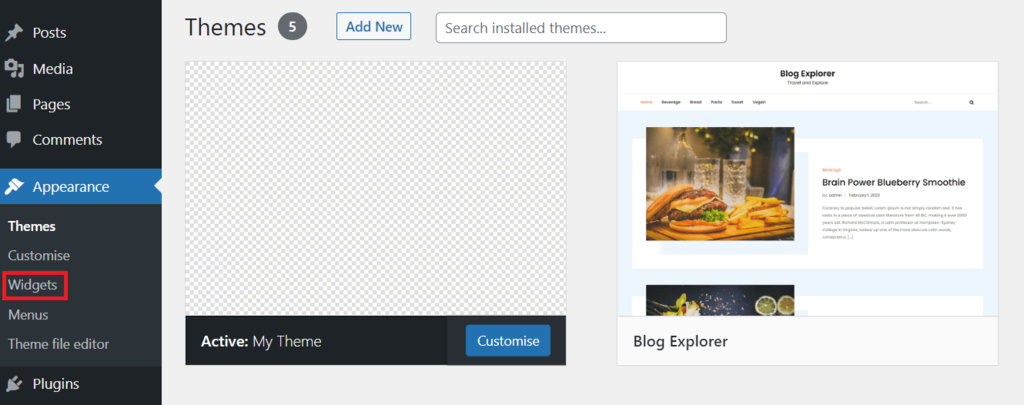
Custom widgets add special features to your WordPress theme. They make your site more interactive. You can add widgets for social media feeds, recent posts, and more. Use the WordPress Widgets API to create them. First, define the widget class. Next, set up the widget options. Finally, write code to display the widget. Test the widget to ensure it works well. Widgets bring more life to your site.
Theme options let users change how the site looks. Users can adjust colors, fonts, and layouts. Use the WordPress Customizer API to create these options. Start by adding panels and sections. Then, add controls for each option. Users can preview changes in real-time. This makes your theme more flexible and user-friendly.
Testing And Debugging
Creating a WordPress theme involves testing and debugging to ensure it functions smoothly. Pay attention to detail. Check for errors in code and fix them. Use developer tools to spot issues. This step improves user experience and ensures your theme is ready for launch.
Cross-browser Testing
Themes should work on all browsers. Cross-browser testing helps find issues. Each browser shows websites differently. This can cause display problems. Use tools to see your theme in different browsers. Check for layout issues. Fix any problems you find. This makes your theme look good everywhere.
Debugging Tools And Techniques
Debugging helps find and fix code problems. Use debugging tools to make this easy. These tools show errors in your code. They help you see what went wrong. Check for syntax errors and broken links. Fixing these errors makes your theme work better. It also improves user experience. Practice debugging often to keep your theme in top shape.
Optimizing Performance
Crafting a WordPress theme involves understanding HTML, CSS, and PHP basics. Start by setting up a local development environment. Customize layout and design to suit your needs. Test for performance and responsiveness to ensure a smooth user experience.
Minifying Scripts And Styles
Minifying means making files smaller. It helps your website load fast. Remove spaces, comments, and unused code in CSS and JavaScript. Use tools like Minify or UglifyJS. Smaller files speed up your site. Faster sites make users happy. Happy users stay longer.
Lazy Loading Images
Lazy loading saves time. Images load only when needed. This way, not all images load at once. It makes the page open faster. Use plugins like Lazy Load. They help images appear only when users scroll. Faster loading keeps visitors engaged. It saves bandwidth too. Happy visitors mean more views.
Preparing For Launch
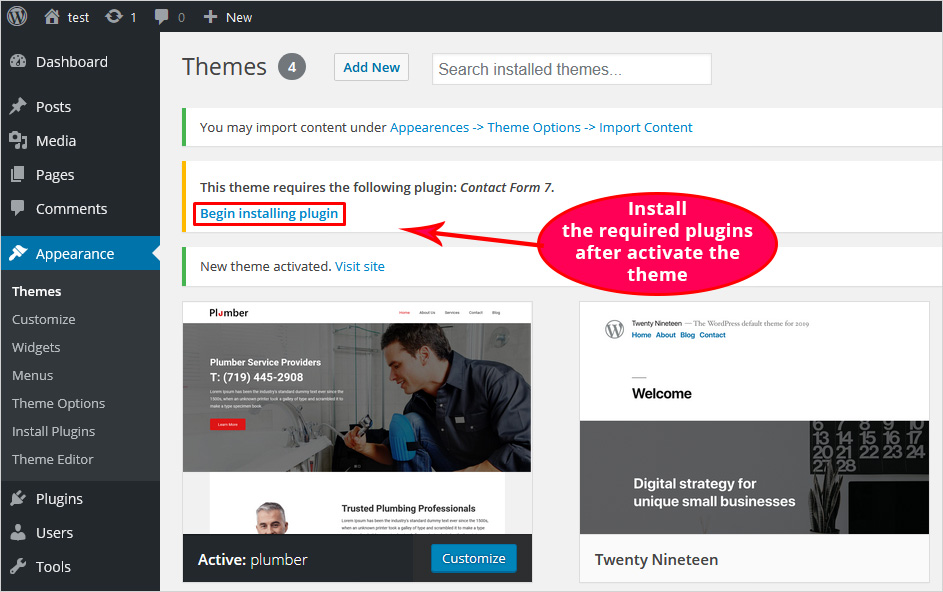
Writing clear theme documentation is important. It helps users understand your theme. Include easy steps to install it. Explain how to use each feature. Make sure to describe settings clearly. Visuals, like screenshots, can help a lot. They make instructions easy to follow. Keep the language simple. Avoid technical terms. The goal is to help everyone, even beginners.
Before submitting, check your theme well. Fix any bugs or errors. Ensure it follows WordPress guidelines. This includes security and design checks. Add a detailed description. Mention key features and compatibility. Use clear and simple words. Upload your theme package carefully. Follow each step in the submission process. Patience is important as review may take time. Once approved, your theme goes live!
Credit: blog.templatetoaster.com
Frequently Asked Questions
How Do I Create My Own Theme In WordPress?
To create your own WordPress theme, set up a local development environment. Create a new theme folder in wp-content/themes. Develop templates using HTML, CSS, and PHP. Add WordPress functions and tags. Test the theme, then upload it to your WordPress site.
Which Theme Builder Is Best For WordPress?
Elementor is a popular and versatile theme builder for WordPress. It offers an intuitive drag-and-drop interface, making customization easy. Users appreciate its extensive widget library and responsive design capabilities. Elementor is suitable for beginners and professionals, enhancing website creation efficiency.
Which Language Is Used To Develop A Theme In WordPress?
WordPress themes are primarily developed using PHP, HTML, CSS, and JavaScript. PHP handles backend logic, HTML structures content, CSS styles it, and JavaScript adds interactivity. These languages work together to create dynamic and visually appealing themes for WordPress websites.
How To Create A WordPress Theme And Sell It?
To create a WordPress theme, learn HTML, CSS, PHP, and JavaScript. Design a unique theme using these skills. Test for responsiveness and compatibility. Sell your theme on marketplaces like ThemeForest or your website. Ensure it’s well-documented and supported to attract buyers.
Conclusion
Creating a WordPress theme can be simple and rewarding. Start small. Focus on essential elements like layout and style. Use tools like theme frameworks for easier design. Test your theme thoroughly before launch. Ensure it’s responsive and user-friendly. Keep learning and updating your skills.
Practice makes perfect. Engage with online communities for support and tips. This journey enhances your web development skills. Soon, you’ll craft themes with ease. Enjoy the process, and see your creativity shine. Your own WordPress theme awaits!


