
Do you want to give your WordPress site a fresh look that stands out? Creating a custom stock theme might be just what you need.
Imagine having a site that perfectly matches your style and brand, without the cookie-cutter feel. You don’t need to be a coding expert to achieve this. With the right guidance, you can craft a theme that’s as unique as your vision.
You’ll discover step-by-step instructions to make your WordPress site truly yours. Get ready to unleash your creativity and transform your website into something remarkable. Keep reading, and you’ll see how simple it can be to bring your digital space to life.
Choosing The Right Tools
Using the right software is important. WordPress is the main tool. It helps build websites. For coding, Sublime Text or Atom are great. They make coding easier. You will also need Photoshop or GIMP for images. These tools help design the look. Don’t forget FileZilla for uploading files. It moves files to the web server. All these tools are free or have free versions.
Frameworks make theme building simple. Underscores is a popular choice. It offers a clean start. Genesis is another option. It is good for SEO. Bootstrap helps with mobile-friendly designs. These frameworks save time. They offer ready-to-use code. Choose one that fits your needs. They make work faster and easier.
Setting Up A Development Environment
Begin with a local serverWAMP or XAMPP. These tools help you mimic a real server on your computer. Install the tool, then start the server.
Create a new folder for your WordPress files. This folder holds all theme files. Keep it organized. Easy to find later.
Organize the theme files well. Start with a main folder. Inside, make folders like CSS, JS, and images. Each folder should have related files.
This structure makes finding files quick. Helps in theme development. Keeps everything tidy.
Designing The Theme Layout
A clear and simple interface is key. Users should find it easy to navigate. Think about colors and fonts. They should be easy on the eyes. Use bold for important buttons. Keep the layout clean and tidy. Avoid clutter. Consistency is vital. Every page should feel like it belongs. Users love familiarity.
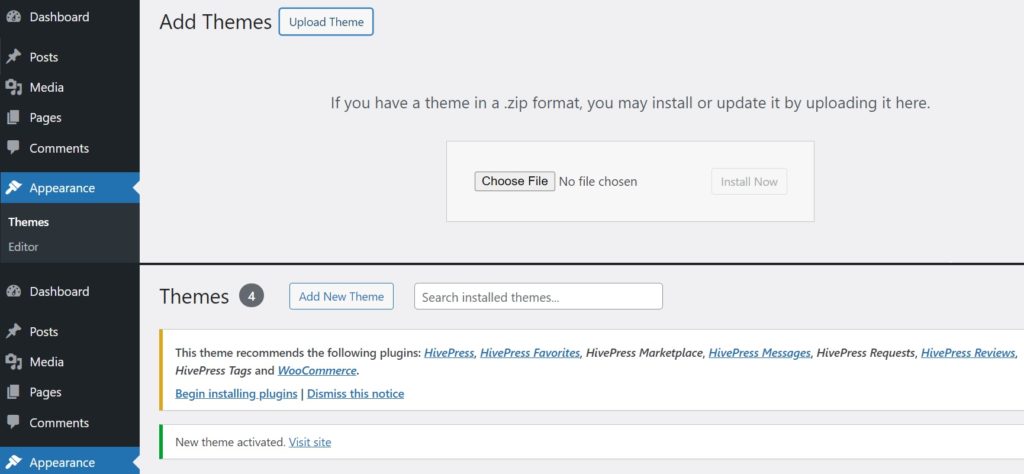
Design must work on all devices. Phones, tablets, and computers. Use flexible grids. They help in adjusting the layout. Images should resize automatically. This keeps them looking good everywhere. Test the design on different screens. From small to large. Make sure everything fits well. Responsive design makes users happy. They can view your site anywhere.
Credit: hivepress.io
Coding The Theme
Start with HTML. It builds the structure. Like bones in a body. Use CSS to add style. Make it pretty. Choose colors and fonts. Align text. Make it look nice. Practice simple layouts. Use divs and spans. They help organize. Keep it tidy.
JavaScript makes things move. Adds life to your site. Click buttons. See magic happen. Show pop-ups. Hide elements. It adds fun. Learn simple scripts first. Like image sliders. Or toggle menus. Keep practicing. Watch your theme grow.
Integrating With WordPress
Start by making template files for your theme. These files tell WordPress how to show pages. Use simple names like header.php and footer.php. Keep the code neat and tidy. This helps in easy updates later.
CSS files are also important. They make your site look nice. Link these files in your template. This way, changes to design are quick and easy.
Use WordPress functions to add features. Functions like wp_head() and wp_footer() are key. They help include extra scripts and styles. Make sure you understand what each function does. This makes your theme work well.
Conditional tags can change what the user sees. For example, is_home() checks if the main page is viewed. These tags help show different content on different pages. Using them wisely makes your theme smarter.
Credit: www.premiumpress.com
Customizing The Theme
Theme options let users change parts of the site. These options make the theme unique. Add options for colors, fonts, and layouts. Use the WordPress Customizer API. This tool is simple and effective. With this, users can see changes live. Keep the options easy to find. Users like simple settings.
Custom widgets add special features to your site. They give extra tools for users. Widgets can show recent posts, photos, or social links. Use the WordPress Widgets API. This helps in making and using widgets. Give clear names to your widgets. Users need to know what each widget does. Test widgets to make sure they work well.
Testing And Debugging
Creating a stock theme for WordPress involves thorough testing and debugging to ensure smooth functionality. Identify and fix errors to enhance user experience and compatibility. Regular checks help maintain performance and quality.
Cross-browser Testing
Different browsers show websites in different ways. It’s important to check your theme on all major browsers. This includes Chrome, Firefox, Safari, and Edge. Each browser may have its own quirks. Use online tools like BrowserStack to help. These tools show how your site looks on various devices and browsers. Make sure all elements display correctly. Check fonts, images, and layouts. Ensure everything looks neat and works well everywhere. Remember to test on mobile browsers too. Most people use their phones for browsing. A theme should work well on all screens.
Error Identification And Fixing
Errors in your theme can break your site. Finding these errors is the first step. Use debugging tools to help you. WordPress has a built-in debugger. Turn it on to see error messages. These messages show what’s wrong. Fix one error at a time. Start with the most important ones. Use simple code to fix issues. Test your changes as you go. Ensure everything works properly. A clean, error-free theme is crucial for a smooth user experience.
Optimizing For Performance
Crafting a stock theme for WordPress requires thoughtful performance optimization. Minimize code bloat for faster load times. Efficiently use CSS and JavaScript to enhance responsiveness and user experience. Prioritize clean design and functionality to ensure the theme is lightweight and efficient.
Minifying Code
Minifying your code makes it faster. Remove spaces, commas, and new lines. Keep the code short. This helps the website load quickly. Faster websites are better for users. Use tools like UglifyJS for JavaScript. For CSS, try CSSNano. These tools make the code smaller. Smaller code means quicker sites. Users will enjoy the speed.
Image Optimization Techniques
Images should be small but clear. Large images slow down websites. Use tools like TinyPNG to reduce size. Choose the right format. JPEGs are good for photos. PNGs work well for graphics. Compress images to save space. This helps pages load faster. Fast loading is key for happy users. Optimize all images for the best performance. Quality should not suffer.
Ensuring Security
Check all user data to keep your site safe. Use validation methods to prevent hackers. Never trust data from users without checking. Protect your site by verifying inputs. Keep malicious code out. Only allow safe data to pass.
Follow security rules to guard your site. Update your software often to close security holes. Use strong passwords for all accounts. Enable two-factor authentication for extra safety. Limit user permissions to reduce risk. Scan your site for viruses regularly. These steps help keep your site secure.
Launching The Theme
Submitting to WordPress Theme Directory helps many people find your theme. First, create a WordPress account. Next, read the guidelines for submitting themes. Follow each step carefully. Check your theme for errors. Use tools to test your theme. Fix any problems before submitting. Submit your theme with a clear name. Add useful details in the description. Make sure your theme follows all rules.
Promoting Your Theme is essential. Share your theme on social media. Join forums to talk about your theme. Write a blog post about your theme. Tell people why your theme is special. Offer support to users. Respond to questions quickly. Happy users will share your theme. This builds trust. Trust brings more users to your theme.

Credit: www.youtube.com
Frequently Asked Questions
What Is A Stock Theme In WordPress?
A stock theme is a pre-designed template for WordPress sites. It provides a basic layout and design elements. Users can customize it to suit their needs. Stock themes save time and effort in website creation. They are ideal for beginners and those with limited design skills.
How Do I Start Creating A WordPress Theme?
Begin by setting up a local development environment. Use tools like XAMPP or Local by Flywheel. Download WordPress and install it locally. Study existing themes to understand their structure. Create a new folder in wp-content/themes for your theme. Develop templates, styles, and functions according to your design plan.
Why Use A Stock Theme For WordPress?
Using a stock theme simplifies website design. It offers a ready-to-use layout with customizable features. Stock themes are budget-friendly and time-efficient. They are ideal for those with limited design experience. They also ensure responsive design and compatibility with plugins.
Can I Customize A Stock WordPress Theme?
Yes, you can customize a stock theme extensively. Use the WordPress Customizer to change colors, fonts, and layouts. Add custom CSS for advanced styling. Install plugins to enhance functionality. Modify theme files if you have coding skills. Always backup your theme before making changes.
Conclusion
Creating a stock theme for WordPress empowers your online presence. You gain control over design and functionality. Custom themes meet your specific needs. This guide provided a clear path to start building. Experiment with features and layouts to stand out.
Test on different devices to ensure responsiveness. Keep user experience in mind as you design. Themes that are simple, clean, and intuitive attract more visitors. Regular updates keep your theme fresh and secure. Dive into the creative process and bring your vision to life.
Your unique theme can enhance your site’s appeal and engagement.


