
Imagine having a stunning website that captures your audience’s attention with just one scroll. That’s the magic of a one-page scrolling WordPress theme.
It’s sleek, modern, and incredibly user-friendly. Whether you’re a seasoned developer or a passionate beginner, creating a one-page scrolling theme can elevate your web design game. Are you ready to dive into this exciting process? With the right steps, you can transform your WordPress site into an engaging, single-page masterpiece that keeps your visitors hooked.
In this guide, we’ll walk you through each step, ensuring you have the tools and knowledge to craft a site that truly stands out. Let’s get started on this creative journey and watch your website come alive with every scroll.
Benefits Of One Page Scrolling Themes
One page scrolling themes load fast. This makes them great for users. They do not need to wait long. Visitors see all content on one page. This keeps them interested.
These themes are easy to navigate. Users scroll down to find everything. This is very simple. A clear layout helps users understand content.
One page themes are mobile-friendly. They work well on phones and tablets. This means more people can view your site. Mobile users have a great experience.
These themes are cost-effective. You save money on design and development. Less content is needed. This reduces costs.
Credit: visualmodo.com
Choosing The Right Theme Framework
Frameworks help build themes easily. Divi is popular for its drag-and-drop features. Genesis offers strong security and is fast. Elementor is great for beginners. It has many templates. Thrive Themes focuses on conversions. It is ideal for businesses. Beaver Builder is simple and flexible. It is perfect for designers.
Speed is important. Slow sites lose visitors. Check for responsive design. It should look good on phones. SEO-friendly themes help rank higher. Easy customization is a must. You want to change things easily. Make sure it supports plugins. They add more features. Look for good support. You might need help. Consider your budget. Some themes are free. Others cost money.
Setting Up Your WordPress Environment
First, download the WordPress software from the official site. Then, unzip the file on your computer. You need a host to run your site. Choose a good web host. They store your website files. Upload WordPress to your hosting account. This can be done using a file manager or FTP. Next, create a database for your site. Use your hosting control panel for this. Enter the database information during the setup. Follow the on-screen instructions to finish.
Plugins add extra features to your site. Contact Form 7 helps visitors reach you. Yoast SEO improves search visibility. Use WP Super Cache for faster loading times. Elementor is great for designing pages. Always check plugin ratings and reviews. Install only trusted plugins. Too many plugins can slow down your site. So, choose wisely.
Designing The Layout
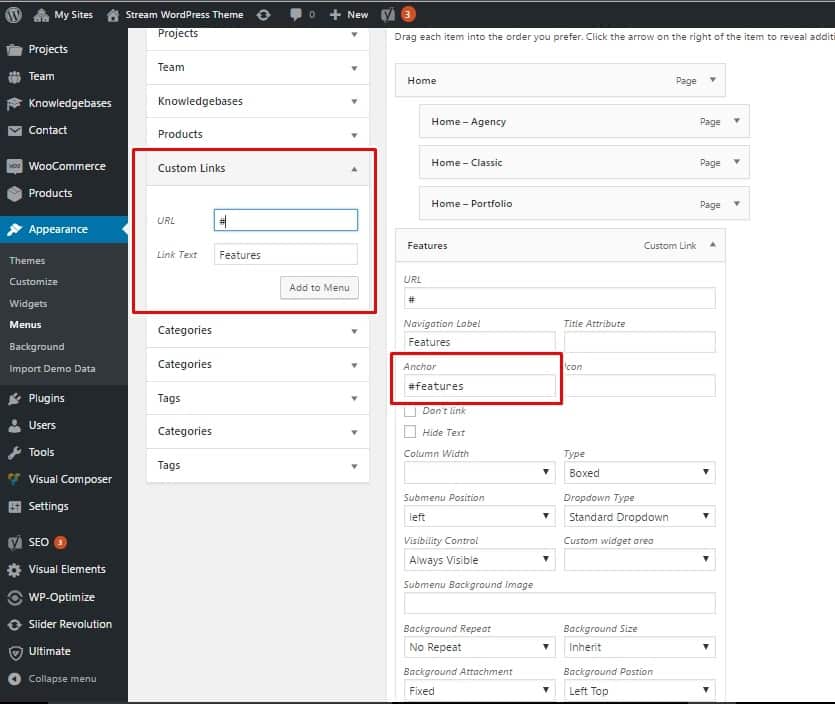
Crafting a one-page scrolling WordPress theme involves designing a smooth and engaging layout. Focus on clear sections with distinct visual elements. Ensure seamless navigation by linking menu items to corresponding sections.
Structuring The Page
Start with a clear structure. Use sections like header, content, and footer. Keep it simple. Each section should have a purpose. Use a consistent design across the page. Think about the flow. Make sure it is easy to follow. Navigation should be smooth and intuitive. Use anchor links for quick jumps. This helps users move around easily.
Incorporating Visual Elements
Add images and icons to make it interesting. Use high-quality images that load fast. Keep the design clean and not too busy. Choose colors that match your theme. Fonts should be easy to read. Avoid using too many styles. Visuals should enhance, not distract. Use animations sparingly. They should add value, not confusion.
Customizing The Theme
Theme options help change the look of your page. You can adjust colors and fonts. You can also add a logo or background image. These options make your site unique. You don’t need coding skills to use them. They are easy to find and use.
CSS and HTML give more control over your site. CSS changes styles like colors or fonts. HTML changes the structure of your page. Knowing both can make your site special. Small changes can have big effects. Learn a bit, try a lot. You can see changes quickly.
Adding Content Sections
Engaging headers are important in a one-page theme. They grab attention. Use simple words for your headers. Make them clear and direct. Try to use a few words only. This helps people understand quickly. It also helps with SEO.
Incorporating Media
Images and videos make your page fun. They help tell your story. Use high-quality pictures. Make sure they are not too big. This keeps your page fast. Videos should be short and interesting. Add captions to explain them. This helps people know what they see.
Implementing Smooth Scrolling
JavaScript libraries like jQuery can help with smooth scrolling. They are easy to use. First, add the library to your WordPress theme. Then, write a simple script. This script will control the scroll effect. Users will see a smooth transition between sections. Libraries often come with helpful documentation. Read it to understand how it works. Many websites use libraries for scrolling. They enhance the user experience.
Customizing scroll effects can be simple. Adjust the scroll speed to your liking. Fast or slow, it’s up to you. Change the easing effect too. This controls how the scroll feels. Some prefer linear scrolling. Others like a more dynamic feel. Experiment with settings. Find what suits your theme best. Different effects can change how users feel. Keep it engaging and smooth. Make sure the scroll is not jarring. Users should enjoy the movement.
Optimizing For Performance
Crafting a one-page scrolling WordPress theme involves optimizing performance for a smoother user experience. Focus on clean code, minimal plugins, and responsive design to ensure fast loading times and seamless navigation.
Minimizing Load Times
Fast websites make users happy. To achieve this, keep your theme lightweight. Use fewer images. They should be small in size. Select a simple design. This helps pages load quickly. Choose plugins wisely. Only use what is needed. Fewer plugins mean faster pages. Use a content delivery network (CDN). It helps in faster delivery of content. A faster website makes users stay longer.
Ensuring Mobile Responsiveness
Many people use phones to browse. Your theme must work well on phones. Use a responsive design. It changes the layout for different screens. Make buttons and text big enough. Everyone should see and click them easily. Test your theme on different devices. This ensures a smooth experience. A good mobile experience keeps users engaged.
Testing The Theme
Ensure the theme works on all browsers. Check it on Chrome, Firefox, and Safari. Also, test it on mobile browsers. Each browser may display things differently. Fix any issues you find. This will help all users have a good experience. Some features may not work on old browsers. Make sure to note this. Always update your code for best results.
Make sure the site is easy to use. Check if buttons are easy to click. Look at how long pages take to load. Slow pages make users unhappy. Get feedback from friends or family. Ask if they find the site easy to navigate. Fix any problems they find. Happy users will stay longer on the site.
Credit: colorlib.com
Launching Your Theme
Creating a one-page scrolling WordPress theme involves organizing content into seamless sections. Design each part to flow naturally, enhancing user experience. Utilize plugins to add functionality, ensuring smooth navigation and captivating visuals.
Deploying To A Live Site
First, make sure your theme is tested on a local server. Check for any errors or missing elements. Upload the theme files to your web host using FTP or a file manager. Go to the WordPress dashboard. Activate your theme from the Themes section. Test all links and functions to ensure everything works. Check your site on different devices. Make sure it looks good everywhere. Take a backup of your site. It’s important to save your work.
Promoting Your Theme
Tell people about your theme. Share on social media. Write a blog post about it. Reach out to bloggers. Ask them to review your theme. Offer a free version or demo. Encourage users to share their feedback. Create a tutorial video. Show how easy it is to use. Get listed on theme directories. This helps people find your theme. Keep updating your theme. Make it better and more useful.

Credit: themify.me
Frequently Asked Questions
What Is A One-page Scrolling Theme?
A one-page scrolling theme is a web design template. It allows visitors to scroll through all content seamlessly on a single page. This design is popular for its simplicity and ease of navigation. It enhances user experience by displaying information without requiring multiple clicks.
How To Choose A WordPress Scrolling Theme?
Choosing a WordPress scrolling theme involves considering design, functionality, and user experience. Look for themes with responsive design and customizable options. Ensure compatibility with WordPress plugins for added functionality. Check reviews and ratings from other users to ensure reliability and performance.
Can I Customize A One-page Theme Easily?
Yes, customizing a one-page theme is typically straightforward. Most themes offer user-friendly interfaces and customization options. You can modify colors, fonts, and layouts without coding knowledge. WordPress themes often come with documentation for guidance. Plugins also provide extended customization features to enhance functionality.
Why Use A One-page WordPress Theme?
A one-page WordPress theme offers streamlined navigation and improved user engagement. It simplifies content presentation, reducing clutter and enhancing focus. It is ideal for portfolios, landing pages, or single-product websites. Mobile-friendly design ensures accessibility across devices, improving SEO and visitor retention.
Conclusion
Creating a one-page scrolling WordPress theme can be simple. Follow the steps closely. Choose your layout carefully. Focus on clear navigation. Keep your design clean and responsive. Use plugins wisely to enhance features. Test your theme on different devices. Ensure your site loads quickly.
A well-designed theme attracts more visitors. Engage your audience with striking visuals. Regular updates keep your theme fresh. Now, you’re ready to build an impressive site. Your creativity and planning make it unique. Happy designing!


