
Creating a job board theme for WordPress can seem like a daunting task. But what if I told you it could be simpler than you think?
Imagine having the power to transform your website into a dynamic job-seeking platform, connecting employers with potential candidates effortlessly. You’re about to discover how to make this possible. This guide will break down the process into straightforward steps, ensuring you have all the tools you need to succeed.
Whether you’re a seasoned WordPress user or a complete beginner, this article will show you how to create a job board theme that stands out and functions seamlessly. Get ready to unlock the potential of your website and captivate your audience by turning it into an engaging, user-friendly job board. Keep reading to find out how you can achieve this and more!
Choosing The Right Platform
Selecting a platform for creating a job board theme on WordPress involves comparing features and ease of use. Prioritize platforms offering customization options, responsive design, and seamless integration with job listing plugins.
WordPress Vs. Other Cms Options
Choosing a platform is important for your job board. WordPress is a popular choice. It is easy to use. It has many tools and plugins. Other CMS options can be hard to learn. They might not have the same support. WordPress has a big community. This helps with any problems.
Why WordPress Is Ideal For Job Boards
WordPress is great for job boards. It offers flexibility. You can customize themes easily. There are many job board plugins. These plugins add useful features. Employers can post jobs. Job seekers can apply directly. WordPress makes it simple. You can manage everything from one place. It saves time and effort.
Essential Features For Job Boards
Visitors need easy ways to register and create profiles. Profiles should show skills and experience. This helps employers find the right person. Simple forms make registration easy. Profiles must be editable anytime.
Job boards need strong posting tools. Employers should add job details quickly. Job posts should include title, description, and salary. It’s important for posts to be clear and detailed. This attracts the right candidates.
Users need to find jobs fast. Search tools help find jobs by title or location. Filters narrow down choices by date or salary. This saves time and effort. Making searches easy helps users find jobs faster.
Charging for job posts can earn money. Easy payment methods help users pay for listings. Secure systems keep payments safe. Users should have options like credit card or PayPal. This makes transactions smooth and reliable.
Designing Your Theme
A theme must work on all devices. This means both phones and computers. Use flexible grids and layouts. Images should resize to fit the screen. Text must be readable at any size. Avoid small fonts. Test your theme on different devices. Make sure it looks good everywhere.
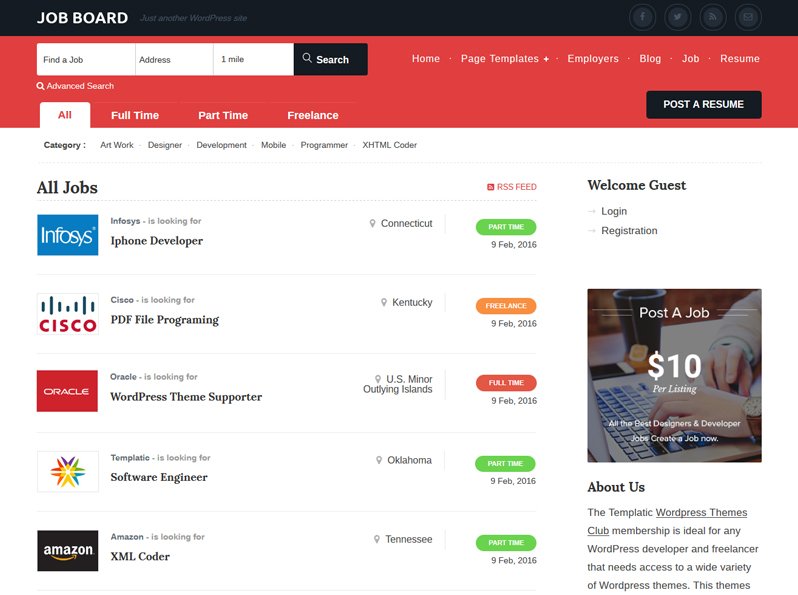
Keep the design simple and clean. Users like easy navigation. Use clear buttons and links. Avoid cluttered pages. Group similar items together. Use colors wisely. They should guide the user. Highlight important parts of the page.
Use keywords in your theme. They help search engines find you. Add meta tags and alt text for images. This improves search visibility. Ensure fast loading times. Slow sites rank lower. Use clean code to speed up your site.
Credit: templatic.com
Developing The Backend
Custom post types help organize job listings. They make managing jobs simple. Each job type has its own category. This helps users find jobs fast. Use taxonomies to group similar jobs. This is like sorting books by genre. Jobs are sorted by type or location. This makes searching easy.
A database stores all job data. It holds job titles, descriptions, and more. Keeping this data organized is key. Databases help retrieve jobs quickly. They ensure no data is lost. Use tables to keep everything neat. Each row is a job. Each column is a detail like salary or location.
Users submit job applications online. A form collects this data. It’s important to keep this data secure. Ensure users can upload resumes easily. Collect names, emails, and cover letters. This makes applying for jobs easy. Review submissions regularly. Respond to applicants quickly.
Integrating Plugins And Tools
Job board plugins make your site powerful. They help users find jobs easily. WP Job Manager is popular. It is free and easy to use. Simple Job Board offers good features. It supports custom fields. Resume Manager lets users upload resumes. This adds more value to your site.
Security keeps your site safe. Use Wordfence for protection. It stops bad traffic. Jetpack improves site speed. It helps with backups too. Cloudflare gives extra security. It speeds up loading times.
Credit: www.premiumpress.com
Testing And Debugging
Usability tests help find problems in your job board theme. Ask people to try your theme. Watch how they use it. Take notes on what confuses them. Fix problems to make it easy for users. Check all parts of the theme. Ensure forms work well. Make sure links go to the right pages. Test on different devices. Phones, tablets, and computers. Simple tests make the theme better.
Many themes have common issues. Slow loading is a big problem. Reduce image sizes to speed it up. Broken links frustrate users. Check links regularly. Some themes may have bad layouts. Use simple designs for clarity. Missing buttons confuse users. Make sure all buttons are visible. Fixing these issues improves user experience.
Browsers show websites differently. Test your theme on Chrome, Firefox, and Safari. Make sure it looks good everywhere. Fix layout issues for each browser. Use tools to help check compatibility. CSS adjustments may be needed. Good themes work on all browsers. Users will appreciate a smooth experience.
Launching Your Theme
Crafting a job board theme for WordPress involves choosing user-friendly layouts and integrating essential plugins. Focus on intuitive navigation and responsive design to enhance user experience. Customize features to support job listings, applications, and employer profiles effectively.
Marketing Your Job Board Theme
Start with a clear marketing plan. Share your theme on social media. Use email campaigns to reach users. Create a simple and engaging video. Show how your theme helps users find jobs. Write blogs about the benefits of your theme. Make sure your website is easy to navigate. Offer discounts for early buyers. Encourage users to share feedback. Build a strong community around your theme. Help users feel connected.
Gathering User Feedback And Iterating
Listen to users carefully. Ask them about their needs. Use surveys to gather opinions. Consider their feedback seriously. Change your theme based on user needs. Improve features that users dislike. Keep updating your theme regularly. Add new features to meet user demands. Make your theme user-friendly. Build trust through transparency. Show users you care about their experience.

Credit: www.youtube.com
Frequently Asked Questions
What Are The Basics Of A WordPress Job Board Theme?
A WordPress job board theme should be user-friendly and responsive. It must allow easy job posting and application. Essential features include search filters, job categories, and employer profiles. Integration with plugins for payment and notifications enhances functionality. Customization options help in branding and user engagement.
How Can I Customize A Job Board Theme?
Customizing a job board theme involves editing design and functionality. Use WordPress customizer for layout changes. Employ plugins for additional features like payment gateways. Modify CSS for styling tweaks. Ensure mobile responsiveness and SEO optimization for better visibility and user experience.
Which Plugins Enhance Job Board Functionality?
Essential plugins include WP Job Manager for listings and applications. Use WooCommerce for payment integration. Yoast SEO improves visibility. Notifications can be managed with WP Mail SMTP. Contact Form 7 helps create application forms. Each plugin enhances specific functionalities for a complete job board experience.
Is Seo Important For Job Board Themes?
SEO is crucial for job board themes to attract visitors. Optimize content with relevant keywords and meta tags. Use clean URLs and fast-loading pages. Mobile responsiveness boosts search rankings. Regular updates and quality backlinks further enhance visibility. SEO ensures your job board reaches the right audience.
Conclusion
Creating a WordPress job board theme doesn’t have to be complex. Start with clear goals. Choose a simple design. Use plugins that enhance functionality. Optimize for mobile users. Test everything before launching. Keep user experience in focus. Regularly update your theme.
Listen to user feedback. Make improvements based on it. Ensure your site is secure. Protect user data. A well-crafted job board can attract more visitors. It can help job seekers and employers connect easily. Your theme should grow with your business needs.
Stay committed to delivering value. Your efforts will pay off in the long run.


