
Creating a control panel for web hosting might seem like a daunting task, but it doesn’t have to be. Imagine having the power to manage your own hosting environment with ease.
You can customize, control, and enhance your web hosting experience just the way you want. In this guide, you’ll discover step-by-step how to build a control panel that’s tailored to your needs. With the right tools and a clear roadmap, you’ll unlock a new level of efficiency and convenience.
So, if you’re ready to take your web hosting skills to the next level and gain full control over your online space, keep reading. Your journey to mastering web hosting management starts here.
Choosing The Right Platform
Open source solutions are usually free. They offer flexibility. You can change them as you need. Proprietary solutions often cost money. They might be more stable. You get support from the company. Each option has its pros and cons. Think about your budget. Do you need lots of changes? Or do you want support?
Check if the control panel works with your hosting. Some panels need specific server configurations. Others are more flexible. It should work well with the operating system you use. Some panels fit better with Linux. Others may suit Windows. Always check compatibility before you start. This helps avoid problems later.
Essential Features
A secure login system is vital. Users need unique usernames and passwords. This keeps their accounts safe. Use two-factor authentication for extra security. This way, users feel more protected. They receive a code on their phone. They enter this code to access their accounts.
Users should manage their domains easily. They can add or remove domains as needed. They can also update domain details. This includes changing nameservers. Easy-to-use tools make the process quick. Users can focus more on growing their websites.
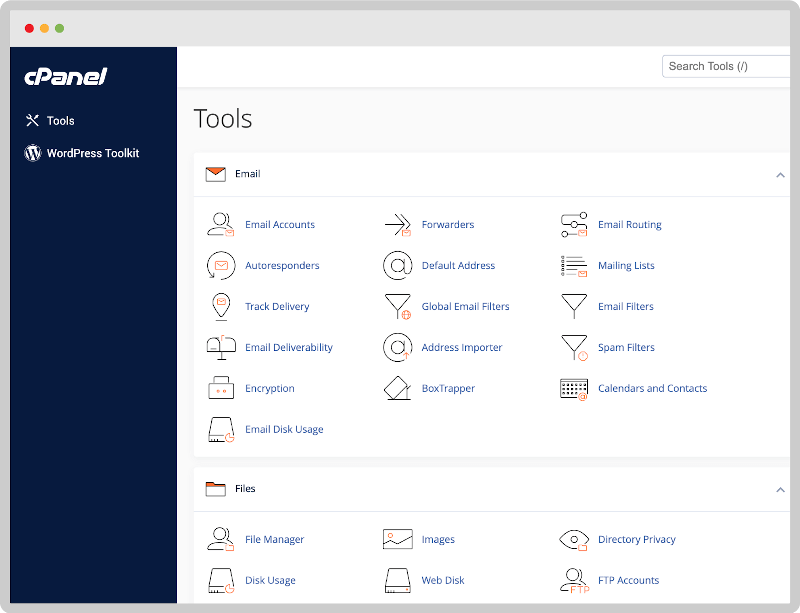
Setting up emails should be simple. Users create and manage email accounts. They can set forwarding rules. It helps keep their messages organized. Filters can sort emails into folders. This helps in managing communication better.
Users need to manage databases efficiently. They can create new databases. They can also delete old ones. Backup options are important too. Backups keep data safe. Users can restore data if needed. Easy management tools make this task simple.
Designing The User Interface
Users need to find things fast. Simple menus help them do this. Icons with clear labels guide the way. Easy paths make users happy. They don’t want to get lost.
Devices come in all sizes. Designs must fit them all. Phones, tablets, or computers. The interface should look good on each. Easy clicks on small screens matter. Users won’t struggle.
Personal touch is key. Themes let users choose colors. They pick what they like. This makes them feel at home. Happy users are loyal users. They enjoy their experience more.
Integrating Security Measures
SSL certificates are very important for websites. They keep data safe. A site with SSL is more trusted. Visitors feel secure. SSL helps in keeping hackers away. It makes sure data is private. Always choose a good SSL provider. Ensure SSL is updated regularly.
A firewall protects your server. It blocks bad traffic. Only good traffic gets through. Firewalls stop hackers. They keep your data safe. Set up rules for your firewall. Update these rules often. A strong firewall is a must.
Backups save your data. If something breaks, you can recover data. Always have a backup plan. Keep backups in a safe place. Make backups daily. Recovery tools help restore data. Test your recovery tools often. This ensures they work well.
Automating Tasks
Creating a control panel for web hosting simplifies managing multiple websites. Automating tasks like server configuration and security updates saves time. Users can easily monitor site performance and manage resources efficiently.
Scheduled Backups
Scheduled backups keep your data safe. Choose a time for backups. Early morning is good. Data is fresh and ready. Use tools to set backup schedules. Tools make it easy. Get alerts when backup is done. Alerts help you know status. Backup files should be stored safely. Use cloud storage for safety. Cloud keeps files secure. Make sure files are encrypted. Encryption protects your data.
Resource Monitoring
Resource monitoring checks how much power you use. Watch CPU and RAM usage. Keep an eye on bandwidth. Bandwidth shows data flow. Use monitoring tools for easy checks. Tools give real-time info. Info helps you make decisions. Adjust settings based on data. Settings improve performance. Alerts notify you of problems. Fix problems fast with alerts.
Automatic Updates
Automatic updates keep software fresh. Updates fix bugs and improve security. Schedule updates to run at night. Nighttime updates avoid disruptions. Use update tools for ease. Tools automate the update process. Make sure updates are tested first. Testing prevents issues. Keep a record of updates. Records help track changes. Updates make hosting better.

Credit: www.inmotionhosting.com
Testing And Deployment
Creating a control panel for web hosting involves testing and deployment. Ensure it is user-friendly and secure. Test functionalities thoroughly before deployment to prevent issues.
Staging Environment Setup
A staging environment is like a practice area. It helps find bugs. This area looks like the real site. It is safe to test changes. Make sure it matches the live site. Check settings, plugins, and themes. This step is very important.
Load Testing
Load testing checks how the site handles many users. It helps find weak spots. Use tools to test the site’s speed. Check if the site crashes. Ensure it runs smoothly with many visitors. This helps keep your site fast.
User Feedback Implementation
User feedback is important. Ask users what they think. Use forms or surveys. Listen to their ideas. Improve the site based on feedback. Happy users come back often. This can boost your site’s success.
Ongoing Maintenance
Keep your control panel updated. This ensures security and efficiency. Developers release new versions often. These updates fix bugs and improve features. Users need the latest version for best results. Check for updates weekly. Install them promptly. This keeps your panel running smoothly.
Monitoring helps track the panel’s health. Check server load and speed regularly. Slow performance frustrates users. Use tools to see how your system works. Look for any unusual activity. This can signal problems. Fix issues before they grow big.
Users might face problems. Provide clear support options. Include a help section in the panel. Offer guides and documentation. This helps users solve issues on their own. Make it simple and easy to follow. Users appreciate quick and simple solutions.
Credit: www.tecmint.com

Credit: www.inmotionhosting.com
Frequently Asked Questions
What Is An Hosting Control Panel?
A hosting control panel is a web-based interface that allows users to manage server functions and website hosting. It simplifies tasks like email setup, domain management, and file uploads. Popular options include cPanel, Plesk, and DirectAdmin, making website management more efficient and user-friendly.
How To Open Hosting Control Panel?
Log into your hosting account with your credentials. Find the hosting control panel link. Click to access it. Typically, this link is labeled as “cPanel” or “Dashboard. ” Follow any on-screen instructions to navigate and manage your hosting settings efficiently.
How To Make A Server Panel?
To create a server panel, choose a programming language like PHP or Python. Use frameworks such as Laravel or Django. Design a user-friendly interface. Implement server management features. Ensure security with authentication measures. Test thoroughly before deployment. Regularly update and maintain for optimal performance.
What Is The Cpanel Of A Website?
CPanel is a web hosting control panel. It allows users to manage website files, databases, and emails. The interface is user-friendly and simplifies website management tasks. CPanel also provides tools for security, analytics, and backups. It’s popular among web hosts for its efficiency and ease of use.
Conclusion
Creating a web hosting control panel may seem complex at first. Break the process into steps. Choose the right software. Focus on usability for users. Test the panel thoroughly. Ensure security features are strong. Regular updates keep it running smoothly.
Customization enhances user experience. Feedback helps improve the panel over time. Remember, simplicity is key. Aim for a balance between functionality and ease of use. With careful planning, your control panel will be effective. And user-friendly.


