
Are you ready to bring your website to life? Connecting your domain to your web host is a crucial step in making your online presence official.
Imagine your domain as your website’s nameplate and your web host as its home. Without connecting the two, your visitors won’t know where to find you. But don’t worry; this process is simpler than it sounds. In this guide, you’ll discover a straightforward approach to linking your domain and host.
By the end, you’ll have your site up and running smoothly. Ready to get started? Let’s dive in and make sure your website is ready to welcome its first visitors!

Credit: kb.porkbun.com
Choosing The Right Domain Registrar
Many people choose GoDaddy for buying domains. It is a known name. Another option is Namecheap. It is famous for its low prices. Bluehost offers both domains and hosting. This makes it easy to manage. Google Domains is another choice. It is simple and direct.
Always check the cost first. Some registrars are cheaper than others. Look for customer support. It helps when you face problems. Consider the ease of use. Simple tools save time. Look for extra features. They add value to your purchase.
Credit: sendlayer.com
Selecting A Web Hosting Provider
Web hosting comes in different types. Shared hosting is very popular. Many websites use one server. VPS hosting means a virtual private server. You get more control. Dedicated hosting gives you the whole server. It costs more. Cloud hosting uses many servers together. This is very flexible. Managed hosting means the host helps you a lot. Each type has its own benefits. Choose what fits your needs.
Look at the speed of the hosting. Fast websites keep visitors happy. Uptime is also important. It shows how often the site works. Look for 99% or more. Customer support can help when things go wrong. Check if they have 24/7 support. Price is a factor too. Make sure it fits your budget. Security features protect your site. Good hosts offer backups and SSL. Choose wisely.
Domain Name System (dns) Basics
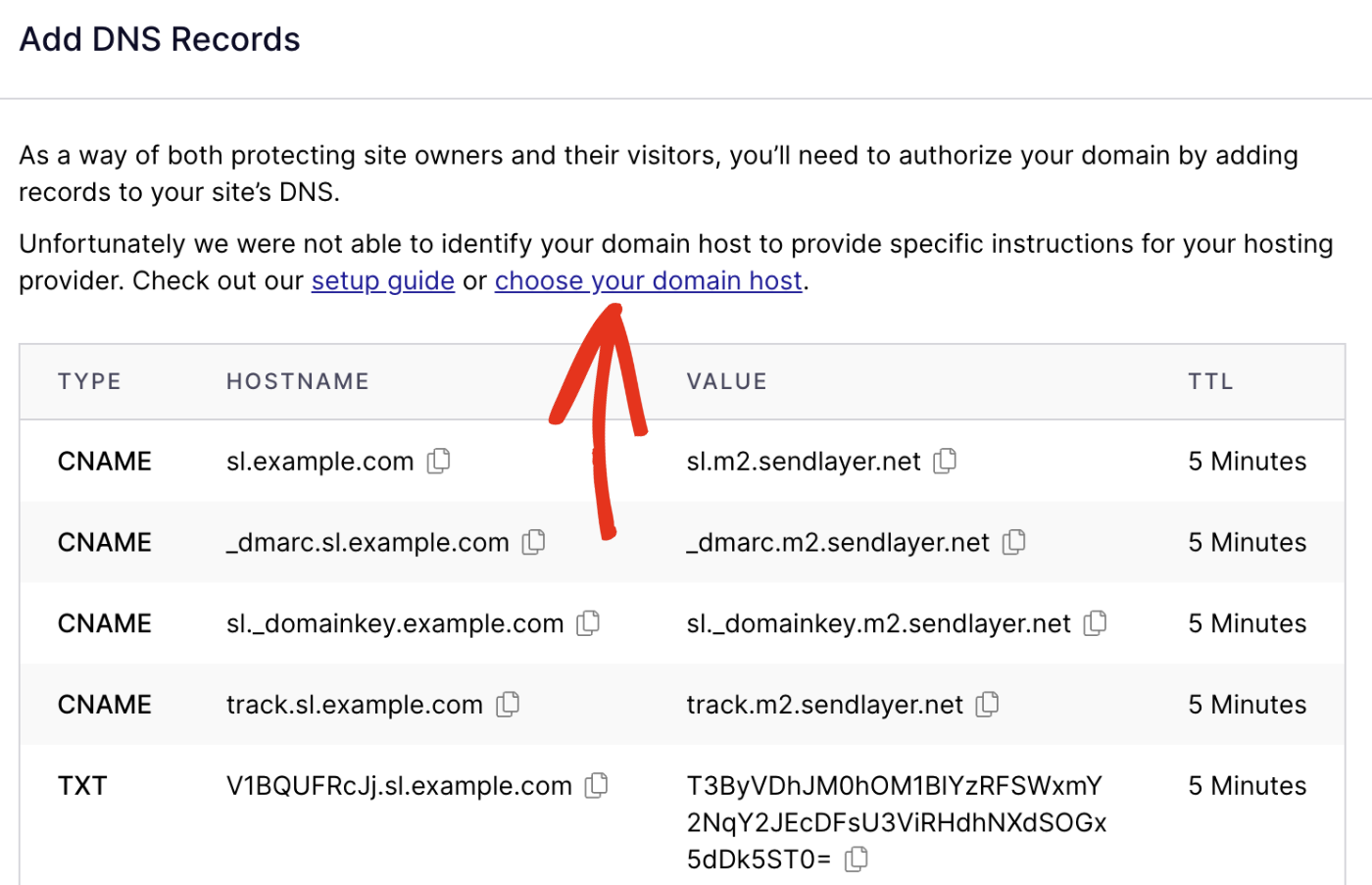
Connecting your domain to your web host involves updating DNS records. Start by locating your web host’s name server details. Then, access your domain registrar’s settings to input these details, ensuring your website is accessible online. This process links your domain with your hosting service efficiently.
Understanding Dns Records
DNS records are like addresses for your website. Each record tells the internet where to find your site. There are different types of records. The most common is the A record. It links your domain to an IP address. Another important record is the CNAME. This points one domain to another. There are also MX records. They direct emails to the right server.
DNS settings are vital for your website. They help browsers find your site quickly. Incorrect settings can lead to downtime. Your site may not be accessible. It is crucial to double-check these settings. This ensures your site runs smoothly.
Pointing Your Domain To Your Host
To connect your domain, start by accessing DNS settings. Log in to your domain provider. Find the DNS settings section. This is often under a tab named DNS or Domain Settings. Here, you can make changes to how your domain points. You need the DNS settings to update your nameservers. These settings are crucial for directing your domain to your host.
Once in DNS settings, you will update nameservers. Nameservers connect your domain to the host server. Locate the nameserver fields. You may see names like NS1 or NS2. Replace these with your host’s nameservers. Your host provides these nameservers. This step ensures your domain points correctly. After entering nameservers, save changes. It may take time to update. Usually, updates finish within 24 hours.
Testing Domain Connection
Connecting your domain to your web host involves updating DNS settings. Start by accessing your domain registrar’s control panel. Locate the DNS settings section, then enter your web host’s provided nameservers. This links your domain to the host, enabling website visibility online.
Using Online Tools
Online tools help check if your domain connects well. Many free tools are available. They show if the domain points to the right server. Use a tool like “What’s My DNS.” Enter your domain name there. The tool checks for DNS propagation. Wait for the results. You will see green checks if all is good. Red crosses mean problems exist. These tools are easy to use. They save time and effort.
Troubleshooting Common Issues
Sometimes, domains do not connect well. This can cause frustration. Check your nameserver settings first. They should match your host’s details. Update if needed. Another issue is DNS propagation delay. This can take up to 48 hours. Be patient during this time. Check your domain again later. Make sure your domain is not expired. Renew it if needed. Contact your host for more help if issues persist.
Securing Your Domain Connection
SSL certificates keep your site safe. They encrypt data between users and servers. This makes it hard for hackers to steal data. Most web hosts offer free SSL certificates. Check your host’s control panel. Look for SSL settings. Enable it with a click. Your site will show a padlock icon. This means the connection is secure. Users trust websites with SSL. It also helps with search rankings.
Domain security is important. Regularly check your domain settings. Ensure your contact details are correct. Set up domain privacy features. These hide your details from public records. Use strong passwords for all accounts. Change them often. Enable two-factor authentication. This adds an extra layer of safety. Keep an eye on any unusual activity. Report suspicious actions right away. Protecting your domain is a must.
Maintaining Domain And Hosting Relationship
Regular updates keep your website safe. They fix bugs and improve security. Backups are very important. They save your work. If something breaks, you can restore it. Always update your domain settings. Check your hosting dashboard often. This makes sure everything is in order. A strong relationship between domain and hosting is crucial. It ensures a smooth-running website.
Renew your domain and hosting on time. Set reminders to avoid forgetting. Renewal fees are often yearly. Missing them might cause website issues. You might lose your domain name. Always check for renewal offers. Sometimes, hosts give discounts. Save money by grabbing them. Keep your payment methods updated. This avoids any payment failures.
Credit: wegic.ai
Frequently Asked Questions
How To Connect Domain To Web Host?
Change domain DNS settings to point to your web host’s nameservers. Access your domain registrar account. Locate DNS settings and update nameservers with those provided by your host. Save changes and allow propagation time. This connects your domain to your web hosting service efficiently.
How Do I Connect My Domain To Web Com?
Log into your Web. com account. Navigate to the “Domain Management” section. Select your domain, choose “Connect Domain,” and follow the prompts to update DNS settings. Ensure your domain points to Web. com servers for a successful connection. Save changes to finalize the setup.
Can I Connect My Domain To A Website For Free?
Yes, you can connect your domain to a website for free using services like Cloudflare or Freenom. Many website builders also offer free domain connection options. Ensure the service provides DNS management features for seamless integration. Always verify the terms and conditions before proceeding.
How Do I Point A Domain To Another Host?
To point a domain to another host, update the domain’s DNS settings. Log in to your domain registrar’s account, locate the DNS settings, and replace the existing nameservers with those provided by your new host. Save changes and allow up to 48 hours for propagation.
Conclusion
Connecting your domain to your web host doesn’t have to be complex. Follow the steps outlined, and you’ll be set up in no time. Remember to update DNS settings carefully. Double-check each entry for accuracy. This ensures your website runs smoothly.
Patience is key during propagation. It might take a few hours. If issues arise, consult your host’s support team. They can guide you effectively. Practice makes perfect with tech tasks. Soon, you’ll handle domains like a pro. Keep learning and exploring.
Your website’s success depends on it. Stay curious and keep improving your skills.


