
Are you ready to bring your website to life? Connecting your domain to your web host is a crucial step in making your online presence visible to the world.
Imagine your domain as the address to your digital home and your web host as the foundation where all your content resides. Without this connection, your visitors might as well be wandering in cyberspace with no destination. In this guide, you’ll discover a straightforward path to seamlessly link your domain with your web host.
By the end, you’ll have the confidence and knowledge to ensure your website is live and ready for visitors. Dive in to learn how you can quickly connect your domain and start showcasing your content to the world!
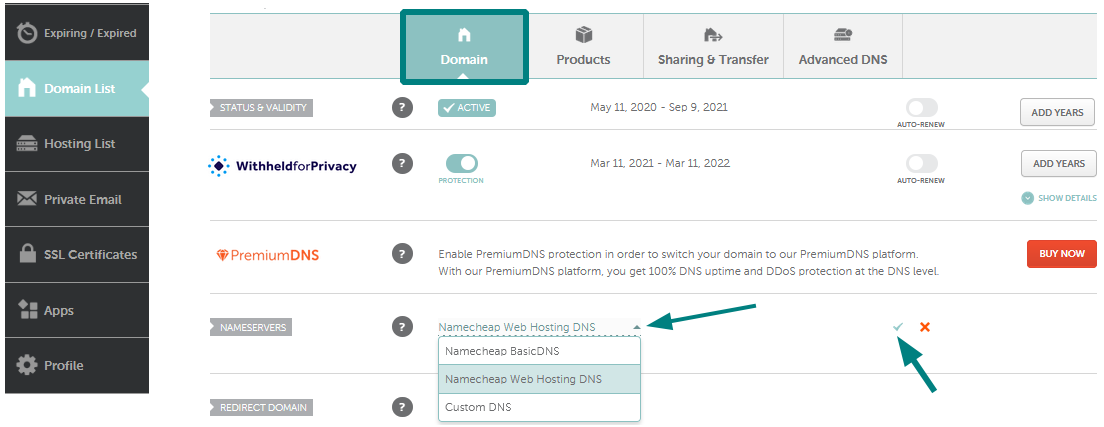
Credit: www.namecheap.com
Choosing The Right Domain Registrar
Many people use GoDaddy for domains. It’s very popular. Another choice is Namecheap. They have good prices. Google Domains is also an option. They offer simple tools. Each registrar has different services. It’s important to compare them.
Check the pricing first. Some registrars are cheaper. Look at the support they offer. Good support is important. Consider their security features. They keep your domain safe. Think about ease of use. Some are easier to manage. All these factors help in choosing the best registrar.

Credit: kb.porkbun.com
Understanding Domain Name System (dns)
DNS stands for Domain Name System. It is like the phone book of the internet. DNS helps us find websites using domain names instead of IP addresses. Computers use numbers to talk to each other. DNS translates those numbers into words we can read. This makes it easy to surf the web.
When you type a website name, DNS starts working. It checks the domain name in its system. Then it finds the right IP address for that name. This tells your computer where to go. The process happens very fast. It takes only a few seconds. Without DNS, finding websites would be hard.
Locating Dns Settings
First, sign in to your domain provider’s website. Use your email and password. Look for the “My Domains” or similar section. This section shows your domains. Click on the domain you want to manage. You need to find the DNS settings. This is often under “Manage Domain” or “Domain Settings”.
Once inside, search for DNS management or DNS settings. This is where you can update DNS records. Common options include A Records and CNAME Records. Make sure you are in the correct domain’s DNS settings. Changes here affect where your domain points.

Credit: support.wix.com
Updating Dns Records
DNS records help connect your domain to your web host. These records tell the internet where to find your website. There are several types of DNS records. Each has a special job. The most common one is the A record. It points your domain to an IP address. Another type is the CNAME record. It helps redirect one domain to another. MX records direct emails to your mail server. They keep your emails working smoothly. Always check your DNS records. Make sure they are set up correctly.
There are different DNS records. Each has its use. Here’s a simple table:
| Type | Purpose |
|---|---|
| A Record | Points to an IP address |
| CNAME Record | Aliases one domain to another |
| MX Record | Routes emails |
To connect your domain, update your DNS settings. Log in to your domain provider. Go to the DNS management section. Enter your web host’s details. Add the correct IP address. Save changes. It may take some time to update. Be patient. Refresh and check your website. If it loads, it’s connected.
Testing Domain Connection
Checking DNS Propagation is important. It ensures your domain is linked. DNS stands for Domain Name System. It helps your domain connect to the web. After you change DNS settings, it takes time. This is called propagation. Check it using online tools. These tools show if your domain is ready. If it is not ready, wait a bit more.
Troubleshooting Common Issues can be simple. Sometimes the domain does not connect. First, check your DNS settings. They must be correct. Next, see if the nameservers are set. They point your domain to the host. If problems persist, contact your hosting provider. They help solve connection issues quickly.
Securing Your Domain Connection
SSL certificates keep your site safe. They protect data from hackers. Visitors feel safe when they see a secure site. A lock icon in the address bar shows this. SSL certificates encrypt data. This means only you can read it. Most hosts offer free SSL certificates. It’s easy to add them to your domain. Check your host’s control panel. Look for SSL options. Follow the steps to activate it.
Websites need regular checks. This keeps them working well. Check for broken links. They can confuse visitors. Update plugins often. Old plugins can cause problems. Look for security updates too. These updates keep your site safe. Back up your site regularly. Backups help if something goes wrong. Use tools that alert you to issues. They help you fix problems fast.
Frequently Asked Questions
How To Connect Domain To Web Host?
To connect a domain to a web host, update your domain’s DNS settings. Set the nameservers to your host’s provided ones. This change can take up to 48 hours to propagate globally. Ensure your web hosting account is correctly set up and linked to your domain for seamless connectivity.
How Do I Connect My Domain To Web Com?
Log in to your Web. com account. Go to “Domain Management” and select your domain. Click “Connect” and follow the instructions to link it to your website. Save the changes to complete the process.
Can I Connect My Domain To A Website For Free?
Yes, you can connect your domain to a website for free using platforms like WordPress, Wix, or Blogger. These platforms offer free hosting options with basic features to link your domain. You’ll need to follow their setup instructions for domain integration without extra costs.
How Do You Add A Domain To Your Website?
Log in to your hosting account. Navigate to the domain management section. Choose “Add Domain. ” Enter your domain name. Save changes to link the domain.
Conclusion
Connecting your domain to your web host is straightforward. Follow the steps carefully. Start by accessing your domain settings. Then locate your domain’s DNS records. Update these records with your host’s details. Double-check for errors. Changes might take some time to update.
Typically, within 24 to 48 hours. Your website will then be live. Celebrate your accomplishment! You have successfully linked your domain. Enjoy showcasing your site to the world. Always keep your domain details safe. Regularly monitor your site for any issues.
Happy hosting!



