
Are you ready to launch your website and make your mark on the internet? One crucial step in bringing your online presence to life is connecting your domain name to your web hosting.
It might sound a bit technical, but don’t worry—it’s easier than you think. Imagine your domain name as the friendly street address of your online home, and your web hosting as the land where your digital house is built. By connecting the two, you’re essentially putting up a signpost that guides visitors straight to your site.
But why is this so important for you? The answer is simple: seamless connectivity between your domain name and web hosting ensures that your website is accessible, professional, and ready to engage your audience. Missing this step could mean lost visitors or a poor first impression. This guide will walk you through the process step by step, making sure you feel confident and empowered to take control of your online presence. Keep reading, and you’ll soon have everything you need to turn your digital dreams into reality.
Credit: www.namecheap.com
Choosing The Right Domain Registrar
A domain registrar helps you buy a domain name. It’s important to pick a trustworthy registrar. Look for one with good reviews. Check if they offer easy management tools. These tools help you change settings easily.
Some registrars give free privacy protection. This keeps your information safe. Compare prices before buying. Some have hidden fees. Make sure the price fits your budget.
Customer support is also key. You might need help later. Choose a registrar with good support. They should respond quickly to questions. Happy customers often mention this in reviews.
Selecting A Web Hosting Provider
Choosing the right web hosting provider is important. It keeps your website online. Hosting providers store your website files. They make sure your site is fast and safe. Look for a provider with good customer support. This helps when you have questions or issues. Check the provider’s uptime guarantee. This tells you how often your site will be live. A good uptime is above 99%. Consider the storage and bandwidth options. This depends on your website needs. Make sure it fits your budget too. Some providers offer extra features. These can include email, backups, and SSL certificates. Compare different providers to find the best fit. Read reviews from other users. They can tell you about their experiences. A good provider will help your website grow.
Accessing Domain Management Panel
First, log in to your domain account. Locate the Domain Management Panel. This is where you control your domain settings. Find the button or link that says “Manage Domain”. Click it to open the panel. Look for DNS settings or Name Servers. This is where you can change server details. You might see some numbers or letters here. These are your current settings.
Check for any instructions given. Follow them to avoid mistakes. Write down any important details. These details might help later. If confused, look for help or guides. Many sites have support sections. Use them to learn more. Save changes when done. This ensures your settings update correctly.
Understanding Dns Settings
DNS records are like instructions for your domain. They tell the internet where to send users. These records are stored in a DNS server. They help in mapping domain names to IP addresses. This allows users to find your website easily. Without DNS records, your domain won’t work.
| Record Type | Description |
|---|---|
| A Record | Links domain to an IP address. |
| CNAME Record | Links domain to another domain. |
| MX Record | Directs email to a mail server. |
| TXT Record | Provides text information to sources outside your domain. |
Updating Nameservers
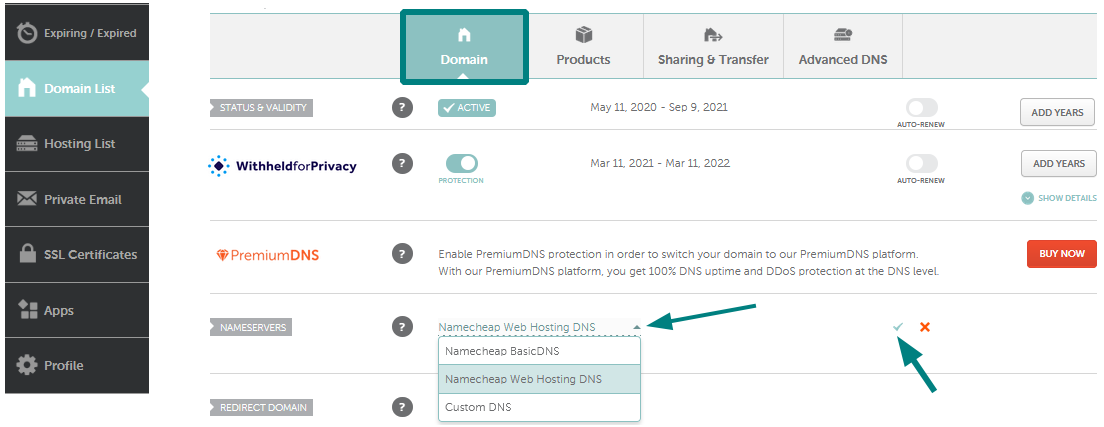
Your hosting provider gives you the nameserver information. Check your welcome email from the provider. It usually contains the details. Another way is to log into your hosting control panel. Look for a section labeled DNS settings or Nameservers. This section shows the information you need.
Log into your domain registrar account. Find the section for DNS settings. Here, you can update the nameservers. Replace the old nameservers with the new ones. The new details come from your hosting provider. Save the changes to update your domain’s settings. The process may take 24 to 48 hours for changes to show. This time is called propagation.

Credit: wegic.ai
Verifying Domain Connection
Establishing a domain connection to web hosting involves updating DNS settings. It’s crucial for your website’s accessibility. Ensure DNS records point accurately to hosting servers for a seamless online presence.
Using Online Tools
Many tools help check if a domain connects right. These tools are easy to use. They show if the domain is linked. Check DNS records with them. This helps find issues quickly. Online tools often show a green checkmark. This means the domain is set up well. If there is a red cross, there might be a problem.
Checking Propagation Status
DNS changes take time. This delay is called propagation. Online tools show propagation status. Some domains update fast. Others take longer. Tools show if changes spread worldwide. Propagation may take up to 48 hours. Check the status often. This ensures everything works fine. Patience is key during this time.
Troubleshooting Common Issues
DNS settings must be correct for your domain to work. Check if the DNS records point to the right server. Wrong records can lead to website errors. Ensure A and CNAME records are set properly. Each part should match the hosting provider’s details. Update records if they are incorrect. Changes may take time to reflect. This delay is known as propagation. Patience is key during this time.
Nameservers link your domain to your host. Ensure they match the host’s nameservers. Mismatched nameservers cause connection issues. Find the right nameservers from your host. Update your domain’s settings with these. Check multiple times to confirm the match. This helps avoid future problems. Double-checking ensures fewer errors.
Securing Your Domain And Hosting
SSL certificates make websites secure. They protect data from hackers. Your domain should have SSL. This keeps visitors safe. SSL certificates are easy to get. Many hosting services offer them for free. They are important for trust. Google prefers secure sites. SSL can help with search ranking. Always check your site’s SSL status.
Domain privacy hides your personal information. Without it, anyone can see your details. Privacy protection is important. It keeps your name and address secret. Many hosts provide this service. It is often an extra cost. But it is worth it. Your privacy matters. It prevents spam and unwanted calls. Choose privacy for peace of mind.
Maintaining Domain And Hosting
Regularly check your DNS settings. This ensures your website stays live. DNS connects your domain to your host. Sometimes settings can change. This might cause your site to go offline. Check settings every month. This helps catch problems early. Fix any errors you find. Use online tools for DNS tests. They make checking easy and fast.
Keep track of your domain’s expiry date. Renew it on time to avoid losing it. Set up reminders for domain renewal. Many people forget and risk losing their domain. Hosting services can also expire. Keep an eye on those dates too. Automatic renewal is a good option. It renews domains and hosting without you worrying. Always check your billing information. Make sure it’s up to date.

Credit: designpowers.com
Frequently Asked Questions
How To Connect Domain Name With Web Hosting?
Update your domain’s DNS settings to point to your web host’s nameservers. Access your domain registrar’s control panel, enter the provided nameservers, and save changes. Wait for DNS propagation, which can take up to 48 hours. Your domain will then be connected to your web hosting.
How Do I Connect My Domain To Web Com?
Log into your Web. com account. Navigate to the “Domain Management” section. Select your domain and click “Connect Domain. ” Follow the on-screen instructions to complete the connection process. Ensure DNS settings are correctly configured. Contact Web. com support if assistance is needed.
How Do I Point My Domain To Another Hosting Provider?
Update your domain’s DNS settings. Log into your domain registrar account. Change the nameservers to those provided by your new hosting provider. Save the changes, then allow 24-48 hours for DNS propagation. Check if your domain redirects to the new host.
Can I Connect My Domain To A Website For Free?
Yes, many website builders allow free domain connection. Platforms like WordPress and Wix offer this feature. Check their plans. You might need to upgrade for advanced features. Ensure your domain provider supports free DNS settings. Always compare options for best results.
Conclusion
Connecting your domain to web hosting is crucial. It’s the final step in launching your website. Follow the steps carefully. You’ll ensure everything works smoothly. Verify your settings. Check if your website loads correctly. This process might seem complex. It becomes easier with practice.
You’ll gain confidence. Soon, you’ll manage domains effortlessly. Remember, patience is key. Be diligent. Your website can now greet the world. It’s exciting. You’re ready to start sharing your content. Enjoy the journey ahead. A well-linked domain is your website’s new home.
It brings your online presence to life.


