
Are you ready to make your mark online? Imagine having a virtual space that’s entirely yours—where you can showcase your passion, your business, or your ideas to the world.
To turn this dream into reality, two key elements must come together: your domain name and your web hosting. But how do you configure them to work seamlessly? This is where many get stuck, and it’s completely understandable. The good news is, you’re about to unlock the secrets to setting up your domain name with your web hosting effortlessly.
Whether you’re launching a personal blog or a business website, knowing how to connect these components is crucial. You don’t need to be a tech genius to get it done. With our guide, you’ll gain the confidence and skills to tackle this task with ease. So, grab a cup of coffee, settle in, and let us walk you through this exciting process step-by-step. Your online presence is just a few clicks away!
Choosing The Right Domain Name
Pick a name that’s easy to remember. A simple name sticks in minds. Avoid complex words. Short names are better. Check if it is unique. It should not match other websites. A unique name stands out. Consider the brand. The name should match the brand. Reflect the purpose of the website. Your domain must be related to your content. It helps in search ranking. Make sure it’s easy to spell. Avoid names that can confuse spelling.
Domain extensions are important. Choose a common extension like .com. It’s popular and trusted. Other options are .net or .org. They work well too. Some extensions show location. Use .uk for UK sites. Pick extensions that match your industry. For tech sites, .io is good. For education, .edu works.

Credit: www.geeksforgeeks.org
Selecting A Web Hosting Provider
There are several types of web hosting. Shared hosting is where websites share a single server. It is usually cheaper and good for small websites. VPS hosting offers more control and is suitable for larger sites. Dedicated hosting gives you a whole server. It is best for big businesses with many visitors. Cloud hosting uses many servers. It is flexible and can handle a lot of traffic. Choose a type that fits your website’s needs.
Look for features like storage space and bandwidth. More storage means more files can be saved. Bandwidth affects how fast your site loads. Security features are also important. Make sure there is SSL support. This keeps user data safe. Check if the provider offers customer support. Help should be available 24/7. This ensures problems get fixed quickly. Ensure the hosting has a good uptime guarantee. This means your site will be online most of the time.
Registering Your Domain Name
Domain registrars help you buy and manage domain names. They are like shops for domains. Popular registrars include GoDaddy, Namecheap, and Bluehost. These registrars have easy-to-use websites. You can search for available domain names there. Choose a name that is easy to remember.
The registration process is simple. First, pick a domain name. Check if it is available. If it is, add it to your cart. Next, provide your contact information. This includes your name and email address. Then, select a registration period. One year is common. Finally, pay for the domain. Most registrars accept credit cards. Once paid, the domain is yours. You can now link it to your web hosting. Enjoy your new online space!
Linking Domain To Web Hosting
Set up your domain with the right DNS settings. DNS stands for Domain Name System. It helps direct your domain to your web host. Access your domain registrar’s dashboard. Look for the DNS settings panel. You will need to update these settings to link your domain correctly. This step is crucial for your website to show up online.
Name servers tell the internet where your site is hosted. Find the name servers your web host provides. They usually look like ns1.example.com. Go to your domain registrar’s site. Enter these name servers under the domain settings. Save your changes. Your domain now points to your web host. This process might take up to 48 hours to work everywhere.
Testing Domain Configuration
Verifying Connection is crucial for domain setup. First, check your domain settings. Ensure the DNS records point to the correct server. Visit a DNS checker site. Enter your domain name there. Look for any errors. If records match, your domain is likely configured well. Next, open a browser. Type your domain in the address bar. See if your website loads correctly. This shows the domain and hosting connection is working.
Troubleshooting Common Issues can be simple. Sometimes, domains don’t connect right. Check if the DNS settings are correct. Mistyped records cause issues. Another problem might be server downtime. Check your hosting provider’s status page. Also, clear your browser cache. This helps in seeing changes quickly. If problems persist, contact your hosting support. They have tools to solve domain issues effectively.
Enhancing Domain Security
SSL certificates keep your website safe. They make sure data is secure. Visitors see a lock icon in the address bar. This means their connection is protected. Without SSL, data could get stolen. It is important to have it. Websites without SSL are not trusted. SSL helps your site rank better. Search engines like secure sites more.
Privacy protection keeps your information safe. It hides your details from others. Without it, anyone can see your contact info. This includes your name and phone number. Bad people might use this to spam you. Privacy protection is like a shield. It protects you from unwanted eyes. It keeps your domain safe and private.
Maintaining Domain And Hosting Setup
Keep track of your domain and hosting renewal dates. Use a calendar reminder. This helps avoid any service disruption. Check for any promotional offers by your provider. It might save you money. Always ensure your payment details are up-to-date. This avoids payment failure issues.
Use tools to check your website’s speed and uptime. Google PageSpeed Insights is a good tool. Faster websites keep visitors happy. Regularly monitor your website traffic. Understand where your visitors come from. This helps in making better decisions. If issues arise, contact your hosting support team quickly. They can help solve problems fast.
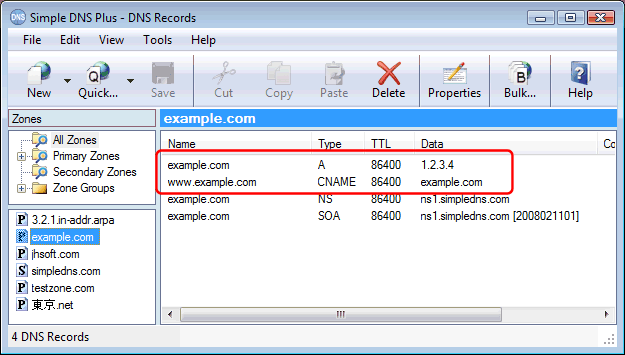
Credit: simpledns.plus
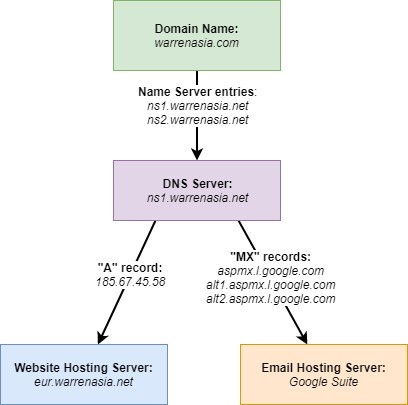
Credit: www.warrenasia.com
Frequently Asked Questions
How To Point A Domain Name To Web Hosting?
Update your domain’s DNS settings to point to your hosting provider’s nameservers. Log into your domain registrar account, locate DNS settings, and replace current nameservers with the ones provided by your host. Save changes and allow 24-48 hours for DNS propagation.
How To Setup Domain And Hosting?
Choose a domain name, then register it with a domain registrar. Purchase hosting from a reputable provider. Update the domain’s DNS settings to point to your hosting server. Use the hosting provider’s control panel to upload and manage website files.
Ensure everything is set up correctly, then launch your website.
How To Configuration A Domain Name?
Configure a domain by accessing your domain registrar’s dashboard. Update DNS settings to point to your web hosting server. Verify the changes through DNS propagation. For email setup, link the domain to your email provider. Ensure all settings are saved and functional for your website and email services.
How Do I Point My Domain To Another Hosting Provider?
Log into your domain registrar account. Locate DNS settings. Change nameservers to those provided by your new hosting. Save changes. Allow propagation time.
Conclusion
Setting up your domain with web hosting is simple. Follow the steps outlined. Choose a reliable hosting provider. Adjust DNS settings carefully. Link your domain and hosting together. Test your website once connected. Ensure everything is working smoothly. Troubleshooting may be needed at times.
Reach out to support if needed. This process enhances your online presence. Remember, practice makes perfect. Familiarize yourself with hosting basics. Keep learning for better results. Your new website will soon be live. Enjoy your journey in the digital world.


