
Are you ready to give your WordPress site a fresh and appealing look? Choosing the right theme can make a world of difference in how visitors perceive your brand and interact with your content.
But with thousands of themes available, how do you decide which one is perfect for your needs? It might feel overwhelming, like searching for a needle in a haystack. Yet, finding the ideal theme doesn’t have to be a daunting task.
In this guide, you’ll discover simple yet powerful tips to help you select a WordPress theme that not only looks great but also aligns with your goals. Imagine the satisfaction of watching your site come alive, perfectly reflecting your vision and engaging your audience. Let’s dive in, and you’ll see how choosing the right theme can be both easy and rewarding.
Importance Of Choosing The Right Theme
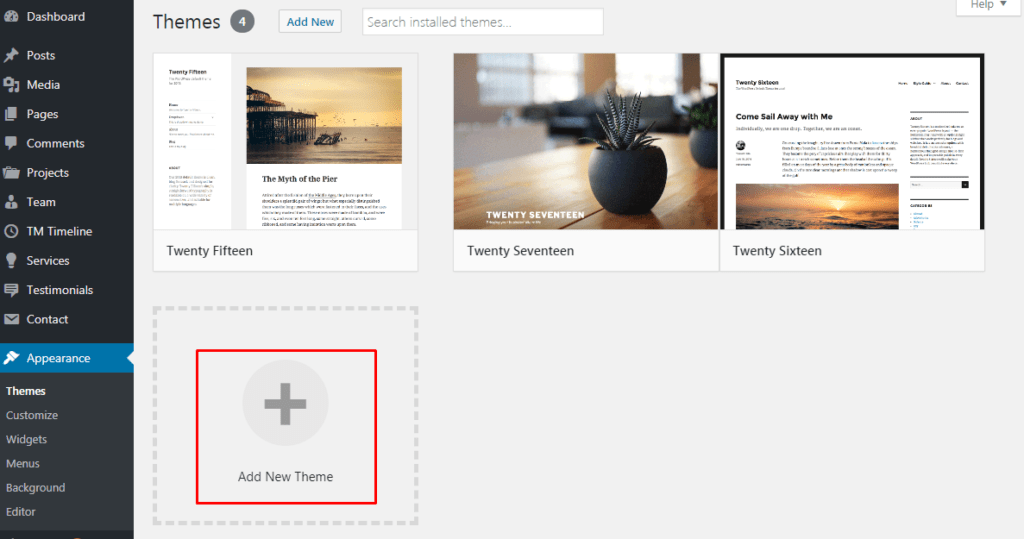
Picking the correct WordPress theme is very important. It affects how your website looks. It also affects how it works. A good theme makes your site look nice. It helps visitors find things easily. A bad theme can make your site slow and messy.
Themes can change how your site feels. Some themes are colorful and fun. Others are plain and simple. A theme should match your site’s purpose. A business site needs a professional theme. A kid’s site might need a playful theme.
Many themes are free. Some cost money. Free themes are good for starters. Paid themes have more features. They can give you extra options. Choosing a theme takes time. It is worth it.
Credit: www.templatemonster.com
Assessing Your Website Needs
Your website needs a clear purpose. Is it for selling products? Sharing stories? Teaching lessons? Setting clear goals helps choose the right theme. A business site needs a professional look. A blog might need something more personal.
Think about who visits your site. Are they kids, teens, or adults? Maybe teachers or parents? Choose a theme that speaks to them. Bright colors might attract kids. Simple designs work for adults. Your theme must fit your audience.
What does your site need to do? Sell items? Share videos? Maybe show a calendar? Themes offer different features. Check if your theme supports what you need. Some themes offer shopping carts. Others help with photo galleries. Choose a theme with the right tools.
Exploring Theme Options
Free themes cost nothing. They offer basic features. Many people use them. Paid themes often have more options. They come with support. Some paid themes have better design and security. Free themes can be limited. Paid themes usually get updates. Choose what fits your budget and needs.
Websites must work on all devices. This is called responsive design. A site should look good on phones and computers. Many themes are built for this. Check if a theme is mobile-friendly. Look at demos. Test on different screens. Responsive design helps more people visit your site.
Customization allows you to change your site. Some themes are easy to customize. Others are not. Look for themes with drag-and-drop tools. These make changes simple. Check for color and font options. The more you can change, the more unique your site becomes. Choose a theme that fits your style.
Credit: www.elegantthemes.com
Evaluating Theme Quality
Fast themes make websites happy. Users like quick loading pages. Speed helps in better search rankings. Choose themes with clean code. Avoid heavy graphics. Lightweight themes work best. Faster themes mean more visitors stay longer.
Good themes help in SEO. They have clean coding. This helps search engines. Themes with SEO tags are better. Use themes with proper headings. They help in better ranking. Make sure URLs are clean too.
Security is very important. Choose themes with regular updates. Updated themes fix bugs. They keep sites safe. Look for themes with SSL support. They keep data secure. Safe themes protect against hackers. Always check theme reviews.
Reading User Reviews
User reviews help you know if a theme is good. Many users share their thoughts online. Positive feedback means people like the theme. Negative feedback shows problems. Read many reviews for a clear picture. Some themes have known issues. Others might be hard to use.
Good themes have active support. Developers fix bugs fast. Regular updates keep themes safe. New features often come with updates. Check if developers respond to user questions. A theme without updates can cause trouble. Choose a theme with a support team ready to help.
Credit: motopress.com
Testing The Theme
Most themes offer demo and preview options. These let you see the theme in action. Click on the demo link. Look at the layout and design. Does it match your needs? Check the colors and fonts. Are they easy to read? See how the theme looks on mobile phones. Many people use phones to browse websites. A good theme looks good on all devices. Spend time checking different demos. This helps in making the right choice.
Some themes have a trial period. This is a short time to test the theme. Download the theme and try it on your site. See how easy it is to use. Make sure all features work well. Check if the theme loads fast. A fast site keeps visitors happy. If you do not like it, you can choose another theme. Trials help you find the best fit.
Ensuring Compatibility
Plugin integration is vital for your WordPress theme. Many plugins enhance website functionality. Not all themes support all plugins. Check theme compatibility with popular plugins. This ensures smooth performance. Avoid themes with limited plugin support. Plugins like WooCommerce need compatible themes. A theme that integrates well saves time. It boosts site efficiency.
Browser compatibility is crucial for user experience. Users access sites through different browsers. Ensure your theme works on all major browsers. This includes Chrome, Firefox, Safari, and Edge. Test your theme on various browsers. Check for display errors or slow loading. A compatible theme reaches more users. It improves site accessibility. All users should have a smooth browsing experience.
Making The Final Decision
Choosing the right WordPress theme can be challenging. Focus on design that matches your site’s purpose. Look for themes that are responsive and customizable. Prioritize themes that load quickly and are easy to use. Ensure they are compatible with popular plugins for added functionality.
Balancing Features And Costs
Choosing a WordPress theme means considering both features and costs. Themes come with different features. Some have customizable layouts. Others offer built-in SEO tools. Consider what your website needs. A theme with many features may cost more. But it could save money in long run. Free themes may lack support. Paid themes often offer updates. Think about your budget. Also, think about how much help you will need. It’s important to find a theme that fits your needs.
Long-term Viability
Some themes look great today. But will they last? Choose a theme updated often. This ensures it works with new WordPress versions. Check the theme’s support team. Are they helpful? Do they respond quickly? A good theme should last many years. It should adapt to future trends. Do some research before choosing. Read reviews from other users. Make sure the theme is from a trusted source. This ensures long-term success for your site.
Frequently Asked Questions
What Should I Consider When Choosing A WordPress Theme?
Consider your website’s purpose, audience, and desired features. Opt for responsive design for mobile users. Check theme compatibility with plugins and ensure it is SEO-friendly. Look for themes that offer customization options and have positive reviews. Prioritize lightweight themes for faster loading times.
How Do I Test A WordPress Theme’s Speed?
Use tools like Google PageSpeed Insights or GTmetrix to test theme speed. Install the theme on a staging site first. Evaluate loading times and performance metrics. Ensure the theme is optimized for speed and doesn’t have excessive scripts. A faster theme enhances user experience and boosts SEO.
Are Free WordPress Themes Reliable?
Free themes can be reliable, but choose wisely. Check if the theme is updated regularly and has good support. Read user reviews and ensure compatibility with recent WordPress versions. Verify that it follows coding standards and is secure. Consider reputable sources for downloading free themes.
How Do I Ensure Theme Compatibility With Plugins?
Check theme documentation for plugin compatibility details. Most themes list compatible plugins. Test the theme with essential plugins on a staging site. Ensure no conflicts arise with popular plugins. Compatibility is crucial for functionality and seamless integration, enhancing user experience.
Conclusion
Choosing the right WordPress theme matters. It sets your site’s tone. Focus on simplicity and responsiveness. Avoid cluttered designs. Prioritize speed and compatibility. Make sure it suits your content. Test the theme’s features. Customize to reflect your style. Check reviews and ratings.
Consider mobile-friendliness. Look for regular updates. Secure themes are crucial. Don’t rush the choice. Take time to explore options. Your theme shapes user experience. It impacts your site’s success. Choose wisely for better results. Enhance your site’s appeal today. With the right theme, your website shines.


