
Are you ever browsing a website and find yourself impressed by its clean design, user-friendly layout, or stunning visuals? If you’re curious about the WordPress theme behind that awe-inspiring look, you’re not alone.
Unveiling the secret of a website’s design can spark creativity and provide direction for your own projects. Imagine the possibilities if you could easily find out the WordPress theme name of any site you admire! This knowledge can be a game-changer for your own website or blog.
In this guide, you’ll discover simple, effective ways to uncover the mystery behind any WordPress theme, satisfying your curiosity and empowering your creativity. Let’s dive into the secrets of web design and unlock the potential of your online presence!
Why Identify A WordPress Theme
Finding a website’s WordPress theme helps many people. It helps web developers and bloggers. They can see what others use on their sites. This can give new ideas for their own website designs. Web designers can get inspiration from these themes. Identifying themes can also help in learning about new features. It helps to know what is popular in the market.
Knowing the theme can also help troubleshoot problems. If a site has an issue, seeing the theme can help find a solution. This is because some problems are theme-specific. Lastly, identifying a theme can help protect your site. It makes sure the theme is safe and updated.

Credit: www.wpbeginner.com
Inspecting The Website’s Source Code
Browser developer tools help find the theme name. They show the website’s source code. Right-click on the page. Choose “Inspect” or “Inspect Element”. A window pops up. It shows HTML and CSS.
Using Browser Developer Tools
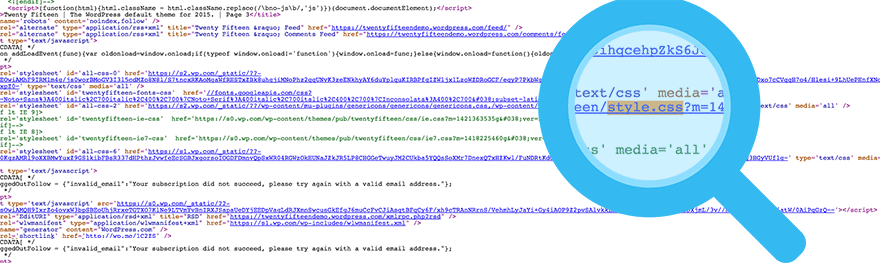
Look for style.css in the code. This file has theme info. Find the wp-content/themes folder. It shows the theme name. Sometimes, it’s in the header section. Check for a comment with the theme name.
Locating Theme Information In Html
The theme name is often in the HTML code. Look for meta tags. They may show theme details. Use CTRL + F to search. Type “theme” or “style”. This finds theme info quickly.
Online Theme Detection Tools
Many free tools help find a WordPress theme name. These tools are easy to use. Just enter a website URL. The tool shows the theme name. Some popular tools include WhatWPThemeIsThat and WPThemeDetector. They are accurate and fast. Most tools work on any website. They provide theme and plugin details. Users find these tools helpful. They save time and effort.
The tools scan the website’s code. They check for theme files. They look for style.css file in the theme folder. This file has the theme name and details. The tools read this information. Then, they display it to the user. This process is quick and simple. Anyone can use these tools. No special skills needed. They are perfect for beginners.
Manual Methods For Theme Identification
Discovering a WordPress theme name involves checking the page source code. Inspecting elements can reveal theme details. Another method is to use online tools that identify themes by scanning the site’s URL.
Checking Css And Javascript Files
Every WordPress theme uses a style.css file. This file holds important theme details. You can find the theme name here. Open your browser and right-click on the page. Select “View Page Source.” Search for style.css in the source code. Click on the link to open it. The file will show the theme name and author. This is one way to identify the theme.
Exploring The Style.css File
Inside the style.css file, you will see a header. This header has theme information. Look for lines that say Theme Name. You may also see Theme URI. These lines tell you the theme’s name and source. The style.css file is a key part of theme identification. It makes finding the theme name easy.
Contacting Website Owner Or Developer
Send an email to the website owner or developer. You can find their contact details on the website. Look for the “Contact Us” page. Use the contact form if available. Be polite and clear in your message. Explain why you want to know the WordPress theme name.
- What is the name of the theme used?
- Is the theme custom-built or purchased?
- Where can I buy or download the theme?
Credit: winningwp.com
Limitations And Challenges
Custom themes can be tricky. They often hide their real name. Developers change the theme name to something new. This can confuse users. They may think it’s a different theme. Some developers also modify theme code. This makes it harder to find the original name. Users then face difficulties in identifying it. It’s like a puzzle. You must piece it together to see the picture.
Sometimes, theme data is hidden or obscured. This makes things even more confusing. Developers do this for various reasons. They might want to protect their work. Or they may not want others to copy it. This adds a layer of mystery. Users have to work harder to see the truth. They need patience and a keen eye.
Tips For Choosing A Similar Theme
Look at the design of the theme. Check if it has a clean layout. A good theme often has easy navigation. Notice the color scheme and fonts. Make sure they suit your brand.
Try to find themes that have similar features. Search on WordPress theme directories. These directories have many options. Compare the themes by their popularity and ratings. Always read user reviews. They help in making the right choice.

Credit: basicwp.com
Frequently Asked Questions
How Can I Identify A WordPress Theme?
You can identify a WordPress theme by inspecting the site’s source code. Right-click on the webpage and select “View Page Source. ” Search for “style. css” or “themes” in the code. The theme name is typically found in a comment at the top of the style.
css file.
Is There A Plugin To Find Theme Names?
Yes, several plugins can help you find a theme name. Tools like “What WordPress Theme Is That? ” Or “Theme Detector” are popular options. These plugins scan the website and provide detailed theme information, including the name and author.
Can I Find A Theme Name Using Online Tools?
Online tools like WPThemeDetector can help identify WordPress themes. Simply enter the website URL, and the tool scans for theme details. It provides the theme name, author, and other relevant information, making it easy to identify the theme used.
Why Is Knowing The Theme Name Important?
Knowing a theme name helps replicate website design or troubleshoot issues. Identifying the theme lets you find documentation and support easily. It’s useful for website customization, ensuring you have the right resources for modifications.
Conclusion
Finding a WordPress theme name is simple with the right steps. Use online tools or check the page source code. This helps you identify the theme quickly. Knowing the theme name can improve your website experience. It also helps in customizing your site effectively.
Remember to explore more about the theme for better usage. A good theme can enhance your site’s look and functionality. Keep learning and experimenting with different themes. Your website’s appearance matters, and themes play a crucial role. Stay curious and keep enhancing your WordPress skills.


