
Imagine this: you’ve just found the perfect WordPress theme that suits your website’s style and functionality. You’re excited to install it and see your vision come to life.
But hold on a second—what if it contains hidden viruses or malware? These threats can compromise your website’s security, jeopardize your data, and even ruin your reputation. You wouldn’t want that, right? That’s why it’s crucial to know how to check a WordPress theme for viruses before you hit that install button.
You’ll discover simple yet effective ways to ensure your theme is safe and secure, giving you peace of mind and safeguarding your online presence. Keep reading to learn how you can protect your site and your visitors from potential cyber threats.
Importance Of Virus-free Themes
Using a virus-free theme is crucial for your website’s health. A theme with a virus can harm your site. It can steal your personal data. Your site might become slow or unresponsive. Visitors may see unwanted ads or pop-ups. Your site could even get banned by search engines.
Keeping your theme clean helps maintain trust with users. A safe theme ensures your site runs smoothly. It protects your site’s reputation. Regular checks for viruses are essential. Always download themes from trusted sources. This reduces the risk of getting a bad theme. A healthy site keeps visitors happy and secure.
Credit: theme4press.com
Common Threats In Themes
Malicious code hides in themes to harm your website. It can steal information. It can slow down your site. It may even crash it. Always scan your theme. Ensure it is from a trusted source.
Hidden links can be dangerous. They redirect users without permission. These links can affect your site’s ranking. They may lead to spam or harmful sites. Check for links in theme files. Remove them if suspicious.
Backdoors allow hackers to enter your site secretly. These can change your website settings. They can add or delete content. They may take control of your site. Use security plugins to detect backdoors. Keep your themes updated.
Choosing Safe Sources
The WordPress Repository is a safe place for themes. All themes here get checked. Experts make sure they are safe. They look for viruses and bad code. This makes it a good choice for downloading themes. Always update themes from this source. Updates keep themes safe and strong.
Trusted developers make good themes. They care about safety. Many people use their themes without problems. Popular developers often have good reviews. Check reviews before downloading. This helps to know if a theme is safe. A theme with many downloads is often a good sign. Trusted developers keep their themes updated. Updates fix problems and remove risks.
Manual Inspection Techniques
Start by downloading the theme files to your computer. Look for any strange or extra files. Common theme files include CSS, JavaScript, and PHP. Extra files might mean a problem. Be careful with files named weirdly. They might hide bad code.
Use a text editor to open PHP files. Look for base64 code. This can hide malicious content. Also, check for eval() functions. These can run harmful code on your site. If you see them, your theme might be unsafe. Always compare your theme with a trusted version.
Using Security Plugins
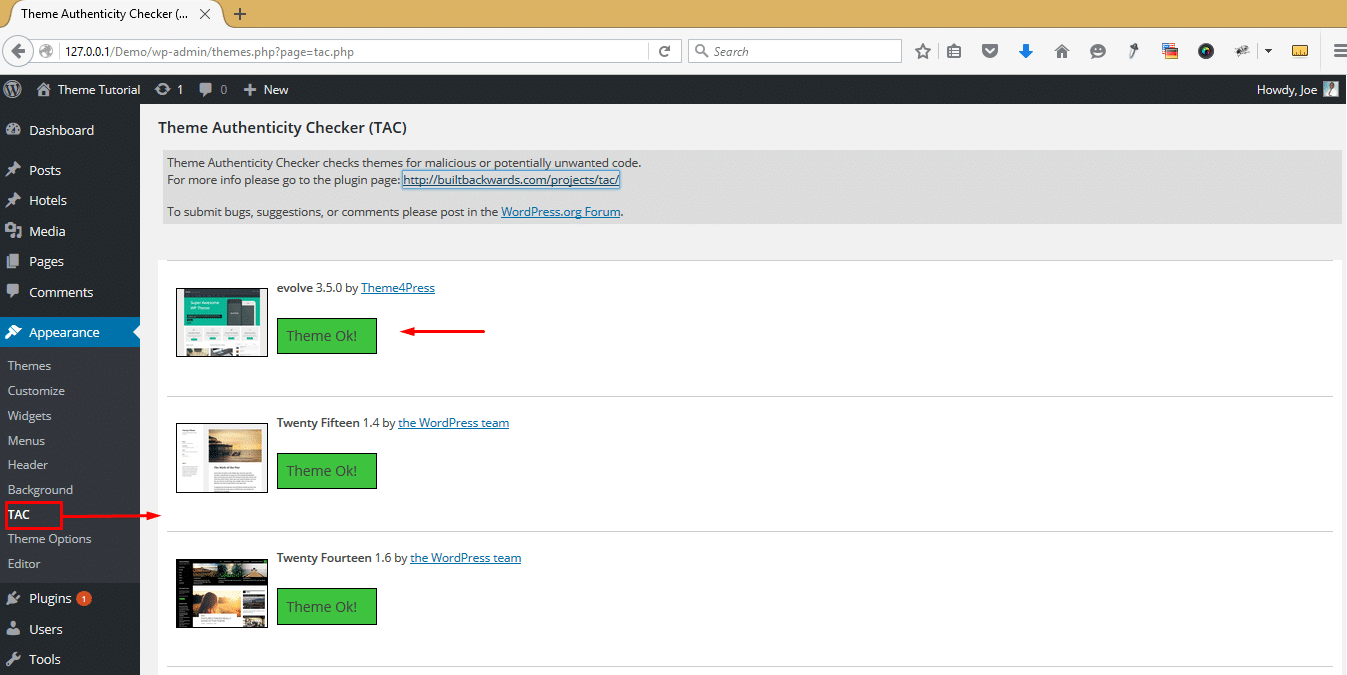
Security plugins are vital for protecting your WordPress site. They scan for viruses and malware. Some popular options include Wordfence, Sucuri, and iThemes Security. Each has its own unique features to keep your site safe.
Wordfence offers a firewall and malware scanner. It checks for known threats. Sucuri provides website monitoring and firewall protection. iThemes Security focuses on login security and file monitoring.
Choose plugins with real-time scanning. This feature alerts you of immediate threats. Look for firewall protection. It blocks unwanted traffic. Ensure the plugin offers automatic updates. Updates keep your site secure. Check for login protection. This prevents unauthorized access. File scanning is essential. It detects infected files.

Credit: www.youtube.com
Online Scanners For Themes
Many websites offer free online tools to check themes. These tools find hidden viruses and malware in themes. Some popular ones include Theme Check, VirusTotal, and Sucuri. Each tool has a simple interface. You can upload the theme file. Then the tool scans it for risks. These tools are free and easy to use. They help keep your site safe.
Using these tools is simple. First, download the theme to your computer. Next, visit the scanner website. Click on the upload button. Choose the theme file you saved. The tool will scan the file. This might take a few minutes. Once done, it shows a report. This report tells if the theme is safe. Always check themes before installing them.
Regular Theme Updates
Ensure your WordPress theme is safe by using a reliable security plugin to scan for viruses. Regular theme updates can help prevent vulnerabilities and maintain security. Always download themes from trusted sources to minimize risks.
Importance Of Updates
Updates are important for safety. They fix bugs and improve security. Themes need updates to stay safe. Updates can also bring new features. They help keep the site fast and reliable. Without updates, the theme can have problems. Problems make the site slow or unsafe. Always check for theme updates. This keeps the site secure and efficient.
Automating Updates
Manual updates can be time-consuming. Automating updates can save time. WordPress allows automatic updates. This makes the process easy. Automatic updates keep the theme current. It helps avoid security risks. Set automatic updates in the theme settings. This ensures the theme always has the latest version. Automatic updates are a smart choice for busy people. They provide peace of mind.
Credit: woorkup.com
Backup And Recovery Plans
Creating backups is very important. It keeps your website safe. Use tools like UpdraftPlus. They help you make backups easily. Backups save your data. If something goes wrong, you won’t lose your work.
It’s smart to make backups often. Do this weekly or daily. Choose a safe place to store them. Cloud storage is a good option. It keeps your backups safe from viruses. Backups are your safety net.
Problems can happen. Restoring from backups is the solution. Use your backup tool to restore. Follow simple steps. Your site returns to normal quickly. Restoring is easy with the right tools.
Keep your backup tools updated. This ensures smooth recovery. Always check your backups. Make sure they work. Peace of mind comes from knowing your site can be fixed.
Frequently Asked Questions
How Do I Scan My WordPress Theme For Malware?
To scan your WordPress theme for malware, use a security plugin like Wordfence or Sucuri. These plugins offer automated scans and alerts for suspicious files. Regularly update themes and plugins to minimize vulnerabilities. Always download themes from reputable sources to reduce the risk of malware infection.
Are Free WordPress Themes Safe From Viruses?
Free WordPress themes can be safe if downloaded from trusted sources like WordPress. org. Avoid downloading from unknown websites, as they might include malicious code. Always check reviews and ratings before installing a theme. Use a security plugin to scan for potential threats after installation.
Can A WordPress Theme Affect Site Security?
Yes, a poorly coded or outdated WordPress theme can affect site security. Vulnerabilities in themes can be exploited by hackers. Regularly update your theme to the latest version. Choose themes from reputable developers and perform regular security scans to ensure your site remains secure.
How To Update WordPress Themes Safely?
To update WordPress themes safely, back up your site first. Use the WordPress dashboard to perform theme updates. Ensure compatibility with plugins and other site elements. Regular updates help fix security vulnerabilities and improve functionality. Always download updates from official sources.
Conclusion
Detecting viruses in your WordPress theme is crucial. Start with reliable tools. Scan regularly for threats. Keep your theme updated. Choose themes from trusted sources. Check user reviews. Avoid themes with negative feedback. Regular maintenance protects your site. Security is a continuous effort.
Stay informed about new threats. Make backups frequently. They save your content from unexpected issues. A secure theme ensures better site performance. Keep your visitors safe. Your efforts build trust. A secure website attracts more users. Protect your digital space diligently.
Your site deserves the best care.


