
Struggling to figure out the details of your web hosting? You’re not alone.
Understanding the ins and outs of your hosting setup can feel like deciphering a secret code. But it’s crucial for maintaining your website’s performance, security, and reliability. Imagine having the peace of mind knowing exactly where your website stands, and how you can make informed decisions to enhance it.
In this guide, we’ll unravel the mystery of checking your web hosting details, empowering you with the knowledge to keep your site running smoothly. Dive in to transform your hosting experience from confusing to crystal clear.

Credit: www.temok.com
Choosing The Right Tools
Many websites offer free tools to check hosting. These tools are easy to use. Type the website URL and click submit. The tool shows hosting details fast. You see the hosting provider’s name and server location. Some tools also show the website’s IP address. Always choose a reliable tool. A good tool gives accurate results.
Tech-savvy users prefer command line utilities. Commands like “ping” and “tracert” help find hosting info. These commands run in the terminal. Ping shows if a server is reachable. Tracert shows the path data takes to the server. Both commands work on Windows, Mac, and Linux. Results are quick and useful for troubleshooting.
Browser extensions make checking easy. Install an extension on Chrome or Firefox. These tools show hosting info with one click. Extensions can show server location and IP address. They work fast and save time. Choose trusted extensions to ensure safety and accuracy.

Credit: www.youtube.com
Identifying Hosting Provider
WHOIS helps find out who hosts a website. Simply enter the domain name. Results show hosting provider and contact details. This tool is very helpful. It gives quick answers. Easy to use and understand.
DNS records tell where a site is hosted. Use online tools to check them. They show IP addresses and nameservers. These details help identify the host. DNS records are like a map. They guide you to the host.
Many websites list their hosting in the footer. Look for the hosting provider’s name. Sometimes, the footer has links. These links might lead to hosting details. Check carefully. Not all sites show this info. But many do.
Analyzing Server Information
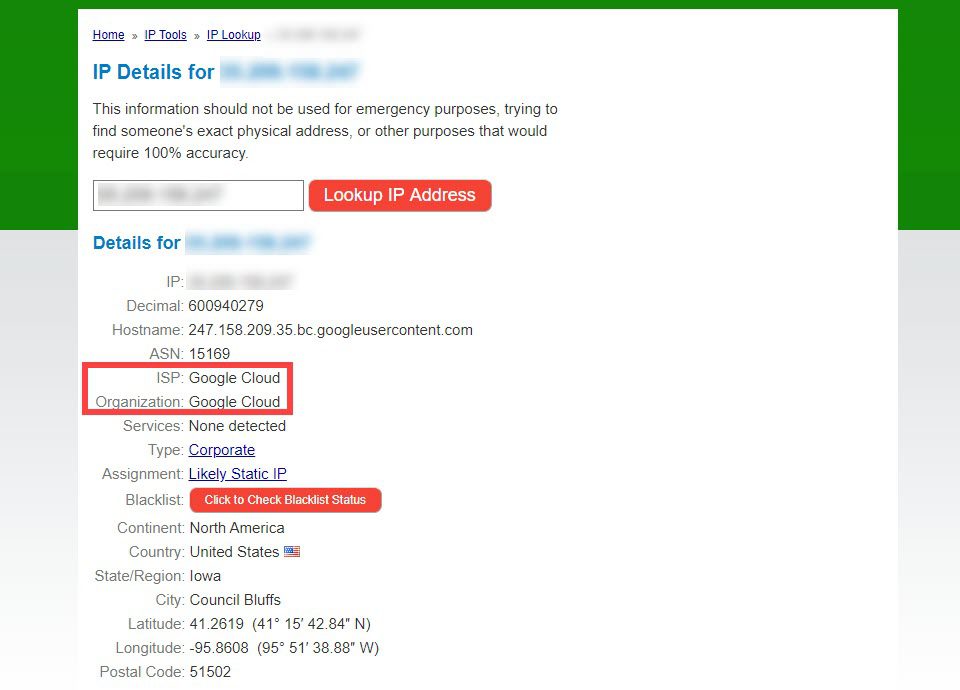
Every server has a unique IP address. This is a set of numbers. It looks like 192.168.1.1. With this, you can find where the server is. Use a tool to check the IP address. You can easily find these tools online. They are free to use. Just enter the website’s name. The tool will show you the IP address.
Finding the server’s location is important. It helps you know where your data is stored. The location can affect website speed. A server closer to you is faster. Use a location tool to find this info. Enter the IP address. The tool shows the server’s city and country. Easy and quick.
Websites need an SSL certificate for safety. It protects data from hackers. Check if a website has an SSL. Look for a padlock icon in the browser. This means the site is secure. You can also use online tools. Enter the website name. The tool shows SSL details. Simple and helpful.
Understanding Hosting Plans
Shared hosting means sharing a server with others. It’s cheaper but slower. Good for small websites. Dedicated hosting gives you a whole server. It’s faster and safer. Cost is high, but performance is better. Choose shared for budget and dedicated for speed.
Cloud hosting uses many servers. It helps if one server fails. You pay for what you use. It’s flexible. Great for growing websites. Scalability is a key feature. Costs depend on usage. Security can be a concern. Choose cloud for flexibility.
VPS hosting is like shared but better. It gives you more control. Virtual Private Server means you get a slice of a server. It’s affordable like shared, but more powerful. You can install software. Good for medium websites. It’s not as strong as dedicated, but still good.
Evaluating Performance Metrics
Uptime is the time a server stays online. This is very important. Look for hosts with over 99.9% uptime. Less downtime means more reliable websites. Check uptime statistics regularly. These numbers tell you if the host is good.
A fast website is important. It keeps visitors happy. Use speed test tools to check load times. Good hosts have fast servers. Fast servers help pages load quickly. Look for low load times. This ensures smooth browsing for users.
Resources include CPU, RAM, and storage. These help run your website. Check what resources your host offers. More resources usually mean better performance. Know your needs. This helps in choosing the right plan. Balance cost and resource needs wisely.
Checking Security Features
Firewalls are like strong walls for websites. They block bad traffic. This helps keep your site safe from hackers. Always check if your hosting offers a good firewall. Good firewalls protect your site day and night.
Websites can get too much traffic at once. This is a DDoS attack. It can slow down or crash your site. Hosts with DDoS mitigation tools help stop this. These tools keep your site running smoothly.
Backups save your website information. Always ask if your host offers regular backups. They help recover data after problems. Good hosts offer daily or weekly backups. This keeps your site safe and secure.
Reviewing Customer Support
Support Channels are vital for hosting help. Many companies offer live chat. Email is also common. Some have phone support. Check these options. Choose what suits you best.
Response Time Analysis matters a lot. Quick replies save time. Many hosts promise fast responses. Check if they keep this promise. Compare different hosts. Look for average response times. Faster is better.
User Reviews tell the real story. Read what others say. Reviews show how support works. Look for good and bad comments. Trustworthy reviews help make choices. They show the truth about support.
Credit: www.asktheegghead.com
Frequently Asked Questions
How Do I Find Out What Service Is Hosting My Website?
Use a WHOIS lookup tool to identify your website’s hosting service. It provides server details and registrar information.
How To Find Out What Platform A Website Is Hosted On?
Use online tools like BuiltWith or Netcraft to identify hosting platforms. Check WHOIS records for hosting details. Inspect website source code for clues. Analyze server headers using browser developer tools.
How To Check Website Details Information?
Use online tools like WHOIS, SEMrush, or Ahrefs. Enter the website URL to access detailed information, including domain registration, hosting, SEO metrics, and traffic data. These tools provide comprehensive insights for analyzing website performance and ownership.
How Do I Check My Hosting Plan?
Log into your hosting provider’s dashboard. Navigate to ‘Account’ or ‘Services’. Check ‘My Hosting Plan’ for details. Contact support for assistance if needed.
Conclusion
Checking web hosting details is essential for your website’s success. Knowing these details helps in managing your site effectively. You can find hosting information easily using online tools. They provide insights into server location and performance. Understanding this data ensures your website runs smoothly.
Regular checks prevent unexpected issues. Stay informed to maintain your site’s health. This knowledge empowers you to make better decisions. Simplify web hosting management with these steps. Embrace the process and enhance your site’s reliability. Keep exploring to grow your understanding and confidence.
Your site deserves the best care and attention.


