
Ever stumbled upon a website and wondered who’s behind its smooth performance? Knowing the web host of a website can be incredibly useful, whether you’re hunting for a reliable hosting service for your own site or just satisfying your curiosity.
You might be thinking, “Why does this even matter? ” Well, the right web host can make all the difference in website speed, security, and uptime. Imagine finally discovering the secret sauce behind your favorite sites and applying it to your own.
This guide is crafted just for you, making the process of identifying a web host as simple as pie. Dive in and uncover the tools and tricks that will empower you to check the web host of any website effortlessly. Your journey to becoming a web-savvy detective starts here!
Why Identify A Website’s Web Host
Knowing a website’s web host can be very helpful. It helps in finding out who supports the website. This can be useful for technical support or troubleshooting. Sometimes, it helps in comparing hosting services. You might want to use a similar service. It also helps in website security checks. If the host is known for security issues, you can be cautious. It can also be helpful for business opportunities. You might want to collaborate with the host.
It is important for SEO purposes too. Some hosts are better for site speed which is good for SEO. Also, it lets you understand how reliable the website might be. A good host often means a more reliable site. This knowledge is simple yet powerful.
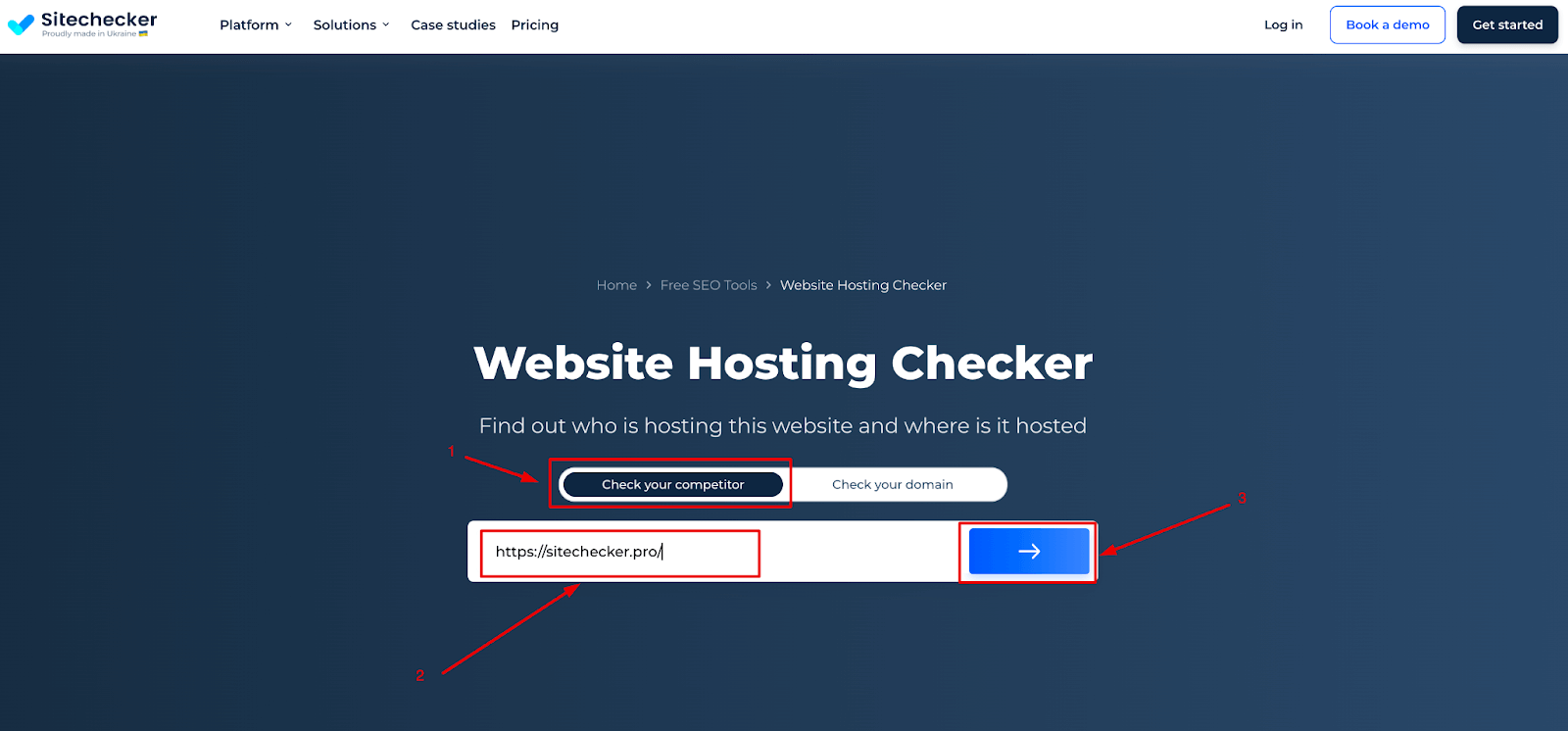
Credit: sitechecker.pro
Basic Tools For Host Identification
Finding a website’s host can be easy. Online services help with this. These tools are simple. Whois is a popular choice. Type the website’s name. See the host info quickly. Another tool is HostingChecker. This tool is fast and clear. It shows the host’s details. Site24x7 is also helpful. It offers extra info like server location.
These tools are useful for checking hosts. HostAdvice gives detailed reports. It is user-friendly. YouGetSignal is another option. It provides host data. DomainTools is trusted by many. It shows host details and more. Such tools make host checks easy. No need to be tech-savvy. Just enter the domain name. Get the info you need.
Inspecting Domain Information
WHOIS is a tool that shows domain details. It tells who owns a domain. It also shows the domain registrar and contact info. Use WHOIS for checking website hosts. It is very easy and fast. Just enter the domain name in a WHOIS tool. You will see a lot of data. This data includes the domain’s registration date and expiry date. You can also find the hosting company’s name. This helps you know more about the website. Everyone can use WHOIS. It is open to the public.
The domain registrar is the company where the domain is registered. They keep all the records. They manage the domain name system. Knowing the registrar helps in understanding the website’s origins. It can also tell about the website’s credibility. Some registrars are well-known and trusted. Information from a registrar can help in website investigations. This is useful for many users. Make sure to look for reliable registrars. It is important for domain safety.

Credit: hostingchecker.com
Analyzing Website Source Code
HTTP headers show details about a website. They can reveal the web host. Use browser tools to check these headers. Right-click on a page and select “Inspect”. Look for the “Network” tab. Refresh the page. Notice the “Headers” section. Find the “Server” line. It often lists the web host. Simple and quick.
Meta tags are hidden bits of info on a page. They can also show the web host. Right-click a webpage and select “View Page Source”. Look for the meta tags near the top. Check if any tag mentions the hosting provider. Sometimes it’s there. Not always, but worth checking. Easy to do. No special tools needed.
Utilizing Command Line Tools
Use Traceroute to see the path data takes to reach a website. Open the command line on your computer. Type traceroute followed by the website name. Hit enter. You will see hops through servers. Each hop shows a server on the path. IP addresses tell you where servers are. This helps in knowing the web host.
Use Ping to check if a website is reachable. Open your command line tool. Type ping and then the website’s name. Press enter. The tool sends small data packets. It returns the IP address of the website’s server. This IP address helps identify the web host. Ping shows how fast data travels. Fast replies mean quick connections.
Engaging With Web Hosting Communities
Many people talk in web hosting forums. They share their ideas and help others. You can find answers to many questions here. It’s a great place to learn. Ask questions if you are stuck. People are friendly and will help you. Always be polite and thank them.
Social media has groups for web hosting. Join these groups to learn. People post about their experiences. You can see real-life examples. It’s easy to connect with others. Share your thoughts too. Everyone helps each other. It’s a friendly space for all.
Advanced Techniques For Expert Users
Discovering a website’s web host can be simple. Tools like WHOIS and web hosting checkers reveal hosting details quickly. Knowing the host aids in understanding site performance and reliability.
Reverse Ip Lookup
Reverse IP Lookup helps find other sites on the same server. This is important to know if a server hosts many websites. You can use online tools for this lookup. They display a list of websites sharing the IP address. Some popular tools include DomainTools and MXToolbox. These tools are usually free to use. You just need the website’s IP address to start. Be careful with the information you find. Not all sites will show up.
Dns Record Analysis
DNS records hold key details about a website. They show the domain name, IP address, and mail servers. Tools like Whois and Dig help analyze these records. They can reveal the web host name. The DNS record called ‘NS’ is crucial. It often points to the hosting provider. Checking the ‘A’ record shows the direct IP address. This helps understand more about the hosting.
Common Challenges And Solutions
Discovering a website’s web host can be tricky. Many face issues like hidden server details. Tools like WHOIS and online lookup services offer solutions, simplifying the process.
Privacy Protection By Hosts
Many hosts offer privacy protection. This hides owner info. It’s good for privacy. But it makes finding the host harder. You might need to contact them directly. Some hosts charge for privacy. Check if it’s free or paid. Privacy can prevent spam and scams. It’s a useful feature.
Limitations Of Free Tools
Free tools can help find hosts. They are easy to use. But they have limits. Some details might be missing. Free tools often show basic info. They may not show all data. Paid tools offer more. They give detailed host info. Free tools are good for quick checks. But they are not always complete.
Tips For Accurate Host Identification
Find the website’s IP address first. Use tools like Whois or DNS Lookup. These help you see the host’s name. Look for the hosting provider’s name in the results. Sometimes, this might be tricky. Use another tool if unsure. Check the website’s footer or contact page. Many sites mention their host here. This is an easy way to know.
Explore the website’s source code. Right-click and select “view source”. Look for clues about the host. You might see a hosting company mentioned. Always double-check your findings. This ensures you have the correct info.
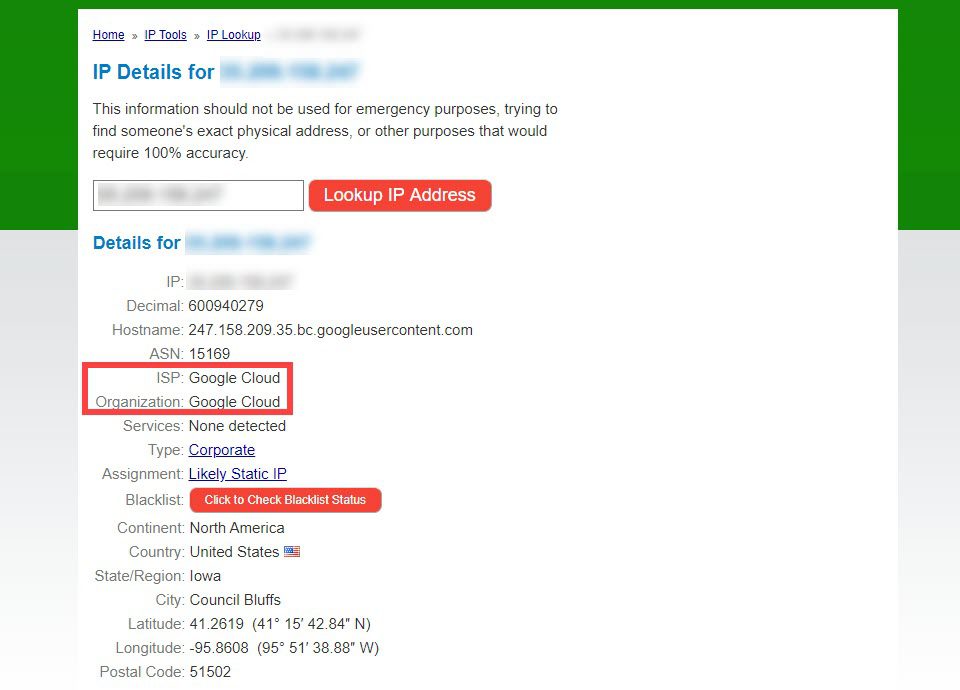
Credit: www.elegantthemes.com
Frequently Asked Questions
How Do I Find The Host Of A Website?
Use WHOIS tools to identify a website’s host. Enter the domain name to view hosting information.
How Do I Know The Web Server Of A Website?
Use online tools like “WhatWeb” or “Netcraft” to identify a website’s server. Access the website, enter the URL, and check the server details. Browser extensions like “Wappalyzer” can also reveal server information.
How Do I Check The Hosting Of A Website?
Use online tools like “Whois” or “Hosting Checker” to find website hosting information. Enter the website URL, and these tools will display the hosting provider details. Alternatively, check the website’s DNS records for hosting details.
How To Find Out What Platform A Website Is Hosted On?
Use online tools like BuiltWith or Wappalyzer to check a website’s hosting platform. Inspect the website’s source code for clues. Analyze DNS records using tools like MXToolbox. These methods help identify the hosting provider.
Conclusion
Checking a website’s web host is simple and useful. Knowing the host helps you understand website performance. Use online tools for quick results. These tools give you details about hosting services. This information can guide your choices for website management.
Regular checks ensure your site runs smoothly. Stay informed to maintain a reliable website. By knowing your web host, you can optimize your site better. This knowledge supports your digital goals effectively. Keep learning and exploring to enhance your online presence.
A small step towards better website management.


