
Are you curious about where your website calls home on the internet? Understanding how to check your domain web hosting is crucial for managing your online presence effectively.
Whether you’re a seasoned webmaster or just starting out, knowing the ins and outs of your domain hosting can empower you to make informed decisions that enhance your site’s performance and security. Imagine having the confidence to troubleshoot issues swiftly or even switch providers with ease.
In this guide, we’ll walk you through the simple steps to identify and evaluate your web hosting setup. You’ll uncover the secrets behind your domain’s digital residence, ensuring you have the upper hand in optimizing your website’s potential. Stay with us, and by the end of this article, you’ll have the knowledge you need to keep your website running smoothly and efficiently. Let’s dive in and unlock the power of your domain web hosting.
Credit: sitechecker.pro
Importance Of Web Hosting
Web hosting is crucial for your website. It makes your site accessible online. Without hosting, your site can’t be seen. Hosting affects speed and security. A good host keeps your site safe. It also ensures fast loading times. Bad hosting can slow your site down. It can make your site vulnerable to hacks.
Choosing the right hosting is important. Look for reliability and good support. The host should offer 24/7 help. This is vital when problems arise. Uptime is another key factor. Good hosts offer 99% uptime or more. This keeps your site online. Check the host’s reputation before deciding. Read reviews and compare features.

Credit: hostingchecker.com
Types Of Web Hosting
Shared hosting is like sharing a room with friends. Many websites live on one server. This makes it cheap. Perfect for small websites. But if one site gets busy, others might slow. It’s simple to use. No tech skills needed. Just like living in a shared house, you share resources.
VPS stands for Virtual Private Server. It’s like having your own room in a big house. You have more control and privacy. Costs are higher than shared hosting. Suitable for growing sites. You get your own space. But you still share the building.
Dedicated hosting is having a whole house to yourself. Full control and resources. Best for big websites. It’s more expensive. You need tech skills to manage it. No sharing with others. Everything is yours alone.
Cloud hosting is using a lot of servers together. It’s like living in a hotel. If one room is full, you get another. Flexible and reliable. Good for busy websites. Pay only for what you use. It grows with your needs. Like using many rooms as needed.
Choosing The Right Hosting Provider
Price is important. You need a hosting you can afford. Look for good support. Support should be available 24/7. Check the uptime. Uptime should be more than 99%. Speed matters. Fast hosts are better for your site. Security is key. Ensure they have security features. Consider the storage and bandwidth too. It should match your needs. Look for user-friendly control panels. This makes managing easy. Finally, check reviews and ratings. They help you choose wisely.
| Hosting Provider | Price Range | Key Features |
|---|---|---|
| Bluehost | $2.95 – $13.95/month | Free domain, 24/7 support |
| HostGator | $2.75 – $5.95/month | 99.9% uptime, easy control panel |
| SiteGround | $3.99 – $10.69/month | High speed, great security |
Checking Current Domain Hosting
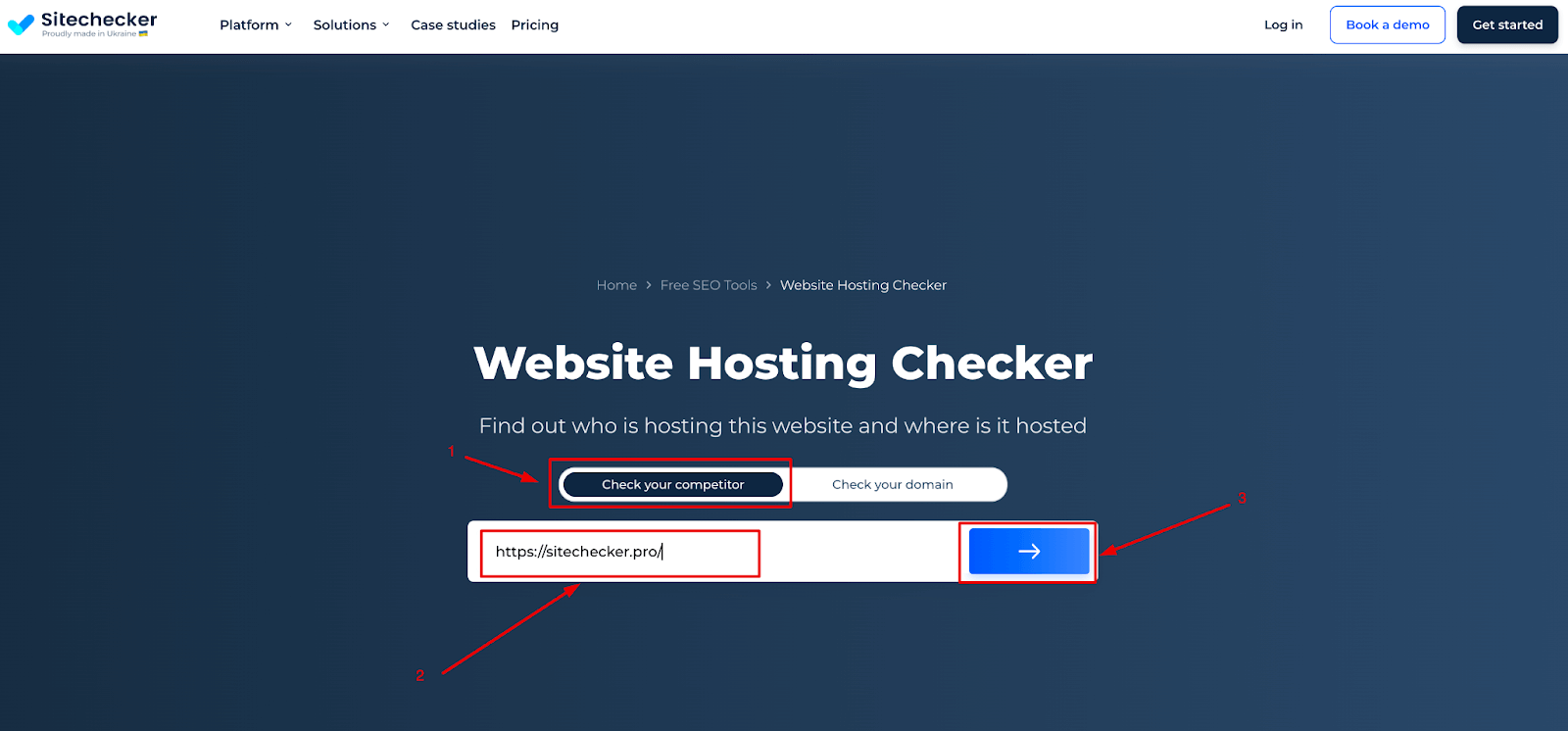
Online tools can help find your domain host. Many are free and easy to use. Simply enter your domain name. The tool will show your host details. Popular tools include WhoIs and Hosting Checker. These tools are fast and accurate. You can learn your hosting provider quickly.
You can also check hosting manually. Open the command prompt on your computer. Type nslookup followed by your domain name. This will show the IP address. Check this IP in a web browser. It may lead to your hosting company. Another way is to look at your domain’s DNS settings. This can show hosting details as well.
Evaluating Hosting Performance
Hosting uptime is very important. Uptime shows how often a site is online. Good hosts have at least 99.9% uptime. This means your site is almost always available. Downtime can hurt your site’s reputation. It can also make visitors unhappy. Reliable hosting keeps your site safe and accessible. Check reviews to find out about host reliability. A reliable host will have good feedback from users.
Site speed is crucial for visitors. Fast loading pages make users happy. Many people leave slow sites quickly. Check the host’s speed performance. Good hosts use fast servers to improve load times. You can test speed using online tools. These tools show how fast your site loads. Fast sites rank better in search engines. Choose a host that provides quick loading times. A speedy site is good for everyone.

Credit: hostarmada.com
Security Features In Hosting
SSL Certificates keep your data safe. They encrypt the information. This stops hackers from seeing it. Websites with SSL have a lock icon. This icon appears in the browser bar. It shows the site is secure. People feel safer with SSL. They trust websites more.
Backup Solutions save your website’s data. If data is lost, backups help. They restore everything quickly. Backups run daily or weekly. This keeps information up to date. Many hosting services offer this. It is a key feature to have.
DDoS Protection stops bad traffic from crashing sites. It keeps websites online. This is important for all sites. Protection tools filter unwanted traffic. This helps your site stay fast and safe. Hosting companies include this in their plans.
Cost Considerations
Choosing a web hosting service is important. Many options are budget-friendly. Shared hosting is a popular choice. It costs less and works for small websites. Look for discounts on hosting plans. Some providers offer special deals for new users. Many services have a free trial. This helps you test before buying. Always read reviews from other users. They share real experiences and help you decide.
Some hosting services have hidden fees. These can surprise you later. Setup fees are one example. They are not always shown at first. Renewal costs might be higher after the first year. This is common with low starting prices. Extra fees could be for backups or security. Always check the terms before you pay. Ask questions if you do not understand. Knowing about these fees helps you plan better.
Migrating To A New Host
Start with a clear plan. Write down steps. This helps stay organized. Backup your website files. Very important. Choose the right time to migrate. Avoid busy days. Keep visitors happy. Avoid downtime at all costs. Use a testing site. Check everything works. Fix issues early. Important to check new host’s features. Match them with your needs. Transfer data carefully. Use secure methods. Keep data safe. Tell users about the change. They should know when it happens. Clear communication helps. Hire experts if needed. They make migration smoother. Monitor your site after moving. Watch for errors. This helps fix problems fast. Remember, planning is key.
Frequently Asked Questions
How To Check Hosting Of A Domain?
Use online tools like “Whois” or “Hosting Checker” to find a domain’s hosting provider. Enter the domain name, and the tool displays hosting details. You can also check DNS records through your domain registrar. This helps identify the hosting company quickly and easily.
How To Find Out What Platform A Website Is Hosted On?
Use tools like BuiltWith or Wappalyzer to identify the hosting platform of a website. Inspect the site’s source code for clues. Check the WHOIS database for hosting information. Analyze website headers using browser developer tools. These methods help determine the hosting provider efficiently.
How Do I Find My Dns Hosting Provider?
Check your domain’s WHOIS information for DNS hosting provider details. Use online WHOIS lookup tools for quick access. Alternatively, view your domain registrar account settings to identify the DNS host. Contact customer support for assistance if needed.
How Do I Find My Hosting Account?
Log into your hosting provider’s website. Check account section or dashboard for hosting account details. Use account recovery options if needed. Contact support for assistance in locating your account information.
Conclusion
Checking your domain web hosting is simple and essential. It ensures your site runs smoothly. Use online tools for quick checks. Verify server speed, uptime, and security. Regular monitoring prevents issues and downtime. It also helps maintain your website’s performance.
A reliable host boosts user experience. Don’t ignore potential red flags. Stay informed and proactive. This way, your website remains accessible and efficient. Remember, a well-hosted site attracts more visitors. Keep your digital presence strong by choosing wisely. Stay vigilant, and make informed decisions.
Your website deserves the best care and attention.


