
Changing your web domain hosting might seem like a daunting task, but it doesn’t have to be. You’ve put a lot of effort into building your website, and the thought of moving it can be intimidating.
However, the benefits of choosing the right host can significantly enhance your website’s performance and security. Imagine faster load times, improved customer support, and more robust security features. These are just a few advantages you could enjoy with a better hosting service.
In this guide, you’ll discover simple steps to smoothly transition your web domain hosting without losing any data or affecting your website’s uptime. You’ll learn the common pitfalls to avoid and get tips to ensure a seamless experience. By the end of this article, you’ll feel empowered and ready to take control of your website’s future. Let’s dive in and explore how you can make this change effortlessly and confidently.
Choosing A New Hosting Provider
Choose hosting based on your website’s size and traffic. Large sites need more resources. Small sites need less. Consider storage and bandwidth. Think about your site’s growth. Future needs matter too. Security is important. Ensure your site is safe. Backup options are crucial. Look for reliable services. Support availability is key. Quick help can solve issues. Cost is a factor. Balance price with features.
Compare different hosting plans carefully. Look at the features offered. Check the storage limits. Bandwidth is important too. Some plans offer unlimited resources. Others have limits. Look for free domain registration. Check for SSL certificates. Email hosting is a useful feature. Consider the control panel options. User-friendly interfaces are better. Look for automated backups. Compare prices for each plan. Understand what each plan offers.
Customer reviews give insights. Read about others’ experiences. Look for consistent feedback. Positive reviews are a good sign. Negative reviews can be warning signs. Check the support reviews. Prompt support is essential. Reliability is key in hosting. Downtime reviews matter. Frequent downtime is a problem. Compare reviews on different sites. Trustworthy reviews are valuable. Verified reviews are more reliable.
Backing Up Your Website
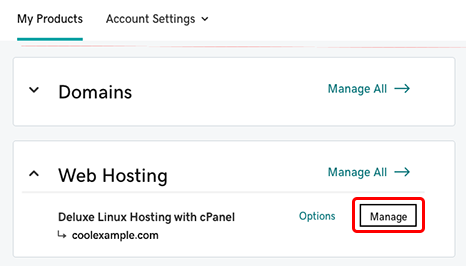
Backing up your website is crucial. cPanel makes it easy. Log in to your cPanel account. Find the Backup Wizard option. Click it. Follow the steps shown. It guides you. Save your files safely. Keep them for future use.
You can also back up manually. Use FTP to download files. Save them on your computer. Don’t forget the database. Export it from phpMyAdmin. Keep these backups in a safe place. They protect your work.
Always store backups safely. Use cloud storage like Google Drive. Or try external hard drives. Keep them away from harm. Regular backups help if things go wrong. Stay prepared. Protect your website.
Migrating Website Files
FTP is a tool that moves files. It works like a bridge. Connect to your old host with FTP. Then download all your files. Next, connect to your new host. Upload the files there. Be sure you get every file. Skipping files can break your website. Double-check each folder and file.
Databases hold important data. Use a tool like phpMyAdmin. Export your database from the old host. Save it as a file. Open phpMyAdmin on the new host. Import the saved file there. Make sure the import goes well. Missing data can cause errors. Check every table and entry.
Email accounts need careful moving. First, create the same email accounts on the new host. This keeps your emails safe. Then, copy email settings from the old host. Set them up on the new host. Test each account by sending a mail. Check if everything works fine. Email is important. Don’t lose it.
Credit: www.godaddy.com
Updating Dns Settings
First, log into your domain registrar account. Find the section called “DNS Settings” or “DNS Management”. Here, you can see all your current DNS records. It’s important to know what these records do. They help direct your web traffic to the right place.
Nameservers are like address books for the internet. To change them, look for the “Nameservers” section in your DNS settings. You might see two or more nameserver entries. Replace these with the new ones given by your hosting provider. Save the changes after updating.
DNS changes take time to update. This is called propagation. It can take up to 48 hours. During this time, your website might not work everywhere. Be patient and check your site after some hours. It should be accessible soon.
Testing The Website Post-migration
The website must work properly after migration. Test every button and link. Ensure pages load quickly and correctly. Look for any missing images or content. Make sure forms are working. Users should not face any errors.
Check all database connections are intact. Data must be accessible. Ensure login and user data are working fine. Test data fetching and storage. Confirm the database is not corrupted. Use tools to check database integrity.
Emails should send and receive properly. Test contact forms and newsletters. Email notifications must work as expected. Verify email settings in the admin panel. Ensure SMTP configurations are correct.

Credit: www.accuwebhosting.com
Troubleshooting Common Issues
Domain propagation takes time. Usually, it takes up to 48 hours. Sometimes, it may be faster. Clear your browser cache to see changes. Restart your router. This can help too. Check DNS settings with your domain host. Ensure they are correct. Patience is key during this time.
Broken links frustrate users. Use online tools to find broken links. Fix them quickly. Update old URLs if needed. Redirect them to the new page. Check internal links on your site. Ensure they work. This keeps visitors happy.
Database errors can happen. Check your database connection settings. Ensure they are correct. Backup your database regularly. This helps prevent data loss. Repair the database if needed. Many hosting services offer this option. Ask for support if you need help.
Finalizing The Transition
Ensure all files and databases are backed up. Inform your current hosting provider of your departure. Cancel the service to stop future billing. Double-check for any pending charges. Confirm the cancellation with an email receipt.
Use analytics tools to watch website speed. Check for broken links. Ensure pages load correctly. Keep an eye on visitor numbers. Look for unusual activity or slowdowns.
- Update plugins and themes monthly.
- Check site security settings.
- Backup site regularly.
- Monitor traffic and performance.
- Keep software up to date.
Credit: www.liquidweb.com
Frequently Asked Questions
How Do I Change The Hosting Of A Domain?
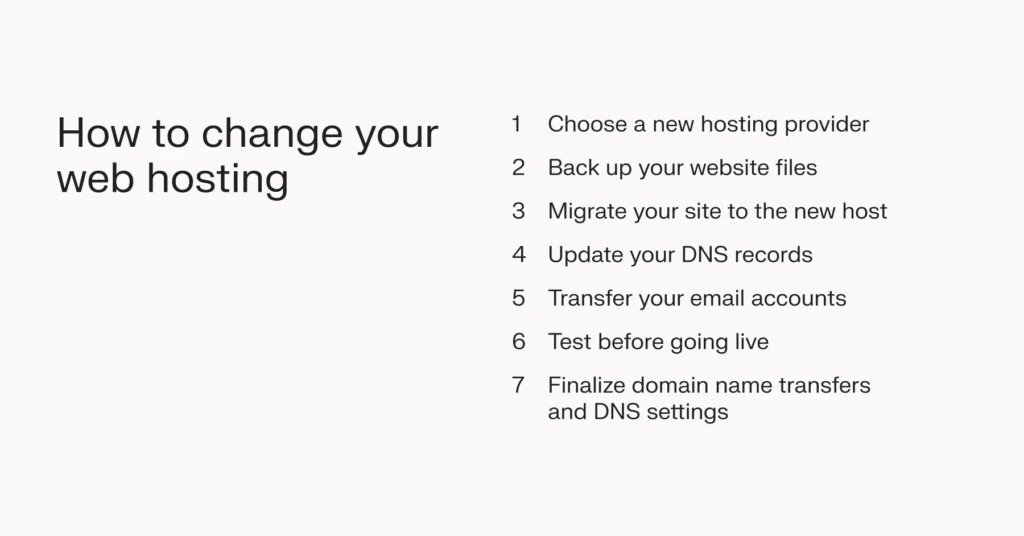
To change the hosting of a domain, choose a new provider. Backup your website data. Update DNS settings to point to the new host. Transfer files and databases to the new hosting account. Verify everything functions correctly before canceling the old hosting service.
How Do I Transfer A Domain To Another Hosting?
Unlock the domain at your current registrar. Obtain the transfer authorization code. Initiate the transfer at the new host. Confirm the transfer via email. Update DNS settings after completion.
Can I Switch Website Hosting?
Yes, you can switch website hosting. Choose a new host, migrate your files, and update DNS settings. Ensure minimal downtime by planning carefully. Backup your website before starting the transfer. Consider technical support from the new host for a smoother transition.
Can I Keep My Domain But Change Host?
Yes, you can keep your domain while changing your host. Update your domain’s DNS settings to point to the new hosting provider. This allows your website to remain accessible under the same domain name. Ensure proper configuration for a seamless transition.
Conclusion
Changing your web domain hosting is easier than it seems. Follow the steps carefully for a smooth transition. Backup your data to avoid losing important files. Choose a reliable hosting provider for better performance. Update your DNS settings promptly to keep your site online.
Test everything to ensure it works properly. Remember, patience and attention to detail are key. With these guidelines, you can confidently switch your web hosting. Stay informed and adapt to any changes. Your website’s success depends on a strong foundation.
Happy hosting!


