
Are you tired of the default font style in your WordPress Sydney theme? Do you feel that the text just doesn’t reflect your brand’s personality?
You’re not alone. Many website owners crave that personal touch to set their site apart from the rest. Changing the font style can breathe new life into your content, making it more engaging and attractive to your visitors. Imagine having a website that not only delivers great content but also looks stunning and unique.
This guide will show you how to easily change the font style in your WordPress Sydney theme, allowing your site to truly shine and capture the attention of your audience. Ready to transform your site’s appearance and make a lasting impression? Let’s dive in and explore how you can achieve that perfect look!
Accessing WordPress Dashboard
Log into your WordPress dashboard to start. Use your username and password. Once inside, look on the left side. You will see a menu. Find the option called “Appearance”. Click on it. A new menu will drop down. Here, select “Customize”. This takes you to the theme customizer. You can change many things here.
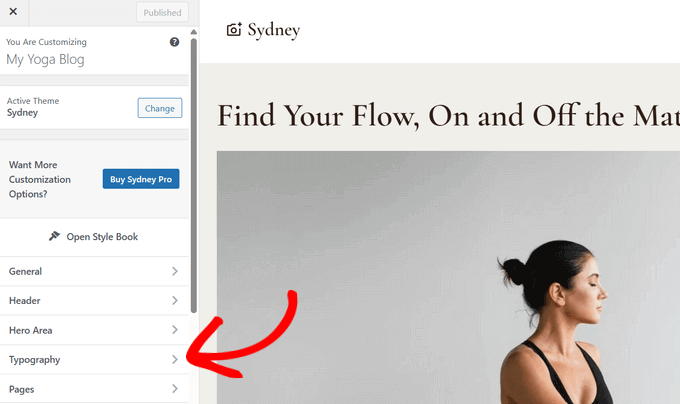
To change the font style, look for “Typography”. Click on it. This section lets you choose different fonts. You can see changes in real-time. Pick a font you like. Then, click “Publish” to save. Now, your site has a new look. It’s that simple!

Credit: tagembed.com
Navigating To Appearance Settings
Begin by finding the “Appearance” tab in your WordPress dashboard. Click on it. This opens various options. Look for “Customize” in the list. Select it. The screen will show different settings. Focus on “Typography”. This section controls fonts. Click to explore.
You’ll see “Font Style” options. Adjust them as needed. Choose a font that suits your taste. Make sure it’s readable. Save your changes. Preview the site to see the effect. If satisfied, keep the settings. If not, you can change them again. This process is simple. Anyone can do it. Enjoy customizing your site!
Customizing Fonts With Theme Customizer
Easily change font styles in the WordPress Sydney Theme using the Theme Customizer. Access the customizer, navigate to Typography, and select your preferred font. Save changes to update your site’s appearance instantly.
Opening The Customizer
First, go to your WordPress dashboard. Find the Appearance section on the left. Click on it to see more options. Now, click on Customize. This will open the Theme Customizer. Here, you can change many things about your site.
Locating Typography Options
Inside the Theme Customizer, look for the Typography settings. It should be easy to find. Click on it to see different font options. You can change the font style, size, and color. These changes will make your site look unique. Make sure to save your changes before you leave. This way, your new font style stays the same.

Credit: wpmarmite.com
Using Additional Css For Font Changes
Want to change font styles in your Sydney Theme? Use Additional CSS. Go to your WordPress dashboard. Click on Appearance. Then, select Customize. Find the Additional CSS option. Click it. Now, you can add new CSS rules.
To change font, type: body {font-family: 'Arial', sans-serif;}. Replace ‘Arial’ with your desired font. Save changes. Your new font style is applied.
After saving, view your site. Check if the font looks right. If not, go back. Try another font. You can also change size. Use font-size: 16px; in your CSS. Adjust the number for size you need. Experiment until satisfied.
Installing A Font Plugin
Find a good plugin to change fonts. Many plugins are available. Some plugins work better than others. Read reviews before choosing. This helps you pick a reliable one. Popular plugins often have more features. They also receive regular updates.
Many users choose Google Fonts or Font Awesome. These plugins are trusted. They have easy-to-use tools. They make font changes simple. Be sure the plugin supports the Sydney theme. Check compatibility before installing.
After installation, open the plugin settings. Look for font options. You can select different styles. Change sizes and colors too. Save your changes to see the effect. Preview your site. Ensure the fonts look good. Adjust settings if needed. The process is quick and easy.
Credit: www.wpbeginner.com
Exploring Google Fonts Integration
Google Fonts offer many options for your website. Sydney Theme supports these fonts easily. First, go to your WordPress dashboard. Click on “Appearance” and then “Customize.” In the Customizer, find “Fonts” settings. Here, choose from many Google Fonts. Select a font that fits your style.
After choosing, apply the new font. Save your changes. Check your website to see the new look. If needed, adjust the size and color. This makes your site unique and easy to read.
Remember, fonts can change how visitors feel. So, pick a font that matches your site’s mood.
Troubleshooting Font Issues
Changing font style in the Sydney theme enhances your site’s look. Navigate to Appearance, then Customize, and select Fonts. Adjust font settings to suit your preferences and save changes for immediate effect.
Checking Browser Compatibility
Different browsers may show fonts differently. Always check fonts in multiple browsers. This ensures your site looks good for everyone. Some browsers might not support all fonts. Stick to common fonts like Arial or Times New Roman. These are safe choices. If a font doesn’t load, the page uses a default font. This can change the look of your site. Always test your site after changing fonts.
Resolving Conflicts With Other Plugins
Plugins can sometimes cause font issues. Deactivate all plugins. Then activate them one by one. This helps find the problem plugin. Some plugins may override font settings. Check plugin settings for font options. Use only trusted plugins. Always update plugins to the latest version. This helps avoid conflicts. If a plugin causes a problem, consider finding an alternative.
Saving And Publishing Changes
After selecting a font, click Save to keep changes. This button is on the top right corner. Always check your work before saving. Mistakes can happen easily. Check the preview to see how it looks. Does the font match your style? If yes, proceed to publish it. Click the Publish button. This makes the changes live on your site. People can now see the new font style. Remember, you can always change it later. It’s okay to test different fonts. Finding the right one takes time. Keep experimenting until satisfied.
If unhappy with the change, click Cancel. This will not save the new font. You can start again. Make sure you like the font. Your site should look good. Fonts are important for readability. They affect how visitors see your site. Always choose a font that is clear and easy to read.
Frequently Asked Questions
How To Customize Font Style In Sydney Theme?
To customize font style in the Sydney theme, access the WordPress Customizer. Navigate to the ‘Typography’ section. Here, you can select different fonts for headings and body text. Adjust sizes and weights to suit your design needs. Save changes to update the font style across your site.
Can I Use Google Fonts In Sydney Theme?
Yes, Google Fonts are compatible with the Sydney theme. Access the ‘Typography’ section in the Customizer. Select from a wide range of Google Fonts. Choose fonts that complement your site’s style. Ensure readability and aesthetic appeal. Save changes to apply the new font.
Where To Find Font Options In Sydney Theme?
Font options are located in the WordPress Customizer. Navigate to ‘Appearance’ and select ‘Customize’. Then, go to the ‘Typography’ section. Here, you’ll find options for font style, size, and weight. Experiment to find the best fit for your site.
Are Custom Fonts Supported In Sydney Theme?
Sydney theme supports custom fonts using plugins. Install a plugin like ‘Custom Fonts’ for more options. Upload and activate your desired font files. Customize via the WordPress Customizer. Ensure compatibility and readability across devices. This enhances your site’s uniqueness.
Conclusion
Changing fonts in the Sydney theme is simple and effective. With the right tools, you create a unique website look. Experiment with different styles for a fresh design. Your site’s font impacts user experience and brand identity. Always preview changes before saving.
This ensures your text remains readable. Remember, consistent fonts maintain a professional appearance. Use the customization options wisely. They help in maintaining the theme’s aesthetic balance. With these tips, enhance your WordPress site effortlessly. Enjoy creating a personalized web space!


