
Are you struggling with the font size on your WordPress site? Maybe the text feels too large, or perhaps it’s too small for your liking.
This can affect how visitors perceive your content and, ultimately, their experience on your site. But don’t worry; you’re not alone in this! Many WordPress users face similar challenges. The good news is that changing the font size in a WordPress theme is easier than you might think.
You’ll discover simple steps to adjust your font size, making your site more appealing and user-friendly. Imagine your content standing out, just the way you want it. Let’s dive in and transform your WordPress site together!
Choosing The Right Theme
Picking a theme is important for your website’s look. Some themes let you change the font size easily. Others might not have this option. Always check the theme details before you choose. This will save you time later. Some themes come with a customizer tool. This tool helps change the font size. Make sure to explore the theme’s features. It will help you find the right one. A good theme should be user-friendly. And it should have clear instructions. This makes it easier for everyone.

Credit: cyberchimps.com
Accessing The Theme Customizer
Open your WordPress dashboard. Find the Appearance option. Click on it. Choose Customize. The Theme Customizer will open. This tool allows changes to your site.
Look for the Typography or Font options. Not all themes have them. You can change font size here. Some themes need extra settings. Explore the menu for options.
Always preview changes before saving. This helps you see how it looks. Keep the size readable. Make sure it fits well on all devices. Mobile users are important.
Using Css For Font Adjustments
Find the right CSS selectors in your theme. These are like labels for parts of your site. Use a tool like Inspect Element on your browser. Right-click on the text you want to change. Look for the selector name in the code. It might look like .header or #content. Remember these names. You will need them later.
Go to the WordPress dashboard. Click on Appearance, then Customize. Look for Additional CSS. Here, you can make changes. Type the selector name. Add curly braces { }. Inside, write font-size and the size you want. For example, font-size: 16px;. Check how it looks on your site. If it’s good, click Publish to save.
Exploring Theme Options Panel
Many WordPress themes have a Theme Options Panel. This panel is a simple tool. It helps change the look of your site easily. To begin, find the panel in the dashboard. Once there, look for a section about Typography or Fonts. This section usually has a font size option. Increase or decrease the size as needed. Some themes also offer a preview. This helps you see changes before saving. Remember to save changes after adjusting. If your theme lacks a panel, consider a plugin. Plugins can add more font options. This makes changing fonts even easier.
Utilizing Plugins For Font Control
Plugins offer easy ways to adjust font sizes in WordPress themes. They allow quick customization without altering code. Enhance your site’s readability by selecting the right font size plugin.
Top Font Size Plugins
Easy Google Fonts lets you change fonts quickly. It works with any theme. You can preview fonts before saving. This makes it simple to choose the right style. FontPress gives you control over font size and style. It supports Google and Adobe fonts. You can adjust sizes with sliders. This plugin is user-friendly.
Installing And Activating Plugins
Go to your WordPress dashboard. Click on Plugins. Then select Add New. Search for a font plugin. Click Install Now. Wait for the installation. Once done, click Activate. Your plugin is now ready. Adjust settings as needed. You can change font size easily.

Credit: docs.themeisle.com
Adjusting Font Size For Mobile Devices
Responsive design is very important for websites. It ensures that your site looks good on all devices. Mobile phones, tablets, and desktops each have different screen sizes. To make your website look good, you need to adjust the font size. This makes reading easy for everyone.
Testing on various devices is a key step. Check how your site looks on a phone. Then, test it on a tablet and a laptop. Does the text look okay? Is it easy to read? If not, change the font size. Use tools that let you see your site on different screens. This helps you find the best size for each device. Make sure all users have a good experience. Happy readers will stay longer on your site.
Troubleshooting Common Issues
Sometimes, font size does not change as expected. This can be confusing. Make sure you are editing the right CSS file. Changes might not show if you are on the wrong file. Clear your browser cache to see updates. Browsers sometimes keep old pages. Use WordPress customizer for quick changes. It is user-friendly and easy.
WordPress themes come with default styles. These styles can override your changes. Add !important to your CSS rules. This makes sure your styles apply. For example, use font-size: 16px !important; in your CSS. This tells the browser to use your size. Always check for CSS conflicts. They can stop your styles from showing.
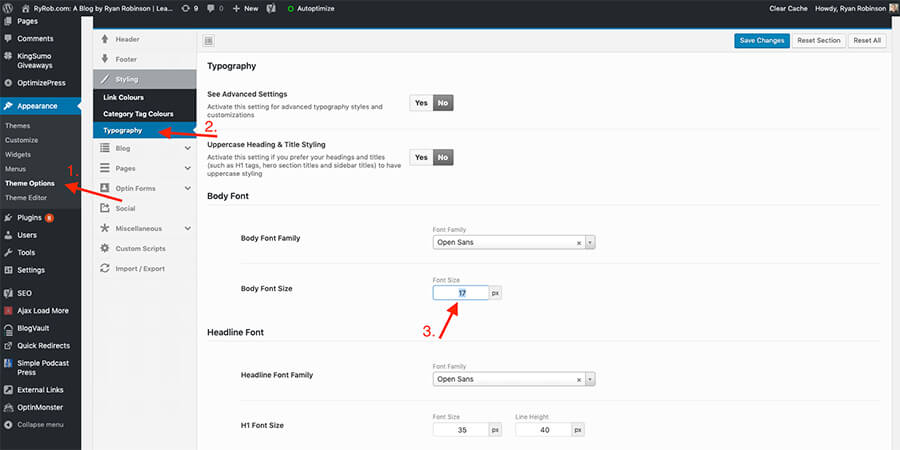
Credit: www.ryrob.com
Frequently Asked Questions
How Can I Change Font Size In WordPress?
To change font size in WordPress, access the theme customizer. Navigate to “Typography” or “Fonts” settings. Adjust the font size slider for different text elements like headings or paragraphs. Save changes when satisfied. Some themes may require additional CSS for specific adjustments.
What Tools Help With WordPress Font Size Change?
Use the WordPress Customizer for built-in font size changes. Plugins like Easy Google Fonts or Advanced CSS Editor can help with more customization. For advanced changes, edit the theme’s CSS files directly. These tools ensure flexibility in modifying font sizes.
Can I Use Css For Font Size Changes?
Yes, you can use CSS to change font sizes in WordPress. Access your theme’s stylesheet via the WordPress dashboard. Locate the specific CSS selector for the text you want to modify. Add or edit the font-size property, then save your changes.
Are Plugins Necessary For Font Size Adjustments?
Plugins are not always necessary for font size adjustments. Many WordPress themes offer built-in options via the Customizer. However, plugins can provide more customization and ease for those unfamiliar with CSS. They are useful for advanced typography settings.
Conclusion
Changing font size in WordPress is simple and effective. You can enhance your site’s readability and style quickly. Whether using theme settings or custom CSS, the process is straightforward. Remember to preview changes before saving. This ensures your site looks great on all devices.
Experiment with different sizes to find what suits your content best. Keep your audience in mind as you adjust. A well-chosen font size improves user experience. Make these changes regularly to keep your site fresh. Happy designing!


