
Are you tired of the same old font on your WordPress site? Changing the font can breathe new life into your website, making it more engaging and visually appealing.
Whether you’re aiming for a sleek, modern look or a warm, inviting atmosphere, the right font can make all the difference. You don’t need to be a tech wizard to make this change, and with the right guidance, you can transform your site’s appearance in no time.
Imagine your website with a fresh, new look that captivates visitors and keeps them coming back for more. Ready to give your WordPress theme a makeover? Let’s dive into how you can easily change the font on your WordPress theme and enhance your site’s personality.
Choosing The Right Font
Readability is key when picking a font. A clear font makes reading easy. Avoid fonts that are too curly or fancy. Simple fonts are best. Arial and Verdana are good choices. Your readers will thank you.
Fonts should match your brand style. If your brand is fun, choose a playful font. For serious brands, pick something formal. The font sets the mood. Make sure it fits your brand’s voice. Consistency is important in branding. Using the same font everywhere helps.
Using WordPress Customizer
Easily change the font on your WordPress theme using the Customizer. Navigate to Appearance, then Customize. Select Typography to update your site’s fonts effortlessly.
Accessing The Customizer
First, log into your WordPress dashboard. Look for the Appearance option on the left side. Click on it, and you will see the Customizer option. Select it to open the customizer. This tool lets you change many things on your site.
Selecting Typography Options
In the customizer, find the Typography section. Here, you can change font styles for your site. Choose the Font Family you want. Adjust Font Size to make text bigger or smaller. Play around until you find the perfect look. Save your changes to see them live.
Installing A Font Plugin
Many plugins can change fonts on WordPress. Two popular options are Google Fonts and Font Awesome. Google Fonts offers a large collection of fonts. Font Awesome is great for adding icons. Both plugins are free. Easy to use.
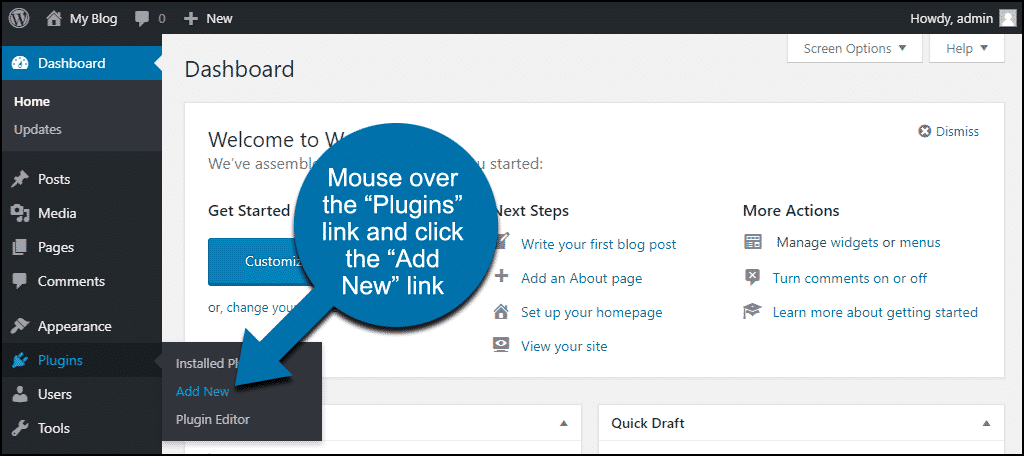
Find the plugin in your WordPress dashboard. Click the Plugins tab. Search for your desired plugin. Click Install Now. After installation, click Activate. This is important. Activated plugins work on your site.
Custom Fonts With Css
Easily change fonts on a WordPress theme using CSS by accessing the theme editor. Add custom fonts through the @font-face rule in your stylesheet. This allows personalized typography to enhance your website’s look, ensuring it stands out.
Adding Custom Css
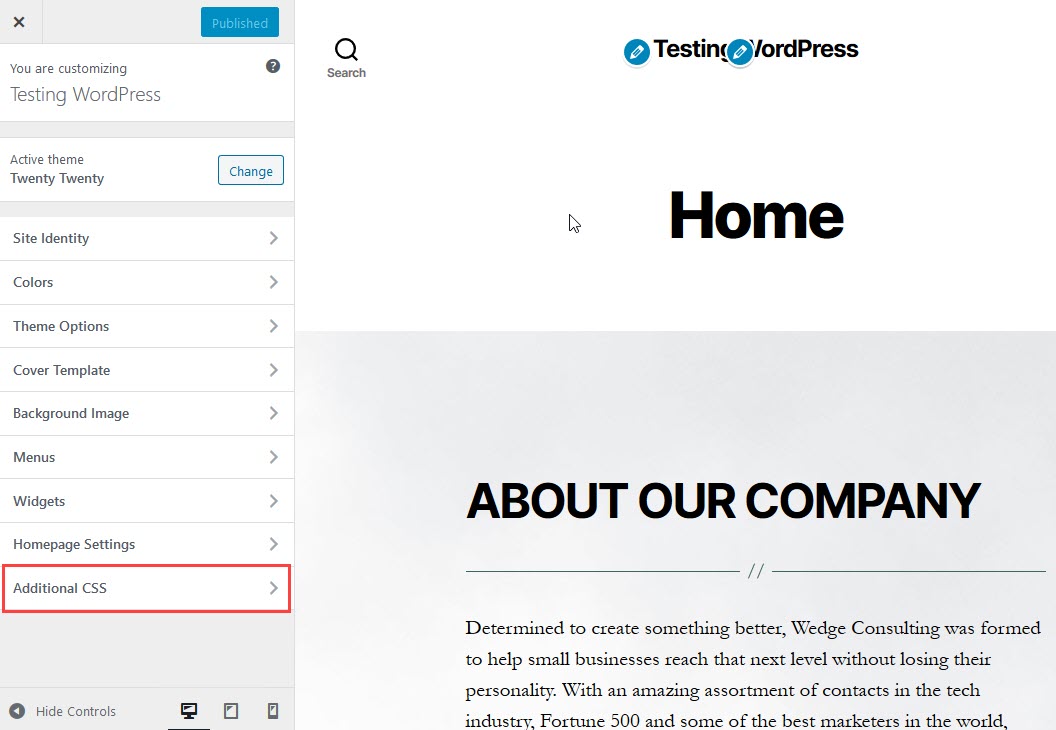
To change fonts, add custom CSS to your WordPress theme. This can make your site look unique. Use the WordPress dashboard to access the theme editor. Look for the “Additional CSS” section. Here, you can write your own CSS code. Make sure to save your changes.
Using Font-family Property
The font-family property changes your text style. First, decide which font you want. You can choose from web-safe fonts or use Google Fonts. Add the font-family property to your CSS. For example, write font-family: 'Arial', sans-serif; to use Arial. This will apply the new font to your text. Remember to check how it looks on your site.
Uploading Custom Fonts
Custom fonts can bring a unique look to your website. To upload them, make sure your font is in a supported format. Common formats include TTF, OTF, and WOFF. These formats ensure compatibility across different browsers. It’s crucial to check the font license before using it.
Supported Font Formats
| Format | Description |
|---|---|
| TTF | TrueType Font, widely used |
| OTF | OpenType Font, advanced features |
| WOFF | Web Open Font Format, optimized for web |
Uploading To WordPress
First, go to the WordPress dashboard. Navigate to the Appearance section. Click on Custom Fonts. Upload your font file here. After uploading, activate the font. This makes it available for use in your theme. Double-check the font display on your site. Ensure it looks good across all pages.

Credit: 10web.io
Testing And Adjusting
Changing the font on a WordPress theme involves testing different styles. Adjust settings to match your design. Ensure readability and appeal.
Previewing Changes
Always preview changes before making them live. This helps catch mistakes early. Use the WordPress preview feature. It shows the new font on your site. Notice how it looks on different pages. Does the font fit the overall style? Is the text clear and easy to read? Make sure headings and body text match. Check that font size is not too small. Small text can be hard to read.
Ensuring Cross-browser Compatibility
Different browsers show fonts differently. Test your site on popular browsers. This includes Chrome, Firefox, and Safari. Ensure the font looks the same on each. Use online tools to check browser compatibility. These tools help find problems. Fix any issues you discover. A consistent look is important. It gives users a smooth experience. Always think about your readers. They should have no trouble reading your text.
Common Troubleshooting Tips
Fonts can sometimes not display as expected. This can happen due to conflicts. Theme settings or plugin settings might cause this. Try disabling plugins one by one. Check if the font changes. Often, two plugins might clash. Update your theme and plugins. This can solve many issues. Some themes have custom font options. Ensure these settings match your choices. Always clear cache after making changes. This helps in seeing the updates.
Font size or style might not show correctly. Ensure your CSS is correct. Check for any CSS errors. Use a tool like W3C CSS Validator. This will help find mistakes. Sometimes, browser cache causes issues. Clear the cache to see real-time changes. Check your site on different browsers. Some browsers display fonts differently. Make sure your theme supports the font you choose.
Credit: www.inmotionhosting.com
Credit: www.greengeeks.com
Frequently Asked Questions
How Do I Change Font In WordPress Theme?
To change the font in your WordPress theme, access the theme customizer under Appearance > Customize. Navigate to the ‘Typography’ section, where you can select and preview different fonts. Save your changes to apply the new font across your site instantly.
Can I Use Custom Fonts In WordPress?
Yes, you can use custom fonts in WordPress. Install a plugin like ‘Custom Fonts’ or ‘Easy Google Fonts. ‘ Upload your desired font files and apply them through the theme customizer. This allows for unique typography that matches your brand identity.
Why Isn’t My Font Change Visible?
If your font change isn’t visible, clear your browser cache and refresh the page. Ensure you saved changes in the theme customizer. Sometimes, caching plugins might prevent updates. Check your plugin settings and clear the cache to resolve this issue.
Are Google Fonts Free To Use In WordPress?
Yes, Google Fonts are free to use in WordPress. They offer a wide variety of fonts suitable for different styles and themes. Easily integrate them through plugins or manually by embedding the Google Fonts code into your theme’s header file.
Conclusion
Changing fonts on your WordPress theme is simple. It enhances your site’s look. Begin by choosing the right font. Customize it using theme options or CSS. Preview changes before saving. Remember, readability matters most. A clean font boosts visitor engagement.
Keep experimenting until satisfied. Enjoy the new style on your site. Always backup your theme before making changes. This prevents losing important data. Happy designing!


