
Are you tired of the same old font in your WordPress theme? Changing the font can give your site a fresh look and make it more engaging for your visitors.
It’s like giving your website a makeover without having to change its entire design. Imagine how your content could stand out with the perfect font that matches your style and message. You might think it’s a daunting task, but don’t worry! You’re about to discover how simple and rewarding it can be to switch up your fonts and breathe new life into your site.
Ready to make your WordPress theme truly yours? Let’s dive in and explore how you can easily change the font and transform the way your audience experiences your content.
Credit: www.greengeeks.com
Selecting A Suitable Font
Fonts can change how your website looks. There are many font options to choose from. Some fonts look old, while others look modern. It’s important to pick a font that fits your site’s style. You can start by looking at different Google Fonts. They are free and easy to use. Another option is Adobe Fonts, but they might cost money. Always check if the font is easy to read. The right font makes your site look good and professional.
Font style is important for your website’s look. Some fonts are bold, while others are thin. You can also choose italic or regular styles. Bold fonts are good for titles. Thin fonts work well for paragraphs. Make sure the font style is easy to read. Changing font style can make your site more attractive. It’s best to use one or two styles only. Too many styles can confuse your readers.

Credit: wordpress.com
Using WordPress Customizer
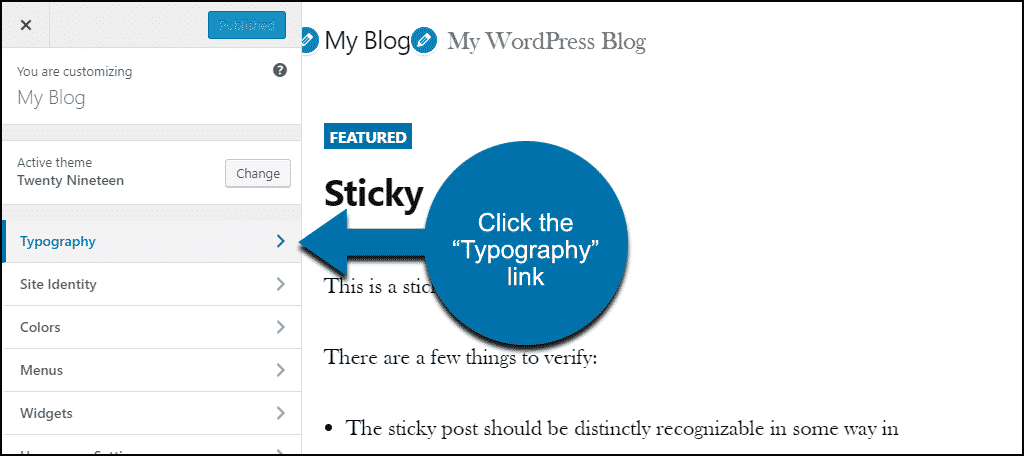
Find the Customizer in your WordPress dashboard. Click on Appearance, then Customize. This opens the Customizer tool. See the options on the left side. They help you change your site’s look.
Locate the Typography section. Here, you can change fonts. Pick a font style you like. You can adjust the size and color too. Check the preview on the right. It shows how changes will look. Make sure to save your changes. Click the Publish button to apply them.
Installing A Font Plugin
Easily change the font in your WordPress theme by installing a font plugin. It offers a simple way to customize your site’s appearance. Choose from a variety of styles to match your brand’s identity effortlessly.
Popular Font Plugins
Finding the right font plugin is important. Some popular ones are Easy Google Fonts, Use Any Font, and FontPress. Each plugin offers unique features. Easy Google Fonts lets you add Google fonts to your site. Use Any Font allows uploading of custom fonts. FontPress is for advanced font styles. Try these to improve your site’s look.
Plugin Installation Process
Begin by logging into your WordPress dashboard. Next, go to the Plugins section. Click on Add New. Type the plugin name in the search bar. After finding it, click Install Now. Wait for the installation to complete. Finally, click Activate to use the plugin. You’re ready to change fonts!
Custom Css For Font Changes
Custom CSS lets you easily change fonts in your WordPress theme. Simply add specific CSS code to adjust font style, size, and color. This approach offers flexibility, allowing you to personalize your site’s appearance without complex tools.
Adding Custom Css
To change fonts, you can use Custom CSS. First, go to your WordPress dashboard. Then, click on Appearance and select Customize. In the new window, look for Additional CSS. Click on it to open the editor. Here, you can add your CSS code. For example, to change the font of all paragraphs, write: p { font-family: 'Arial', sans-serif; }. This code changes the paragraph text to Arial.
Best Practices For Css
Keep your CSS code simple and clean. Use specific selectors to target elements. Avoid using too many different fonts. This keeps your site looking neat. Always check how your changes look on different devices. This ensures a good user experience. Test your CSS to see if it works well. Use the preview option before publishing changes.
Editing Theme Files
Locating Font Files is key to changing your font. First, find your theme folder. It’s usually in the wp-content/themes directory. Open the theme folder. Look for files named style.css or custom.css. These files often contain font settings. Check for @font-face rules. They link to font files. Some themes may use Google Fonts. Look for links to fonts.googleapis.com.
Making Direct File Edits can be tricky. Use a child theme to avoid losing changes. Open the style.css file. Find font-family and font-size settings. Change them to your preferred font and size. Save the file. Check your site for changes. If you see no change, clear your browser cache. Sometimes changes don’t show right away. Be careful while editing. Wrong edits can break your site.
Testing And Troubleshooting
Previewing Font Changes is easy in WordPress. Use the customizer to see your changes. Open the WordPress dashboard. Go to Appearance and click on Customize. Look for the Typography or Fonts section. Change your font and see it in the preview window. This helps you decide if you like the new look. Always save changes before closing.
Fixing Common Font Issues can be simple. Sometimes, fonts do not show up right. Check if your theme supports the new font. Some themes do not support all fonts. Make sure the font file is correct. Sometimes, a plugin can cause a problem. Try deactivating plugins one by one. Refresh your site to check changes. If problems continue, contact your theme support for help.
Credit: studiomommy.com
Frequently Asked Questions
How Do I Change Font In WordPress Theme?
To change the font, navigate to the WordPress Customizer. Click on ‘Typography’ or ‘Fonts’ section, depending on your theme. Choose your desired font from the available options. Save your changes and refresh your site to see the new font applied.
Can I Use Google Fonts In WordPress?
Yes, you can use Google Fonts in WordPress. Install a plugin like ‘Easy Google Fonts. ‘ Activate it and access the plugin settings. Select your preferred Google Font and apply it to your theme. Save your changes and view your site to ensure the font is applied correctly.
Is Changing Fonts In WordPress Hard?
Changing fonts in WordPress is generally easy. Most modern themes offer built-in typography options. Simply use the WordPress Customizer or a plugin. Follow the instructions provided by your theme or plugin. If you face difficulties, consult your theme’s documentation or support.
Can I Change Font Size In WordPress?
Yes, you can change font size in WordPress. Access the WordPress Customizer and go to ‘Typography. ‘ Adjust the font size sliders or input a specific size. Save your changes and refresh your site to see the updated font size.
Ensure it enhances readability.
Conclusion
Changing fonts in your WordPress theme is simple and rewarding. Customize your site’s look to match your style. Remember to choose fonts that enhance readability. Check compatibility with different devices. This ensures a consistent user experience. Experiment with various fonts until you find the perfect fit.
You can easily update fonts using built-in options or plugins. Always preview changes before making them live. This helps maintain a professional appearance. Regular updates keep your site fresh and engaging. Now, you have the tools to make your WordPress theme truly unique.
Happy customizing!


