
Are you tired of seeing the same old copyright footer on your WordPress website? Do you want to stand out and truly mesmerize your visitors with a unique touch?
Changing the copyright footer might seem like a small tweak, but it can significantly enhance your website’s professional appeal. Imagine your visitors scrolling to the bottom of your site and being surprised by a personalized message that reflects your brand’s identity.
Intrigued? You should be. This guide will walk you through the simple steps to change the copyright footer in WordPress. You’ll learn how to make your website look more polished and customized, captivating your audience from top to bottom. Dive in and transform that mundane footer into a statement that leaves a lasting impression!
Accessing The WordPress Dashboard
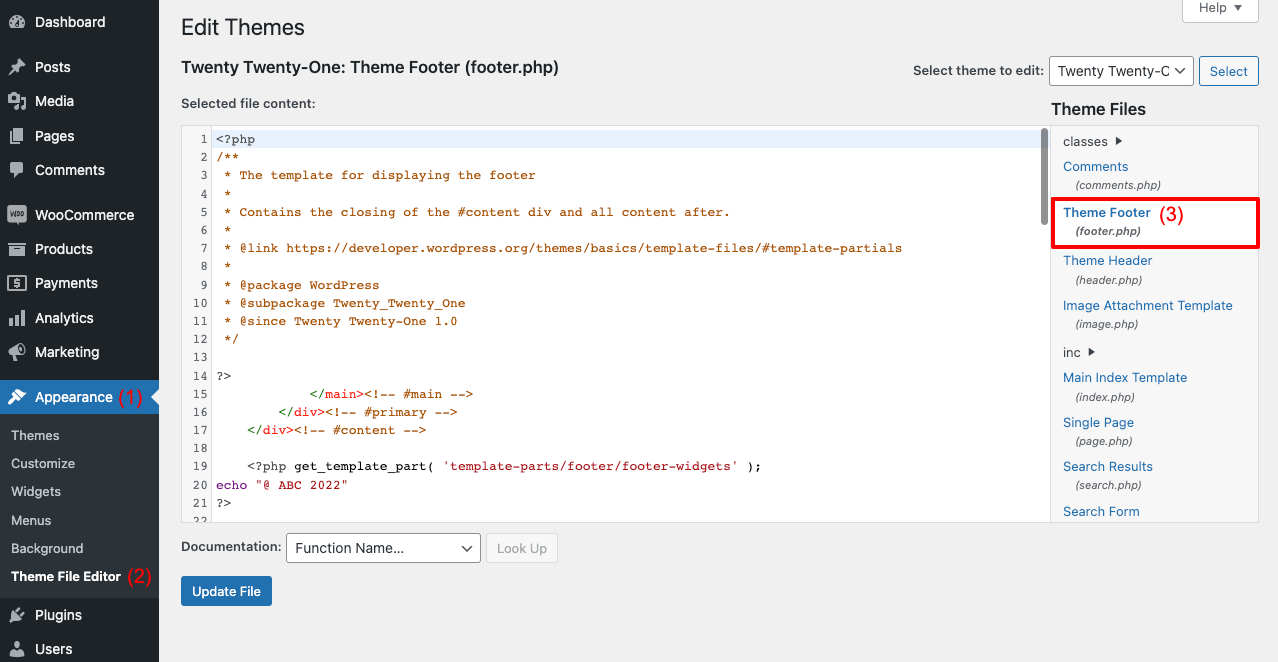
First, log into your WordPress dashboard. Use your username and password. This area is the heart of your WordPress site. Here, you can make many changes. Find the Appearance option on the left side. Click on it to open more settings. This is where you can edit your theme.
After opening Appearance, look for Theme Editor. Click to enter the editor. You may see a warning message. Don’t worry, it’s there to keep you safe. Make sure to backup your site before making changes. This way, you will not lose important data.
Credit: happyaddons.com
Locating The Theme Customizer
Find the theme customizer in WordPress. First, log in to your WordPress admin. Look for the sidebar on the left. Click on Appearance. A menu will appear. Choose Customize. This is where you change your site’s look.
The customizer lets you change many things. Headers, footers, and colors. But today, focus on the footer. It’s important. Your site needs a special touch. Personalizing the footer is easy. Just follow the steps.
Navigating To The Footer Section
Finding the footer section is easy. First, go to your WordPress dashboard. Look for the Appearance option. Click on it. Now, you will see Customize. Select it. This opens a new page. On the left, find the Footer section. Click on it to open more settings.
Inside the footer settings, look for a box. This is where you can change text. Type in your new copyright information. After typing, press Save. Your new footer is ready. Visit your site to see the changes.
Editing The Copyright Text
Open your WordPress dashboard. Click on Appearance, then Customize. Find the Footer section. Here, you can change the copyright text. Type your new text. Click Publish to save. Easy and quick.
Go to Appearance and then Widgets. Locate the Footer area. Find the Text widget. Edit the text inside. Write your own copyright details. Click on Save to update. Done in minutes.
Navigate to Appearance and click Theme Editor. Open the footer.php file. Look for the copyright text code. Edit this with care. Change the text to your needs. Click Update File to save it.
Saving Changes
Press the save button to keep your changes. Check your website to see if the footer looks good. If it does not show, you might need to clear your browser cache. This helps you see the new changes. Go to your browser settings to clear cache. You can ask for help if you get stuck. Make sure your changes are saved properly.
Sometimes, saving changes takes a few seconds. Do not close your browser window too quickly. Double-check that your changes are saved. If your changes are not showing, you may need to refresh your page. This simple step can fix many problems.
Using A Child Theme For Customization
Creating a child theme is important for WordPress changes. It lets you update your site without losing customizations. Begin by making a new folder in your themes directory. Name it after the parent theme plus “-child”. Add a style.css file inside this folder. In the file, include your parent theme details. This tells WordPress where to find the main theme.
Now, create a functions.php file. Add code to link the child theme to the parent. This step is crucial for proper functionality. Once set up, activate the child theme in your WordPress dashboard. Use this theme to make changes. Your original theme stays safe during updates. Remember, using a child theme is smart for maintaining your site’s custom look.
Utilizing Plugins For Footer Changes
Transforming the copyright footer in WordPress becomes simple with plugins. These tools allow for easy customization, enhancing the visual appeal. Plugins make it straightforward to adjust text, colors, and layout, giving your site a unique touch.
Popular Plugins
Many plugins help change your WordPress footer. They are easy to use. Some famous plugins include Elementor, WP Footer, and SeedProd. These plugins let you customize your footer. You can add text, links, or images. Each plugin has special features. Choose the one that suits your needs.
Installation And Setup
Installing a plugin is simple. First, go to your WordPress dashboard. Find the Plugins section. Click on Add New. Type the plugin name in the search bar. Click Install, then Activate. Now, your plugin is ready to use. Follow the setup instructions. Each plugin has different steps. Read carefully and apply changes.
Credit: www.youtube.com
Troubleshooting Common Issues
Changing the copyright footer in WordPress can be tricky. Sometimes, the footer won’t update. Check the theme settings first. Some themes hide this option.
Ensure you’re using the correct theme editor. The wrong editor won’t show footer options. Check plugins next. Some plugins block footer changes.
Deactivate plugins one by one. This helps find the problem plugin. Clear your cache often. Old cache can cause issues.
If problems persist, reach out to theme support. They provide guidance on specific themes. Always back up your site before changes. Backups prevent data loss.
Best Practices For Copyright Footers
A copyright footer is important for your website. It shows who owns the content. Always include the current year. This keeps your site updated. Use simple text for easy understanding. For example, “© 2023 Your Website Name.” This format is clear. Avoid long and confusing words.
Remember to add a link to your privacy policy. It’s a good practice. It shows you care about user data. Make sure the font is readable. A clear font helps users read better. Bold the important details. It makes them stand out.

Credit: www.youtube.com
Frequently Asked Questions
How To Edit Copyright Footer In WordPress?
To edit the copyright footer, go to your WordPress dashboard. Navigate to Appearance > Customize > Footer. You can modify the copyright text directly from this section. If your theme does not support this, consider adding custom CSS or using a plugin for further customization.
Can I Change Footer Without Coding?
Yes, you can change the footer without coding by using WordPress customizer. Navigate to Appearance > Customize > Footer. Here, you can edit the copyright text. Alternatively, use footer editing plugins that offer user-friendly interfaces for customization without any coding knowledge.
What Plugins Help Edit WordPress Footer?
Several plugins help edit the WordPress footer, such as “Insert Headers and Footers” and “Footer Putter. ” These plugins allow you to add custom HTML, text, or widgets to the footer. They are user-friendly and require no coding skills, making customization easy for beginners.
Is It Safe To Modify WordPress Footer?
Yes, it’s safe to modify your WordPress footer if done correctly. Use the WordPress customizer or a trusted plugin to make changes. Avoid directly editing theme files unless necessary, as updates could overwrite changes. Always backup your site before making significant modifications.
Conclusion
Changing the copyright footer in WordPress is simple. It personalizes your site. A unique footer enhances your brand image. It also keeps your site fresh. Follow these steps carefully. They make the process easy. Customize your site to reflect your style.
Your audience will appreciate the effort. Small changes can make a big impact. This task is straightforward but effective. Try it today and see the difference. It’s all about making your website yours. Keep your site engaging and updated. Make every element count.


