
Are you ready to give your WordPress site a fresh look with the Twenty Twenty Two theme? Changing the font can make a big impact on how your website feels to visitors.
It can enhance readability, reflect your brand’s personality, and make your content more engaging. But, if you’re unsure how to do it, don’t worry. This guide will walk you through each step, ensuring you can effortlessly transform your site’s typography.
Imagine capturing your audience’s attention right from the first glance. Let’s dive into the world of fonts and discover how a simple change can elevate your website’s appeal. Keep reading to learn how you can make your site stand out with just a few clicks.
Credit: wpdeveloper.com
Accessing Theme Customizer
First, open your WordPress dashboard. Look for the Appearance option on the left side. It is easy to find. Click on it. You will see more options.
Find the Customize button there. Click it to enter the customizer. The customizer helps you change your theme. Look for Typography or Fonts settings. These options let you change the font style.
Credit: www.wpxpo.com
Locating Typography Settings
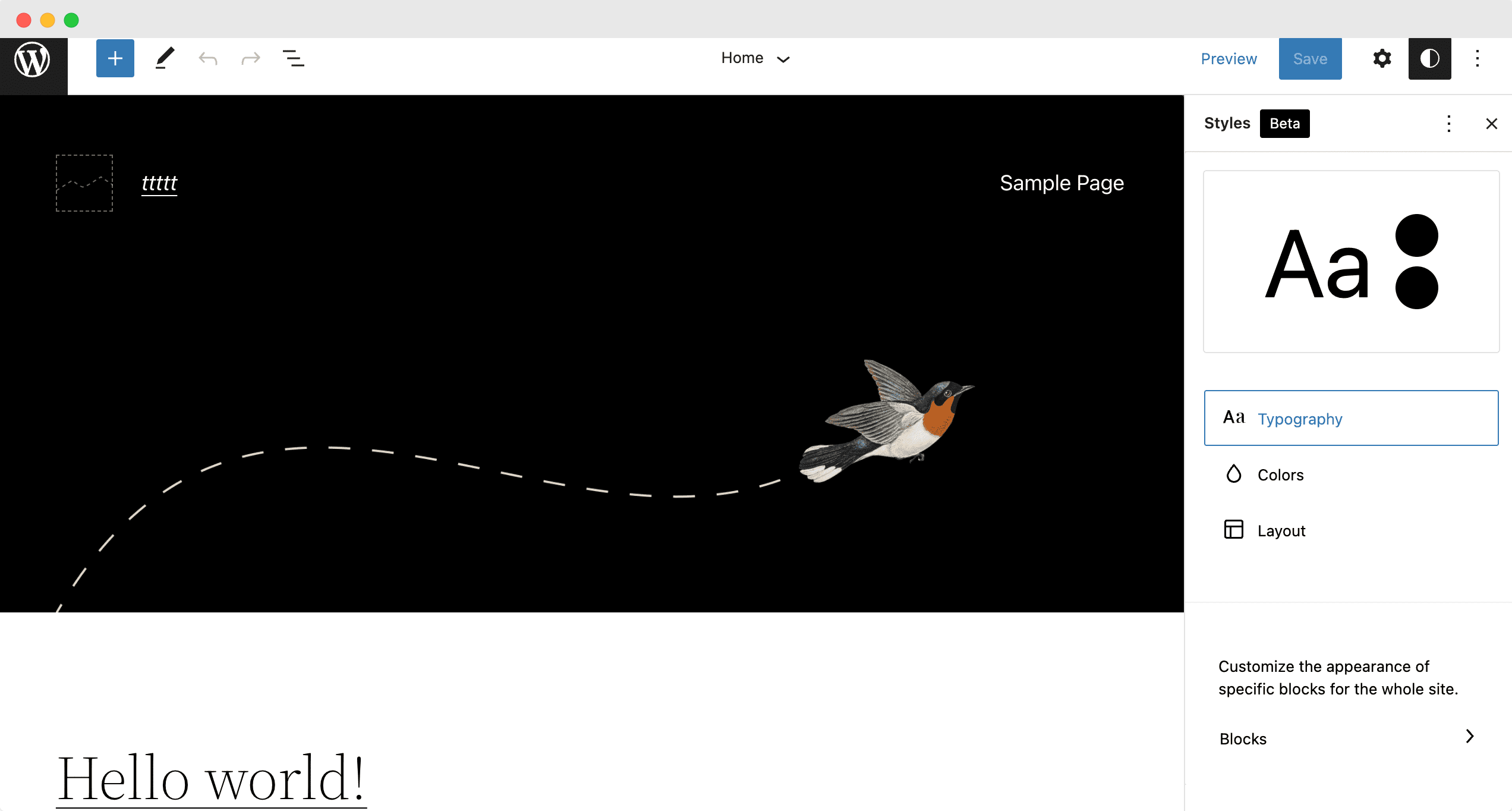
Changing fonts in the Twenty Twenty Two theme is simple. Start by locating the Typography Settings. It’s usually found in the WordPress Customizer. Click on Appearance in your dashboard. Then, select Customize. This will open the Customizer screen. Here, look for the Typography section. This is where you change your fonts.
Finding The Fonts Section
In the Typography section, find the Fonts menu. This section lets you pick different fonts. You might see options for Headings and Body Text. Choose the font style you like. Some themes allow Google Fonts. Others may have their own list. Pick a font that suits your website.
Exploring Text Elements Options
Text elements include Headings, Paragraphs, and Links. Each has its own font settings. Headings usually have a bold style. Paragraphs need to be readable. Links may have different colors or styles. Adjust these settings as needed. Make sure your text is clear and easy to read.
Selecting A New Font
Discover ways to change fonts in the Twenty Twenty-Two WordPress theme. Navigate to the site editor, select ‘Typography,’ and customize your font choices. Enhance your site’s appearance easily with new fonts.
Choosing From Default Fonts
The Twenty Twenty Two theme offers many default fonts. You can find these in the customizer. Click on the Appearance tab. Then, choose Customize. Next, select Typography. Here, you can see the list of fonts. Choose a font that you like. This way, your site can look unique and fresh. Remember, the right font can make your site easy to read.
Adding Custom Fonts
Sometimes, default fonts are not enough. You might want a special font. First, you need a font file. It could be a TTF or OTF file. Next, go to your WordPress dashboard. Navigate to the Plugins section. Install the Custom Fonts plugin. With this plugin, upload your font file. After uploading, the font will appear in your list. Now, you can apply it to your text. Enjoy your new, custom look!
Customizing Font Appearance
Changing the font size can make text easier to read. Start by opening the WordPress customizer. Go to Appearance and click on Customize. Look for Typography settings. You will find options to adjust font size. Choose a size that fits your needs. Always preview changes before saving.
Line height affects how text looks. It can make paragraphs clear. Go to the same Typography section. Find the line height option. Adjust to see different looks. Spacing is important too. It refers to space between lines. A good spacing helps text flow better. Experiment with different settings.
Applying Font Changes
Changing fonts gives your site a fresh look. First, go to the customizer. Find the option for font settings. Choose a new font you like. The preview shows changes right away. Look at your site in the preview window. Make sure it looks good. Try different fonts. Find the one that fits your style. You can always go back and choose another.
Happy with the new font? Great! Now, you need to save your changes. Click the publish button at the top. This makes your changes live. If you change your mind, you can always update later. Your site now has a new look. Enjoy how it stands out with the new font. Fonts matter!
Troubleshooting Common Issues
Changing fonts in the Twenty Twenty Two WordPress theme can be simple. Navigate to the theme customizer, select typography, and explore various font options available to personalize your site. Adjust sizes and styles to suit your design preferences seamlessly.
Dealing With Font Conflicts
Font conflicts can happen. They make your site look strange. It is important to check CSS codes. These codes tell fonts what to do. Make sure there are no extra codes causing trouble. Sometimes, plugins can be the problem. Deactivate each one to find the issue. If the font still looks wrong, check your theme settings. They might need a small change.
Ensuring Mobile Compatibility
Mobile devices are different from computers. Fonts can look bad on small screens. Use responsive design to keep fonts neat. This means fonts will change size for different screens. Check your theme’s mobile settings. Make sure fonts look good on both mobile and desktop. Test on multiple devices to be sure. A good font is easy to read everywhere.

Credit: torquemag.io
Frequently Asked Questions
How Do I Change Font In Twenty Twenty Two?
To change fonts in the Twenty Twenty Two theme, navigate to Appearance > Customize > Typography. Select the desired font family from the dropdown menu. You can also adjust font size and style. Ensure you preview changes before saving to ensure the new look suits your site.
Can I Use Google Fonts In Twenty Twenty Two?
Yes, you can use Google Fonts in Twenty Twenty Two. Install the Easy Google Fonts plugin. Activate the plugin and go to Appearance > Customize. Select Typography, then choose Google Fonts. Pick your preferred font from the list and apply it to your site.
Is Custom Font Upload Possible In Twenty Twenty Two?
Custom font upload is possible in Twenty Twenty Two. Use a font plugin like Custom Fonts. After installation, upload your desired font files. Once uploaded, assign them to specific elements in the typography settings. Always preview the changes before saving them.
How To Change Font Size In Twenty Twenty Two?
To change font size, go to Appearance > Customize > Typography. Here, you can adjust font sizes for different sections. Use sliders to set the desired size for headings, body text, and more. Preview the changes before saving to ensure they fit your design.
Conclusion
Changing fonts in the Twenty Twenty-Two WordPress theme is straightforward. With a few steps, you can customize your site’s look. Start by accessing the theme settings. Then, choose your preferred font. Save your changes. Your website will now have a fresh appearance.
This simple tweak can enhance readability and appeal. It makes your content more engaging for visitors. Experiment with different fonts. Find what best represents your brand. Happy customizing! Your WordPress site will stand out. Enjoy your newly styled website. Keep exploring other theme options.
Improve your site’s overall look.


