
Are you ready to launch your website but confused about buying web hosting and server space? You’re not alone.
Many people feel overwhelmed when faced with the technical jargon and endless options. But worry not. This guide will simplify everything for you, making the process easy and stress-free. Imagine your website running smoothly with reliable hosting, giving your visitors a seamless experience.
It’s possible, and you’ll discover how. Choosing the right web hosting is crucial for your website’s success. It affects your site’s speed, security, and reliability. With so many choices out there, it’s essential to understand what you need and how to get it. You’ll learn what to look for and avoid common pitfalls that can lead to frustration. This isn’t just about making a purchase; it’s about making the right choice that supports your goals. Dive into this guide, and by the end, you’ll feel confident in your decision, ready to buy web hosting and server space that perfectly suits your needs. Let’s make your online presence shine!
Types Of Web Hosting
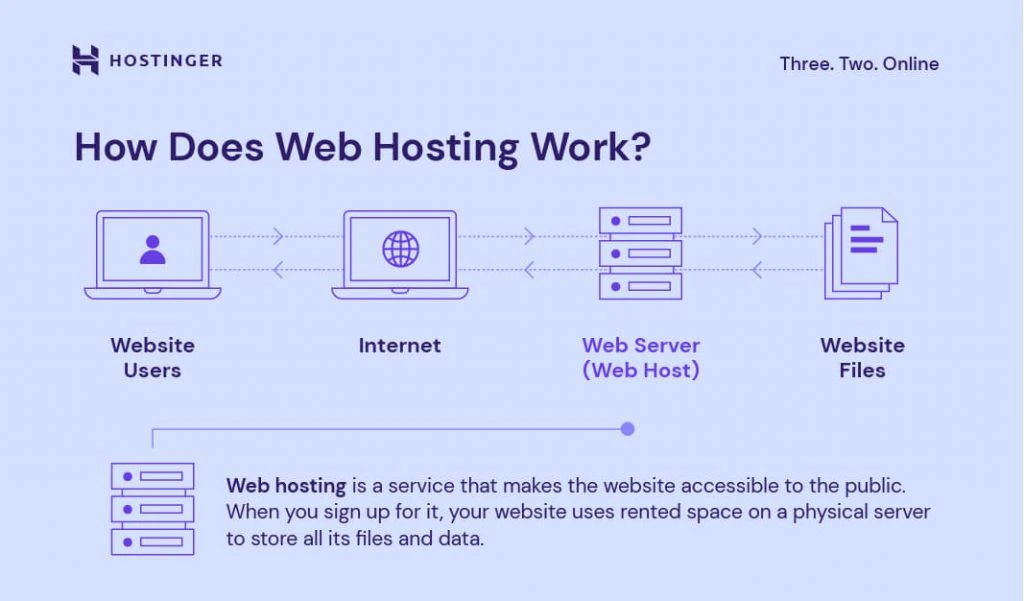
Shared hosting is very popular. Many websites share one server. This makes it cheap. It’s great for beginners. You don’t need much technical knowledge. Websites share resources like memory and CPU. If one site gets busy, others may slow down. Ideal for small websites or blogs. Easy to set up.
VPS stands for Virtual Private Server. It gives more control than shared hosting. The server is split into parts. You get your own part. More resources and power. Fewer users on the server. Good for growing websites. More secure than shared hosting. Needs some technical skills.
Dedicated hosting offers a whole server just for you. No sharing with others. Full control over everything. Perfect for large websites. High traffic sites need it. Very secure but costly. You need to manage the server. Best for experienced users.
Cloud hosting uses many servers. If one server fails, others help. Very reliable and scalable. Pay for what you use. Good for unpredictable traffic. Flexible resources. Perfect for businesses that grow fast. More complex but worth it.
Choosing The Right Hosting Provider
Finding the right hosting provider is crucial for online success. Consider factors like reliability, speed, and customer support. Evaluate pricing plans and server space options to ensure they align with your website needs. Choosing wisely will enhance your site’s performance and user experience.
Reputation And Reviews
Check what others say about the hosting provider. Positive reviews mean people trust them. Look for bad reviews too. They can show problems. A good reputation is very important.
Customer Support
Help should be available all the time. Good customer support is fast and kind. They should fix problems quickly. Check if they offer 24/7 support. This ensures help is there whenever needed.
Uptime Guarantee
Websites must be online most of the time. An uptime guarantee shows reliability. Look for at least 99.9% uptime. This means your site is rarely down. Downtime can cause loss of visitors.
Scalability Options
Your site may grow. Scalability helps it handle more visitors. Choose a provider that offers easy growth. This will help manage more traffic. It’s important for future needs.
Understanding Server Space
Bandwidth is like a road. It decides how much data moves. More bandwidth means a bigger road. Storage is where data lives. You need enough storage for your files. This includes pictures, text, and videos. Both bandwidth and storage are important. They keep your website working smoothly.
SSD stands for Solid State Drive. It’s fast and quiet. HDD means Hard Disk Drive. It’s slower and cheaper. SSDs load pages faster. This makes visitors happy. HDDs are good for saving money. Choose what fits your needs best.
Data centers are where servers live. They are all over the world. Closer data centers make your website faster. Visitors like fast websites. Pick a data center near your users. This helps them get to your site quickly.
Credit: www.hostinger.com
Assessing Your Needs
First, decide the type of your website. Is it a blog, shop, or portfolio? Each type needs different hosting. Think about traffic. Do many people visit your site? More traffic means you need more server space.
Check your website’s technical needs. Does it need databases or special software? Some hosting plans offer more features. Others are simpler. Match hosting with your site’s needs.
Hosting prices vary. Some are cheap, some are costly. Decide your budget. Look for plans that fit your wallet. Remember, price affects quality. Sometimes paying a bit more is better.
Registering A Domain
Choosing a domain registrar is crucial. Popular options include GoDaddy and Namecheap. They help you buy and manage domains. Compare prices and features. Some registrars offer special deals. Be sure to check their customer support. Good support helps solve problems quickly.
Domain privacy protection keeps your details safe. Without it, anyone can see your name and address. This can lead to unwanted emails and calls. Privacy protection hides this information. Many registrars offer this service for a fee. It’s important to protect your privacy online.
Domain extensions are the end part of a web address. Common ones include .com, .net, and .org. Each extension has a different purpose. .com is for commercial sites. .org is often for non-profits. Choose an extension that fits your site. Make sure it’s available before buying.
Setting Up Your Hosting Account
First, choose a hosting provider. Make sure to pick one that fits your needs. Create an account by filling in your details. Use a strong password to keep your account safe. Some hosts offer a free domain. You can take advantage of this offer.
The control panel is where you manage your hosting. Look for a user-friendly panel like cPanel. It helps you manage files and databases easily. Access your control panel through the link provided by your host. Remember your login details to prevent issues.
FTP is used to upload files to your server. Download an FTP client like FileZilla. Connect it with your server using your credentials. Drag and drop files to upload them. Keep your site organized by using folders. Check file permissions to avoid errors.
Security And Backup
Choosing web hosting and server space requires attention to security and backup features. Ensure reliable backups protect your data. Opt for hosts with strong security measures to safeguard your site.
Ssl Certificates
SSL Certificates protect your data. They keep information safe. Your website needs them for trust. Visitors feel secure. SSL is like a lock for your site. Without it, data is at risk. You can buy SSL from hosting providers. They often offer it free. Make sure to check this.
Regular Backups
Backups save your website data. Always make copies of your files. Problems can happen anytime. Having a backup helps. Many hosts offer backup services. Check if yours does. You can also use plugins. Backup plugins are easy to use. They help keep your data safe.
Security Features
Security features protect your site. Look for firewalls and malware scans. These tools stop hackers. They keep your site safe. Many hosts provide security tools. Ask them about it. Protecting your site is important. Use strong passwords too. Change them often.

Credit: www.geeksforgeeks.org
Migrating Your Website
Make sure to backup your website before you start. This keeps your files safe. Use a backup tool or save files manually. Store them on a hard drive or cloud storage. Backups help if something goes wrong. You can easily restore your site.
Transfer your website files to the new server. Use FTP or a file manager. Be careful not to miss any files. Check each folder and file. Upload them to the new server. This step moves your site to its new home.
Test your website on the new server. Check if pages load well. Click links and check images. Make sure everything works correctly. Verify that your site looks right. Testing helps find any errors. Fix them before your site goes live.
Optimizing Server Performance
Caching helps to load web pages faster. It stores data temporarily. This means fewer requests to the server. Faster websites are better for users. They also rank higher in search engines.
A Content Delivery Network, or CDN, spreads content across many places. It uses servers around the world. This makes your site load quickly everywhere. Users from any country can enjoy faster access.
Databases store lots of data for websites. Over time, they get slow. Database optimization cleans and organizes this data. This makes it faster to find and use. Faster data means a better website experience.
Credit: www.hostinger.com
Frequently Asked Questions
How Much Does Server And Hosting Cost?
Server and hosting costs vary widely. Shared hosting starts at $2-$10 monthly. VPS costs range from $20-$100 monthly. Dedicated servers can cost $80-$300 or more monthly. Prices depend on resources, provider, and features. Choose based on your website’s needs and budget.
Can I Buy My Own Server To Host My Website?
Yes, you can buy your own server to host your website. It offers complete control over your hosting environment. Ensure you have the technical expertise to manage server maintenance and security. Consider costs for hardware, software, and bandwidth. Alternatively, managed hosting providers offer convenience without server management complexities.
How To Pay For Web Hosting?
Pay for web hosting using credit cards, PayPal, or bank transfers. Choose your preferred payment option at checkout. Select a plan, enter payment details, and complete the transaction. Ensure your account information is correct for a smooth process. Keep payment confirmation for future reference.
How Much Is Web Hosting Storage?
Web hosting storage varies by provider and plan, typically ranging from 10GB to unlimited. Choose according to your needs. Prices differ based on storage capacity and features offered. Compare plans to find the best value. Always consider future growth and scalability when selecting a hosting plan.
Conclusion
Buying web hosting and server space is straightforward. Choose a reliable provider. Compare prices and features. Ensure good customer support. Check uptime guarantees. Select a plan that fits your needs. Consider future growth. Read reviews from other users. Understand the terms before committing.
Be mindful of renewal rates. Regularly monitor your website’s performance. Make adjustments as needed. Stay informed about new options. Remember, your website’s success depends on a stable host. Keep it simple and efficient for your audience. Happy hosting!


