
Are you ready to establish your presence online and make your mark in the digital world? Buying a domain is your first step toward creating a unique identity for your website, and Namecheap is a popular and trusted platform to do just that.
Whether you’re launching a blog, a business site, or a personal portfolio, securing the perfect domain name is crucial. But how do you navigate the process without feeling overwhelmed? We’ll guide you through the simple steps of buying a domain on Namecheap, ensuring you can focus on what truly matters—bringing your ideas to life on the web.
Imagine the satisfaction of owning a domain that resonates with your vision, draws in your audience, and enhances your brand. We’ll equip you with the knowledge you need to confidently make the right choices, avoid common pitfalls, and ultimately, achieve your online goals. Dive in to discover how easy it can be to claim your digital space today!
Choosing The Right Domain Name
Choosing the right domain name is crucial for your online presence. It represents your brand and impacts your search engine visibility. A well-chosen domain name is easy to remember and reflects your website’s purpose. Let’s explore how to select an ideal domain name.
Brainstorming Ideas
Start by listing words related to your brand. Consider your niche and target audience. Think of terms that are catchy and easy to spell. Short names are better since they are easy to remember. Use tools like Thesaurus for creative alternatives.
Checking Availability
Once you have ideas, check their availability. Many domain names are already taken. Use Namecheap’s search tool to find available options. If your preferred name is unavailable, try variations. Add words or use initials to find unique names.
Considering Extensions
Domain extensions like .com, .net, and .org are popular. Consider which extension fits your purpose. .com is widely used and trusted. Other extensions can reflect specific industries or locations. Choosing the right extension enhances credibility and helps in branding.

Credit: www.youtube.com
Navigating Namecheap Platform
Embarking on your journey to buy a domain with Namecheap is straightforward. The platform is user-friendly, making it easy for beginners. Whether you’re setting up a personal blog or a business site, Namecheap simplifies each step. Let’s dive into navigating the Namecheap platform.
Creating An Account
First, create an account on Namecheap. Visit their homepage and click “Sign Up” at the top. Fill in your email, username, and password. Confirm your email to activate your account. This process takes just a few minutes. With an account, you can manage all your domains easily.
Searching For Domains
Once logged in, start searching for your domain name. Use the search bar on the homepage. Type your desired name and hit enter. Namecheap will show available options. Consider variations if your first choice is taken. Keep your domain simple and memorable. Shorter names are often better.
Understanding Pricing
Namecheap offers competitive pricing for domains. The cost depends on the domain extension you choose. Common extensions like .com are usually priced higher. Namecheap often runs promotions, reducing prices. Always check for any ongoing discounts. Renewal fees can differ from initial purchase prices. Be sure to review the pricing details before purchasing.
Completing The Purchase
You’ve finally decided on the perfect domain name for your website, and Namecheap is your chosen platform to make it yours. Now comes the exciting part: completing the purchase. This stage is crucial, as it ensures that the domain is securely registered in your name. Let’s explore how you can smoothly navigate through adding the domain to your cart, reviewing the details, and finalizing your payment.
Add To Cart
Adding your chosen domain to the cart is as simple as clicking a button. Once you’ve found the domain you want, click “Add to Cart.” This step is quick and ensures that the domain is reserved for you while you complete the purchase.
It’s like shopping for your favorite gadgets online. You see it, click it, and put it in your cart. Remember, the domain isn’t yours until the purchase is complete, so act swiftly if you’re set on a particular name.
Reviewing Details
Before you proceed to payment, take a moment to review the details of your cart. Double-check the domain name for any typos—an accidental letter change can lead to buying the wrong domain.
Consider any additional services offered, like privacy protection, that can enhance your domain ownership experience. Is everything as you expected? This is your chance to make adjustments before committing.
Finalizing Payment
Once you’re satisfied with your cart, it’s time to finalize the payment. Choose your preferred payment method—credit card, PayPal, or another option provided by Namecheap. Input your details carefully to avoid any hiccups.
Have you ever had a payment fail because of a simple error in your card details? Double-check your information to ensure a smooth transaction. When the payment is processed, the domain is officially yours.
Congratulations! You’ve completed the purchase. How does it feel to know that your online presence is about to take off? With your domain registered, you can now focus on building your website and bringing your ideas to life.

Credit: www.youtube.com
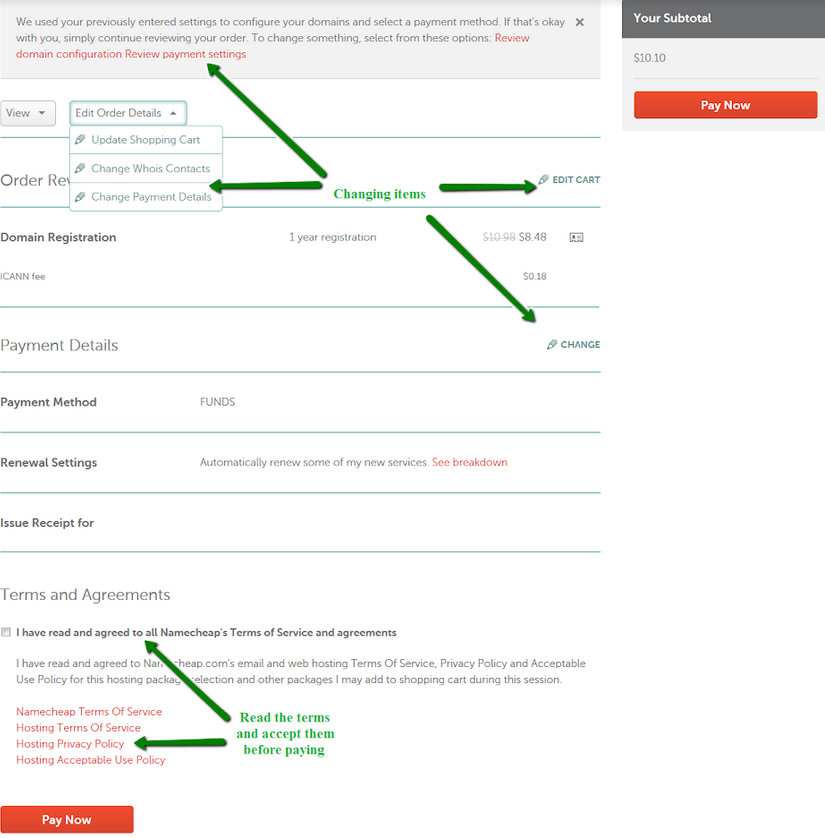
Credit: www.namecheap.com
Frequently Asked Questions
How To Buy A Domain Name In Namecheap?
Visit Namecheap, search for your desired domain, add it to your cart, and proceed to checkout. Complete payment, register the domain under your account, and confirm your purchase via email. Your domain is now ready for use.
Should I Buy A Domain From Namecheap?
Namecheap offers affordable domains with good customer support. It’s a trusted choice for domain registration. Consider their competitive pricing and user-friendly interface when purchasing a domain. Positive reviews highlight ease of use and reliability.
How Do I Permanently Buy A Domain Name?
You can’t permanently buy a domain name. Register it for extended periods and renew regularly. Choose a reliable registrar, ensuring domain control and privacy protection.
How Do I Add A New Domain In Namecheap?
To add a new domain in Namecheap, log into your account. Navigate to “Domain List” and click “Add Domain”. Enter the domain name and follow the prompts to complete the process. Ensure the domain is available before purchase.
Conclusion
Buying a domain on Namecheap is simple and straightforward. Follow the outlined steps. Start by searching your desired domain. Check its availability. Add it to your cart. Proceed to checkout. Fill in the necessary details. Choose your preferred payment method.
Complete the purchase. You’ve got your new domain! Namecheap’s user-friendly platform makes the process easy. Plus, you get reliable support if needed. Now, you’re ready to build your online presence. Just remember to renew your domain on time. Happy domain shopping!



