Imagine having your very own slice of the internet, a place where your ideas, projects, or business can shine. Buying a domain is the first step toward making that dream a reality.
If you’re wondering how to get started, Namecheap is one of the most user-friendly platforms out there. You might be thinking, “Why Namecheap? ” Well, it’s all about simplicity, affordability, and reliability. In this guide, you’ll discover just how easy it is to buy a domain from Namecheap.
Whether you’re a seasoned pro or a complete beginner, you’ll find every step laid out clearly, ensuring you make the perfect choice for your needs. By the end, you’ll have the confidence to secure your domain and start building your online presence. So, are you ready to take control and claim your corner of the web? Let’s dive in and explore how you can buy a domain from Namecheap effortlessly.
Choosing The Right Domain Name
Choosing the right domain name is crucial for your website’s success. It serves as your online identity, impacting how visitors perceive your brand. A well-thought-out domain can enhance your site’s credibility and attract more traffic. Here are key steps to guide you in selecting the perfect domain name.
Brainstorm Ideas
Start by brainstorming several domain name options. Keep them short and memorable. Use words that reflect your site’s purpose or niche. Try combining relevant terms to form unique names. Avoid numbers and hyphens; they can confuse visitors. Think about the keywords your audience might search for.
Check Availability
After brainstorming, check the availability of your chosen names. Use Namecheap’s search tool to see if they are taken. If a name is unavailable, consider slight variations. You can add a prefix or suffix. Don’t forget to check different domain extensions, like .com or .net.
Consider Branding
Your domain name should align with your branding strategy. It must be easy to spell and pronounce. Ensure it reflects your brand’s voice and message. A strong domain name can boost your brand recognition. Avoid names that are too similar to existing brands. This helps prevent confusion and legal issues.
Credit: www.namecheap.com
Navigating Namecheap’s Platform
Easily purchase a domain from Namecheap by starting with a quick search for your desired name. Add your chosen domain to the cart, proceed to checkout, and complete the payment process. With user-friendly navigation, securing your web address is straightforward and efficient.
Navigating Namecheap’s Platform Buying a domain from Namecheap can be a smooth experience if you know your way around their platform. The user-friendly interface is designed to make the process straightforward, even if you’re not tech-savvy. With just a few steps, you can secure the domain that perfectly matches your brand. ### `Creating An Account
Using The Search Tool
Exploring Domain Options
Finalizing The Purchase
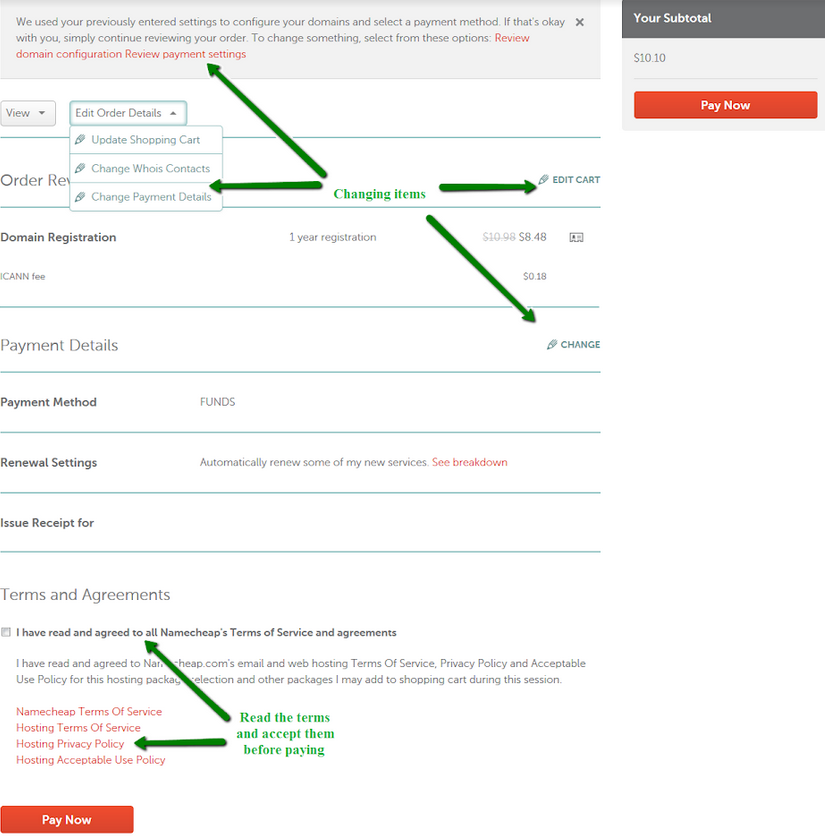
Completing the purchase at Namecheap involves selecting your domain, adding it to your cart, and proceeding with payment. Carefully check your cart details before confirming the transaction. Once finalized, ownership details are sent to your email, ensuring a smooth buying experience.
Once you’ve navigated through the initial stages of selecting your perfect domain on Namecheap, it’s time to finalize the purchase. This is the moment where your vision starts to become a reality. If you’re feeling a bit overwhelmed, don’t worry—this part is straightforward. Let’s break it down into manageable steps so you can confidently secure your domain and bring your project to life.Adding To Cart
Once you’ve found your ideal domain, click the “Add to Cart” button. It’s as simple as adding an item to your shopping cart on any online store. Suddenly, owning your unique corner of the internet feels tangible. You might even feel a rush of excitement—you’re one step closer to launching your dream project.Reviewing Domain Details
Before proceeding to checkout, review your domain details carefully. This step is crucial to ensure everything is accurate, including the spelling of your domain name. You wouldn’t want any last-minute surprises, like a typo in your domain. Double-check everything to avoid future hassles.Completing Payment
Finally, it’s time to complete your payment. Choose your preferred payment method, whether it’s a credit card or PayPal. Namecheap’s process is user-friendly and secure. Have you ever noticed how hitting the “Pay Now” button can feel like a leap of faith? Rest assured, Namecheap provides a safe transaction environment, ensuring your information is protected. Congratulations! You’ve successfully purchased your domain. How does it feel to own a piece of the digital world? Now, the exciting journey of building your online presence begins. Are you ready to take the next step?
Credit: www.youtube.com

Credit: www.youtube.com
Frequently Asked Questions
How To Purchase A Domain On Namecheap?
Visit Namecheap’s website. Use the search bar to find your desired domain. Add the domain to your cart. Proceed to checkout and create an account or log in. Complete the purchase using your preferred payment method.
Should I Buy A Domain From Namecheap?
Namecheap offers affordable domain pricing, excellent customer support, and free privacy protection. Many users find it reliable and user-friendly. Consider comparing it with other registrars to ensure it meets your needs. Overall, it’s a popular choice for buying domains.
How Do I Permanently Buy A Domain Name?
You can’t permanently buy a domain name. Register it for a specific term, usually 1-10 years. Renew before expiration to maintain ownership. Use registrars like GoDaddy or Namecheap for registration and renewal. Regularly update contact info to avoid losing the domain.
What Are The Disadvantages Of Namecheap?
Namecheap’s customer support can be slow at times. Their hosting plans have limited resources. Website performance may be inconsistent during peak times. Advanced features are less robust compared to competitors. Backup options may require additional purchase.
Conclusion
Purchasing a domain from Namecheap is straightforward and stress-free. This guide simplifies the process for you. First, search for available domains. Next, choose your preferred domain name. Then, add it to your cart and proceed to checkout. Ensure your contact details are accurate.
Finally, complete your purchase using your preferred payment method. With these steps, you’re ready to establish your online presence. Namecheap offers great support and affordable pricing. Now, you can focus on building your website. Start your journey today. Make your mark online with ease.