
Are you looking to turn your web design skills into a profitable business? Building WordPress themes to sell could be your perfect opportunity.
Imagine creating stunning, customizable themes that countless website owners will use to bring their online presence to life. With the growing demand for unique and versatile WordPress themes, you have a chance to tap into a lucrative market. In this guide, you’ll discover step-by-step how to craft and sell WordPress themes that not only captivate users but also stand out in a crowded marketplace.
Whether you’re a seasoned developer or just starting, this article will provide you with actionable insights and practical tips. Let’s unlock the secrets to building WordPress themes that sell and take your creative career to the next level. Keep reading to learn how you can start making your mark in the digital world today.
Getting Started With WordPress Theme Development
Starting with the right tools is key. A code editor like Sublime Text or Atom helps a lot. You also need a local server. XAMPP or MAMP can do the job. They create a test area for your theme. A version control system is good too. Git is popular for tracking changes.
A WordPress theme is made up of files. These files control the look of a site. The main file is often named style.css. It tells how the site should look. Other files help create pages and posts. They are called template files. Learn about these files to build themes.
Picking the right place to work is important. Many developers use a local environment. This means building the theme on your computer. Online platforms like CodePen can be used too. They let you see changes live. Choose what feels best for you.
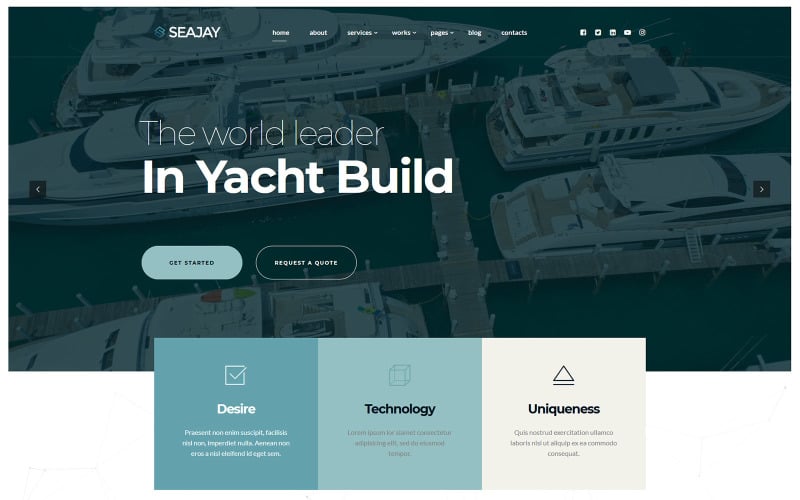
Credit: www.templatemonster.com
Market Research And Idea Validation
Stay updated with latest design trends. Look at popular websites. Notice colors and layouts they use. Check what users prefer. Minimalist designs are popular now. Bold colors catch eyes. Responsive designs work on all devices. Simple navigation is key. Users love easy access.
Study what competitors offer. Look at their themes. Check features and prices. Read reviews. See what people like or dislike. Find gaps in their offerings. Offer something unique. Make your theme stand out.
Choose your niche wisely. Focus on specific audience. Understand their needs. Look at demographics. Age, interests, and location matter. Craft themes they love. Offer solutions to their problems. Build trust with your audience.
Design And Prototype Creation
Start with a simple wireframe. A wireframe is like a blueprint. It shows the basic layout of your theme. Use pencil and paper for sketching. Keep the design clean and simple. This helps users find what they need fast. Use boxes for text. Use circles for buttons. Make sure everything is easy to see.
Follow UI/UX best practices. This makes your theme user-friendly. Keep navigation easy. Users should find pages with a few clicks. Use contrasting colors for text and background. This makes text easy to read. Icons should be clear and simple. They should match their function. Test your design with friends. See if they find it easy to use.
Make sure your theme is responsive. This means it works on phones, tablets, and computers. Use flexible grids. Grids help with alignment. Use media queries in your CSS. They adjust the layout for different devices. Check your theme on various screens. This ensures it looks good everywhere. Responsive design is important for all users.
Coding The Theme
HTML builds the structure. CSS makes it look nice. JavaScript adds actions. These are the basic tools for theme building. HTML is like the bones of a page. CSS is the skin and clothes. It styles the page. JavaScript adds movement and magic. Each has a role. Learn them well. Practice every day. Try to create simple pages first. Then, add colors and animations. This way, you will understand how they work together.
PHP connects WordPress and your theme. It is a server language. It helps WordPress talk to databases. With PHP, you can show posts and pages. Learn the basic PHP functions. Use them to fetch data. They make your theme dynamic. Always check the code for errors. PHP is powerful but tricky. Use it wisely.
Hooks and filters change WordPress behavior. Hooks let you add features. Filters change data output. Both are important for theme building. Use them to make your theme unique. Hooks can add scripts or styles. Filters can change titles or content. Always test changes. This ensures everything works well. Experiment with different hooks and filters. They offer endless possibilities.
Adding Features And Functionalities
Custom widgets make sites unique. They help users add special content. Menus guide visitors around the site. They keep things organized. Use easy tools to create them. WordPress offers many options. Choose ones that fit your theme. Make sure they are easy to use. Test them well. Users should have no trouble using them. Smooth navigation is key. It helps users stay longer. Happy users return often.
Plugins add power to themes. They provide extra features. Some plugins help with security. Others boost performance. Choose plugins that fit your theme needs. Add them carefully. Not too many at once. Test each one. Check for conflicts. Update them regularly. Keep the site safe and fast. Plugins should work well together. Harmony is important. It makes the site reliable.
SEO helps sites rank higher. Use clear titles and descriptions. Keywords matter. Place them well. Use headings wisely. They guide search engines. Images need alt text. It helps with SEO. Links should be meaningful. They connect content. Fast loading is crucial. Speed affects SEO. Test site speed often. Fix slow parts. Keep SEO tools updated. Good SEO brings more visitors.
Testing And Debugging
Cross-Browser Compatibility is crucial for reaching all users. Each browser works differently. Test your theme on Chrome, Firefox, Safari, and Edge. Fix any issues you find. Ensure the design stays consistent. Check for layout breaks. Ensure fonts and colors look the same. Don’t ignore mobile browsers. Many users browse on phones.
Performance Optimization keeps your theme fast. Slow themes frustrate users. Use tools like GTmetrix. They help check speed. Optimize images. Minify CSS and JavaScript files. Reduce HTTP requests. Use caching to save data. Fast themes get better sales. Speed is important for user satisfaction.
User Testing Feedback is valuable. Real users find hidden issues. Ask friends to test your theme. Collect their thoughts. Use feedback to improve. Fix any bugs they find. Make changes they suggest. Happy users lead to more sales. Testing helps refine your product.
Preparing For Launch
Clear documentation helps users understand your theme. Write guides for installation and customization. Offer support through email or forums. Quick replies make users happy. Consider creating FAQs for common issues. This saves time for everyone. Users prefer themes with good support.
Choose a license that suits your theme. GPL is popular for WordPress themes. Decide on a fair price for your work. Compare with other themes to find a good price point. Offer discounts for bulk purchases. Pricing affects your sales a lot.
Selecting the best marketplace is crucial. ThemeForest and Creative Market are popular choices. Look at each platform’s fees and rules. Find where your theme fits best. The right marketplace boosts your sales. More visibility means more buyers.

Credit: www.namehero.com
Marketing And Promotion
Crafting WordPress themes for sale involves design and functionality. Focus on user-friendly interfaces and responsive layouts. Incorporate SEO strategies and clear navigation to attract buyers.
Building An Online Presence
Creating a strong online presence is important. Start with a website that showcases your theme. Highlight its features and benefits. Use clear images and descriptions. Optimize your site for search engines. Include relevant keywords. Make your site easy to navigate. Engage with visitors through a blog. Share updates and tips related to your themes.
Social Media Strategies
Social media is a powerful tool. Share your theme on platforms like Facebook and Twitter. Use eye-catching images and videos. Post regularly to keep your audience engaged. Ask questions to spark conversation. Respond to comments and messages quickly. Build a community around your brand. Collaborate with influencers to reach more people.
Affiliate And Partnership Programs
Partner with others to grow your reach. Set up an affiliate program. Offer commissions for theme sales. Reach out to bloggers and developers. Propose partnerships that benefit both sides. Provide them with tools to promote your themes. Measure the success of each partnership. Adjust your strategies as needed.
Handling Customer Feedback And Updates
Always reply to customer questions quickly. Answering fast builds trust. Use simple words. Make answers clear and short. Customers appreciate helpful responses. It shows you care. This can lead to more sales. Happy customers tell others. They help your business grow.
Regular updates keep your theme fresh. Fix bugs as soon as you can. This makes your theme better. Customers will notice. They like themes that work well. Updates show you care about quality. Always test updates before release. This avoids problems. Good updates make customers happy.
Reviews help new customers decide. Always thank customers for reviews. Good or bad. Respond kindly to bad reviews. Offer help and fix issues. This shows you care. Happy reviews bring more buyers. Encourage customers to leave feedback. Feedback helps improve your theme.

Credit: www.udemy.com
Frequently Asked Questions
What Tools Are Needed To Build WordPress Themes?
To build WordPress themes, you need a code editor, FTP client, and design software like Adobe XD. A local server environment, such as XAMPP, is essential. Knowledge of HTML, CSS, PHP, and JavaScript is crucial. Additionally, WordPress documentation and theme development guides can be valuable resources.
How Can I Customize WordPress Themes?
Customizing WordPress themes involves editing the theme files and using the WordPress Customizer. You can add custom CSS or modify PHP templates. Using a child theme ensures safe customizations. Plugins like Elementor also offer extensive design changes without code. Always back up your site before making changes.
Is Coding Necessary For WordPress Themes?
Yes, coding is essential for building and customizing WordPress themes. Knowledge of HTML, CSS, PHP, and JavaScript is crucial. These languages help you create dynamic and responsive designs. However, page builder plugins can simplify the process for non-coders. Understanding basic coding enhances your theme development skills.
How To Ensure Themes Are Responsive?
Ensure themes are responsive by using flexible grids and media queries in CSS. Test your theme on various devices and screen sizes. Use tools like BrowserStack for cross-browser testing. Prioritize mobile-first design principles to enhance user experience. Responsive themes improve SEO and user satisfaction.
Conclusion
Creating WordPress themes for sale requires dedication and creativity. Focus on user-friendly designs. Ensure your theme is responsive and compatible with plugins. Test thoroughly to provide a reliable product. Market your theme effectively to reach potential buyers. Offer support and updates to keep users satisfied.
Success comes with quality and persistence. Keep learning and improving your skills. Listen to user feedback to enhance your themes. Remember, patience is key in the competitive market. Approach each project with passion and commitment. Good luck with your theme-building journey!


