
Are you ready to take control of your online presence? Building your own server for web hosting could be the key to unlocking unlimited possibilities.
Imagine having the power to manage your website, tailor its performance, and ensure its security—all on your own terms. This guide will walk you through the essentials of setting up a server, whether you’re a tech enthusiast or a small business owner looking to cut costs and boost efficiency.
Discover how easy it is to customize your hosting solution and why it might be the perfect step for you. Keep reading to learn the secrets of building a reliable, efficient server that meets your unique needs and gives you the freedom to grow.
Choosing The Right Hardware
CPU and RAM are very important for a server. A strong CPU handles many tasks. It keeps the server fast. For small websites, start with a basic CPU. More visitors need more power. RAM helps the server run smoothly. Start with 8GB RAM. More traffic means more RAM. Always plan for future growth.
Storage is where you keep data. Choose between HDD and SSD. HDD is cheaper. It is good for storing lots of data. SSD is faster. It makes websites load quickly. For quick response, use SSD. For more space, use HDD. Some servers use both.
Network interfaces connect your server to the internet. A good connection means fast websites. Use a Gigabit Ethernet port. It offers fast data transfer. For more visitors, consider multiple ports. This helps in managing traffic better. Always ensure reliable internet speed.

Credit: webhostinggeeks.com
Operating System Selection
Linux and Windows are popular choices for web servers. Linux is open-source. It’s free and very secure. Windows is user-friendly. It has good support. Linux is great for developers. Windows is easy for beginners. Choose what fits your needs.
Linux has many distributions. Ubuntu is very popular. It’s easy to use. CentOS is stable and reliable. Debian is very secure. Windows has different versions. Windows Server 2019 is common. Each distribution has unique features. Choose based on your requirements.
- Read the instructions carefully.
- Keep your installation media ready.
- Backup your data before installing.
- Check system requirements.
- Follow step-by-step guides.
Web Server Software
Apache and Nginx are popular web server software. Apache is known for its stability. It is easy to configure. Nginx is faster and uses less memory. Many choose it for high-traffic websites. Both are open-source and free to use.
Apache is great for beginners. It offers many modules. These add extra features. Nginx handles many requests at once. It is good for busy sites. Both have strong communities online. You can find help easily.
Virtual hosts allow multiple sites on one server. Apache uses conf files for this. Nginx uses server blocks. You create a file for each site. Include the domain name and file path. This keeps sites separate and organized.
SSL certificates keep data secure. They make web addresses start with https. Apache uses modules like mod_ssl. Nginx uses SSL directives. Both need a certificate file. Install it to encrypt data. This protects users and builds trust.
Database Setup
Setting up a database is vital for building a server for web hosting. It involves installing database management software, configuring settings, and securing data. Proper setup ensures smooth website operation and data management.
Mysql Vs Postgresql
Both MySQL and PostgreSQL are popular choices. MySQL is known for its speed and simplicity. Many websites use it. PostgreSQL is known for its advanced features and robustness. It handles complex queries better. Choose MySQL for basic needs. Choose PostgreSQL for complex tasks. Both have strong community support. Both are open source.
Configuration Best Practices
Keep your database updated. Set strong passwords for users. Limit access to trusted IPs. Use SSL for secure connections. Backup regularly. Monitor performance and logs. Adjust settings based on traffic. Use indexes for faster queries. Optimize queries for efficiency.
Backup Strategies
Regular backups are crucial. Schedule backups daily. Store backups in multiple locations. Use cloud services for safety. Test backups often. Check if they restore correctly. Keep historical backups. Use automated tools for ease. Protect backups with encryption.
Security Measures
Set up a firewall to protect your server. It blocks unwanted access. Only allow trusted traffic. This keeps your data safe. Use rules to manage network connections. Regularly check and update these rules. A strong firewall stops threats before they enter. Your server stays secure and protected.
DDoS attacks can slow your server. Use a DDoS protection service. It helps keep your site online. Look for providers that offer real-time monitoring. They should also have automatic attack mitigation. A good service reduces downtime. Your visitors can access your site easily. Protection ensures smooth performance.
Keep your server software up-to-date. Updates fix bugs and security holes. Schedule regular checks for updates. This keeps your system running smoothly. Outdated software can be a risk. Always use the latest versions. Safe software helps keep your data secure.
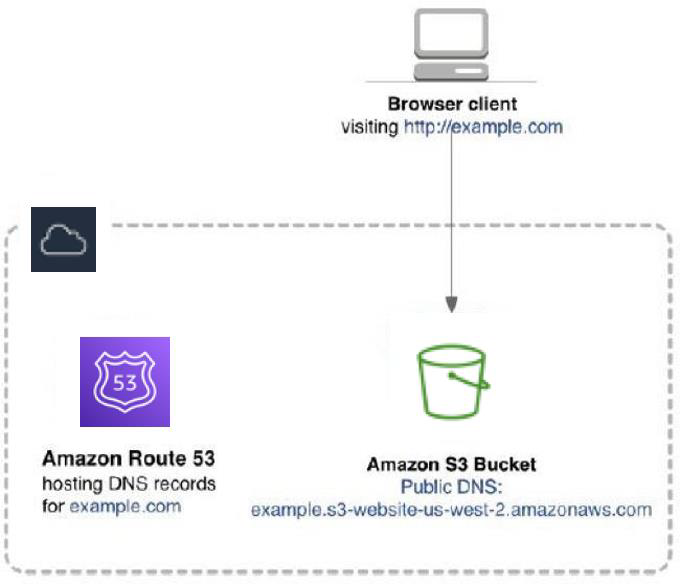
Credit: docs.aws.amazon.com
Monitoring And Maintenance
Performance metrics help you know how your server is doing. Check CPU usage, memory, and disk space often. High usage can slow down the server. Keep track of bandwidth too. It shows data flow on your server. Regular checks keep the server running smoothly.
Automated alerts are important. They warn you when something goes wrong. Set alerts for high CPU or memory usage. Alerts can also tell you about low disk space. Quick alerts help fix problems fast. They keep your server safe and running.
Scheduled maintenance tasks are a must. Set a time to check and update your server. Clean up old files to free up space. Check for software updates regularly. Updates keep your server secure. Plan these tasks to avoid downtime.
Scalability Considerations
Load balancing makes sure every server works evenly. It helps in managing more traffic. Servers need to share the work evenly. This prevents any server from overloading. The system becomes more reliable. It improves performance during busy times.
Cloud integration connects your server to the cloud. This provides extra resources when needed. The cloud offers flexibility. It can grow or shrink based on demand. This helps in handling sudden traffic spikes. It also reduces costs when traffic is low.
Resource allocation involves giving resources to servers wisely. This means assigning memory, CPU, and storage effectively. Too much or too little can cause issues. Balanced allocation ensures smooth operation. It keeps the server efficient and fast. Regular checks help maintain balance.

Credit: www.youtube.com
Frequently Asked Questions
How To Create Your Own Server For Web Hosting?
Begin by selecting reliable hardware for your server. Install a Linux-based operating system like Ubuntu. Configure Apache or Nginx for web hosting. Set up MySQL or PostgreSQL for databases. Secure your server with firewalls and regular updates. Finally, choose a static IP and a domain name for accessibility.
How Much Does It Cost To Build A Web Server?
Building a web server costs between $100 to $1000. This depends on hardware, software, and hosting needs.
What Type Of Server Is Required For Web Hosting?
A reliable web hosting server should be fast, secure, and scalable. Choose between shared, VPS, or dedicated servers based on your website’s needs. Shared hosting is cost-effective; VPS offers more control; dedicated servers provide maximum resources and security.
Can I Host My Own Website If I Have A Server?
Yes, you can host your own website if you have a server. Ensure your server meets technical requirements, such as internet connectivity, security measures, and software compatibility. Properly configure DNS settings for domain pointing. Regularly maintain and update server software for optimal performance and security.
Conclusion
Building a server for web hosting can seem daunting. But with the right steps, it becomes manageable. Start with choosing good hardware. Install reliable software. Ensure security measures are in place. Regular updates keep things running smoothly. Monitor performance closely.
Troubleshoot issues quickly. Good support is crucial. Hosting your own server offers flexibility. Control over resources is a big advantage. It’s a rewarding challenge. Knowledge and patience go a long way. Take it step by step. Soon, you’ll have a server ready for web hosting.
Enjoy the process and the results!


