
Are you tired of relying on third-party web hosting services and ready to take control of your online presence? Building your own web hosting server might sound like a daunting task, but it’s a rewarding challenge that puts you in the driver’s seat.
Imagine having the power to customize, optimize, and manage your very own server. This not only gives you greater flexibility but also potentially saves you money in the long run. In this guide, we’ll break down the process into simple, actionable steps that anyone can follow, even if you’re not a tech expert.
By the end, you’ll be equipped with the knowledge to set up a server that meets your specific needs. Dive in and discover how you can create a hosting environment that’s uniquely yours.

Credit: www.hackster.io
Choosing Hardware
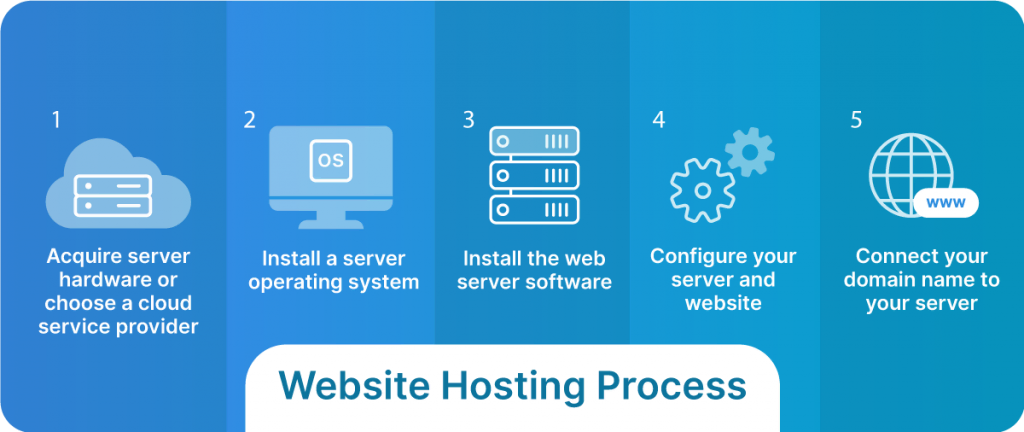
A strong processor helps the server run fast. Intel Xeon or AMD EPYC are good choices. Choose a processor with multiple cores. More cores mean better performance. Memory is also important. 16 GB RAM is a good start. More RAM can help handle many tasks at once. It keeps your server smooth and fast.
Storage is where all your files live. Use SSD for faster speed. 1 TB SSD is a good size. It gives you space for many files. You can use HDD for backups. HDD is cheaper but slower. Mixing both can be a smart choice.
A good network card helps connect to the internet. Gigabit Ethernet is a common choice. It offers fast data transfer. For bigger needs, 10 Gigabit Ethernet is better. This ensures your server is always connected. It keeps data flowing smoothly.
Selecting Operating System
Choosing between Linux and Windows is a big decision. Linux is popular for its flexibility and open-source nature. It can be more cost-effective since it’s often free. Many web servers use Linux. It has strong community support.
Windows is known for its user-friendly interface. It works well with Microsoft products. Some prefer Windows if they use ASP.NET for web apps. Windows can be more expensive due to licensing fees. Consider what software you plan to run.
| Linux | Windows |
|---|---|
| Ubuntu | Windows Server |
| Debian | N/A |
| CentOS | N/A |
Each distribution offers unique features. Ubuntu is known for its ease of use. Debian is stable and secure. CentOS is great for enterprise solutions. Windows Server offers integrated Microsoft services.
Installing Web Server Software
Apache and Nginx are popular web servers. Apache is easy to use. It works well with many websites. Nginx is fast and uses less memory. It handles many connections at once. Both are open-source and free to use.
Configuration Basics
Configuration is setting up your server. Apache uses .htaccess files. Nginx uses nginx.conf. Apache is easier for beginners. Nginx is better for large websites. Choose based on your needs.
Credit: www.liquidweb.com
Setting Up Domain And Dns
First, choose a good name for your website. This is called a domain name. It should be easy to remember. Visit a domain registrar website to buy your domain. Popular registrars include GoDaddy and Namecheap. Check if your chosen name is available. If it is, you can purchase it. This process is called domain registration. Once you have the domain, you are ready for the next step.
DNS stands for Domain Name System. It helps people find your website. Go to your domain registrar’s website. Find the DNS settings. Enter the IP address of your web server. This connects your domain to your server. Save these settings. It might take some time to update. DNS helps direct users to the right place.
Implementing Security Measures
A firewall is like a gatekeeper for your server. It blocks bad traffic. Only safe connections can get through. You must configure it properly. This keeps hackers away. Use a simple tool like ufw. It is easy to set up. Follow guides for your system. Always test your settings. This ensures your server is safe.
SSL certificates keep data safe. They encrypt the information. This protects users’ privacy. You need to get a certificate. Many providers offer them. Some are even free. Install the certificate on your server. This makes your website use HTTPS. Users will see a lock icon. This means your site is secure.
Always update your server software. This fixes security holes. Developers release updates often. These updates keep your server safe. Set reminders for updates. Or use automatic updates. This way, you won’t forget. Regular updates are a must. They protect your server from new threats.
Managing Server Resources
Monitoring tools help keep your server healthy. They watch over your server’s CPU, memory, and disk usage. You can see how much traffic your server gets. Some tools even alert you when something’s wrong. This helps you act quickly. Keeping an eye on your server is very important. It keeps your website running smoothly.
Optimizing makes your server work better. Use caching to save time on loading pages. Compress images to make them smaller. This helps your site load fast. Remove any plugins you don’t need. They can slow down your server. Always keep your server software updated. This keeps it fast and safe.
Backup And Recovery Strategies
Automated backups are important. They keep your data safe. Set a schedule for backups. This ensures your data is saved regularly. Use tools that back up your data without your input. This way, you won’t forget. Keep backups in a safe location. This could be a cloud service or another server. Test your backups often. Make sure they work. This will help when you need them.
A disaster recovery plan is like a safety net. It helps if something bad happens. Write down steps for what to do. This should include how to restore your data. Practice your plan often. Everyone should know what to do. If something breaks, you can act fast. Make sure your plan is clear and simple. It should be easy to follow. This will save time and stress.
Credit: www.socketlabs.com
Legal And Compliance Considerations
Understanding data privacy laws is crucial. These laws protect user information. You must comply with these laws. Failing to do so can lead to penalties. Each country has different rules. Learn about the rules in your country. Ensure your server follows them. Protecting user data builds trust. It is a legal requirement too.
Creating a Terms of Service is important. It explains what users can expect. It also sets rules for usage. This document protects you legally. Users need to agree to it. Make it easy to understand. Include details on data usage. State what happens if rules are broken. This keeps everyone informed.
Scaling And Expansion
Load balancing helps manage web traffic. It spreads traffic across many servers. This prevents any one server from getting too busy. Balanced loads mean faster website loading. Users don’t like waiting. Happy users return often. Use load balancers to keep things smooth. They act like traffic police. Directing traffic to the right places.
Adding servers increases power. More servers can handle more users. Server clusters work together. Each server does a part of the job. This makes sure your website runs well. Even during busy times. More servers mean better performance. They also provide backup. If one server fails, others take over. This keeps your website online.
Frequently Asked Questions
How Do I Create My Own Hosting Server?
Choose a reliable hardware setup and install server software like Apache. Configure settings, secure with firewalls, and manage DNS. Regularly update software and monitor performance. Ensure backup solutions for data safety.
How To Build A Web Server From Scratch?
First, choose a server hardware setup. Install a Linux distribution, like Ubuntu. Configure the network settings. Set up Apache or Nginx as the web server software. Deploy a firewall for security. Test the server using a web browser to ensure functionality.
Can I Host My Website By Myself?
Yes, you can host your website by yourself. You need a server, reliable internet connection, and technical skills. Consider security, backups, and maintenance for effective hosting. Using a hosting provider can simplify management tasks.
Can You Host A Server Yourself?
Yes, you can host a server yourself. Ensure a stable internet connection and necessary hardware. Install server software like Apache or Nginx. Configure security settings and regularly update software. Hosting a server requires technical knowledge and maintenance to ensure optimal performance and security.
Conclusion
Building your own web hosting server offers many benefits. You gain control over your data. You save costs in the long run. It’s a rewarding experience to learn new skills. Start with basic hardware and software knowledge. Gradually, expand your server capabilities.
Troubleshoot challenges with patience and research. Protect your server with strong security measures. Regular updates keep your server healthy. Enjoy the flexibility of managing your own hosting. Use this guide to embark on your server journey. Your effort builds a solid foundation for future growth.


