
Imagine being able to capture your audience’s attention with visually stunning emails that perfectly align with your brand. Now, what if you could do this seamlessly using tools you already know and trust?
Welcome to the world of building email themes using Mailchimp for WordPress. This guide is your ticket to crafting eye-catching emails that not only look great but also resonate with your subscribers. You’ll discover how to harness Mailchimp’s powerful features while integrating them smoothly with your WordPress site.
If you’ve been longing to enhance your email marketing game, this is the solution you’ve been searching for. Dive in, and let’s transform your email campaigns into captivating, brand-boosting masterpieces.
Credit: www.gravityforms.com
Setting Up Mailchimp Account
Visit the Mailchimp website and click on “Sign Up Free.” Fill in your email, username, and password. Check your email for a confirmation link. Click the link to verify your account. Log in to Mailchimp with your new credentials. A welcome screen will appear. Follow the steps to finish the setup. Choose your plan if needed. Free plans are available. Enter your business details like name and address. This helps with email compliance. All done!
Go to your account settings. Click on your profile icon. Then select “Account.” Here, adjust your time zone and language settings. Make sure these match your needs. Next, click “Contact Information.” Update your details if necessary. Save any changes made. Check the “Notifications” tab. Decide which alerts you want. This keeps you informed. Review the “Connected Sites” section. Ensure your WordPress site is linked. This helps with seamless integration. Now your account is ready!
Installing Mailchimp Plugin In WordPress
Mailchimp has many plugins for WordPress. Picking the right one is important. Mailchimp for WordPress is a popular choice. It is easy to use and has many features. Compatibility with your WordPress version is crucial. Always check if the plugin supports your theme and other plugins.
Go to your WordPress dashboard. Click on Plugins. Select Add New. Type “Mailchimp for WordPress” in the search box. Click Install next to the plugin name. Wait for the installation to finish. Click Activate to turn it on.
Designing Your Email Theme
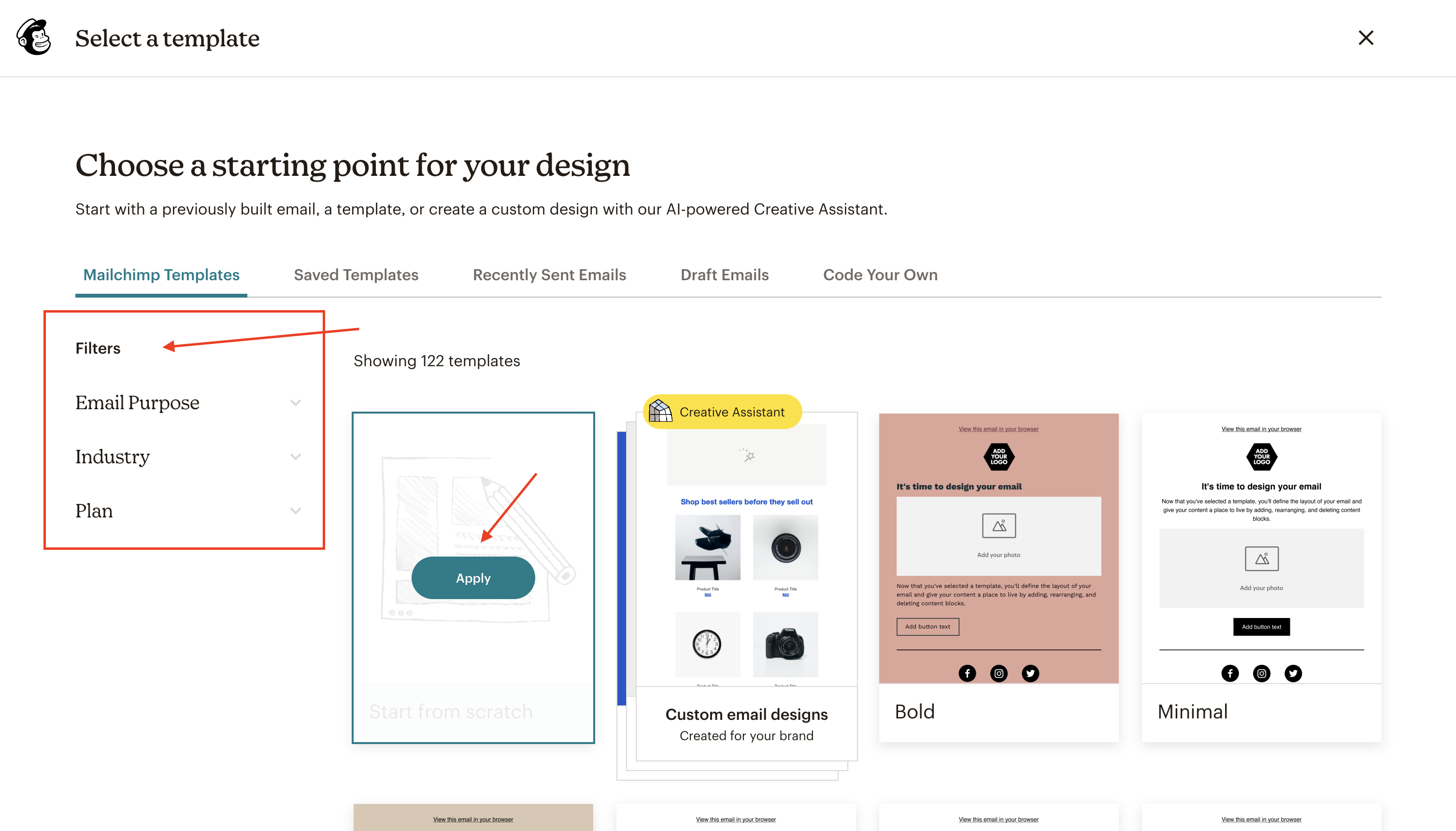
Choose a template that fits your brand. Mailchimp offers many options. Look for templates with a simple layout. This makes them easy to read. Pick a style that suits your message. A good template catches the eye.
Adjust the layout to suit your needs. Change the colors to match your brand. Use your brand’s main colors. Keep it consistent. This helps people recognize your emails. Simple designs work best.
Add your logo to the top of the email. Use the same font as your website. This keeps everything looking the same. Add images that show what your brand is about. Good images make people interested.
Credit: www.iubenda.com
Incorporating Email Elements
Text and images make emails interesting. Add clear text. Use simple words. Pictures should match the text. They should be bright and clear. Make sure all images load fast. This keeps readers happy.
Call to Action buttons guide readers. Use clear words on buttons. Like “Buy Now” or “Learn More”. Colors should stand out. Buttons should be big enough to click. This helps readers know what to do next.
Social media links connect emails to social sites. Add Facebook, Twitter, and Instagram links. Use icons to show these links. Make sure they work well. This helps readers find more about you.
Testing Your Email Theme
Preview the email theme before sending it out. This helps you see how it looks. Make sure all elements are in place. Check the colors and fonts. They should match your brand style. Look at the layout on different devices. The email should be clear on both phones and computers. Adjust any part that seems off. This ensures your message is easy to read.
Sending test emails is very important. It helps ensure everything works. Send the test email to yourself first. Check for any mistakes in text or images. Make sure the links are clickable. Ask a friend to check it too. They might see something you missed. Adjust the email as needed. This process helps make your email perfect.
Integrating With WordPress
Connecting Mailchimp to WordPress is easy. First, install the Mailchimp plugin. You can find it in the WordPress plugin store. Next, activate the plugin. Now, you need to connect your Mailchimp account. Go to the settings page of the plugin. Enter your Mailchimp API key. This key links your account to WordPress.
After entering the API key, you can create email forms. These forms help collect user emails. Place them on your website’s pages. This way, visitors can subscribe to your newsletter.
Keeping contact lists in sync is important. In the Mailchimp plugin, find the sync settings. You can choose which lists to sync. Select your main list. Press the sync button. The plugin will update the list. Now, new subscribers from your site are added automatically. Your list stays up-to-date.
Syncing ensures you reach all your subscribers. It saves time. No need to add emails manually. This process helps you manage your contacts better. Ensure your message reaches everyone interested.
Launching Your Email Campaign
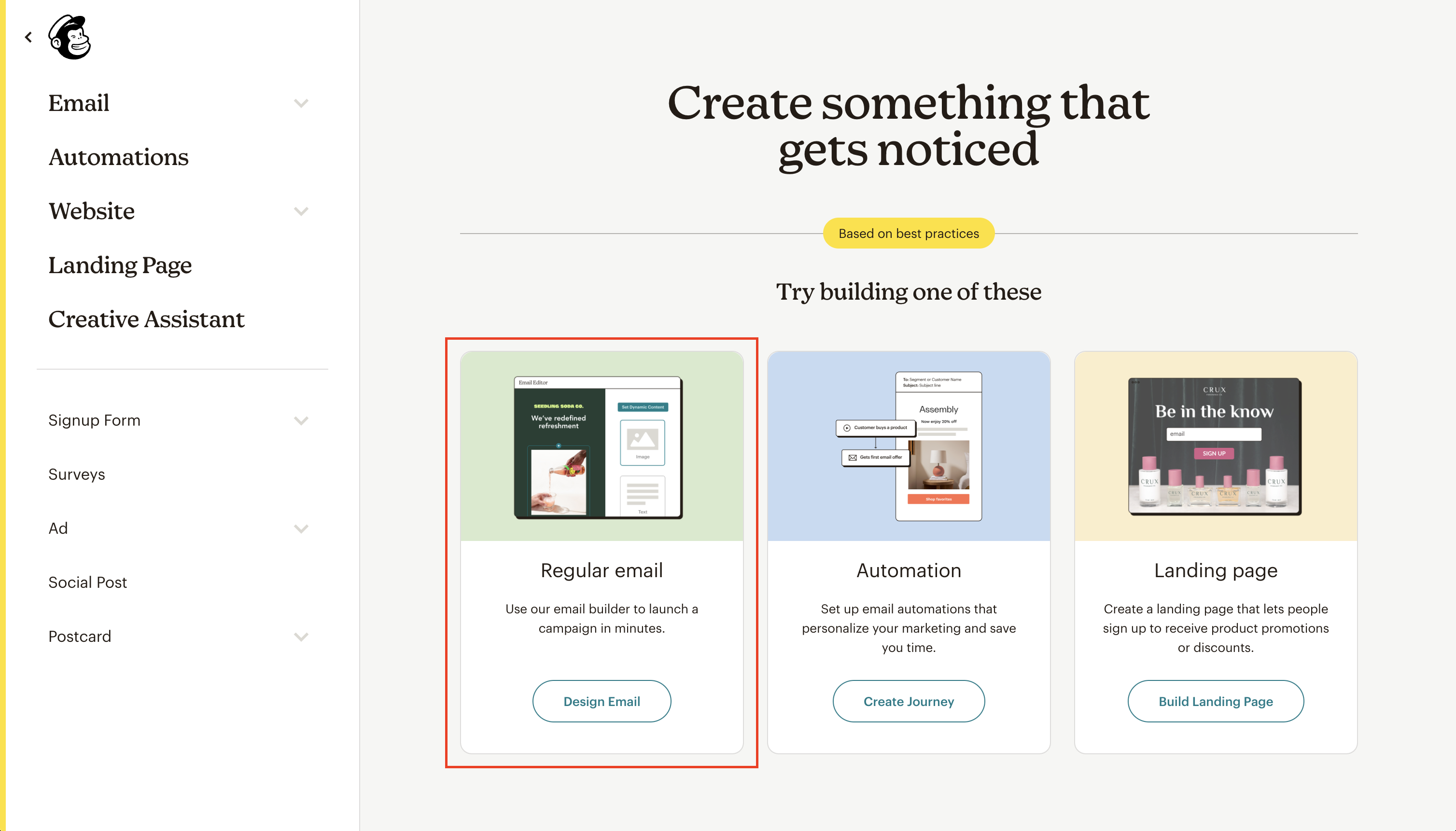
Mailchimp lets you schedule your emails easily. Pick a date and time. Choose the best moment. Send when people are active online. This increases the chance they will open your email. Think about time zones. People live in different places. Use analytics to find the best times for your audience. Consistency is key. Send emails regularly. This keeps your audience engaged. Use Mailchimp’s scheduling tool to automate your sends. Save time and effort. Make sure your content is ready beforehand. Review your emails before sending. Check for errors. Ensure everything is perfect.
Track your email performance using Mailchimp’s tools. Look at open rates and click rates. These show how interested people are. Analyze the data to improve your campaign. Find what works and what doesn’t. Adjust your content accordingly. Engagement is important. Keep an eye on unsubscribes. They tell you if people like your emails. Use A/B testing to see what your audience prefers. Try different subject lines. Experiment with content styles. Learn from the results. Make your emails better each time.
Credit: www.iubenda.com
Frequently Asked Questions
What Is Mailchimp For WordPress?
Mailchimp for WordPress is a plugin that integrates Mailchimp with WordPress sites. It helps you build email lists efficiently. By connecting Mailchimp with your WordPress, you can create signup forms, manage subscribers, and automate email campaigns directly from your website.
It’s a powerful tool for enhancing email marketing strategies.
How Do I Create Email Themes In Mailchimp?
To create email themes in Mailchimp, start by choosing a template. Customize it using the drag-and-drop editor. You can add images, text, and buttons. Ensure it’s mobile responsive and visually appealing. Preview your design before saving it. Mailchimp offers various design tools to make this process intuitive.
Can I Integrate Mailchimp With WordPress Easily?
Yes, integrating Mailchimp with WordPress is straightforward. Install the Mailchimp for WordPress plugin. Connect your Mailchimp account by entering your API key. Once integrated, you can create signup forms and manage subscribers. This integration enhances your website’s email marketing capabilities, making it easier to engage with your audience.
What Are The Benefits Of Using Mailchimp?
Mailchimp offers several benefits for email marketing. It’s user-friendly and integrates well with WordPress. It provides advanced analytics and automation tools. You can segment audiences for targeted campaigns. Mailchimp also ensures high deliverability rates. Its intuitive design features make creating attractive emails simple and efficient.
Conclusion
Creating an email theme with Mailchimp for WordPress is straightforward. You follow simple steps, and your email stands out. Customize and connect with your audience easily. Enhance your brand image through consistent design. Efficient communication builds trust and boosts engagement.
Mailchimp offers tools to make designing easy. You don’t need advanced skills to start. With practice, you get better results. Keep learning and experimenting. Your emails become more effective over time. Stay creative and adapt to changes. Success comes with dedication and effort.
Embrace the process and enjoy the journey.


