
Are you ready to unleash your creativity and take control of your website’s design? Building a WordPress theme from scratch might sound daunting, but it’s a rewarding process that empowers you to create a unique, tailor-made look for your site.
Imagine having complete freedom over every element, every color, and every layout detail. By crafting your own theme, you not only enhance your design skills but also gain a deeper understanding of how WordPress works under the hood. In this guide, we’re diving into the essentials of building a WordPress theme from scratch, specifically tailored for 2020.
You’ll learn practical steps, insider tips, and how to avoid common pitfalls. If you’ve ever felt constrained by pre-made themes or wanted to inject a personal touch into your online presence, this article is for you. Stay with us, and by the end, you’ll have the knowledge and confidence to bring your vision to life, making your website truly one-of-a-kind. Let’s get started!
Setting Up Development Environment
First, download WordPress from the official site. It’s free. You need a tool to run it on your computer. XAMPP or MAMP are good choices. They are easy to use. Install the tool, then open it. Start the Apache and MySQL services. These make your computer act like a server.
Now, create a new database. Use phpMyAdmin for this. It’s a simple tool. Name your database anything. Next, put the WordPress files in the htdocs folder. Then, open your browser. Type localhost/your-folder-name in the address bar. Follow the setup steps. Enter the database name. Use ‘root’ for the username. Leave the password blank. Now, WordPress is ready locally.
You need a code editor to write code. Visual Studio Code is popular. It’s free and simple. You also need a browser. Google Chrome is a good choice. Install a version control tool. Git helps manage changes. Use Node.js for extra tools. It helps automate tasks. These tools make theme building easier.
Understanding Theme Structure
Building a WordPress theme starts with knowing the core files and directories. These are the building blocks of your theme. The main directory holds all theme files. Most themes have a style.css file. This file sets the look of your site.
Another important file is index.php. It acts as the default template file. Other files like functions.php help add features to your theme. Your theme may also have a header.php and footer.php. These files manage the top and bottom sections of your site.
WordPress Template Hierarchy
WordPress uses a template hierarchy to decide which file to use. This means WordPress checks files in a certain order. For instance, home.php is used for the home page. If it is missing, it looks for index.php. This hierarchy helps WordPress know what content to show.
Templates can be specific to pages, posts, or categories. A single.php file shows single posts. A page.php file shows individual pages. category.php is used for showing post lists by category. Understanding this hierarchy is key in building a well-structured theme.
Creating Theme Files
Building a WordPress theme from scratch involves creating theme files that define the site’s design and functionality. Start with basic PHP templates and style sheets to customize layouts and features. Follow step-by-step guides to ensure compatibility and performance.
Setting Up Style.css
Begin with the style.css file. It tells WordPress about your theme. This file includes the theme name and other details. Start by adding a comment at the top. Write the theme’s name, author, and version. This is important for WordPress to recognize your theme. Keep the design simple and clean. Use basic CSS rules for layout. Make sure the text is readable. Use contrasting colors for background and text.
Building Index.php
The index.php file is the main file. It displays your website’s content. Begin with basic HTML structure. Include a header, main content, and footer. Use WordPress functions to pull content from the database. Add basic loops to display posts. Test it in your browser. Ensure it looks neat and organized. Use simple fonts and layouts. Make sure it loads quickly.
Crafting Functions.php
The functions.php file adds extra features. It acts like a plugin for your theme. You can add menus, widgets, and more. Start by opening PHP tags. Add code to register a menu. Create simple functions to change theme behavior. Keep the code clean and organized. Avoid complex functions at first. Test any new code carefully. Make sure the site works well.
Credit: followandrew.dev
Enqueuing Scripts And Styles
To add CSS stylesheets to your WordPress theme, use the wp_enqueue_style function. This ensures styles are added properly. Create a function in your theme’s functions.php file. Use a unique name for your stylesheet. Add the file path and version number. This helps with caching. Finally, use add_action to hook your function to wp_enqueue_scripts.
Adding JavaScript is similar to CSS. Use the wp_enqueue_script function. This loads your JavaScript files safely. Again, create a function in functions.php. Add the script’s name, file path, and dependencies. Dependencies are other scripts your file needs. Don’t forget the version number for cache control. Use add_action to link your function to wp_enqueue_scripts.
Developing Custom Templates
The homepage is the face of your site. Start by sketching a design. Use simple colors and clear text. Add a menu at the top. Include a header with your logo. Below, place a featured section with images. Arrange posts in rows or a grid. Make sure visitors can find what they need quickly.
Each post needs a unique style. Begin with a title at the top. Next, include the author’s name and date. Write the post content in small paragraphs. Add images to break up text. Include a comments section at the end. Make the template clean and easy to read.
Pages can be different from posts. Create a template for each type of page. Use a contact form for the contact page. Add a map if needed. For an about page, write about your team and goals. Use a gallery for image pages. Keep the design simple and user-friendly. This helps people stay longer on the site.
Implementing Theme Features
Custom menus help users navigate your site easily. Register menus in your theme’s `functions.php` file. Use the `register_nav_menus()` function. This function allows multiple menus. Display menus in your theme using `wp_nav_menu()`. Place it in your header or footer. Ensure your theme supports menus. It makes the site user-friendly.
Widgets add extra features to your site. Create widget areas in your theme. Use the `register_sidebar()` function. This is done in the `functions.php` file. Widgets can be placed in sidebars. Sidebars can hold various widgets. They provide dynamic content areas. Customize your sidebars with widgets like search bars, categories, and more.
Custom post types help manage content better. They can be added using `register_post_type()`. This makes organizing content simple. Taxonomies group content in meaningful ways. Use `register_taxonomy()` for custom taxonomies. This improves content structure. It enhances user navigation. Organize posts, pages, or media effectively.
Testing And Debugging
Testing and debugging ensure your WordPress theme functions smoothly. Identify errors and fix them for optimal performance. Use tools like WP_DEBUG to spot issues early and maintain a clean codebase.
Checking Browser Compatibility
It’s important to test your WordPress theme in different browsers. Make sure it looks good in Chrome, Firefox, and Safari. Check for layout issues and fix them. Keep an eye on font styles and colors. Sometimes, they can differ in browsers. Use tools like BrowserStack for testing. Ensure that your theme is responsive. Mobile users should have a smooth experience.
Debugging Common Issues
Debugging can be a tricky part of theme building. Identify errors using the WordPress debug mode. Look for broken links or images. Check the console for JavaScript errors. Fix any PHP warnings. Keep your code clean and organized. Sometimes, plugins can cause conflicts. Deactivate plugins one by one to find the problem. Always test after making changes. This helps catch new issues early.

Credit: www.youtube.com
Optimizing Performance
Crafting a WordPress theme from scratch boosts performance and efficiency. Streamline your code and design for optimal speed. Prioritize lightweight elements and clean coding practices to enhance user experience.
Minimizing Css And Javascript
Reducing the size of CSS and JavaScript files is key. Smaller files load faster. Use tools like Minify to remove extra spaces and comments. This makes files lighter. Combine files when possible. Fewer requests mean quicker loads. Always check if you need all the code. Remove unused parts. This helps speed up your site.
Improving Load Times
Fast websites keep users happy. Use a good host with a fast server. Optimize images so they load quickly. Use the right format and size. Avoid large image files. Enable browser caching for repeat visitors. This makes pages load faster. Use Content Delivery Networks (CDNs) to distribute files globally. This reduces load times for users far away. Always test your site speed regularly.
Preparing For Launch
Ensure your theme is error-free. Use tools to check for coding mistakes. Make sure all links work. Check if images load properly. Test your theme on different browsers. Make sure it looks good everywhere. Validate your HTML and CSS. Use online validators for this. Fix any warnings or errors found.
Keep your theme user-friendly. Make sure it is easy to navigate. Check if it is mobile-friendly. Test on phones and tablets. Your theme should be fast and responsive. Optimize images to improve speed.
Before uploading, ensure your theme follows guidelines. Review the WordPress requirements. Make sure your theme is secure. It should not have any vulnerabilities. Prepare a detailed description. Include all features and benefits.
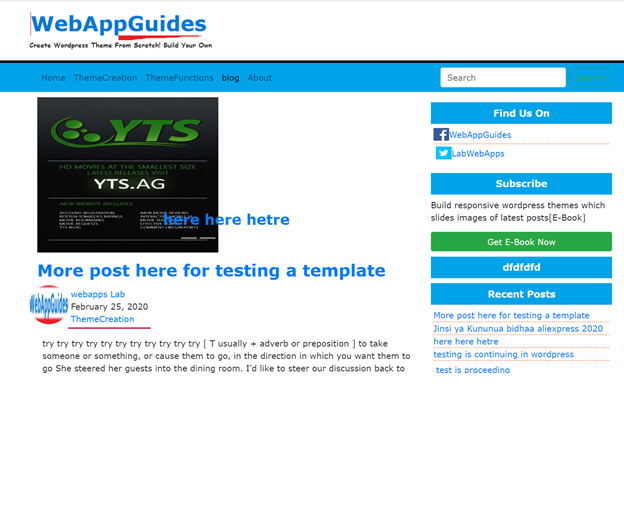
Provide screenshots for users. These help them understand your theme. Keep them clear and informative. Upload your theme to the repository. Follow the steps provided by WordPress. Your theme will be reviewed. Fix any issues if requested. Once approved, your theme will be available.
Credit: webappguides.com
Frequently Asked Questions
What Tools Do I Need To Build A WordPress Theme?
To build a WordPress theme, you need a code editor, browser, and WordPress installation. Tools like Sublime Text or Visual Studio Code can help. A local server environment, such as XAMPP or MAMP, is essential for testing. These tools streamline the development process and enhance efficiency.
How Do I Start Designing My Theme?
Begin with wireframes and sketches to outline your theme’s layout. Choose a design tool like Adobe XD or Sketch for detailed design work. Consider user experience and responsiveness. Design with simplicity and functionality in mind to ensure your theme is user-friendly and appealing.
What Coding Languages Are Required For WordPress Themes?
WordPress themes require PHP, HTML, CSS, and JavaScript knowledge. PHP handles dynamic content, HTML structures the pages, CSS styles them, and JavaScript adds interactive elements. Understanding these languages is crucial for customizing and building your theme efficiently.
How Can I Ensure My Theme Is Responsive?
Use CSS media queries to adapt your design for various screen sizes. Test your theme on different devices to ensure seamless functionality. Implement flexible grid layouts and scalable images. Responsive design enhances user experience and is vital for modern web standards.
Conclusion
Creating a WordPress theme from scratch is rewarding. You learn and grow with each step. Start with a clear plan. Organize your files well. Design with simplicity in mind. Test your theme thoroughly. Ensure it’s responsive and user-friendly. Follow WordPress coding standards.
Stay updated with the latest trends. Practice makes perfect. Keep experimenting and learning. Building your own theme enhances your skills. It opens up new opportunities. Enjoy the process and be patient. Your efforts will pay off. Happy coding!


