
Have you ever wondered how to transform your existing PHP website into a sleek WordPress theme? It might seem like a daunting task at first, but imagine the satisfaction of having a customized WordPress theme that perfectly fits your brand.
You’re not just following a trend; you’re crafting a unique digital space that reflects your vision. Picture this: a website that is not only visually appealing but also easy to manage and update. By converting your PHP website into a WordPress theme, you gain access to a user-friendly interface and a plethora of plugins that simplify your online presence.
Plus, WordPress’s SEO capabilities can significantly boost your website’s visibility. Stay with us as we guide you step-by-step through this process. Whether you’re a coding novice or a seasoned developer, you’ll find valuable insights that make this transformation both achievable and rewarding. Ready to dive in and unlock the full potential of your website? Let’s get started!

Credit: easydigitaldownloads.com
Planning The Theme Structure
First, look at your current PHP website. Check its layout and design. Notice the header, footer, and sidebar. Write down these sections. This helps to understand the structure. It is important to have a clear vision of the theme.
WordPress uses special template files. Each file serves a purpose. For example, the header.php is for the top part. The footer.php is for the bottom. You must plan which PHP files become which WordPress files. Match each PHP part to a WordPress file. This makes the theme work smoothly.
Setting Up The Development Environment
Setting up the development environment is the first step in building a WordPress theme from a PHP website. Install necessary software like a local server and WordPress files. This setup helps you test and modify your theme efficiently.
Installing WordPress Locally
Start by downloading WordPress from its official site. Next, install a local server like XAMPP or MAMP. These tools mimic a real web server on your computer. After installation, place the WordPress files in the server’s htdocs directory. Open the server and create a new database for your WordPress site. Finally, run the WordPress installer. Follow the steps on the screen.
Creating A New Theme Directory
Navigate to the wp-content/themes folder. Create a new folder with your theme’s name. Inside, create two files: style.css and index.php. These are necessary for WordPress to recognize your theme. Add some basic CSS in the style.css file. This makes it easier to start designing. Open the index.php file. Begin coding your theme layout. Your theme directory is now ready.
Converting Html To WordPress Templates
Transforming a PHP website into a WordPress theme involves converting HTML elements into dynamic templates. This process enhances site functionality, making it more user-friendly and adaptable. Integrating PHP code with WordPress ensures seamless content management and customization.
Breaking Down Html Into Parts
HTML pages have many parts. Separate them into smaller pieces. Begin with the header and footer. These are usually the same on every page. Identify other sections like the main content, sidebar, and any unique parts. Each part will be a template in WordPress. This makes it easy to manage.
Creating Header And Footer Templates
Start with the header. Copy the HTML code for the header. Paste it into a new PHP file. Name it header.php. Do the same with the footer. Create a file called footer.php. These files are important. They help build the theme. Include these templates in every page. Use the get_header() and get_footer() functions. This will save time and keep pages consistent.
Credit: www.hostinger.com
Integrating Dynamic Content
Transforming a PHP website into a WordPress theme involves integrating dynamic content seamlessly. This process enhances user experience by making content updates effortless. Emphasizing clean coding and design consistency ensures the theme functions smoothly while maintaining the website’s original aesthetic.
Using The WordPress Loop
WordPress uses a special feature called the WordPress Loop. This loop is important for showing posts. It fetches content from the database. This makes it dynamic and fresh. Each loop shows one post at a time. It repeats until all posts are shown. The loop can display titles, dates, and content.
Replacing Static Content With Dynamic Elements
Static content does not change. Dynamic content updates often. To switch from static to dynamic, use WordPress functions. Replace static text with WordPress tags. Use tags like php the_title(); ? for titles. For content, use php the_content(); ?. This makes your site more interactive. It also keeps content up to date. Dynamic elements make websites exciting.
Styling The Theme
Link stylesheets in WordPress using the enqueue function. This helps load CSS files properly. The function `wp_enqueue_style()` is used. It ensures themes work well. Always use unique names for stylesheets. This prevents conflicts. Place the code in the `functions.php` file. It is an essential step for styling.
Customize your theme using simple CSS. Change colors, fonts, and layouts. Use CSS classes to target elements. Make sure changes are clear. Keep styles clean and organized. A well-styled theme looks professional. Test your styles in different browsers. This ensures compatibility. CSS helps make themes unique. It’s easy to learn and use.
Adding Theme Features
Transform a PHP website into a WordPress theme by adding essential theme features. Include support for custom menus, widget areas, and post thumbnails. Enhance functionality with theme support for title tags and editor styles.
Supporting Widgets And Menus
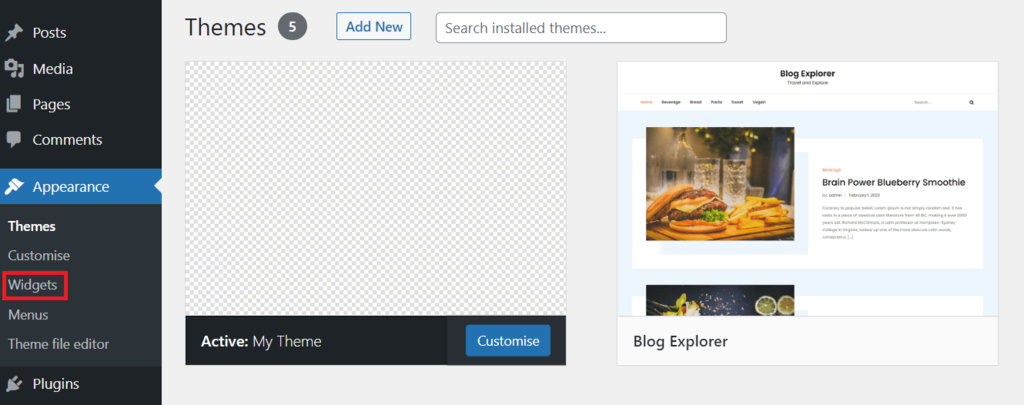
Widgets make a site more interactive. They allow users to add content easily. Menus help users find what they need quickly. To support widgets, register widget areas in the functions.php file. Use the register_sidebar() function for this. For menus, register them using register_nav_menus(). This adds navigation support. Ensure your theme’s header uses these menus. It helps in creating dynamic navigation bars. Both widgets and menus improve user experience. They make websites more user-friendly.
Implementing Customizer Options
The WordPress Customizer lets users change theme settings. It shows live previews. To add customizer options, use the customize_register action hook. This hook registers new settings. Users can adjust these settings easily. Colors, fonts, and layouts are common options. Always provide a preview option. It helps users see changes live. Customizer options make themes flexible. They give users control over their site’s appearance. This boosts satisfaction and engagement.
Testing And Debugging
Checking browser compatibility ensures your theme works everywhere. Test on popular browsers like Chrome, Firefox, and Safari. Adjust your code if problems appear. Use tools like BrowserStack for more thorough testing. This helps find issues on different devices.
Validating code quality is crucial. Errors can break your theme. Use tools like W3C Validator to check HTML and CSS. Fix any errors it finds. This improves your site’s performance and user experience. Always write clean and error-free code.

Credit: webdesignerwall.com
Deploying The Theme
Deploying the theme involves converting a PHP website into a WordPress theme. Begin by organizing your files and creating a new theme folder. Modify PHP code to work with WordPress functions, ensuring compatibility and seamless integration.
Preparing For Live Environment
Check your theme for errors. Use tools like linting to find mistakes. Fix any problems before going live. Make sure your code follows WordPress standards. Test your theme on different devices. Ensure it works on phones and tablets. Optimize images for faster loading. Compress large images to save space. Check the theme speed using online tools. Fast themes provide better user experience.
Uploading To WordPress
Upload your theme to WordPress. First, zip the theme folder. Go to your WordPress dashboard. Click on “Appearance” then “Themes”. Select “Add New”. Click “Upload Theme”. Choose your zipped theme file. Click “Install Now”. After installation, activate your theme. Check your website. Make sure everything displays correctly. If there are issues, troubleshoot them. Ensure all plugins work well with the theme.
Frequently Asked Questions
How Do I Convert Php To WordPress Theme?
To convert a PHP website to a WordPress theme, you must first break down your PHP files into template files. Then, create a style. css file for theme details. Finally, use WordPress functions to replace hard-coded content and ensure compatibility with WordPress standards.
Can I Use Php In WordPress Themes?
Yes, you can use PHP in WordPress themes. WordPress itself is built with PHP. You can integrate PHP code within your theme files. This allows you to add dynamic features and functionalities to your theme. Always ensure your PHP code is secure and optimized.
What Are The Basics Of A WordPress Theme?
A WordPress theme consists of template files, a style. css file, and functions. php. Template files structure the site, while style. css defines its appearance. The functions. php file allows you to add custom functionality. A theme should be responsive and adhere to WordPress standards.
How Long Does It Take To Build A Theme?
Building a WordPress theme from a PHP website can take several days to weeks. The duration depends on the complexity and features of your original site. Experience and familiarity with WordPress can also impact the time required. Planning and testing are crucial for timely completion.
Conclusion
Transforming a PHP website into a WordPress theme is rewarding. You gain flexibility and a user-friendly interface. Familiarity with WordPress and PHP is essential. Break down the process step-by-step. Customize using HTML, CSS, and JavaScript. Test thoroughly before launching. This ensures a smooth experience for your users.
Remember to keep your theme updated. Regular updates enhance security and functionality. Embrace creativity in your design. Make your website stand out. Your unique theme reflects your brand identity. Enjoy the process of building and learning. It strengthens your skills.
You’re now ready to share your creation with the world.


