

Ready to bring your ideas to life online? Building your own WordPress site might seem tricky, but it doesn’t have to be.
Whether you want a personal blog, a business page, or an online store, this guide will walk you through every simple step. You’ll learn how to set up your site, choose the perfect look, and make it truly yours. Stick with me, and by the end, you’ll have the confidence and tools to create a WordPress website that stands out and works exactly how you want it to.
Let’s get started!
Choose Hosting And Domain
Choosing the right hosting and domain is the first step in building your WordPress site. A good hosting provider keeps your site fast and secure. Your domain name is your website’s address on the internet. Both must work well together for your site to run smoothly.
Select A Hosting Provider
Pick a hosting provider with strong uptime and fast servers. Look for WordPress-specific hosting plans. These often include easy WordPress installation and support. Check customer reviews to find reliable options. Shared hosting suits beginners with low budgets. For better speed and control, consider VPS or dedicated hosting.
Register A Domain Name
Choose a simple and memorable domain name. It should reflect your brand or topic clearly. Use domain registrars like Namecheap or GoDaddy to buy your domain. Keep the extension short and popular, like .com or .net. Avoid numbers and special characters to reduce confusion.
Link Domain To Hosting
After buying your domain and hosting, link them together. Change the domain’s DNS settings to point to your hosting provider. This lets browsers find your website online. Most hosts offer guides or support for this step. Wait a few hours for the changes to take effect.
Credit: www.greengeeks.com
Install WordPress
Installing WordPress is the first step to creating your website. It sets up the core system that runs your site. This process is simple and can be done in two main ways. You can use automatic tools or do it manually. Each method has clear steps to follow.
Use One-click Installers
Many web hosts offer one-click WordPress installers. These tools make installation fast and easy. You just select WordPress from the control panel. Then, enter your site name and admin details. The installer does the rest. It sets up the database and files automatically. This method saves time and avoids errors.
Manual Installation Steps
Manual installation gives more control over the setup. First, download the latest WordPress package from wordpress.org. Next, upload the files to your web server via FTP. Create a new database using your hosting control panel. Edit the wp-config.php file with your database info. Finally, run the WordPress installation script by visiting your site URL.
Access WordPress Dashboard
After installation, access the WordPress dashboard to manage your site. Go to yoursite.com/wp-admin in a browser. Enter the username and password you set during installation. The dashboard is your control center. Here, you add content, install themes, and manage plugins. It is user-friendly and easy to navigate.
Pick A Theme
Choosing the right theme sets the tone for your WordPress site. A theme controls your site’s look and feel. It affects colors, fonts, and layout. Pick a theme that fits your site’s purpose. This step is simple but important. A good theme helps visitors enjoy your site. It also makes managing content easier.
Browse Free Themes
WordPress offers thousands of free themes. You can find them in the WordPress theme directory. These themes are easy to install and safe to use. Many free themes come with basic features. They work well for blogs, portfolios, and small websites. Try different themes to see which style you like best. Free themes are a great way to start without spending money.
Consider Premium Options
Premium themes cost money but offer more features. They include better designs and extra tools. Many premium themes come with support and updates. These themes often have customization options. Premium themes suit businesses and large websites. They help your site look professional and unique. Think about your budget and goals before choosing a premium theme.
Install And Activate Theme
After choosing a theme, install it on your WordPress site. Go to the dashboard and click “Appearance.” Then select “Themes” and click “Add New.” Upload your theme file or search for it online. Click “Install” and wait for it to finish. Finally, hit “Activate” to apply the theme. Your site will now use the new design. Check your pages to make sure everything looks right.
Customize Appearance
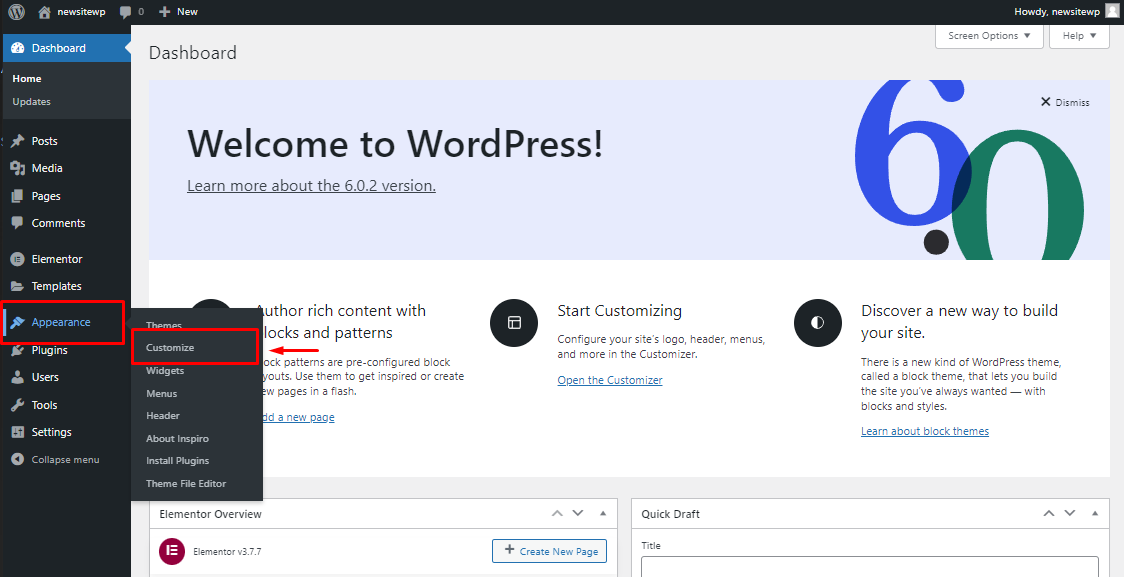
Customizing your WordPress site’s appearance sets the tone for your visitors. It makes your site unique and reflects your brand or personality. WordPress offers simple tools to change how your site looks without coding. Spend time adjusting these settings to create a welcoming and professional website.
Modify Site Identity
Site identity includes your site title and tagline. These appear in browser tabs and search results. Go to the WordPress Customizer to edit these easily. Upload your logo to strengthen your brand. Adding a site icon (favicon) helps visitors recognize your site quickly.
Set Colors And Fonts
Colors and fonts create your site’s mood and style. Choose colors that match your brand or theme. Fonts should be clear and easy to read on all devices. Use the Customizer to pick from preset color schemes and font families. Consistent colors and fonts improve user experience and keep visitors engaged.
Create Menus And Widgets
Menus help visitors navigate your site smoothly. Build menus with links to your main pages and categories. Organize menu items logically for easy browsing. Widgets add extra features to sidebars and footers. Use widgets for search bars, recent posts, or social media links. Customize menus and widgets for a user-friendly site layout.
Add Content
Adding content is a key step in building your WordPress site. It lets you share information and connect with visitors. Proper content organization helps users find what they need quickly. WordPress makes adding and managing content simple and flexible.
Create Pages
Create pages for important site sections. Examples include About, Contact, and Services pages. Use clear titles and concise text. Pages usually hold permanent content that rarely changes. Add images or videos to make pages engaging. Keep navigation easy by linking pages in menus.
Publish Blog Posts
Blog posts keep your site fresh and attract visitors. Write posts regularly on topics related to your site. Posts appear in reverse order on your blog page. Use simple language and short paragraphs. Add images to support your message. Enable comments to encourage visitor interaction.
Organize With Categories And Tags
Categories group related posts for easy browsing. Use broad topics like News, Tips, or Reviews. Tags describe specific details within posts. They help visitors find related content quickly. Assign posts to one or more categories and tags. Avoid using too many tags to keep your site clean.
Credit: wpmet.com
Install Plugins
Plugins extend your WordPress site’s features and functionality. Installing the right plugins helps your site run smoothly and safely. They make your website easier to manage and improve user experience. Choose plugins carefully to avoid slowing down your site or causing conflicts.
Essential Plugins For Beginners
Start with plugins that add basic functions. A good contact form plugin helps visitors reach you easily. Use a plugin for creating backups to keep your data safe. An image optimization plugin speeds up your site by reducing file sizes. These plugins make your site user-friendly and efficient.
Seo And Security Plugins
SEO plugins help your site rank better on search engines. They guide you in optimizing content and keywords. Security plugins protect your site from hackers and malware. They monitor suspicious activity and block attacks. Using these plugins strengthens your site’s visibility and safety.
Backup And Performance Plugins
Backup plugins save copies of your entire website regularly. They allow quick recovery in case of errors or hacks. Performance plugins improve site speed by caching and optimizing files. Faster websites keep visitors engaged and reduce bounce rates. These plugins ensure your site stays reliable and fast.
Optimize Site Performance
Optimizing your WordPress site’s performance improves user experience and boosts search rankings. A fast website keeps visitors engaged and reduces bounce rates. Simple steps can make your site load quickly and run smoothly. Focus on key areas like caching, image compression, and content delivery networks.
Enable Caching
Caching stores a copy of your site’s pages and serves them quickly to visitors. This reduces the load on your server and speeds up page loading. Use plugins like W3 Total Cache or WP Super Cache to enable caching easily. Set up browser caching to save static files on users’ devices. This way, returning visitors get faster access without reloading everything.
Compress Images
Large images slow down your website. Compress images to reduce their file size without losing quality. Use tools like Smush or Imagify for automatic compression. Smaller images load faster and save bandwidth. Always resize images to fit your site’s layout before uploading. This helps maintain a smooth and fast browsing experience.
Use A Content Delivery Network
A Content Delivery Network (CDN) stores copies of your site on servers around the world. It delivers content from the closest server to the visitor. This cuts down loading time, especially for users far from your main server. Popular CDN services include Cloudflare and StackPath. Integrate a CDN with your WordPress site to improve speed globally.

Credit: www.geeksforgeeks.org
Set Up Basic Seo
Setting up basic SEO is a key step in building a WordPress site. It helps search engines find and rank your pages. Good SEO brings more visitors and grows your site’s presence online. Follow simple steps to make your site SEO-friendly from the start.
Configure Seo Plugin
Install a popular SEO plugin like Yoast SEO or Rank Math. These tools guide you through SEO settings. Set up your site’s homepage title and description. Enable XML sitemaps and connect social media profiles. Keep the plugin updated to maintain SEO health.
Optimize Titles And Meta Descriptions
Write clear and concise titles for each page and post. Use keywords naturally in titles to improve search rankings. Create meta descriptions that summarize content well. Keep descriptions under 160 characters to avoid being cut off. Good titles and descriptions increase click rates from search results.
Submit Sitemap To Search Engines
Find your sitemap URL in the SEO plugin settings. Submit it to Google Search Console and Bing Webmaster Tools. This helps search engines crawl your site faster. Regularly check these tools for errors or issues. A submitted sitemap ensures better indexing of your content.
Secure Your Website
Protecting your WordPress site is crucial. Security keeps your content safe and visitors confident. A secure website prevents hacks and data loss. Follow simple steps to strengthen your site’s defense.
Use Strong Passwords
Create passwords that are hard to guess. Mix letters, numbers, and symbols for strength. Avoid common words or easy patterns. Change passwords regularly for better security. Use a password manager to keep track safely.
Enable Ssl Certificate
SSL encrypts data between your site and visitors. It protects sensitive information like passwords and payments. Most hosts offer free SSL certificates. Activate SSL to show a secure padlock icon in browsers. This builds trust and improves search rankings.
Regular Updates And Backups
Keep WordPress, themes, and plugins up to date. Updates fix security holes and bugs quickly. Schedule backups to save your site data often. Store backups in a safe place outside your server. Updates and backups ensure quick recovery from problems.
Launch And Promote
Launching your WordPress site marks a major milestone. Promotion helps attract visitors and grow your audience. Focus on key steps to ensure a smooth launch and effective outreach.
Test Website Functionality
Check all links to avoid broken pages. Test forms, buttons, and interactive elements. Confirm your site loads quickly on desktop and mobile. Make sure images display correctly. Fix errors before going live. A smooth experience keeps visitors engaged.
Announce On Social Media
Share your website launch on platforms like Facebook and Twitter. Create posts that explain your site’s purpose. Use clear images or videos for better impact. Invite friends and followers to visit and share. Regular updates keep your audience interested.
Monitor Traffic And Feedback
Use tools like Google Analytics to track visitors. Watch which pages attract the most attention. Read comments and messages for user opinions. Adjust your content based on feedback and data. Continuous improvement helps your site succeed.
Frequently Asked Questions
How Do I Build My Own WordPress Website?
Choose a hosting provider and domain name. Install WordPress, select a theme, and customize it. Add pages, posts, and plugins. Optimize for speed and SEO. Publish your site and maintain regular updates for security and performance.
Why Are People Moving Away From WordPress?
People move away from WordPress due to its complex updates, security risks, slow speed, and the need for technical skills to manage sites.
Can Chatgpt Build A WordPress Website?
ChatGPT can assist by generating code snippets and content for a WordPress website. It cannot build the site entirely.
Can A Beginner Build A Website On WordPress?
Yes, beginners can build a website on WordPress easily using its user-friendly themes and plugins. Tutorials and support help simplify the process.
Conclusion
Building a WordPress site can be simple and rewarding. Follow each step with care and patience. Choose the right theme and plugins to fit your needs. Keep your site organized and easy to navigate. Regularly update content to keep visitors interested.
Remember, practice improves your skills over time. Start building today and watch your website grow.


