
Building a website might seem like a daunting task, but it doesn’t have to be. Imagine having the power to create a beautiful, functional site without needing a degree in web development.
With WordPress themes, you can do just that. Whether you’re launching a blog, setting up a portfolio, or creating an online store, WordPress offers a vast array of themes to help you make your vision a reality. But how do you get started?
How do you ensure your site stands out in the crowded digital space? This guide is here to show you exactly how to build a website using WordPress themes, step by step. You’ll discover easy-to-follow tips that will turn your ideas into a stunning online presence. Ready to unlock the potential of WordPress and transform your online aspirations? Keep reading to find out how.
Choosing The Right Theme
Choosing a theme is important. First, check the theme’s design. Does it fit your style? Next, look at the theme’s features. Does it have what you need? Ensure the theme is responsive. This means it works well on phones. Consider the theme’s speed. A fast site keeps visitors happy. Also, ensure it is SEO-friendly. This helps people find your site.
Free themes are good for small sites. They cost nothing. Premium themes have more features. They often have better support. Premium themes may look more professional. They can help your site stand out. But they cost money. Think about your budget before choosing.
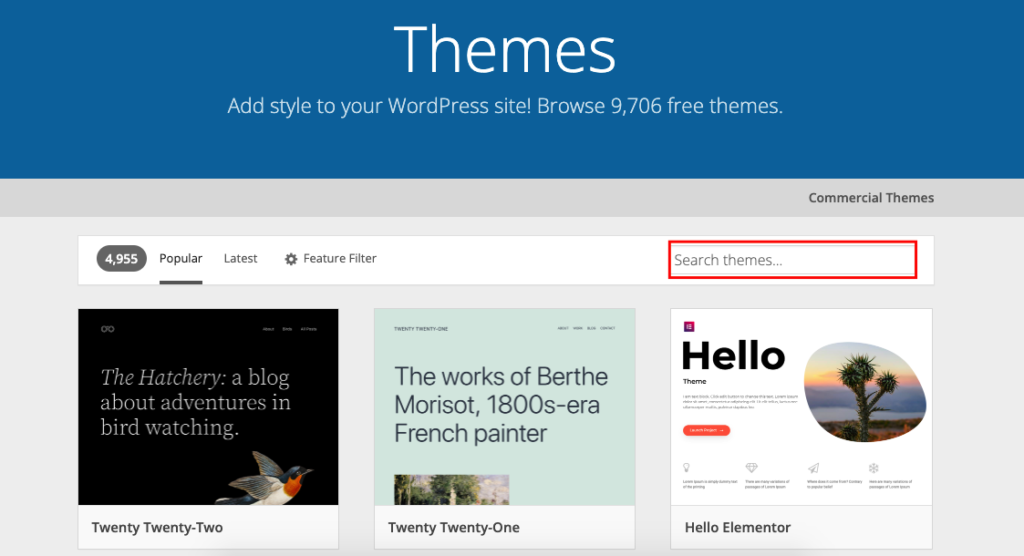
There are many places to find themes. WordPress.org offers free themes. They are safe and tested. ThemeForest is a big marketplace. It has many premium themes. Elegant Themes is another option. They have well-designed themes. Always read reviews before choosing. This helps you pick the best theme.
Installing WordPress
Setting up a domain is the first step. Choose a name for your website. Make sure it’s easy to remember. Buy your domain from a trusted provider. Check if it’s available. Register your domain with your details. Your domain is like your website’s address.
Check your hosting requirements next. WordPress needs a good host. Look for reliable hosting. Ensure it supports WordPress. Check storage and speed. Your host must have enough space. Good speed keeps users happy.
Follow WordPress installation steps carefully. Download WordPress from its site. Upload it to your host. Use the installation wizard. Enter your domain details. Set up your username and password. Keep them safe. Your website is ready now.
Theme Installation
To upload a WordPress theme, first, go to the dashboard. Find the “Appearance” tab and click on it. Now select “Themes”. You will see an “Add New” button. Click it. Next, you will see an “Upload Theme” button. Click on it and select your theme file. Finally, click “Install Now” and wait for the upload to finish.
After uploading, you need to activate the theme. Go back to the “Themes” section. Find the theme you uploaded. Click on the “Activate” button. Now your theme is live on your website. Check if everything looks good.
Once activated, you can make changes to your theme. Go to the “Customize” option under “Appearance”. Here, you can change colors and fonts. You can also add a logo. Play with the settings until you’re happy with the look. Save changes before leaving.
Credit: www.hostinger.com
Customizing Your Site
The Theme Customizer is a powerful tool. It helps you change your site’s look. You can adjust colors, fonts, and more. See changes in real-time. This makes it easy to find what you like. Click “Save” to keep your changes. Make your site unique with just a few clicks.
Widgets are small tools. They add features to your site. Use them for calendars, search bars, or recent posts. To add a widget, go to the Widgets section. Drag and drop your chosen widget where you want it. Customize it to fit your needs. Widgets make your site more fun and useful.
Menus help visitors find their way. Go to the Menus section to create one. Add pages, links, or categories. Arrange them how you like. Save your menu and check it on your site. Easy navigation keeps visitors happy. A good menu is important for every website.
Enhancing Functionality
WordPress themes simplify building a website by enhancing its functionality. Customize designs and features effortlessly to suit your needs. Explore plugins to add extra features without complex coding, ensuring a smooth user experience.
Essential Plugins
Plugins make websites better. They add features and tools. Contact forms help users reach out. SEO plugins improve search visibility. Security plugins protect from threats. Backup plugins save data. Choose plugins wisely.
Seo Optimization
SEO helps websites rank higher. Keywords make search engines notice. Meta tags describe pages. Alt text helps images rank. Fast loading improves user experience. Mobile-friendly design matters for SEO. Focus on these areas.
Social Media Integration
Social media brings more visitors. Share buttons let users share content. Follow buttons increase followers. Display feeds for updates. Connect with users directly. Active presence boosts visibility. Engage with your audience. Social media is important.
Design Tips
Discover how to craft a stunning website using WordPress themes. Choose a theme that fits your style and needs. Customize colors, fonts, and layouts easily to make your site unique.
Choosing Color Schemes
Select colors that reflect your brand. Bright colors grab attention. Soft colors create a calm feel. Limit your palette to three colors. This keeps your site neat and easy to read. Use a primary color for the main areas. Choose secondary colors for buttons and links.
Typography Selection
Pick fonts that are easy to read. Sans-serif fonts work well for screens. They look clean and modern. Avoid using more than two fonts. This keeps your site looking professional. Ensure text size is large enough.
Maintaining Consistency
Use the same layout across pages. This helps users navigate easily. Keep spacing the same. Use consistent headings and subheadings. This makes the site look organized. Consistent style helps users feel comfortable. They know what to expect.
Testing Your Website
Websites must work on all browsers. Test on Chrome, Firefox, and Safari. Each browser shows websites differently. Fix any display issues you find. Users should see the same site everywhere. This helps reach more people. It also makes users happy.
Many users visit sites on phones. Ensure your site works on small screens. Test on Android and iPhone. Buttons should be easy to click. Text must be readable. A well-designed mobile site helps users stay longer. This improves your site’s success.
Fast sites keep users happy. Test your site’s speed. Use tools like Google PageSpeed Insights. Find out what slows your site down. Optimize images for faster loading. Reduce large files. A quick site is important for user satisfaction.
Credit: wedevs.com
Launching Your Website
Check if all pages work well. Look for broken links. Fix them. Ensure images load quickly. Test buttons and forms. Verify spelling and grammar. Make sure content is easy to read. Check mobile view. Make sure it looks good. Ensure your website is secure. Use strong passwords. Update plugins and themes. Verify that backups are set.
Keep your website safe. Backup regularly. Use cloud storage. Keep copies offline. Schedule automatic backups. Choose reliable plugins for backups. Test restore process. Verify that backups work. Keep copies in different locations. Protect your data.
Tell others about your site. Use social media. Share links. Engage with followers. Write blog posts. Add interesting content. Collaborate with others. Share guest posts. Use email newsletters. Invite subscribers. Offer deals and discounts. Build a community. Encourage feedback.
Maintaining Your Website
Keeping your website updated is key. Regular updates ensure your site runs smoothly. Update plugins and themes often. This protects against bugs and glitches. It also helps with security. An updated site is a safe site. Don’t ignore update alerts. They are important for your site’s health.
Security is very important for your website. Use strong passwords for your accounts. Change them often. Install a good security plugin. This helps protect against hackers. Always keep backups of your website. In case something goes wrong, you can restore it quickly. A secure site keeps your users safe.
Monitoring helps you see how well your site is doing. Check the site’s speed. Slow sites can make users leave. Use tools to track visitor numbers. See which pages they like best. This helps you improve your content. A fast, smooth site keeps visitors happy.
Credit: wpmanageninja.com
Frequently Asked Questions
How Do I Choose A WordPress Theme?
Selecting a WordPress theme involves considering your website’s purpose and audience. Ensure the theme is responsive, fast-loading, and customizable. Look for themes with positive reviews and regular updates. Try demos to see if the design matches your vision. Always prioritize SEO-friendly themes for better search engine visibility.
Are Free WordPress Themes Reliable?
Free WordPress themes can be reliable if sourced from trusted providers. Check for regular updates and security features. Many free themes offer basic functionalities suitable for beginners. However, premium themes might offer more advanced features and support. Always review user feedback and ratings before choosing a free theme.
Can I Customize A WordPress Theme Easily?
Most WordPress themes offer easy customization through built-in options and page builders. You can change colors, fonts, layouts, and more without coding. Premium themes often provide more customization options. For advanced changes, you might need basic CSS knowledge. Always back up your site before making significant changes.
Do WordPress Themes Affect Website Speed?
Yes, WordPress themes can impact website speed. Heavy themes with large images and excessive scripts slow down loading times. Choose lightweight, optimized themes for faster performance. Check for speed test results and user reviews. A fast-loading site enhances user experience and improves search engine rankings.
Conclusion
Building a website with WordPress themes is simple. Start by choosing a theme that matches your vision. Customize it to fit your style and needs. Add plugins to enhance functionality. Keep your design clean and your navigation easy. Regularly update your content to keep it fresh.
Always test your website on different devices. This ensures it looks good everywhere. WordPress themes offer flexibility and ease. They make website creation accessible for everyone. With a little effort, your website can shine online. Explore, experiment, and enjoy the journey.
Your perfect website is just a few clicks away.


